
Spike
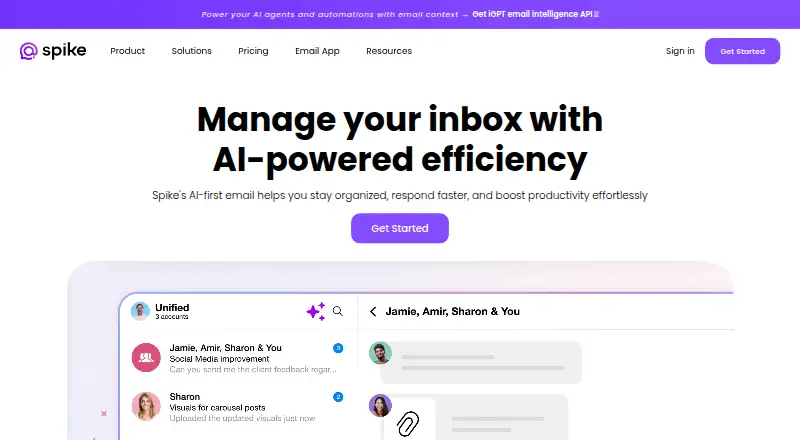
Spike is an email and collaboration app with a unified inbox, scheduled sending, and calendar tools.
What Spike is
Spike is an email and collaboration app with a unified inbox, scheduled sending, and calendar tools. It is available on the web, Windows, macOS, iOS, and Android. Its plans vary by email addresses, team members, search history, storage, file uploads, and video-call participants. The free Starter plan supports three members and one teamspace, with 60 days of search history and 15 GB of storage per member. A separate Free plan includes one email address, 60 days of search history, 1 GB of storage, and 30 MB file uploads. Pro is $6 per month billed annually and includes three email addresses, five video-call participants, 5 GB storage, and 100 MB file uploads. Team costs $4 per month billed annually, while Business costs $8 and Ultimate costs $12 per month billed annually. The listed Team and Business plans include unlimited search history; storage allowances differ. Spike's account limit is three, and app coverage is listed as all.
Good
- Unified inbox and scheduled sending
- Calendar tools included
- Available on web, Windows, macOS, iOS, and Android
- Free Starter plan supports three members
Watch out
- Account limit is three
- Free plan has 60 days of search history
- Paid plans are billed annually
Who it suits
Spike may suit people or teams looking to bring email, scheduled messages, and calendar tools together across desktop and mobile platforms. Its plans cover different email, storage, team, and file-upload needs.
Verdict
Spike offers email and collaboration tools across five named platforms, with separate plan options for individuals and teams. Check the plan limits for email addresses, storage, file uploads, and team size before choosing.
Plans and prices
From Spike's own pricing page, checked 21 Sep 2026.
| Plan | Price | What it gives you |
|---|---|---|
| Starter | Free | 3 members · 1 teamspace · 60 days search history · 15 GB storage per member |
| Team | $4 a month | Unlimited search history · 100 GB storage per member · billed annually |
| Business | $8 a month | 1 TB storage per member · 500 MB file upload · billed annually |
| Free | Free | 1 email address · 60 days search history · 1 GB storage · 30 MB file upload |
| Pro | $6 a month | 3 email addresses · 5 video call participants · 5 GB storage · 100 MB file upload · billed annually |
| Ultimate | $12 a month | Unlimited email addresses · 10 video call participants · 20 GB storage · 1 GB file upload · billed annually |
| Email App Free | Free | 1 email address · 60 days of search history · 1 GB storage · 30 MB file uploads · 1:1 video calls |
| Teamspace Starter | Free | Up to 3 members · 1 teamspace · 60 days of search history · 15 GB storage per member · 15 MB file uploads |
| Teamspace Team | $4 a month | Per member · unlimited search history · 100 GB storage per member · 100 MB file uploads · shared inbox · free custom email domain for one year · billed annually |
| Email App Pro | $6 a month | Per user · up to 3 email addresses · unlimited search history · 5 GB storage · 100 MB file uploads · priority support · billed annually |
| Teamspace Business | $8 a month | Per member · 1 TB storage per member · 500 MB file uploads · VIP support · video call recording and SAML-SSO marked “SOON” · billed annually |
| Email App Ultimate | $12 a month | Per user · unlimited email addresses · unlimited search history · 20 GB storage · 1 GB file uploads · VIP support · video call recording and SAML-SSO marked “SOON” · billed annually |
The facts
Each one read from Spike's own pages, with the date it was checked.
What it does
- Account limit
- 3checked 21 Sep 2026
- AI features
- Spike AI can generate messages and replies, summarize conversations, and provide an AI assistant; the free tiers list 10 queries for several AI features.checked 4 Oct 2026
- Audience
- Spike says its Email App suits people upgrading an existing email experience or managing multiple accounts, while Teamspace is for creating a new address and collaborating with a team.checked 4 Oct 2026
- Calendar tools
- Yeschecked 21 Sep 2026
- Email providers
- Spike says it works with existing email accounts including Gmail, Office 365 or Outlook, Exchange, iCloud, Yahoo, and other IMAP accounts.checked 4 Oct 2026
- Integrations
- Spike supports Google Drive, Dropbox, and OneDrive for cloud attachments, and its calendar feature names Google Calendar, Outlook, and Apple Calendar.checked 4 Oct 2026
- Limits
- The Email App Free plan limits search history to 60 days, storage to 1 GB, and uploads to 30 MB per file; the paid plan comparison lists 3 addresses for Pro and unlimited addresses for Ultimate.checked 4 Oct 2026
- Paid from
- 4checked 21 Sep 2026
- Privacy
- Spike says it is ad-free and does not rent, sell, distribute, or monetize user data, while non-personal data may be used to improve its service.checked 4 Oct 2026
- Product
- Spike describes itself as an AI-powered inbox that brings email, calls, notes, tasks, and to-dos into one hub and turns email threads into chat-like conversations.checked 4 Oct 2026
- Scheduled sending
- Yeschecked 21 Sep 2026
- Security
- Spike says message data is encrypted with AES-256 using a per-message private key and that it has periodic external security audits.checked 4 Oct 2026
- Security assessment
- Spike says it passed an independent security audit and identifies Bishop Fox as the auditing firm.checked 4 Oct 2026
- Support
- The pricing page lists standard support for Starter, priority support for Team and Pro, and VIP support for Business and Ultimate.checked 4 Oct 2026
- Unified inbox
- Yeschecked 21 Sep 2026
Where it runs
- App coverage
- allchecked 21 Sep 2026
- Platforms
- Spike lists iOS, Android, Windows, macOS, and web browser as supported devices.checked 4 Oct 2026
Money
- Free plan
- Yeschecked 21 Sep 2026
The company
- Team collaboration
- Teamspace includes channels, shared inboxes, groups, collaborative docs and tasks, and audio and video meetings.checked 4 Oct 2026
The full review of Spike
Spike is an email client and collaboration hub that reshapes email threads into chat-like conversations and brings AI tools, calls, notes and tasks together. It is best for people consolidating existing email accounts or teams that want shared inboxes and workspace tools alongside email. Its broad feature set is balanced by meaningful storage, upload and account limits on the lower plans.
Overview
Spike works with existing accounts from Gmail, Office 365 or Outlook, Exchange, iCloud, Yahoo and other IMAP providers. A unified inbox and scheduled sending make it more than a single-provider client, while calendar tools connect to Google Calendar, Outlook and Apple Calendar. Google Drive, Dropbox and OneDrive are supported for cloud attachments.
Spike AI can draft messages and replies, summarize conversations and act as an assistant. That can help reduce routine inbox work, though the free tiers cap queries for several AI features. Spike also says messages are encrypted with AES-256 using a private key for each message, and that it undergoes periodic external security audits; it identifies Bishop Fox as the firm behind an independent audit. The service is ad-free and says it does not rent, sell, distribute or monetize user data, though it may use non-personal data to improve the service.
Key features
Email and AI
Chat-like email threads give Spike a distinct approach to reading and responding, and support for multiple providers suits people managing accounts in one place. The free Email App plan is restrictive for heavier use: one address, 60 days of search history, 1 GB of storage and 30 MB uploads. Pro raises the address allowance to three, removes the search-history limit and permits 100 MB uploads, but includes 5 GB of storage.
Teamspace
Teamspace adds channels, shared inboxes, groups, collaborative documents and tasks, plus audio and video meetings. It is aimed at teams creating a new address and working together, rather than individuals simply improving an existing inbox. The free Starter tier allows three members and one teamspace; paid tiers increase storage and upload limits and add team features.
Pricing
Spike has separate Email App and Teamspace plan tracks, with a free option in each and no free trial. Paid prices below are billed annually.
- Email App Free — free: One email address, 60 days of search history, 1 GB storage, 30 MB file uploads and 1:1 video calls. It is suitable for light use, but the storage and single-address caps can quickly constrain people with several accounts or larger attachments.
- Email App Pro — $6 a month: Per user, up to three email addresses, unlimited search history, 5 GB storage, 100 MB uploads and priority support. This is the sensible step up for multi-account users who need better search and attachment capacity, though the address and storage caps remain.
- Email App Ultimate — $12 a month: Per user, unlimited email addresses, unlimited search history, 20 GB storage, 1 GB uploads and VIP support. It fits people with many accounts or frequent large attachments; video call recording and SAML-SSO are marked “SOON.”
- Teamspace Starter — free: Up to three members, one teamspace, 60 days of search history, 15 GB storage per member and 15 MB uploads. It offers a no-cost way for a small group to try the shared workspace, with a small upload cap.
- Teamspace Team — $4 a month: Per member, unlimited search history, 100 GB storage per member, 100 MB uploads, a shared inbox and a free custom email domain for one year. It is the strongest fit for teams that need shared email and room to collaborate without moving to the higher storage tier.
- Teamspace Business — $8 a month: Per member, 1 TB storage per member, 500 MB uploads and VIP support. Video call recording and SAML-SSO are marked “SOON.” Choose it for substantially larger per-member storage and uploads, not for features marked as forthcoming.
Starter and Free are the zero-cost options; the paid Teamspace price is per member, so team costs scale with seats. The Email App plans are priced per user. Standard support is included with Starter, priority support with Team and Pro, and VIP support with Business and Ultimate.
Platforms
Spike supports Android, iOS, macOS, web and Windows. Linux is not among its supported platforms, so users who need a Linux client should consider another option.
Who it's for
Choose the Email App if you want to upgrade an existing email setup or manage multiple accounts in a unified inbox. Choose Teamspace if your group wants shared inboxes, channels and collaborative work tools around a new address. Spike is less compelling for users who need generous free email storage, large free uploads or Linux support.
Pros and cons
- Pros: Broad provider support and a unified inbox help consolidate existing accounts.
- Pros: Teamspace combines shared inboxes with channels, collaborative documents, tasks and meetings.
- Pros: The free Teamspace tier supports up to three members, while paid tiers raise storage and upload limits.
- Cons: Email App Free is limited to one address, 1 GB storage and 30 MB uploads, making it a narrow fit for demanding inboxes.
- Cons: Pro still caps users at three addresses and 5 GB storage; unlimited addresses require Ultimate.
- Cons: Linux is unsupported, and some Business and Ultimate features are marked “SOON.”
Alternatives
For a free email client with no-cost support for email, calendar, contacts and multiple accounts, consider Mozilla Thunderbird, an open-source option available on Linux as well as desktop platforms and Android. If you want a free plan for up to five users, one domain and 5 GB of mail storage per user, Zoho Mail is a better fit. Spark Mail offers a free plan with unlimited email accounts, Smart Inbox and calendar; choose it if that free account capacity matters more than Spike’s Teamspace features. Newton Mail has a free plan capped at two email accounts, 15 read receipts monthly and 20 AI actions daily, which may suit someone whose needs fit those limits.
Epistles Mail has a free plan for two connected accounts and supports Linux; its Pro plan is $35 per y. eM Client offers a free plan for two email accounts on one device and a Personal plan at $39.95 a year. Canary Mail has a free core-inbox plan and a seven-day trial of paid features. Saymail offers a free email client with no time limit and support for IMAP, Gmail and Outlook accounts.
Browse more options in Email clients or AI Personal Assistants.
Verdict
Spike is a strong choice for people who want one workspace for existing email accounts and for teams that value shared inboxes and collaboration tools. Its differentiator is the combination of chat-like email, AI assistance and Teamspace. Look elsewhere if you need Linux support, a generous free email allowance or more than three addresses without paying for Ultimate.
Getting started
- Open the Spike website or choose its Android, iOS, macOS, Windows, or web version
- Choose Email App for an existing email account or Teamspace for a new collaborative address
- Connect Gmail, Office 365 or Outlook, Exchange, iCloud, Yahoo, or another IMAP account
- Select the free plan or a listed paid plan
- Add calendars or cloud-attachment services supported by Spike
Limits worth knowing
The Email App Free plan allows one address, 60 days of search history, 1 GB storage, 30 MB uploads, and 1:1 video calls. Teamspace Starter allows up to three members, one teamspace, 60 days of search history, 15 GB storage per member, and 15 MB uploads.
Questions
Which platforms support Spike?
Spike is available on Android, iOS, macOS, Windows, and the web.
Can Spike use my existing email account?
Yes. It works with Gmail, Office 365 or Outlook, Exchange, iCloud, Yahoo, and other IMAP accounts.
Does Spike have a free plan?
Yes. Email App Free and Teamspace Starter are listed as free.
What does Spike AI do?
Spike AI can generate messages and replies, summarize conversations, and provide an AI assistant.
Which calendars and cloud drives connect?
Calendar support names Google Calendar, Outlook, and Apple Calendar. Cloud attachments can use Google Drive, Dropbox, and OneDrive.
Alternatives to Spike
- 1

Zoho Mail
Free planAndroidiOSWebAPI9.0Free plan - 2

Mailbutler Smart Assistant
Free planAndroidiOSWebExtension8.9Free plan - 3

Front
AndroidiOSWebAPI8.6From $25 a month - 4

eM Client
Free planAndroidiOSmacOSWindows8.4From $39.95 a year - 5

Newton Mail
Free planAndroidiOSmacOSWindows8.4From $5 a month - 6

Spark Mail
Free planAndroidiOSmacOSWindows8.3From $99 a year