
eM Client
eM Client is an email and productivity app for Windows, macOS, Android, and iOS.
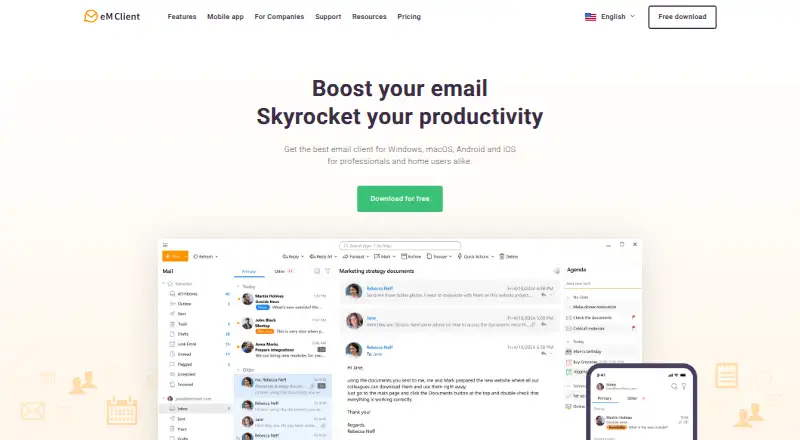
What eM Client is
eM Client is an email and productivity app for Windows, macOS, Android, and iOS. Its unified inbox brings email together with calendar, tasks, contacts, notes, and chat, while calendar tools, offline access, scheduled sending, and online-meeting integration add ways to manage communication and work. It supports Google Workspace, Office 365, Outlook, and Exchange, and offers PGP and S/MIME message encryption. Integrations include Teams, Slack, and Rocket.Chat. The free plan allows two email accounts on one device. Personal costs $39.95 per year and allows unlimited accounts on up to three devices; Business costs $49.95 per year. One-time lifetime plans are also listed, and the Android and iOS versions are free to use without a license. The maker is based in Prague, Czech Republic. Support options include a user forum and VIP Support.
Good
- Unified inbox with offline access and scheduled sending
- Email, calendar, tasks, contacts, notes, and chat
- PGP and S/MIME message encryption
- Integrations include Teams, Slack, and Rocket.Chat
Watch out
- Free plan limited to two email accounts
- Free plan limited to one device
- Personal plan costs $39.95 per year
Who it suits
It suits individuals or teams looking to manage email alongside calendars, tasks, contacts, notes, and chat. Mobile users can use the Android and iOS versions without a license.
Verdict
eM Client combines email and several productivity tools across desktop and mobile platforms. Check the free plan's account and device limits against your needs before choosing a paid plan.
Plans and prices
From eM Client's own pricing page, checked 21 Sep 2026.
| Plan | Price | What it gives you |
|---|---|---|
| Free | Free | 2 email accounts · 1 device · Registration required |
| Personal | $39.95 a year | 3 devices · Unlimited email accounts · 1-year subscription |
| Business | $49.95 a year | Unlimited email accounts · 1-year subscription |
| Personal Subscription | $39.95 a year | Single user with up to 3 devices · 1-year subscription |
| Business Subscription | $49.95 a year | Per device · 1-year subscription |
| Personal Lifetime | $59.95, paid once | Single user with up to 3 devices · One-time payment |
| Business Lifetime | $79.95, paid once | Per device · One-time payment |
The facts
Each one read from eM Client's own pages, with the date it was checked.
What it does
- Account limit
- 2checked 21 Sep 2026
- Calendar tools
- Yeschecked 21 Sep 2026
- Customer Base
- Over 100,000 businesses and 4,000,000 userschecked 28 Sep 2026
- Email Services
- Google Workspace, Office 365, Outlook and Exchangechecked 28 Sep 2026
- Key Integrations
- Teams, Slack and Rocket.Chat integrationchecked 28 Sep 2026
- Message Encryption
- PGP and S/MIME message encryptionchecked 28 Sep 2026
- Mobile Licensing
- Android and iOS versions are free to use without a licensechecked 28 Sep 2026
- NGO Discount
- 30% discount for NGOs, schools and universitieschecked 28 Sep 2026
- Offline access
- Yeschecked 21 Sep 2026
- Online Meetings
- Online meetings integrationchecked 28 Sep 2026
- Productivity Features
- Email, calendar and tasks, contacts, notes and chatchecked 28 Sep 2026
- Scheduled sending
- Yeschecked 21 Sep 2026
- Scheduled Sending
- Send Email Later is included among featureschecked 28 Sep 2026
- Support Options
- User forum and VIP Supportchecked 28 Sep 2026
- Unified inbox
- Yeschecked 21 Sep 2026
Where it runs
- App coverage
- allchecked 21 Sep 2026
- Supported Platforms
- Windows, macOS, Android and iOSchecked 28 Sep 2026
Money
- Free Account Limit
- 2 allowed email accountschecked 28 Sep 2026
- Free plan
- Yeschecked 21 Sep 2026
The company
- Headquarters
- Prague, Czech Republicchecked 28 Sep 2026
- Team Support
- Covers professional communication needs for any team or enterprisechecked 28 Sep 2026
The full review of eM Client
Overview
eM Client is an email and personal-information manager for Windows, macOS, Android and iOS. It is a strong fit for people who want email, scheduling and everyday productivity tools in one place, especially when they also need encrypted messaging or workplace integrations.
Its range is a genuine strength, but the free desktop license is limited to two accounts on one device. Anyone using several accounts or switching between computers will need to weigh the paid license terms carefully.
Key features
A unified inbox brings supported accounts together, with compatibility for Google Workspace, Office 365, Outlook and Exchange. Offline access and scheduled sending help when a connection or timing is an issue. Calendar and task tools, contacts, notes and chat extend the app beyond email, and online-meeting integration supports users who coordinate their work from the same application.
PGP and S/MIME encryption make eM Client a more relevant choice for people who need protected email. Teams, Slack and Rocket.Chat integrations are useful in organizations already relying on those services, though the license structure still matters: the Business subscription is priced per device. The maker offers a user forum and VIP Support, and a 30% discount for NGOs, schools and universities.
Pricing
The Free plan costs nothing, requires registration and covers two email accounts on one device. It is a sensible way to manage a small personal setup, but the single-device cap is restrictive if you work across a computer and phone. Android and iOS apps are free to use without a license.
Personal costs $39.95 a year on a 1-year subscription and covers one user on up to three devices with unlimited email accounts. It suits an individual who needs more than two accounts or cross-device use. Business costs $49.95 a year on a 1-year subscription, billed per device, with unlimited email accounts; it is the option for organizations that need business licensing rather than a single user's multi-device entitlement.
One-time licenses avoid an annual subscription: Personal Lifetime costs $59.95, paid once for one user on up to three devices, while Business Lifetime costs $79.95, paid once, billed per device. The Personal option suits individuals who prefer an upfront payment; the Business license is the relevant lifetime option for per-device purchasing. The 30-day trial gives prospective buyers a chance to assess the app before committing. Eligible NGOs, schools and universities can reduce paid-plan costs by 30%.
Platforms
eM Client runs on Windows and macOS as well as Android and iOS. Mobile apps do not require a license, but the paid Personal plan's three-device allowance is most directly useful to individuals combining desktop and mobile use.
Who it's for
Choose eM Client if you want email alongside calendar, tasks, contacts, notes and chat, or need a unified inbox, offline access, scheduled sending, encryption or integrations with Teams, Slack and Rocket.Chat. It is less compelling if you need a free multi-device desktop setup or prefer email without the added productivity suite.
Pros and cons
- Pros: Unified inbox, offline access and scheduled sending support flexible email management across common personal and workplace services.
- Pros: Calendar, tasks, contacts, notes, chat and online meetings bring several communication and organization tools together.
- Pros: PGP and S/MIME encryption, plus Teams, Slack and Rocket.Chat integrations, address specific security and collaboration needs.
- Cons: The free plan stops at two accounts and one device, limiting its usefulness for people with multiple accounts or a desktop-and-mobile workflow.
- Cons: Business subscriptions and lifetime licenses are billed per device, so organizations must account for each installation.
Alternatives
Zoho Mail is a better fit for teams seeking a free hosted-mail plan: its free tier covers five users, one domain and 5 GB of mail storage per user. Mozilla Thunderbird suits readers who prioritize free, open-source email with calendar, contacts and multiple-account support.
Spark Mail is worth considering for its free plan's unlimited email accounts, Smart Inbox, smart notifications and calendar. Spike offers a free Starter plan with three members, one teamspace, 60 days of search history and 15 GB storage per member.
Mailbutler Smart Assistant is another freemium option. Newton Mail has a free plan for up to two email accounts, with monthly read-receipt and daily AI-action allowances. Epistles Mail offers a free plan for up to two connected accounts. Mailspring is a desktop alternative for Linux, macOS and Windows with unlimited accounts on its Basic plan.
For broader category browsing, see Email clients and Calendar apps.
Verdict
eM Client is a strong choice for individuals who want email, calendar and productivity tools together, with encryption and collaboration integrations as added reasons to choose it. The Personal plan is the practical upgrade for unlimited accounts across up to three devices; look elsewhere if a free multi-device setup or open-source software matters more.
Getting started
- Open the eM Client website
- Register for the Free plan or choose a paid plan
- Install the application on Windows, macOS, Android, or iOS
- Add accounts from Google Workspace, Office 365, Outlook, or Exchange
- Connect Teams, Slack, or Rocket.Chat if needed
Limits worth knowing
The Free plan is free, requires registration, and allows two email accounts on one device. Personal is $39.95 per year for unlimited accounts on three devices; Business is $49.95 per year with unlimited accounts on a per-device basis.
Questions
Is eM Client free?
Yes. The Free plan costs nothing, requires registration, and allows two email accounts on one device.
What does the paid version cost?
Personal costs $39.95 per year, and Business costs $49.95 per year. One-time lifetime plans are also listed.
Which devices support eM Client?
It supports Windows, macOS, Android, and iOS. Android and iOS versions are free to use without a license.
Which email services work with it?
Supported services include Google Workspace, Office 365, Outlook, and Exchange.
Does eM Client provide encryption and team integrations?
Yes. It supports PGP and S/MIME message encryption, plus Teams, Slack, and Rocket.Chat integrations.
Alternatives to eM Client
- 1

Zoho Mail
Free planAndroidiOSWebAPI9.0Free plan - 2

Mailbutler Smart Assistant
Free planAndroidiOSWebExtension8.9Free plan - 3

Front
AndroidiOSWebAPI8.6From $25 a month - 4

Spike
Free planAndroidiOSWebmacOS8.5From $4 a month - 5

Newton Mail
Free planAndroidiOSmacOSWindows8.4From $5 a month - 6

Spark Mail
Free planAndroidiOSmacOSWindows8.3From $99 a year