
Superhuman Go
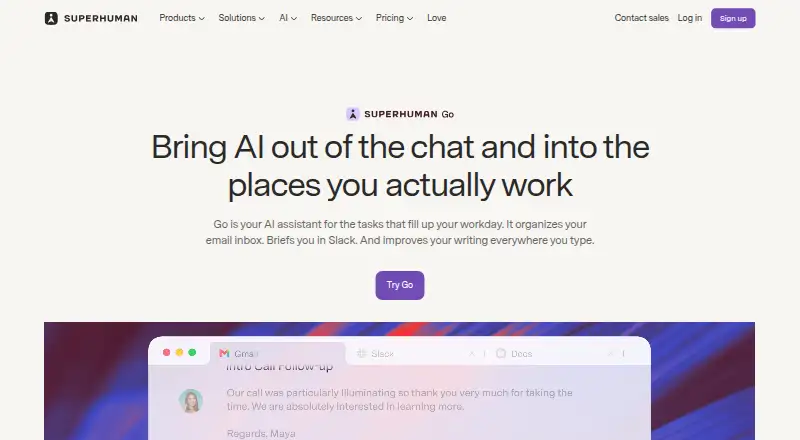
Superhuman Go is an AI assistant and agent platform that offers proactive help across apps and websites.
What Superhuman Go is
Superhuman Go is an AI assistant and agent platform that offers proactive help across apps and websites. It can provide inline writing suggestions, edits, context, and next steps, and interpret what is on screen without requiring users to copy or describe it. The Free plan includes basic inline suggestions, chat with tabs and apps, editable shareable documents, and synced conversations. Pro costs $12 per member per month billed annually, or $15 when billed monthly; it adds custom inline suggestions, cursor chat, Email Assistant, personal connectors, and custom agents. Business costs $33 per member per month billed annually, or $40 monthly, and includes more app connectors and custom agents. Pro, Business, and Enterprise users can build agents without code and schedule them or trigger them from email or Slack activity. Connectors vary by plan, with options including Gmail, Calendar, Outlook, Slack, Jira, Linear, Asana, Confluence, Zendesk, Salesforce, HubSpot, Workday, and ServiceNow. Users choose whether their content is used to train Go’s AI models; Enterprise training is off by default.
Good
- Free plan includes inline suggestions and synced conversations
- Understands screen context
- Custom agents can be triggered from email or Slack
- Users choose whether content trains AI models
- Available on mobile, desktop, web, and browser extension
Watch out
- Paid plans have usage limits described as limited trials for some features
- Enterprise pricing requires contacting sales
- Some listed usage tracking and data sync details are coming soon
Who it suits
Superhuman Go may suit people seeking writing assistance and app-connected workflows across supported platforms. Pro, Business, and Enterprise users can also build custom agents without code.
Verdict
Superhuman Go combines contextual writing help with connectors and custom agents on eligible paid plans. Review plan-specific connector access and stated usage limits before choosing a plan.
Plans and prices
From Superhuman Go's own pricing page, checked 2 Oct 2026.
| Plan | Price | What it gives you |
|---|---|---|
| Free | Free | Basic inline suggestions · chat with tabs and apps · editable, shareable docs · synced conversations |
| Pro | $12 a month | Custom inline suggestions · cursor chat · Email Assistant · personal connectors · custom agents · per member / month, billed annually; $15 when billed monthly |
| Business | $33 a month | Pro features · more app connectors · more custom agents · per member / month, billed annually; $40 when billed monthly |
| Enterprise | Priced on request | Business features · Salesforce, HubSpot, Workday, and ServiceNow connectors · enterprise security and admin controls · Custom; contact sales |
The facts
Each one read from Superhuman Go's own pages, with the date it was checked.
What it does
- Agents
- Users on Pro, Business, or Enterprise can build custom agents without code and schedule them or trigger them from email or Slack activity.checked 2 Oct 2026
- Enterprise connectors
- The Enterprise plan lists Salesforce, HubSpot, Workday, and ServiceNow connectors.checked 2 Oct 2026
- Integrations
- The pricing page lists Superhuman Mail, Gmail, Calendar, Outlook, and Slack among Pro connectors, and Jira, Linear, Asana, Confluence, and Zendesk among Business connectors.checked 2 Oct 2026
- Privacy safeguards
- Superhuman says Go includes prompt injection monitoring, malware scanning for connected data, and protections for web activity.checked 2 Oct 2026
- Product
- Superhuman Go is an AI assistant and agent platform that offers proactive help across apps and websites.checked 2 Oct 2026
- Screen context
- Go can understand what is on your screen so you do not have to copy and paste or describe it.checked 2 Oct 2026
- Security
- Users can choose whether their content is used to train Superhuman Go’s AI models, and Enterprise users have AI training off by default.checked 2 Oct 2026
- Support
- The plans comparison lists Help Center access and marks Enterprise webinar and training as private and customer success as assigned.checked 2 Oct 2026
- Usage limits
- The pricing comparison describes full chat and some agent features on paid plans as limited trials, and says usage tracking and data sync frequency are coming soon.checked 2 Oct 2026
- Workflow examples
- Go can draft follow-up emails from meeting notes, find meeting times across time zones, and gather project status across Gmail, Slack, Jira, and Asana.checked 2 Oct 2026
- Writing
- Go surfaces inline writing suggestions, edits, context, and next steps while you work.checked 2 Oct 2026
Where it runs
- Approvals
- Superhuman says Go suggests actions and the user decides whether to proceed.checked 2 Oct 2026
- Platforms
- Go is available on Windows and Mac desktop, Chrome and Edge extensions, iOS and Android, and the web.checked 2 Oct 2026
The company
- Company history
- Superhuman’s About page says Grammarly was founded in 2009 and Superhuman launched as a unified brand in 2025.checked 2 Oct 2026
- Founded
- 2025checked 23 Sep 2026
- Headquarters
- San Francisco, California, United Stateschecked 28 Sep 2026
The full review of Superhuman Go
Superhuman Go is a screen-aware AI assistant that brings writing help, connected data, and task-oriented agents into the apps and websites you already use. It suits professionals who move between inboxes, calendars, documents, and project systems. Its strongest case is contextual assistance across those tools; connector placement and paid usage limits are the reasons to examine the plans closely.
Overview
Go reads the context on your screen, so getting help does not require repeatedly copying text into a separate chatbot. It can suggest edits, supply relevant context, and propose next steps while you work. Practical examples include turning meeting notes into a follow-up email, finding a mutually suitable time across time zones, and assembling project status from Gmail, Slack, Jira, and Asana.
The assistant recommends actions rather than silently taking them: the user chooses whether to continue. That is a sensible control for email and connected business data, although it adds a confirmation step to workflows that are not fully autonomous. Go is a weaker fit when you need guaranteed high-volume access or a connector reserved for a higher tier, since full chat and some agent capabilities are described as limited trials on paid plans.
Key features
Contextual writing assistance
Inline suggestions, edits, context, and proposed next steps are available as you compose or review work. Screen understanding is the differentiator: Go can use what is visible without requiring a pasted brief. Free provides basic inline suggestions, while Pro moves to custom inline suggestions and cursor chat, making the paid tier more suitable for users who want assistance shaped to their own working style.
Agents and workflow automation
Pro, Business, and Enterprise customers can create custom agents without coding. Agents can be scheduled or triggered by activity in email or Slack, which is useful for recurring follow-ups and status routines. Because the user still approves suggested actions, this is assisted automation rather than an unattended process.
Connectors and safeguards
Pro connectors include Superhuman Mail, Gmail, Calendar, Outlook, and Slack. Business adds Jira, Linear, Asana, Confluence, and Zendesk, while Enterprise lists Salesforce, HubSpot, Workday, and ServiceNow. Go includes prompt-injection monitoring, malware scanning for connected data, and protections for web activity. Users choose whether their content trains Superhuman Go models; Enterprise has AI training off by default.
Pricing
| Plan | Price and inclusions |
|---|---|
| Free | free. Basic inline suggestions, chat with tabs and apps, editable and shareable documents, and synced conversations. |
| Pro | $12 per member/month billed annually, or $15 when billed monthly. Custom inline suggestions, cursor chat, Email Assistant, personal connectors, and custom agents. |
| Business | $33 per member/month billed annually, or $40 when billed monthly. Pro features, more app connectors, and more custom agents. |
| Enterprise | Custom pricing, with Business features, Salesforce, HubSpot, Workday, and ServiceNow connectors, plus enterprise security and admin controls. |
The free tier is a useful way to assess screen-based suggestions and document sharing, but it omits the custom assistance and agent capability that define Go for heavier workflows. Pro is the practical choice for an individual or small operation needing email and calendar connections. Business is aimed at teams whose work spans project and service platforms; Enterprise is for organizations requiring the listed systems, administration, and security controls. A free trial is offered. Paid plans are billed per member, and Superhuman describes full chat and some agent functions as limited trials; usage tracking and sync-frequency controls are forthcoming.
Platforms
Go is offered on Android, iOS, macOS, Windows, and the web, with a browser extension. That coverage suits mixed-device workflows and makes screen-aware help relevant beyond a single desktop environment.
Who it's for
Choose Go if your day combines writing with information spread across mail, calendars, Slack, and project tools, and you want an assistant that can see immediate on-screen context. Pro fits individuals needing personal connectors and custom agents; Business fits teams requiring broader operational integrations. It is less suitable if your work depends on an unlisted connector, unrestricted chat volume, or fully automatic execution.
Pros and cons
Pros
- Screen-aware assistance: suggestions can use the visible work context without manual copy-and-paste.
- Useful cross-app workflows: examples span follow-up email, scheduling, and project-status gathering.
- No-code custom agents: eligible paid plans can schedule agents or trigger them from email and Slack activity.
- Clear user approval: proposed actions require the user to decide before proceeding.
- Broad device coverage: mobile apps, desktop platforms, web access, and an extension support varied setups.
Cons
- Tiered connectors: important systems such as Jira, Salesforce, or Workday require higher plans.
- Usage uncertainty: paid chat and some agent features are limited trials, with tracking and sync-frequency information still pending.
- Per-member billing: team costs rise with every seat, even on annual billing.
- Approval remains necessary: Go assists execution but does not remove review from action workflows.
Alternatives
For a broader category comparison, see AI Email Assistants and AI Personal Assistants.
- Mailbutler Smart Assistant is worth choosing if you want a freemium assistant spanning Linux as well as Go's platforms.
- Perplexity suits users seeking a research-oriented assistant with a $20-per-month Pro plan and daily-use limits on Free.
- Spike is the better alternative for team messaging and shared workspaces, with a free Starter tier for up to three members.
- Spark +AI fits users prioritizing an email client with Smart Inbox, multiple accounts, notifications, and calendar on its Free plan.
- OpenMailBot is a choice for self-hosted Linux or Windows deployments with its free community edition.
- Serif is aimed at users who want meeting recording, task management, knowledge-base tools, and email triage in a paid package.
- EmailOps offers a free, feature-complete option for users who do not need Go's listed cross-app connector model.
- Kerna is an alternative for Mac, web, and Windows users evaluating token-based plans.
Verdict
Superhuman Go is a strong choice for people who want writing guidance and practical automation grounded in the screen and services where work already happens. Pro is the sensible starting point for personal email and calendar workflows, while Business or Enterprise becomes relevant only when its additional connectors and controls match a team’s systems. Look elsewhere if your priority is predictable unlimited usage, a specific connector outside your tier, or automation that runs without approval.
Alternatives to Superhuman Go
- 1

Mailbutler Smart Assistant
Free planAndroidiOSWebExtension8.2Free plan - 2

Perplexity
Free planAndroidiOSWebAPI8.2From $20 a month - 3
Fyxer
Free planiOSWebAPImacOS8.1Free plan - 4

Serif
Free planiOSWebmacOSWindows8.1From $30 a month - 5

Spark +AI
Free planAndroidiOSmacOSWindows7.9From $10 a month - 6

Drag
AndroidiOSWebAPI7.8From $12 a month