Ziflow
Ziflow is an online proofing platform for creative review and approval workflows.
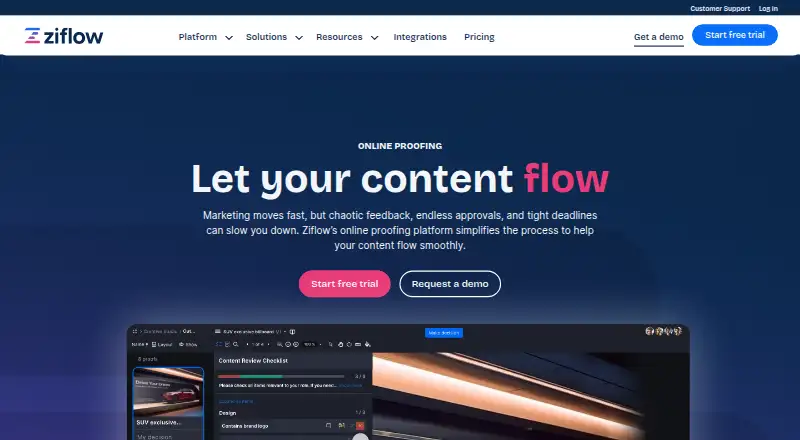
What Ziflow is
Ziflow is an online proofing platform for creative review and approval workflows. Teams can review design files, videos, live websites, and other campaign assets. ReviewAI checks checklist items and brand standards while leaving review decisions with human reviewers. The platform supports more than 1,200 file types and single-file uploads up to 5TB. Ziflow connects with tools including monday.com, Dropbox, Slack, Asana, Adobe Creative Cloud, Jira, Microsoft Teams, Google Drive, Figma, and Salesforce, among others. A RESTful API can extend workflows to proprietary applications and other platforms. It works in a browser without requiring an app: desktop Chrome, Firefox, and Edge are supported, as are Chrome on Android and Chrome or Safari on iOS. A browser extension is recommended for rich media and live website reviews. Ziflow lists a free plan with two users, 2GB storage, one workflow stage, and 60 days of review history. Standard costs $199 a month billed annually; Pro costs $329 a month billed annually.
Good
- Reviews designs, videos, websites, and campaign assets.
- Supports more than 1,200 file types.
- Free plan includes unlimited proofs and reviewers.
- Integrates with a broad range of work tools.
- Offers a RESTful API for workflow extensions.
Watch out
- Free plan allows only two users.
- Free plan provides 2GB storage.
- Free review history lasts 60 days.
Who it suits
Ziflow is suited to agencies, marketing teams, and in-house creative groups managing high-volume content production. It may fit teams needing structured review workflows across varied creative assets.
Verdict
Ziflow brings review workflows, integrations, and browser-based access together for creative teams. Compare the free plan's user, storage, and history limits with your team's needs.
Plans and prices
From Ziflow's own pricing page, checked 1 Oct 2026.
| Plan | Price | What it gives you |
|---|---|---|
| Free | Free | unlimited proofs · unlimited reviewers · 2 users · 2GB storage · 1 workflow stage · 60 days review history |
| Standard | $199 a month | unlimited proofs · unlimited reviewers · 15 free users · 1TB storage · 2 workflow stages · unlimited review history · billed annually |
| Pro | $329 a month | unlimited proofs · unlimited reviewers · 20 free users · 2TB storage · 3 workflow stages · unlimited review history · billed annually |
| Enterprise | Priced on request | unlimited proofs · unlimited reviewers · 25+ free users · 4TB+ storage · unlimited workflow stages · lifetime review history |
The facts
Each one read from Ziflow's own pages, with the date it was checked.
What it does
- AI data handling
- Ziflow says ReviewAI uses zero-retention processing and that customer content is not used to train, fine-tune, or improve AI models.checked 1 Oct 2026
- API
- A RESTful API lets teams extend Ziflow workflows to proprietary applications and other platforms.checked 1 Oct 2026
- Audience
- Ziflow serves agencies, marketing teams, and in-house creative teams handling high-volume content production.checked 1 Oct 2026
- Content review
- The platform supports reviews of design files, videos, live websites, and other campaign assets.checked 1 Oct 2026
- Encryption
- Customer data is encrypted at rest with AES-256 and network communications use TLS v1.2 with at least 128-bit AES encryption.checked 1 Oct 2026
- File support
- Ziflow supports more than 1,200 file types and allows single-file uploads up to 5TB.checked 1 Oct 2026
- Integrations
- Ziflow integrates with monday.com, Dropbox, Slack, Asana, Adobe Creative Cloud, Jira, ClickUp, Microsoft Teams, Wrike, SharePoint, Final Cut Pro X, Airtable, Google Drive, Figma, Salesforce, Zapier, and Smartsheet.checked 1 Oct 2026
- ReviewAI
- ReviewAI verifies checklist items and brand standards for creative reviews while reviewers retain control.checked 1 Oct 2026
- Security certifications
- Ziflow states that it maintains SOC 2, GDPR, ISO/IEC 27001, SSO, 99.9% uptime, and audit-log capabilities.checked 1 Oct 2026
- Support
- Standard includes email and chat support, Pro includes global 24/7 email and chat support, and Enterprise includes enterprise customer support.checked 1 Oct 2026
- What it does
- Ziflow is an online proofing platform that simplifies creative review and approval workflows.checked 1 Oct 2026
Where it runs
- Browser access
- Ziflow does not require an app and supports Chrome, Firefox, and Edge on desktops plus Chrome on Android and Chrome or Safari on iOS.checked 1 Oct 2026
- Browser extension
- A browser extension is recommended for reviewing rich media and live website proofs in Chrome, Firefox, or Edge.checked 1 Oct 2026
The full review of Ziflow
Overview
Ziflow is a creative proofing and approval platform for teams that need to review many kinds of campaign assets in a shared workflow. It is best suited to agencies and marketing or in-house creative teams; smaller groups should weigh its two-user free-plan cap against the storage and review-history limits they need.
Reviewers can comment on design files, videos, live websites and other assets, while approval workflows, role permissions, audit logs and version history help keep decisions organized. Guest access is comment-only. Ziflow also offers ReviewAI for checklist and brand-standard checks, but reviewers retain control over the review.
Key features
Proofing across formats
Support for more than 1,200 file types and single-file uploads up to 5TB gives teams room to handle varied creative materials without splitting large files into smaller uploads. That breadth is useful for campaigns spanning static design, video and live web content; it will matter less to teams with a narrow, lightweight review process.
Workflow and collaboration
Approval workflows, role permissions, audit logs and unlimited version history make Ziflow more than a comment layer: they provide structure for tracking feedback and approvals over successive revisions. The number of workflow stages rises from one on Free to two on Standard, three on Pro and unlimited on Enterprise, so teams with complex routing may need a paid tier. Guest access is limited to commenting, and the stated collaborator limit is 15 users; teams with broader internal participation should check that constraint against their setup.
ReviewAI and integrations
ReviewAI checks checklist items and brand standards while leaving decisions to people. Ziflow says customer content is not used to train, fine-tune or improve AI models and that ReviewAI uses zero-retention processing. The platform also connects with tools including monday.com, Dropbox, Slack, Asana, Adobe Creative Cloud, Jira, ClickUp, Microsoft Teams, Wrike, SharePoint, Final Cut Pro X, Airtable, Google Drive, Figma, Salesforce, Zapier and Smartsheet. A RESTful API lets teams extend workflows to proprietary applications and other platforms.
Security and support
Ziflow states that it maintains SOC 2, GDPR, ISO/IEC 27001, SSO, 99.9% uptime and audit-log capabilities. Data is encrypted at rest with AES-256; network communications use TLS v1.2 with at least 128-bit AES encryption. Support ranges from email and chat on Standard to global 24/7 email and chat on Pro, with enterprise customer support on Enterprise.
Pricing
Ziflow has a free plan and a free trial. Its paid plans start at $199/mo (annual), making the free tier the practical starting point for a small team evaluating proofing rather than a roomy long-term plan.
| Plan | Price | What it includes |
|---|---|---|
| Free | free | Unlimited proofs and reviewers; 2 users; 2GB storage; 1 workflow stage; 60 days of review history. |
| Standard | $199 a month, billed annually | Unlimited proofs and reviewers; 15 free users; 1TB storage; 2 workflow stages; unlimited review history. Includes email and chat support. |
| Pro | $329 a month, billed annually | Unlimited proofs and reviewers; 20 free users; 2TB storage; 3 workflow stages; unlimited review history. Includes global 24/7 email and chat support. |
| Enterprise | Custom pricing | Unlimited proofs and reviewers; 25+ free users; 4TB+ storage; unlimited workflow stages; lifetime review history. Includes enterprise customer support. |
Free keeps proofs and reviewers unlimited, but two users, 2GB of storage, a single workflow stage and 60 days of history make it a constrained fit for ongoing production. Standard adds storage, users, stages and permanent review history, fitting teams ready to pay for a continuing workflow. Pro costs more for five additional free users, twice Standard’s storage, a third stage and round-the-clock global support. Enterprise is aimed at larger or more complex operations that need more than 20 users, 4TB of storage or unrestricted stages; its price is custom.
Platforms
Ziflow supports Android, iOS, macOS, Windows and the web, as well as an API and browser extension. Desktop browser access works in Chrome, Firefox and Edge; on Android it supports Chrome, and on iOS Chrome or Safari. No app is required for browser access. The extension is recommended for reviewing rich media and live website proofs in Chrome, Firefox or Edge.
Who it's for
Ziflow is a strong fit for agencies, marketing departments and in-house creative teams handling high-volume content production, especially when reviews span formats and need controlled approval stages. A small team with light needs may find Free sufficient, but teams that need more than two users, more storage or longer review history will run into its caps. Organizations that need broad workflow routing or larger capacity should consider paid plans, while teams seeking a basic review process may not need Ziflow’s higher tiers.
Pros and cons
- Pro: More than 1,200 supported file types and uploads up to 5TB suit campaigns built from varied or large assets.
- Pro: Unlimited proofs and reviewers on every plan reduce friction when external reviewers need to weigh in.
- Pro: Integrations and a RESTful API can connect review work to existing creative and project tools.
- Pro: ReviewAI supports checklist and brand-standard checks without taking control away from reviewers.
- Con: Free is capped at two users, 2GB, one stage and 60 days of history, which can quickly constrain active production.
- Con: Standard and Pro require annual billing, and their monthly prices start at $199.00 USD and $329.00 USD respectively.
- Con: Comment-only guest access and a 15-user collaborator limit may not suit teams that need guests to do more than comment or have wider collaboration needs.
Alternatives
For a broader comparison, see Design Proofing Software, Video Review Software, Online Proofing Software, Creative Project Management Software and Document Collaboration Software.
Ashore is another freemium option, with a free tier limited to one user, 30 files per month and 1GB of storage. Artwork Flow offers a free plan with three users, unlimited guest reviewers, 2GB of storage and 20 creative reviews per month. QuickReviewer has a free tier with 100MB of storage, one team member and unlimited files, proofs and free reviewers; its Pro plan is $79 a month. WebProof provides a free plan with four users, 1GB of storage, unlimited projects and 100,000 page flips. Cage starts with a free plan for one user and one project, with 2GB of storage and unlimited reviewers; its Standard plan is $8 a month per user. ProofForge may suit teams comparing a paid option at A$29 a month, with file uploads up to 50MB and an extra team member at $5/mo. Flatproof has a free tier with 200MB of storage and 25MB uploads, plus unlimited creators and reviewers. Priflow is a free, self-hosted option with unlimited users, proofs, reviewers and teams.
Verdict
Choose Ziflow if a high-volume creative team needs format breadth, structured approval workflows and connections to its existing tools. Its clearest advantage is bringing diverse assets into one review process; its main drawback is the steep step from a tightly capped free plan to paid plans billed annually. Small teams with modest review needs should start with Free, while teams that need room to grow should compare the paid capacity and custom-priced Enterprise tier with simpler alternatives.
Getting started
- Open the Ziflow website.
- Start with the free plan or choose Standard or Pro.
- Use browser access on a supported desktop or mobile browser.
- Connect relevant tools or extend workflows through the RESTful API.
- Install the browser extension for rich media and live website proof reviews.
Limits worth knowing
The free plan allows two users, 2GB storage, one workflow stage, and 60 days of review history. Standard costs $199 a month billed annually and includes 15 free users, 1TB storage, and two workflow stages; Pro costs $329 a month billed annually and includes 20 free users, 2TB storage, and three workflow stages.
Questions
Is Ziflow free?
Yes. Its Free plan costs nothing and includes unlimited proofs and reviewers, two users, 2GB storage, one workflow stage, and 60 days of review history.
Which platforms can I use?
Ziflow lists Android, iOS, macOS, Windows, web, API, and extension platforms. Browser access works in desktop Chrome, Firefox, and Edge, Chrome on Android, and Chrome or Safari on iOS.
What does ReviewAI do?
It verifies checklist items and brand standards for creative reviews while reviewers retain control. Ziflow says it uses zero-retention processing and does not use customer content to train, fine-tune, or improve AI models.
What tools does Ziflow integrate with?
Integrations include monday.com, Dropbox, Slack, Asana, Adobe Creative Cloud, Jira, ClickUp, Microsoft Teams, Wrike, SharePoint, Google Drive, Figma, Salesforce, Zapier, and Smartsheet, among others.
What security measures does Ziflow state it maintains?
Ziflow states it maintains SOC 2, GDPR, ISO/IEC 27001, SSO, 99.9% uptime, and audit-log capabilities. Customer data is encrypted at rest with AES-256, and network communications use TLS v1.2 with at least 128-bit AES encryption.
Alternatives to Ziflow
- 1

Artwork Flow
Free planAndroidiOSWeb8.0From $30 a month - 2
Cage
Free planiOSWebExtension7.8From $8 a month - 3

Ashore
Free planAndroidiOSWebAPI7.5From $15 a month - 4
StreamWork
Free planWebAPIExtension7.2From $219 a month - 5
Approval Studio
AndroidiOSWebAPI7.1From $60 a month - 6
MarkUp
WebAPIExtension7.1From $79 a month