WebProof
WebProof is an online proofing and collaboration platform for teams reviewing documents or artwork and managing approvals.
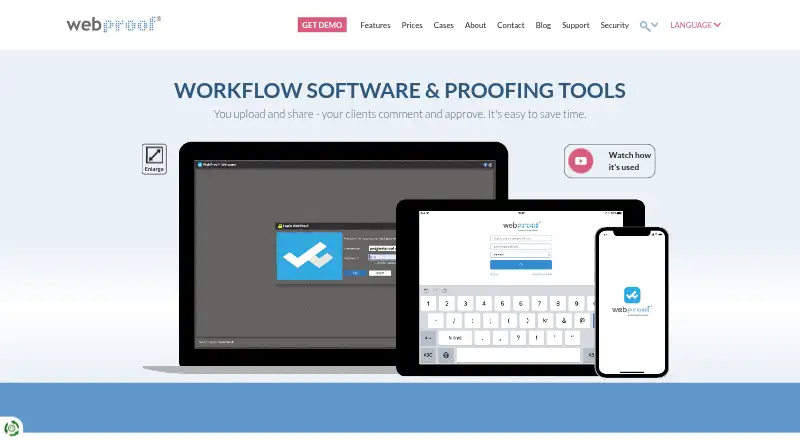
What WebProof is
WebProof is an online proofing and collaboration platform for teams reviewing documents or artwork and managing approvals. Reviewers can leave sticky-note comments, mark areas, highlight text, attach files, and follow revision history. A colour-coded overview shows correction, proofing, and approval statuses to indicate which projects need attention. Teams can invite people without WebProof accounts through an email link so they can comment on pages. InDesign and Illustrator plugins send work into the platform; Platinum adds direct correction in InDesign files and WebFlow automation to move and rename files between WebProof, a front-end MIS, and back-end printing systems. The iOS app supports project navigation, page previews, comments, highlighting, status changes, and notifications on iPhone and iPad. WebProof supports PDF files. The maker says its software and cloud hosting are ISO 27001:2022 certified, and states a 99.9% uptime guarantee measured over three months, with a refund for any shortfall. The free plan is free forever and includes four users, four sharing users, 1 GB storage, unlimited projects, and email support. Paid plans start at €199/mo.
Good
- Reviewers can mark areas, highlight text, and attach files.
- Email links let external reviewers comment on pages.
- The iOS app supports comments, status changes, and notifications.
- Free plan includes unlimited projects and 1 GB storage.
- Platinum includes InDesign correction and WebFlow automation.
Watch out
- Free plan is limited to four users.
- Free plan includes 1 GB storage.
- Basic plan has no phone support.
- Supported file type listed is PDF.
Who it suits
WebProof suits teams that need document or artwork review with comments, revision history, and approval statuses. Its described audiences include agencies, publishers, retailers, printers, translation teams, and medical businesses.
Verdict
WebProof combines proofing tools with approval tracking and external review links. Check plan limits and support options against your team's needs; Platinum adds the described InDesign and workflow automation capabilities.
Plans and prices
From WebProof's own pricing page, checked 30 Sep 2026.
| Plan | Price | What it gives you |
|---|---|---|
| Free | Free | 4 users · 4 sharing users · 1 GB storage · 3 status codes · 2 user roles · 100,000 page flips · unlimited projects · email support · Free forever, no credit card needed |
| Basic | Priced on request | 10 users · 5 GB storage · 3 status codes · 2 user roles · 500,000 page flips · email and text sharing · 250 projects · email and chat support; no phone support |
| Enterprise | Priced on request | 10 GB storage · unlimited status codes and user roles · 1,000,000 page flips · unlimited projects · email, chat and phone support · tailored onboarding · 12/5 technical support |
| Platinum | Priced on request | 20 GB storage · unlimited status codes and user roles · 1,000,000 page flips · unlimited projects · WebFlow automation · InDesign direct correction · 24/7 technical support · SLA |
The facts
Each one read from WebProof's own pages, with the date it was checked.
What it does
- Availability
- WebProof states a 99.9% uptime guarantee measured over a three-month period, with a refund for any shortfall.checked 30 Sep 2026
- External reviewers
- Users can share projects with non-WebProof users by email link so those users can comment on pages.checked 30 Sep 2026
- Hosting
- WebProof says it hosts customer files with Amazon Web Services in Ireland and cites EU data protection requirements.checked 30 Sep 2026
- Intended users
- WebProof describes its audiences as including agencies, newspapers, magazines, retailers, corporations, printers, full-service providers, translation teams, and medical businesses.checked 30 Sep 2026
- Project overview
- The project overview uses colour-coded correction, proofing, and approval statuses to show which projects need attention.checked 30 Sep 2026
- Purpose
- WebProof is an online proofing and collaboration platform where teams upload and share documents or artwork for comments and approval.checked 30 Sep 2026
- Review tools
- Reviewers can add sticky-note comments, draw or mark areas, highlight text, attach files, and track revision history.checked 30 Sep 2026
- Security certification
- WebProof says its software and cloud hosting are ISO 27001:2022 certified.checked 30 Sep 2026
- Security controls
- The security page describes role-based permissions, quarterly third-party penetration scans, activity logging, and multi-factor authentication for staff access.checked 30 Sep 2026
- Support limits
- The pricing page says the Pageflip plan offers email and chat support but no phone support; Enterprise includes 12/5 technical support and Platinum 24/7 support.checked 30 Sep 2026
- Translation
- The maker says selected text can be translated into over 60 languages, including Arabic, Chinese, Greek, and Russian.checked 30 Sep 2026
- Workflow integration
- Platinum's WebFlow automation can move and rename files between WebProof, a front-end MIS, and back-end printing systems.checked 30 Sep 2026
Where it runs
- Creative app integrations
- WebProof provides InDesign and Illustrator plugins for sending work into WebProof, and Platinum includes direct correction in InDesign files.checked 30 Sep 2026
- Mobile app
- The iOS app supports project navigation, page previews, comments, text highlighting, status changes, and notifications on iPhone and iPad.checked 30 Sep 2026
The company
- Founded
- 1998checked 28 Sep 2026
- Headquarters
- Copenhagen, Denmarkchecked 28 Sep 2026
The full review of WebProof
Overview
WebProof is a web and iOS proofing workspace for reviewing PDF documents and artwork with comments, approvals, and revision tracking. It suits agencies, publishers, retailers, printers, translation teams, medical businesses, and other groups that move work through repeated sign-offs. The free tier is useful for a small trial or low-volume operation, while larger teams will need a paid configuration and, in some cases, custom pricing.
Key features
Reviewers can place sticky-note comments, draw or mark regions, highlight text, attach files, and follow revision history. These tools keep feedback tied to specific pages and revisions instead of scattered email threads. Approval workflows and colour-coded correction, proofing, and approval statuses make outstanding work visible across projects, which is valuable when several jobs are moving at once.
Email links let non-WebProof users open a project and comment on pages, so clients, suppliers, or occasional approvers do not all need accounts. The platform accepts PDF files and supports guest reviewers, annotations, approvals, and version history. Selected text can be translated into more than 60 languages, including Arabic, Chinese, Greek, and Russian, helping multilingual review teams work from the same proof.
InDesign and Illustrator plugins send creative work into WebProof. Platinum adds direct correction in InDesign files, reducing the handoff for production teams that make changes during proofing. Its WebFlow automation can move and rename files between WebProof, a front-end MIS, and back-end printing systems; that is a meaningful workflow feature for print operations, but unnecessary overhead for teams seeking only browser-based markup.
The iOS app covers project navigation, page previews, comments, text highlighting, status changes, and notifications on iPhone and iPad. WebProof says its software and cloud hosting are ISO 27001:2022 certified, with files hosted by Amazon Web Services in Ireland. Role-based permissions, activity logging, multi-factor authentication for staff access, and quarterly third-party penetration scans add administrative safeguards. A stated 99.9% uptime guarantee, measured over three months with a refund for a shortfall, is relevant to production schedules.
Pricing
WebProof uses a freemium model: a free plan is available, and paid service starts from €199/mo. The Free plan costs 0.00 USD, is free forever with no credit card, and allows four users, four sharing users, 1 GB of storage, three status codes, two user roles, 100,000 page flips, unlimited projects, and email support. It is a reasonable way to validate the review flow, but the small user and storage allowances will constrain active teams.
Basic has custom pricing and raises capacity to 10 users, 5 GB of storage, 500,000 page flips, 250 projects, email and text sharing, three status codes, and two user roles. Email and chat support are included, but there is no phone support. It fits a modest department that needs more room than Free without requiring unlimited projects or governance.
Enterprise is also custom priced. It provides 10 GB of storage, unlimited status codes and user roles, 1,000,000 page flips, unlimited projects, email, chat and phone support, tailored onboarding, and 12/5 technical support. This is the more suitable tier for organisations with formal roles, onboarding needs, or a support expectation beyond business-hours email.
Platinum has custom pricing and includes 20 GB of storage, unlimited status codes and user roles, 1,000,000 page flips, unlimited projects, WebFlow automation, direct correction in InDesign, 24/7 technical support, and an SLA. Its premium capabilities are justified primarily for integrated print workflows and production teams that need round-the-clock coverage. The published plan terms do not state seat counts for Enterprise or Platinum, so buyers should confirm capacity during quotation.
Platforms
WebProof runs on the web and has an iOS app for iPhone and iPad. Creative teams can also use its InDesign and Illustrator plugins to submit work.
Who it's for
Choose WebProof when approvals, page-level annotation, external reviewers, and revision history are central to your process. Agencies, newspapers, magazines, retailers, corporations, printers, full-service providers, translation teams, and medical businesses are all within its stated audience. It is less compelling for a solo user or a team wanting broad file-format support: the supported file type is PDF, and even the free plan stops at four users and 1 GB.
Pros and cons
- Pros: Detailed page-level markup and revision history keep feedback actionable; external email links simplify client review; status codes and approval workflows expose bottlenecks; iOS notifications support mobile sign-off; Platinum connects InDesign correction and print-system file automation.
- Cons: Free storage, users, roles, and page flips are limited; Basic lacks phone support; paid tiers use custom pricing, making budgeting less transparent; Platinum's specialised automation is unlikely to repay its cost for teams that only need comments on PDFs.
Alternatives
Ziflow is a better fit if you want a free plan with unlimited proofs and reviewers, two users, 2 GB of storage, one workflow stage, and 60 days of review history, plus Android, macOS, Windows, API, extension, iOS, and web access.
Ashore suits a solo workflow: its free tier allows one user, 30 files per month, and 1 GB of storage.
Artwork Flow is worth considering when Android support, unlimited guest reviewers, 20 creative reviews per month, and 20-plus file formats matter.
QuickReviewer offers a free plan with one team member, 100 MB of storage, and unlimited files, proofs, and free reviewers.
Cage is an option for a single-user project setup with 2 GB of storage and unlimited reviewers.
StreamWork is suited to a small free workspace with two users, one project, 2 GB of storage, and unlimited proof links and free reviewers.
Filestage may appeal if you prefer a free allowance of one active project, five new files per month, two reviewer groups, 10 team members, and 2 GB of storage.
Flatproof is a web-only alternative with unlimited creators and reviewers on its free tier.
Browse more options in Design Proofing Software.
Verdict
WebProof is a strong choice for creative and print-oriented teams that need structured approvals, guest feedback, and dependable revision control around PDF proofs. Its main reason to look elsewhere is commercial fit: small teams may outgrow the free limits quickly, while teams without InDesign or print-system workflows may pay for Platinum capabilities they will not use.
Alternatives to WebProof
- 1

Artwork Flow
Free planAndroidiOSWeb8.0From $30 a month - 2
Cage
Free planiOSWebExtension7.8From $8 a month - 3

Ashore
Free planAndroidiOSWebAPI7.5From $15 a month - 4
Ziflow
Free planAndroidiOSWebAPI7.5From $199 a month - 5
StreamWork
Free planWebAPIExtension7.2From $219 a month - 6
Approval Studio
AndroidiOSWebAPI7.1From $60 a month