
QuickReviewer
QuickReviewer is an online proofing platform for centralizing creative feedback and review workflows.
What QuickReviewer is
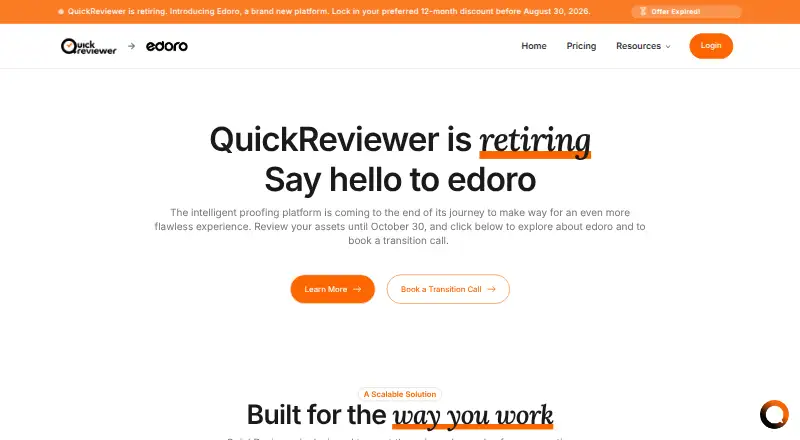
QuickReviewer is an online proofing platform for centralizing creative feedback and review workflows. It supports more than 150 file types, including PDFs, Adobe files, live websites, 3D models, and professional video formats. Reviewers can leave contextual comments and annotations, reply in threads, mention colleagues, and compare versions side by side. Approval tools include multi-stage workflows, automatic notifications, conditional routing, and triggers for third-party systems. Listed integrations include Adobe Creative Cloud, Google Drive, Box, Dropbox, YouTube, Vimeo, Jira, Asana, Trello, Slack, Microsoft Teams, Zapier, Make.com, and Canva. Its API can automate proof creation, sync user data, retrieve review metrics, and trigger custom actions. The Windows and macOS Desktop Uploader supports files up to 25GB. QuickReviewer lists SOC 2 Type II and GDPR compliance, AES-256 and TLS 1.2 or higher encryption, single sign-on, SCIM, role-based permissions, and password-protected share links. Its Forever Free plan includes 100 MB of storage and one team member. QuickReviewer says the platform is retiring and customers can review assets until October 30, 2026.
Good
- Supports more than 150 file types.
- Reviewers can compare asset versions side by side.
- Approval workflows include conditional routing.
- Desktop Uploader supports files up to 25GB.
Watch out
- Platform is retiring October 30, 2026.
- Forever Free includes 100 MB of storage.
- Forever Free includes one team member.
- No free trial is listed.
Who it suits
QuickReviewer suits creative agencies, freelancers, marketing and design teams, editorial teams, and project managers coordinating feedback and approvals. Its stated retirement date matters for anyone considering it for ongoing review work.
Verdict
QuickReviewer provides broad file support, threaded feedback, and approval workflows, but its planned retirement is a key consideration. The site says customers can review assets until October 30, 2026.
Plans and prices
From QuickReviewer's own pricing page, checked 30 Sep 2026.
| Plan | Price | What it gives you |
|---|---|---|
| Forever Free | Free | 100 MB storage · 1 team member · unlimited files and proofs · unlimited free reviewers |
| Pro | $79 a month | 500 GB storage · 10 team members · unlimited files and proofs · unlimited free reviewers · Billed Monthly |
| Premium | $169 a month | 1 TB storage · 20 team members · unlimited files and proofs · unlimited free reviewers · Billed Monthly |
| Enterprise | Priced on request | Call us for storage and team member limits · unlimited files and proofs · unlimited free reviewers |
The facts
Each one read from QuickReviewer's own pages, with the date it was checked.
What it does
- Access controls
- QuickReviewer lists single sign-on and SCIM, role-based permissions, and password-protected share links among its security features.checked 30 Sep 2026
- API
- QuickReviewer says its API can automate proof creation, sync user data, retrieve review metrics, and trigger custom actions.checked 30 Sep 2026
- Desktop uploader
- The Desktop Uploader for Windows and macOS supports uploads of files up to 25GB.checked 30 Sep 2026
- Enterprise-only features
- The pricing table lists ePub review, AutoCAD proofing, audiobook proofing, AI tools, and bespoke API integrations as Enterprise features.checked 30 Sep 2026
- Integrations
- The listed integrations include Adobe Creative Cloud, Google Drive, Box, Dropbox, YouTube, Vimeo, Jira, Asana, Trello, Slack, Microsoft Teams, Zapier, Make.com, and Canva.checked 30 Sep 2026
- Markup and collaboration
- Reviewers can add contextual comments and annotations, reply in threads, mention colleagues, and compare asset versions side by side.checked 30 Sep 2026
- Purpose
- QuickReviewer is an online proofing platform that centralizes creative feedback and review workflows.checked 30 Sep 2026
- Retirement
- QuickReviewer says the platform is retiring and customers can review assets until October 30, 2026.checked 30 Sep 2026
- Security
- The feature page states that the platform is SOC 2 Type II compliant, GDPR compliant, and encrypts data with AES-256 and TLS 1.2 or higher.checked 30 Sep 2026
- Supported content
- The platform supports more than 150 file types, including PDFs, Adobe files, live websites, 3D models, and professional video formats.checked 30 Sep 2026
- Who it serves
- The site presents solutions for freelancers and startups, creative agencies, enterprises, marketing teams, creative and design teams, editorial teams, and project managers.checked 30 Sep 2026
Where it runs
- Approval workflows
- Its workflow tools support multi-stage approvals, automated notifications, conditional routing, and third-party system triggers.checked 30 Sep 2026
Money
- Free plan limits
- The Forever Free plan lists 100 MB of storage and one team member, with unlimited files and proofs and unlimited free reviewers.checked 30 Sep 2026
The full review of QuickReviewer
QuickReviewer is an online proofing platform for teams that need to review varied creative assets and coordinate approvals. Its broad file support and workflow controls are useful, but the announced retirement makes it a time-limited choice rather than a platform to build a lasting process around.
Overview
QuickReviewer brings asset feedback and review workflows together, supporting more than 150 file types, including PDFs, Adobe files, live websites, 3D models, and professional video formats. That breadth can help teams keep mixed-media reviews in one place instead of splitting feedback across tools. The central drawback is the retirement: customers can review assets until October 30, 2026, which makes it a poor fit for workflows expected to continue past that date.
Key features
Reviewers can add contextual comments and annotations, reply in threads, mention colleagues, and compare versions side by side. Those tools are well suited to iterative creative work, where feedback needs to stay attached to the asset and changes must be checked between rounds. Version history, guest reviewers, video proofing, and custom branding further support collaborative review.
Approval workflows include multiple stages, automated notifications, conditional routing, and triggers to third-party systems. These controls are more useful to teams with repeatable sign-off paths than to people seeking only a lightweight way to collect occasional comments. Integrations include Adobe Creative Cloud, Google Drive, Box, Dropbox, YouTube, Vimeo, Jira, Asana, Trello, Slack, Microsoft Teams, Zapier, Make.com, and Canva. The API can automate proof creation, sync user data, retrieve review metrics, and trigger custom actions.
The Windows and macOS Desktop Uploader supports files up to 25GB. Security features include SOC 2 Type II and GDPR compliance, AES-256 and TLS 1.2-or-higher encryption, single sign-on, SCIM, role-based permissions, and password-protected share links. These controls address security and access management needs, although the retirement remains a constraint for any long-term deployment.
Pricing
QuickReviewer has a free plan and paid plans billed monthly, with no free trial. Every plan includes unlimited files and proofs and unlimited free reviewers; the main stated differences are storage and team-member limits.
- Forever Free: free, with 100 MB of storage and one team member. Unlimited files, proofs, and free reviewers make it useful for an individual testing a small workflow, but the storage cap is restrictive for media-heavy work.
- Pro: $79 a month, billed monthly, with 500 GB of storage and 10 team members. It suits a small team that needs substantially more room and collaborators than the free plan allows.
- Premium: $169 a month, billed monthly, with 1 TB of storage and 20 team members. It fits larger teams needing more storage and seats, though the announced retirement should weigh heavily against taking on a new subscription.
- Enterprise: custom pricing; storage and team-member limits are set by discussion. It includes unlimited files, proofs, and free reviewers. ePub review, AutoCAD proofing, audiobook proofing, AI tools, and bespoke API integrations are Enterprise-only.
The free plan’s one-seat and 100 MB limits are the clearest trade-offs; moving up increases capacity rather than removing the unlimited proof and reviewer allowances. QuickReviewer also lists 500 GB as a storage limit, while the Premium plan states 1 TB, so readers should confirm the applicable storage ceiling before committing.
Platforms
QuickReviewer supports web, macOS, Windows, and API access. Its desktop uploader is available for macOS and Windows and supports uploads up to 25GB.
Who it's for
The platform presents itself for freelancers and startups, creative agencies, enterprises, marketing teams, creative and design teams, editorial teams, and project managers. Its varied file support and approval routing make it most compelling for teams coordinating structured reviews across different asset types. It is less suitable for anyone seeking a dependable long-term home for review work because customers can review assets only until October 30, 2026.
Pros and cons
- Pro: Support for more than 150 file types, including 3D models and professional video, helps consolidate reviews of varied creative work.
- Pro: Threaded feedback, mentions, side-by-side comparison, and multi-stage approvals keep discussion and sign-off organized around assets.
- Pro: Unlimited files, proofs, and free reviewers are included even on the free plan.
- Con: The Free plan’s 100 MB storage and one team member limit its usefulness for teams or larger assets.
- Con: The platform is retiring, with asset reviews ending October 30, 2026, making it difficult to justify for a continuing workflow.
Alternatives
For a category-wide comparison, see Design Proofing Software, Online Proofing Software, and Video Review Software.
- Ziflow is worth considering if you need broader platform coverage, including Android, iOS, and browser extensions, or a free plan with 2 users, 2GB storage, one workflow stage, and 60 days of review history.
- Ashore is another freemium option with Android and iOS support as well as web and API access.
- Artwork Flow is a freemium alternative available on Android, iOS, and web.
- WebProof is a freemium option for iOS and web.
- Cage is a freemium alternative available through a browser extension, iOS, and web.
- StreamWork offers a free plan and free trial, with API, extension, and web platforms.
- Filestage offers a free plan and free trial, and supports API and web.
- Flatproof is a freemium web option.
Verdict
QuickReviewer is a strong fit for teams that need broad creative-file support, threaded collaboration, and structured approvals in one proofing workflow. Its unlimited proofs and reviewers make the free tier appealing for small-scale use, while paid plans add storage and team seats. But the announced retirement and October 30, 2026 review cutoff are decisive: choose it only for a time-limited need, and look elsewhere for a platform meant to anchor ongoing work.
Alternatives to QuickReviewer
- 1

Artwork Flow
Free planAndroidiOSWeb8.0From $30 a month - 2
Cage
Free planiOSWebExtension7.8From $8 a month - 3

Ashore
Free planAndroidiOSWebAPI7.5From $15 a month - 4
Ziflow
Free planAndroidiOSWebAPI7.5From $199 a month - 5
StreamWork
Free planWebAPIExtension7.2From $219 a month - 6
Approval Studio
AndroidiOSWebAPI7.1From $60 a month