Artwork Flow
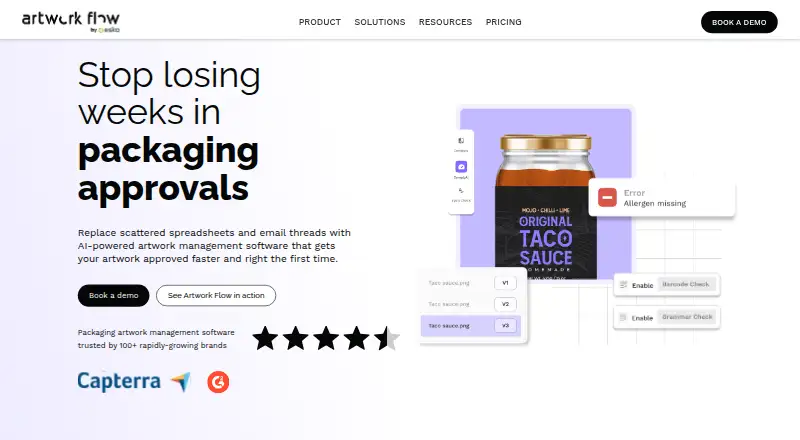
Artwork Flow is artwork management software for packaging teams, bringing artwork assets, reviews, and approvals into a shared workflow.
What Artwork Flow is
Artwork Flow is artwork management software for packaging teams, bringing artwork assets, reviews, and approvals into a shared workflow. Its proofing tools include annotations, comments, version comparison, overprint preview, and barcode and color checks. Customizable rulebooks can flag label issues such as incorrect barcodes, missing allergen information, and regulatory requirements. Teams can upload and review more than 160 file types, including images, PDFs, HTML, and video. The workflow can support Part 11 and Annex 11 requirements for 21 CFR, including audit logs and electronic signatures. Artwork Flow runs on Android, iOS, and the web, and includes version history and guest reviewers. The Free plan is for individuals and small teams, with three users, 2 GB of storage, and up to 20 creative reviews monthly. Professional costs $30 per user per month, billed per user per month, and Enterprise adds features such as single sign-on and activity reporting. The cloud service identifies ISO 27001:2013 and SOC 2 Type 2 certifications.
Good
- Proofing includes annotations, comments, and version comparison.
- Rulebooks check barcodes, allergen details, and regulatory requirements.
- Supports Android, iOS, and web access.
- Guest reviewers are available on Free and Professional.
- Cloud service identifies ISO 27001:2013 and SOC 2 Type 2 certifications.
Watch out
- Free is capped at three users and 2 GB storage.
- Free includes up to 20 creative reviews per month.
- Professional costs $30 per user per month, billed per user per month.
Who it suits
Artwork Flow suits packaging teams that need structured creative reviews, artwork approvals, and label checks. Its plans are positioned for individuals and small teams, growing brands and agencies, and larger or rapidly scaling teams.
Verdict
Choose Artwork Flow if packaging reviews need artwork proofing, version comparison, and label rulebooks in one workflow.
Plans and prices
From Artwork Flow's own pricing page, checked 15 Oct 2026.
| Plan | Price | What it gives you |
|---|---|---|
| Professional | $30 a month | up to 10 users · unlimited reviewers · 50 GB storage · up to 50 creative reviews per month · brand compliance · spell check · e-signatures · multi-language support · Slack and Google Drive integrations · per user per month |
| Free | Free | up to 3 users · unlimited reviewers · DAM library · version compare · measurements · reviews and approvals · AI smart tagging · Figma and Adobe integrations · per user per month |
| Enterprise | Priced on request | advanced workflows · custom checklists · enterprise-grade security · dedicated customer success manager · single sign-on · activity logging and reports · smart compliance checks · analytics · integrations |
The facts
Each one read from Artwork Flow's own pages, with the date it was checked.
What it does
- Access controls
- The pricing page lists admin password resets, forced logouts, mandatory password changes, document encryption, and password protection among security features.checked 28 Sep 2026
- AI compliance
- ComplyAI lets teams create rulebooks for checks such as allergens, ingredients, barcodes, approved words and regulatory requirements.checked 15 Oct 2026
- Annotations and checklists
- Reviewers can mark artwork, tag colleagues, attach reference files and use custom checklists with rejection comments.checked 15 Oct 2026
- API security
- Artwork Flow's security documentation says API calls use secured JWT tokens and network traffic is HTTPS-protected.checked 15 Oct 2026
- Asana integration
- The Asana integration can create Artwork Flow projects from Asana tasks, synchronize statuses and approvals, and requires an Asana administrator API token.checked 15 Oct 2026
- Backups and logs
- The security page states that backups run daily, are retained for 35 days, and infrastructure actions are logged with request and IP details.checked 15 Oct 2026
- Barcode inspection
- The product checks 14 types of one-dimensional barcodes and also analyzes two-dimensional codes such as QR codes.checked 15 Oct 2026
- Certifications stated
- The vendor cites SOC 2 Type 2 and ISO 2701:2013 certification on its homepage, while its security page describes provider coverage for ISO 27001, ISO 27018, PCI DSS and ISO 22301.checked 15 Oct 2026
- Compliance
- Customizable rulebooks check labels for issues such as incorrect barcodes, missing allergen information, and regulatory requirements.checked 28 Sep 2026
- Digital asset management
- Its DAM centralizes packaging assets and supports metadata, AI smart tagging, contextual search, permissions and version history.checked 15 Oct 2026
- File storage controls
- Artwork files are kept in private AWS S3 objects, accessed through permission-checked presigned URLs that expire after 30 minutes.checked 15 Oct 2026
- Integrations
- The pricing page lists Figma, Adobe, Slack, Google Drive, Dropbox, SharePoint and Google Calendar integrations across plans.checked 15 Oct 2026
- Intended users
- The pricing page describes Free as for individuals and small teams, Professional for creative agencies and growing brands, and Enterprise for large teams and rapidly scaling brands.checked 28 Sep 2026
- Legal name and founder
- Crunchbase identifies the legal name as Artwork Flow and lists Ankit Tomar as founder; it places the company in Bangalore, Karnataka, India with 101–250 employees.checked 15 Oct 2026
- Legal workflows
- The proofing page says the workflow can support Part 11 and Annex 11 requirements for 21 CFR, including audit logs and electronic signatures.checked 28 Sep 2026
- Limit: performance and reporting
- GetApp's review summary lists slow performance, slow loading, feature limitations, integration issues and inadequate reporting among recurring negatives.checked 15 Oct 2026
- Notable launch
- Product Hunt records Artwork Flow's AI-powered artwork-management launch in 2021 and shows later launches ranked second for the day and third for the week on November 2, 2023.checked 15 Oct 2026
- Online proofing
- The proofing system supports more than 160 file types and includes annotations, measurements, spell checking, color inspection and print inspection.checked 15 Oct 2026
- Paid from
- 30checked 20 Sep 2026
The company
- Company size and age
- LinkedIn lists Artwork Flow as privately held, founded in 2019, headquartered in New York and sized at 51–200 employees.checked 15 Oct 2026
- Founded
- 2020checked 23 Sep 2026
Money
- Free plan
- Yeschecked 20 Sep 2026
- Free tier limits
- The Free plan is capped at three users and 2 GB of storage, and includes up to 20 creative reviews per month.checked 28 Sep 2026
- Limit: price and adaptation
- Some G2 reviewers describe the software as costly and say teams need time to adapt to it.checked 15 Oct 2026
The full review of Artwork Flow
Overview
Artwork Flow is cloud-based artwork management software built for packaging reviews, approvals, and label compliance. It is a strong fit for packaging teams that must coordinate creative changes with regulatory checks and multiple reviewers. The main trade-off is scale: the free tier is tightly capped, while paid access is priced per user.
Key features
Its proofing workspace combines annotations, comments, version comparison, overprint preview, and barcode and color checks. In practice, that gives packaging reviewers a way to inspect visual changes and production-sensitive details in one place, rather than treating artwork comments as a separate process from print checks. Approval workflows and version history help teams keep a record of what changed and which iteration moved forward.
Artwork Flow accepts images, PDFs, HTML, and video. The proofing workflow supports more than 160 file types, while the Free and Professional plan descriptions specify 20+ file formats. That broad coverage should suit packaging agencies handling mixed creative deliverables, although the plan summaries do not identify which formats are included in each tier.
Customizable rulebooks can check labels for incorrect barcodes, missing allergen information, and regulatory requirements. This is a meaningful advantage for brands with repeatable packaging rules because checks can be built into review instead of left to memory. The workflow can also support Part 11 and Annex 11 requirements for 21 CFR, including audit logs and electronic signatures; teams remain responsible for configuring rules and approvals appropriately for their obligations.
Integrations depend on the plan. Free includes Figma and Adobe, Professional adds Slack and Google Drive, and Enterprise adds Dropbox and SharePoint. Security features include ISO 27001:2013 and SOC 2 Type 2 certification, along with document encryption, password protection, admin password resets, forced logouts, and mandatory password changes. Enterprise adds single sign-on, user activity logging, and reports.
Pricing
Artwork Flow uses a freemium model with a capable but restricted entry tier.
| Plan | Price and allowance | Best fit |
|---|---|---|
| Free | free, billed yearly (20% off); 3 users, unlimited guest reviewers, 2 GB storage, 20 creative reviews per month, and 20+ file formats. | Individuals and small teams with limited monthly review volume. |
| Professional | $30 a month, billed per user per month; up to 10 users, 50 GB storage, up to 50 creative reviews per month, unlimited guest reviewers, and 20+ file formats. | Creative agencies and growing brands needing more capacity and collaboration. |
| Enterprise | Custom pricing; advanced workflows, custom checklists, enterprise-grade security, single sign-on, and user activity logging and reports. | Large teams and rapidly scaling brands with governance requirements. |
Free is useful for proving the workflow, but three users, 2 GB of storage, and 20 reviews per month can constrain an active packaging pipeline. Professional raises those ceilings but still limits teams to 10 users and 50 monthly reviews, and its per-user billing can become significant as participation grows. Enterprise is the tier to consider when custom workflows, checklists, reporting, or identity controls matter more than a published price.
Platforms
Artwork Flow runs on web, Android, and iOS, giving teams browser access alongside mobile review options.
Who it's for
Choose it for packaging departments, agencies, and brands that need artwork proofing, approval tracking, version control, and label rulebooks together. It is especially relevant where barcode, color, allergen, or regulatory checks must be part of the review path. Small teams with occasional reviews can start on Free; growing operations will likely need Professional, while organizations requiring single sign-on and detailed activity reporting belong on Enterprise.
Pros and cons
- Pro: Packaging-focused proofing includes overprint, barcode, and color checks alongside annotations and version comparison.
- Pro: Custom rulebooks and support for audit logs and electronic signatures address compliance-oriented workflows.
- Pro: Unlimited guest reviewers on Free and Professional makes external approvals easier without adding paid seats.
- Con: Free is limited to three users, 2 GB, and 20 creative reviews each month.
- Con: Professional retains a 10-user and 50-review monthly ceiling and charges per user.
- Con: Advanced governance features and custom workflows require Enterprise custom pricing.
Alternatives
For a broader design-proofing directory, see Design Proofing Software; for asset-library-focused tools, see Digital Asset Management Software.
- Ziflow is a better starting point when unlimited proofs and reviewers are more important than packaging-specific rulebooks; its free plan supports two users, 2 GB, one workflow stage, and 60 days of review history.
- Ashore suits a one-user setup seeking a free-forever allowance of 30 files per month and 1 GB of storage.
- QuickReviewer is worth considering for unlimited files and proofs with unlimited free reviewers, accepting just 100 MB of storage on its free plan.
- WebProof fits teams wanting four users, four sharing users, unlimited projects, and 1 GB of storage on its free tier.
- Cage is an option for a single user needing one project, 2 GB, and unlimited reviewers at no cost.
- StreamWork offers a free workspace for two users with 2 GB and unlimited proof links and free reviewers.
- Filestage may suit teams working in euros that need reviewer groups and 10 team members on its free plan.
- Flatproof is a low-cost web alternative with unlimited creators and reviewers, though its free storage is 200 MB.
Verdict
Artwork Flow is a strong choice for packaging teams that want creative proofing and label-compliance controls in one governed workflow. Its rulebooks, production checks, version history, and enterprise security make it more specialized than a basic approval tool. Look elsewhere if your work is not packaging-focused, your review volume quickly exceeds the plan caps, or you need predictable pricing for a larger user base.
Getting started
- Visit the Artwork Flow website.
- Choose the Free plan or Professional at $30 per user per month, billed per user per month.
- Use the web service or access it on Android or iOS.
- Invite reviewers and upload artwork for review.
Limits worth knowing
Free is limited to three users, 2 GB of storage, and 20 creative reviews per month. Professional allows up to 10 users, 50 GB of storage, and up to 50 creative reviews monthly.
Questions
Is there a free plan?
Yes. Free costs nothing and includes three users, unlimited guest reviewers, 2 GB of storage, and up to 20 creative reviews monthly.
How much does Professional cost?
Professional costs $30 per user per month, billed per user per month. It includes up to 10 users, 50 GB of storage, and up to 50 creative reviews monthly.
What platforms does Artwork Flow support?
It is available on Android, iOS, and the web.
Which integrations are listed?
Free lists Figma and Adobe integrations. Professional lists Slack and Google Drive, while Enterprise lists Dropbox and SharePoint.
Does it support regulated workflows?
Its workflow can support Part 11 and Annex 11 requirements for 21 CFR, including audit logs and electronic signatures.
What is included with Enterprise?
Enterprise lists advanced workflows, custom checklists, enterprise-grade security, single sign-on, and user activity logging and reports.
Alternatives to Artwork Flow
- 1
Cage
Free planiOSWebExtension7.8From $8 a month - 2

Ashore
Free planAndroidiOSWebAPI7.5From $15 a month - 3
Ziflow
Free planAndroidiOSWebAPI7.5From $199 a month - 4
StreamWork
Free planWebAPIExtension7.2From $219 a month - 5
Approval Studio
AndroidiOSWebAPI7.1From $60 a month - 6
MarkUp
WebAPIExtension7.1From $79 a month