
Ashore
Ashore is online proofing software for reviewing and approving digital files.
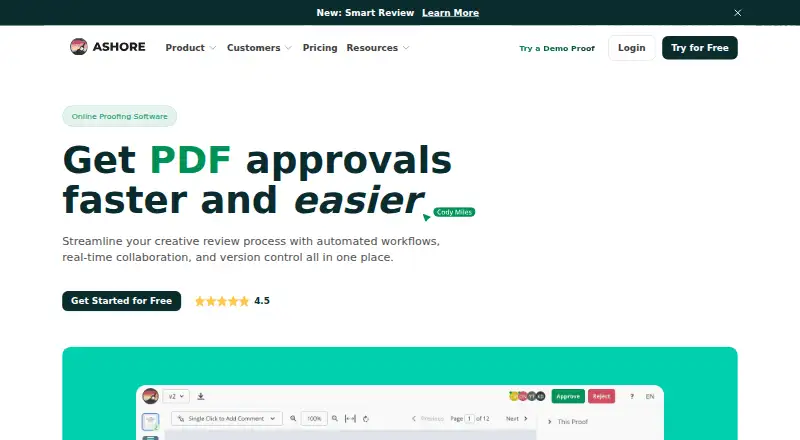
What Ashore is
Ashore is online proofing software for reviewing and approving digital files. It supports automated approval workflows, real-time collaboration, and version control. Smart Review compares uploaded versions and highlights what changed, while reviewers can comment on video and audio at specific timestamps. Supported formats include images, PDFs, video, audio, HTML, live websites, DOCX, and TXT. Integrations include plugins for Photoshop, Illustrator, and InDesign, Zapier connections, and a REST API. Teams can brand review experiences with custom domains, logos, and integrated email. Ashore also logs proof activity, including emails and new versions, for audit trails. It is available on Android, iOS, and the web, with an API platform listed. The Free plan provides one user, 30 files per month, and 1 GB of storage. Starter costs $15 a month and includes one user, with additional users listed at $15 per month each. Standard costs $46 a month and includes three users; additional users are also listed at $15 per month each. Ashore identifies creative agencies, marketing teams, and print and promotional apparel businesses as customer groups.
Good
- Smart Review marks changes between uploaded versions.
- Reviewers can comment at specific media timestamps.
- Supports a broad range of file formats.
- Free plan includes one user and 30 monthly files.
Watch out
- Free plan storage is limited to 1 GB.
- Starter includes one user; additional users cost extra.
- Support hours are Monday through Friday, 9:00 AM–4:30 PM CT.
Who it suits
Ashore suits creative and marketing teams, as well as print and promotional apparel businesses, that need to collect feedback and approvals on digital files. Its timestamped media comments and version comparison are useful for review workflows involving video or audio.
Verdict
Ashore provides collaborative proofing, version comparison, and approval workflows across many file types. The free tier is limited in users, monthly files, and storage, while paid plans start at $15 per user per month.
Plans and prices
From Ashore's own pricing page, checked 29 Sep 2026.
| Plan | Price | What it gives you |
|---|---|---|
| Free | Free | 1 user · 30 files/month · unlimited approvers · 1 GB storage · limited automation · 1 custom field · $0 /Forever |
| Starter | $15 a month | 1 included user · 150 files/month/user · unlimited storage · all file types · limited custom branding · full automation · Adobe plugins · Zapier access · $15/month per additional user · $15/ month |
| Standard | $46 a month | 3 included users · Smart Review · artwork intake forms · PDF watermarking · proof password protection · files library · 1 free training · $15/month per additional user · $46/ month |
| Premium | $199 a month | 5 included users · unlimited files · unlimited custom fields · full custom branding · contact portal · preflight automation · API access · job management · $23/month per additional user · $199/ month |
The facts
Each one read from Ashore's own pages, with the date it was checked.
What it does
- Annotations
- Approvers can comment on video and audio at specific timestamps.checked 29 Sep 2026
- Audit trails
- Ashore says it automatically logs proof activity, including emails and new versions, for audit trails.checked 29 Sep 2026
- Branding
- The product supports branded review experiences with custom domains, logos, and integrated email.checked 29 Sep 2026
- File support
- Supported formats include images, PDFs, videos, audio, HTML, live websites, DOCX, and TXT.checked 29 Sep 2026
- Integrations
- Ashore describes direct plugins for Photoshop, Illustrator, and InDesign, plus Zapier connections and a REST API.checked 29 Sep 2026
- Product
- Ashore describes itself as online proofing software for reviewing and approving digital files.checked 29 Sep 2026
- Smart Review
- Smart Review compares uploaded versions and marks what changed.checked 29 Sep 2026
- Support
- The support policy lists email and phone support Monday through Friday, 9:00 AM–4:30 PM CT, and says email responses arrive within 24 hours during business hours.checked 29 Sep 2026
- Target users
- Ashore identifies creative agencies and marketing teams, as well as print and promotional apparel businesses, as customer groups.checked 29 Sep 2026
- Training
- The Standard plan includes one free training.checked 29 Sep 2026
- Workflows
- The product supports automated approval workflows, real-time collaboration, and version control.checked 29 Sep 2026
The company
- Company history
- Ashore says it was initially built as an in-house product of Brandcave, a creative agency in Austin, Texas.checked 29 Sep 2026
- Headquarters
- The site lists 109 E 8th Street Suite 200, Georgetown, TX 78626, and says Ashore is built in Austin, Texas.checked 29 Sep 2026
The full review of Ashore
Overview
Ashore is online proofing software for teams that need to review and approve digital files. Its workflow combines automated approvals, real-time collaboration, version control, and comments, with support for assets ranging from images and PDFs to video, audio, documents, and live websites.
A useful distinction is Smart Review, which compares uploaded versions and marks what has changed. That can help reviewers focus on revisions rather than repeat a full review of each file. Ashore also records proof activity—including emails and new versions—in an audit trail.
The product identifies creative agencies, marketing teams, print businesses, and promotional apparel businesses as customer groups. Ashore says it began as an internal tool at Brandcave, a creative agency in Austin, Texas; its headquarters are listed in Georgetown, Texas.
For readers comparing specialist tools, Ashore belongs in the conversation around Online Proofing Software, Design Proofing Software, and Video Review Software.
Key features
Review across file types
Ashore supports images, PDFs, videos, audio, HTML, live websites, DOCX, and TXT. Video and audio reviewers can leave comments at specific timestamps, tying feedback to a precise moment rather than a general note about the file.
Approval and version tracking
Automated approval workflows organize review steps, while version control keeps successive uploads within the proofing process. Smart Review highlights changes between uploaded versions. Guest reviewers are supported, so a review can include people who are not regular users.
Creative-tool connections and branding
Ashore describes direct plugins for Photoshop, Illustrator, and InDesign, along with Zapier connections and a REST API. Branded review experiences can use custom domains, logos, and integrated email, which may suit teams presenting work to clients under their own identity.
Activity records and support
The platform says proof activity is logged automatically, including email and version events, to create audit trails. Support is available by email and phone Monday through Friday, 9:00 AM–4:30 PM CT; Ashore says email responses arrive within 24 hours during business hours. The Standard plan includes one free training.
Pricing
Ashore is freemium, with a free plan and paid plans starting at $15/user/mo. The listed plan details are:
| Plan | Price | Included limits and billing details |
|---|---|---|
| Free | free | Free forever; 1 user, 30 files per month, and 1 GB storage. |
| Starter | $15 a month | 1 included user; 150 files per month per user; additional users billed at $15/month per additional user. |
| Standard | $46 a month | 3 included users; 150 files per month per user; additional users billed at $15/month per additional user. |
| Premium | $199 a month | 5 included users; additional users billed at $23/month per additional user. |
The stated paid starting price is $15/user/mo. The plan information lists different included user counts and file allowances, so teams should weigh those limits alongside the per-additional-user rates.
Platforms
Ashore is available on web, Android, and iOS, and it also lists an API. The supported file formats and design-tool plugins make its platform scope relevant to both browser-based review and creative production workflows.
Who it's for
Ashore is aimed at creative agencies and marketing teams that need a structured process for collecting feedback, comparing revisions, and documenting approvals. Print and promotional apparel businesses are also named as customer groups. Timestamped audio and video feedback may be especially useful when reviews involve moving or recorded content, while branded portals can support client-facing review work.
Small teams can start with the free plan’s one user and 30 monthly files. Teams with more reviewers can consider Starter, Standard, or Premium, keeping the additional-user charges and listed file limits in view.
Pros and cons
- Pros: Supports a broad mix of file types, including live websites, video, and audio.
- Pros: Smart Review marks differences between uploaded versions, and audio or video comments can be tied to timestamps.
- Pros: Offers automated approval workflows, guest reviewers, custom branding, and audit trails.
- Pros: Provides a free plan and integrations with Adobe creative tools, Zapier, and a REST API.
- Cons: The Free plan is limited to 1 user, 30 files per month, and 1 GB storage.
- Cons: Paid plans charge for additional users, and the per-user rates differ between plans.
- Cons: Published support hours are limited to weekdays, 9:00 AM–4:30 PM CT.
Alternatives
Teams comparing review and approval products can also consider Ziflow, Frame.io, and Cage. Other options in the same broad comparison include Krock.io, Pastel, and QuickReviewer. For video-focused review, Dropbox Replay is another product to evaluate; Approvallo is another approval-oriented option.
Verdict
Ashore brings proofing, approvals, version comparison, timestamped media feedback, and activity records into one workflow. Its breadth of supported content and branding options fit agencies, marketing groups, and businesses managing creative approvals with outside reviewers. The free plan offers a constrained entry point, while paid tiers add included users at listed monthly prices. The main considerations are plan limits, additional-user costs, and weekday-only support hours.
Getting started
- Open the Ashore website.
- Choose web, Android, iOS, or API access.
- Select the Free plan or a paid plan based on users and file volume.
- Upload digital files in a supported format for review.
- Connect a listed plugin, Zapier, or the REST API if it fits your workflow.
Limits worth knowing
The free plan includes one user, 30 files per month, and 1 GB of storage. Starter includes one user and 150 files per month per user; Standard includes three users at that per-user file allowance.
Questions
Does Ashore have a free plan?
Yes. The Free plan is $0 forever and includes one user, 30 files per month, and 1 GB of storage.
How much do Ashore's paid plans cost?
Starter is $15 per month, Standard is $46 per month, and Premium is $199 per month. Additional users are listed at $15 per month for Starter and Standard, and $23 per month for Premium.
Which platforms does Ashore list?
Ashore lists Android, iOS, web, and API access.
What tools can Ashore connect with?
It offers direct plugins for Photoshop, Illustrator, and InDesign, plus Zapier connections and a REST API.
What does the Standard plan include?
Standard costs $46 per month, includes three users and 150 files per month per user, and includes one free training.
What support does Ashore offer?
Its support policy lists email and phone support Monday through Friday, 9:00 AM–4:30 PM CT. Email responses are listed within 24 hours during business hours.
Alternatives to Ashore
- 1

Artwork Flow
Free planAndroidiOSWeb8.0From $30 a month - 2
Cage
Free planiOSWebExtension7.8From $8 a month - 3
Ziflow
Free planAndroidiOSWebAPI7.5From $199 a month - 4
StreamWork
Free planWebAPIExtension7.2From $219 a month - 5
Approval Studio
AndroidiOSWebAPI7.1From $60 a month - 6
MarkUp
WebAPIExtension7.1From $79 a month