
Frame.io
Frame.io is a creative asset management and collaboration platform for centralizing media feedback and coordinating creative workflows.
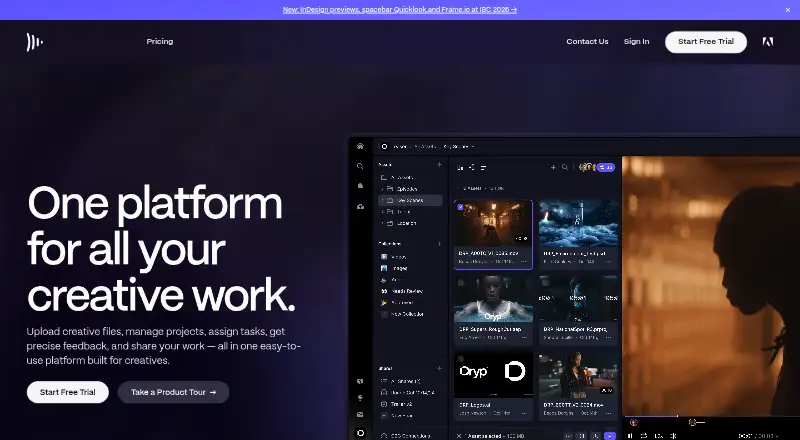
What Frame.io is
Frame.io is a creative asset management and collaboration platform for centralizing media feedback and coordinating creative workflows. Its Camera to Cloud feature can upload, organize, and distribute RAW or proxy files from cameras to creative teams after a take or snapshot. External clients can view and comment through Share links without a Frame.io account. The platform supports time-coded comments, approvals, and version comparison, and lists integrations with tools including Adobe Premiere Pro, Lightroom, Adobe After Effects, and LumaFusion, along with Final Cut Pro-related workflows. Frame.io Drive is a free desktop app for Mac and Windows that supports uploads, downloads, and mounting projects on the desktop. Developers can use its public API, webhooks, custom Actions, and connectors for automation. The Free plan includes up to two members, 2GB of storage, and up to two projects. Pro costs $15 per member per month plus tax, while Team costs $25 per member per month plus tax. Team supports up to 15 members; customers needing more are directed to Enterprise.
Good
- External clients can review links without an account.
- Camera to Cloud distributes RAW or proxy files.
- Includes time-coded comments, approvals, and version comparison.
- Public API and webhooks support automation.
- Free plan includes up to two projects.
Watch out
- Free plan includes 2GB of storage.
- Pro supports up to five members.
- Team supports up to 15 members; larger teams are directed to Enterprise.
- Paid prices are per member per month plus tax.
Who it suits
Frame.io may suit creative teams coordinating media review, client feedback, and approvals. It also fits workflows that connect camera uploads or editing tools with automated actions and webhooks.
Verdict
Frame.io brings media organization and review into a shared creative workflow, with external links and integrations for editing and automation. The free plan is limited to two members and 2GB of storage, while paid plans charge per member.
Plans and prices
From Frame.io's own pricing page, checked 15 Oct 2026.
| Plan | Price | What it gives you |
|---|---|---|
| Free | Free | up to 2 members · 2GB storage · 2GB Mounted Storage · up to 2 projects · Camera to Cloud · transcription and captions · $0/mo |
| Pro | $15 a month | up to 5 members · 2TB included plus 2TB per additional member · 250GB Mounted Storage · unlimited projects · custom-branded shares · passphrase-protected shares · share-link expiration · share permissions · comment attachments · one static watermark template · $15 per member per month + tax |
| Team | $25 a month | up to 15 members · 3TB included plus 2TB per additional member · 500GB Mounted Storage · restricted projects and folders · internal comments · $25 per member per month + tax |
| Enterprise | Priced on request | custom members and storage · single sign-on · multiple team workspaces · 2TB Mounted Storage · session-based watermarking · unlimited watermarking templates · asset lifecycle management · secure sharing · priority in-app support · Storage Connect · forensic watermarking · digital rights management · Custom |
The facts
Each one read from Frame.io's own pages, with the date it was checked.
What it does
- API
- Frame.io exposes REST APIs for custom workflow solutions and application integrations, including a Camera to Cloud devices API.checked 15 Oct 2026
- API and automation
- Frame.io provides a public API, webhooks for real-time events such as uploads or status changes, custom Actions, and no-code or low-code connectors.checked 30 Sep 2026
- API documentation
- The API reference covers accounts, assets, audit logs, comments, custom actions, projects, teams, search, sharing, webhooks, and Camera to Cloud.checked 15 Oct 2026
- API licence
- The public API reference identifies the Frame.io API documentation as MIT licensed and provides C#, JavaScript, cURL, and Python SDK examples.checked 15 Oct 2026
- Camera to Cloud
- Camera to Cloud can upload takes from a set immediately after recording so remote teams can review them.checked 15 Oct 2026
- Creative Cloud inclusion
- Frame.io is included with Creative Cloud All Apps, Premiere, and After Effects, providing 100GB of storage, five projects at a time, two users, and unlimited reviewers.checked 30 Sep 2026
- Drive requirements
- Frame.io Drive requires macOS 13 or later or Windows 10 or later, at least 2GB RAM, 50GB free SSD space minimum, and an internet connection.checked 15 Oct 2026
- Encryption
- Frame.io states that uploaded media uses Amazon S3 server-side AES-256 encryption and that all interactions use SSL/HTTPS and Transport Layer Security.checked 30 Sep 2026
- Enterprise security
- Enterprise features include real-time watermarking, passphrase and domain-restricted sharing, and single sign-on with user provisioning through the Adobe Admin Console.checked 30 Sep 2026
- External sharing
- External clients can view and comment through Share links without creating or logging into a Frame.io account.checked 30 Sep 2026
- File management
- The product supports cloud upload, organization, tagging, sorting, grouping, metadata fields, nested folders, and Collections for creative assets.checked 15 Oct 2026
- Integrations
- Official integrations include Premiere Pro, Lightroom, After Effects, LumaFusion, CuttingRoom, Eddie AI, Baselight, Telestream Vantage, Evercast, Make, Pabbly Connect, Zapier, and Workfront Fusion.checked 15 Oct 2026
- Legacy API sunset
- Frame.io release notes state that V2 API endpoints are scheduled for removal on December 1, 2026, while Camera to Cloud endpoints are excluded.checked 15 Oct 2026
- Limit: Software Advice reviewers
- Some reviewers report that navigation is initially difficult, icons are small, and nontechnical clients can feel overwhelmed.checked 15 Oct 2026
- Limit: Trustpilot complaints
- Trustpilot complaints include playback failures, slow downloads, billing and cancellation disputes, login problems, bugs after the V4 transition, and poor support experiences.checked 15 Oct 2026
- Limit: TrustRadius reviewers
- TrustRadius summaries mention a complicated interface after updates, freezing or crashes, storage cost concerns, and requests for broader integrations.checked 15 Oct 2026
- Mounted Storage
- Mounted Storage and Frame.io Drive stream cloud media into desktop applications and work with applications that read a file system.checked 15 Oct 2026
- Notable news: SDK release
- Frame.io announced updated Python and TypeScript SDK capabilities on May 27, 2026, including large-file upload handling and built-in OAuth flows.checked 15 Oct 2026
- Notable news: V4 availability
- Adobe announced general availability of the next-generation Frame.io on October 16, 2024, adding metadata and asset workflows and expanding beyond video to photo and design.checked 15 Oct 2026
- Offline limitation
- Mounted Storage requires an active internet connection for authentication, permissions, and project-state consistency; it is not designed for offline use.checked 15 Oct 2026
Where it runs
- Desktop app
- Frame.io Drive is a free desktop app for Mac and Windows that supports fast uploads and downloads and mounting Frame.io projects to the desktop.checked 30 Sep 2026
- Mobile app
- The Apple listing describes Frame.io apps for iPhone, iPad, and Apple TV with asset search, scrubbing, zooming, commenting, and team collaboration.checked 15 Oct 2026
The company
- Maker identity
- LinkedIn lists Frame.io as a privately held software-development company with 201–500 employees, headquartered in New York, New York, and founded in 2014.checked 15 Oct 2026
Money
- Notable plan limit
- The pricing page says Pro supports up to 5 users and Team supports up to 15 users, with customers needing more than 15 users directed to Enterprise.checked 30 Sep 2026
The full review of Frame.io
Overview
Frame.io is a creative asset management and collaboration platform for teams handling video and other media. It suits production groups that need feedback tied to footage, quick camera-to-team delivery, or links with editing and automation tools. Its workflow reach is a strength, but storage and member limits can make the cheaper plans restrictive as a team grows.
Key features
Review and sharing
Time-coded comments, approval workflows, and version comparison keep review focused on the media itself, rather than scattering notes across messages. External clients can view and comment through Share links without a Frame.io account, a practical advantage when reviewers are outside the production team. Pro adds custom-branded and passphrase-protected shares; Team adds restricted projects and folders and internal comments.
Capture, desktop access, and integrations
Camera to Cloud uploads, organizes, and distributes RAW or proxy files from cameras after each take or snapshot. That is particularly useful for camera-based teams that want footage in the review workflow promptly; it matters less when material arrives through other means. Frame.io Drive is a free Mac and Windows app for uploading, downloading, and mounting projects on the desktop.
Integrations include Adobe Premiere Pro, Lightroom, After Effects, LumaFusion, Final Cut Pro-related workflows, Zapier, Make, and Adobe Workfront Fusion. A public API, webhooks for events such as uploads and status changes, custom Actions, and no-code or low-code connectors give teams options for linking Frame.io to their own processes.
Security and support
Frame.io says uploaded media is protected with Amazon S3 server-side AES-256 encryption, while interactions use SSL/HTTPS and Transport Layer Security. Its stated certifications include TPN Gold Shield accreditation, SOC 2 Type 2, and inclusion in Adobe's ISO 27001:22 certification. Enterprise adds real-time watermarking, passphrase- and domain-restricted sharing, and single sign-on with user provisioning through the Adobe Admin Console. In-app chat and English-language email support are also offered.
Pricing
The Free plan costs nothing and allows up to 2 members, 2GB storage, 2GB Mounted Storage, and up to 2 projects. It also includes Camera to Cloud, transcription, and captions. Those caps suit a small trial or limited collaboration, but leave little room for an active media library.
Pro costs $15 a month, billed per member per month plus tax. It supports up to 5 members, includes 2TB plus 2TB per additional member, 250GB Mounted Storage, and unlimited projects, as well as custom-branded and passphrase-protected shares. The per-member billing makes the total rise with the team, and the five-member ceiling may force a growing group to move up.
Team costs $25 a month, billed per member per month plus tax. It raises the cap to 15 members, includes 3TB plus 2TB per additional member and 500GB Mounted Storage, and adds restricted projects and folders and internal comments. This is the more suitable tier for a team that needs those controls and collaboration features, though groups above 15 must look to Enterprise.
Enterprise uses custom pricing and offers custom member and storage amounts, single sign-on, multiple team workspaces, 2TB Mounted Storage, priority in-app support, Storage Connect, and Digital Rights Management. It is aimed at larger or security-conscious organizations rather than smaller teams seeking a predictable per-member price. Creative Cloud All Apps, Premiere, and After Effects include a separate Frame.io entitlement of 100GB storage, five projects at a time, two users, and unlimited reviewers.
Platforms
Frame.io supports API, extension, iOS, macOS, web, and Windows access. Its web app supports the latest two versions of Chrome, Safari, Firefox, and Microsoft Edge, with Windows, macOS, and Chrome OS supported.
Who it's for
Frame.io is a strong fit for video and creative teams that need structured review, external client comments, or footage delivery directly from cameras. Its editing integrations and automation options also suit teams coordinating work across several tools. A small group can start on Free, but teams with more than five members need Team or Enterprise, and those exceeding 15 need Enterprise. It is less compelling for a solo user or a group with minimal review needs, where the member-based paid tiers and broad workflow toolkit may be more than necessary.
Pros and cons
- Pro: External reviewers can comment without creating an account, reducing friction in client review.
- Pro: Camera to Cloud can move RAW or proxy files into team workflows after each take or snapshot.
- Pro: Time-coded comments, approvals, and version comparison keep feedback attached to media and review stages.
- Pro: API, webhooks, and connectors support customized workflows beyond the listed editing integrations.
- Con: Free is capped at two members, 2GB of storage, and two projects, limiting sustained team use.
- Con: Pro and Team are billed per member and cap teams at five and 15 members respectively; larger teams must request Enterprise pricing.
- Con: The free Creative Cloud inclusion has 100GB storage, two users, and five simultaneous projects, so it is not unlimited capacity.
Alternatives
For a free plan with unlimited users and guests but only three active reviews and 5GB total storage, consider ReviewStudio. If a one-user free tier with unlimited reviewers and 2GB storage is a better fit, Krock.io is another option. Teams seeking a free plan limited to one user, 30 files a month, and 1GB storage can consider Ashore; Cage offers a free one-user, one-project plan with 2GB storage and unlimited reviewers.
QuickReviewer has a free tier with 100MB storage, one team member, and unlimited files, proofs, and free reviewers. Ziflow offers unlimited proofs and reviewers for two users on its free plan, with 2GB storage and one workflow stage. Teams already using Dropbox Plus or higher may prefer Dropbox Replay, whose add-on is priced at $10 / month per user when billed annually as $120 / year, or $12 / month per user billed monthly. For a free plan limited to one user and one canvas, or a Pro plan with two users, three canvases, and 100GB video storage, consider Pastel.
Browse Online Proofing Software, Video Annotation Software, Video Review Software, and Creative Project Management Software for category options.
Verdict
Choose Frame.io if your team needs media-centered review, low-friction client sharing, and a path from camera capture through editing and automation. The combination is compelling for production workflows, but the free tier is small and paid seat caps make growth consequential. Look elsewhere if your needs are limited to a small number of proofs or you want a tool whose free plan allows more users.
Getting started
- Open the Frame.io website
- Start the free plan or free trial
- Invite members and create projects
- Upload media or connect Camera to Cloud
- Share review links with clients or collaborators
- Install Frame.io Drive on Mac or Windows if desktop mounting is needed
- Connect supported editing, automation, or API integrations
Limits worth knowing
The Free plan allows up to two members, 2GB storage, 2GB Mounted Storage, up to two projects, Camera to Cloud, and transcription and captions. Pro supports up to five members, while Team supports up to 15; customers needing more than 15 users are directed to Enterprise.
Questions
Is Frame.io free?
Yes. The Free plan costs nothing and includes up to two members, 2GB storage, 2GB Mounted Storage, and up to two projects. A free trial is also available.
How much do paid plans cost?
Pro costs $15 per member per month plus tax. Team costs $25 per member per month plus tax. Enterprise pricing is custom.
Can external clients review files without an account?
Yes. Share links let external clients view and comment without creating or logging into a Frame.io account.
Which platforms does Frame.io support?
Frame.io offers API, extension, iOS, macOS, web, and Windows access. Its web app supports the latest two versions of Chrome, Safari, Firefox, and Microsoft Edge.
Does Frame.io integrate with editing software?
Yes. Listed integrations include Adobe Premiere Pro, Lightroom, After Effects, LumaFusion, and Final Cut Pro-related workflows.
What does Enterprise add?
Enterprise includes custom members and storage, single sign-on, multiple team workspaces, 2TB Mounted Storage, priority in-app support, Storage Connect, and Digital Rights Management.
Alternatives to Frame.io
- 1

Roboflow
Free planAndroidiOSWebAPI8.3From $39 a month - 2

Label Studio
Free planOpen sourceWebAPILinuxmacOS8.2From $99 a month - 3

Kollaborate
iOSWebAPIExtension7.8From $7 a month - 4
MAXQDA
Free planWebExtensionmacOSWindows7.8From $41 a month - 5

FrameQuery
Free planWebAPImacOSWindows7.7From $19 a month - 6
LongoMatch
Free planAndroidiOSWebmacOS7.4From €1.95 a month