
Pastel
Pastel is a visual review tool for websites and creative work, including images, PDFs, and videos.
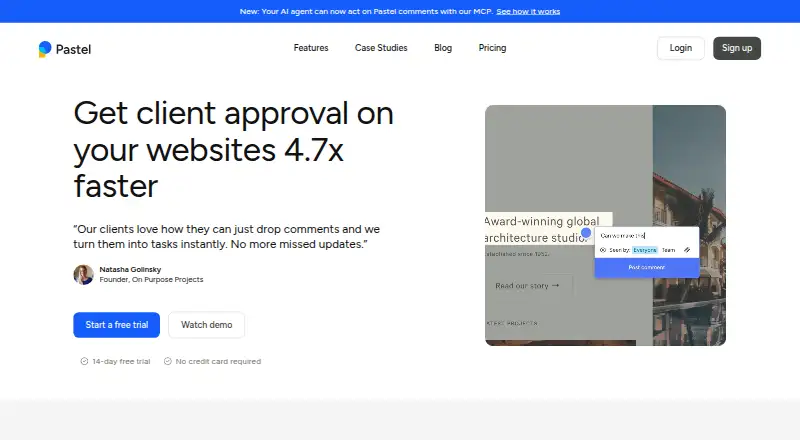
What Pastel is
Pastel is a visual review tool for websites and creative work, including images, PDFs, and videos. Create a canvas from a website to place comments directly on the page in a browser, or share a live site and upload files for review. The workspace supports real-time updates, private team comments, and guest reviewers who can participate without accounts. Review workflows can use assignments, labels, deadlines, approvals, paused comments, and responsive testing, with CSV export available. Pastel lists connections to Trello, Asana, Jira, ClickUp, Monday.com, and Zapier, as well as webhooks and API integrations; it also says Cursor, Claude, and ChatGPT can act on feedback through its MCP. A free plan is available, limited to one active canvas at a time; canvases can be archived and restored. The 14-day trial includes access to any paid plan and requires no credit card.
Good
- Comments can be placed directly on website canvases.
- Guests can comment without an account.
- Reviewers can use assignments, labels, and deadlines.
- Connects with listed project tools and APIs.
Watch out
- Free plan allows one active canvas at a time.
- Pro is billed yearly at $350/year.
Who it suits
Pastel suits teams and clients who need to comment on websites or creative files together. Its guest access can accommodate reviewers who do not have accounts.
Verdict
Pastel brings website and file feedback into a shared review workflow, with guest participation and project-management integrations. Check the active-canvas limit and the listed paid-plan pricing against your team's needs.
Plans and prices
From Pastel's own pricing page, checked 30 Sep 2026.
| Plan | Price | What it gives you |
|---|---|---|
| Free | Free | 1 user · 1 canvas |
| Free Forever | Free | 1 user · 1 active canvas · unlimited guest reviewers · unlimited versions per canvas · 2GB video storage · $0/mo |
| Pro | $25 a month | 2 users · 3 active canvases · CSV export · 100GB video storage · $25/mo; $29 shown before 15% discount |
| Team | $84 a month | Starts at 5 users · $17/user/mo for additional users · unlimited active canvases · Trello/Asana/Jira exports · webhook or Zapier export · 500GB video storage · $84/mo; $99 shown before 15% discount |
| Enterprise | $383 a month | Starts at 10 users · $38/user/mo for additional users · SAML SSO · SOC 2 report · custom terms · dedicated account representative · $383/mo; $450 shown before 15% discount |
The facts
Each one read from Pastel's own pages, with the date it was checked.
What it does
- AI agents
- Pastel says Cursor, Claude, and ChatGPT can act on feedback through its MCP.checked 30 Sep 2026
- Canvas workflow
- Users create a canvas from a website URL, share it, receive comments, and resolve or export feedback.checked 14 Oct 2026
- Chrome extension purpose
- The extension creates canvases for websites behind VPNs or firewalls and supports one-click feedback capture.checked 14 Oct 2026
- Collaboration
- The product supports real-time updates, team-only comments, and unlimited guest reviewers who can comment without an account.checked 30 Sep 2026
- Comment controls
- Users can mention teammates, attach images, apply labels, pause commenting, assign comments and mark them resolved.checked 14 Oct 2026
- Copy editing
- The product allows copy changes on a website canvas with a click.checked 14 Oct 2026
- Deadlines
- Pastel provides feedback deadlines and deadline reminders for canvases.checked 14 Oct 2026
- Documentation
- The help center lists 38 usage articles, 13 account/privacy articles, 10 integration articles and 6 MCP articles.checked 14 Oct 2026
- Enterprise compliance
- The Enterprise plan includes access to a SOC 2 report and SAML single sign-on.checked 14 Oct 2026
- Enterprise security
- The Enterprise plan includes a SOC 2 report and SAML single sign-on.checked 30 Sep 2026
- Founders
- Crunchbase names Aloke Pillai, Haneef Ghanim and Valentin Staykov as founders.checked 14 Oct 2026
- Funding
- Crunchbase lists Pastel as a private pre-seed company funded by DMZ, with one recorded funding round.checked 14 Oct 2026
- Guest access
- People invited through a canvas link can comment as guests without creating an account or installing software.checked 14 Oct 2026
- Integrations
- Documented integrations include Trello, Jira, Asana, Monday.com, ClickUp, Zapier and custom webhooks.checked 14 Oct 2026
- Limit: bugs and adoption
- G2 reviewers report occasional bugs and say some clients do not understand the board or prefer email.checked 14 Oct 2026
- Limit: pricing
- G2 reviewers say pricing was less competitive than BugHerd and that monthly pricing could be high for occasional use.checked 14 Oct 2026
- Limit: value
- A Capterra/GetApp reviewer said Pastel felt expensive for how little it was ultimately used.checked 14 Oct 2026
- Live-site proxy
- Pastel overlays comments on the live website through proxy technology instead of storing a copied snapshot.checked 14 Oct 2026
- MCP server
- Pastel hosts an MCP server at https://api.usepastel.com/mcp for compatible AI agents.checked 14 Oct 2026
The company
- Company
- The company identifies itself as Pastel Labs Inc. and says it was created by freelance designers and developers to make website feedback easier.checked 30 Sep 2026
- Company facts
- LinkedIn lists Pastel as a privately held Toronto company founded in 2016 with 2–10 employees.checked 14 Oct 2026
- Company legal name
- Pastel Labs Inc is identified as the owner of Pastel.checked 14 Oct 2026
- Founded
- 2017checked 28 Sep 2026
Money
- Free plan limit
- The Free plan allows one active canvas at a time; users can archive canvases to create another and unarchive them later.checked 30 Sep 2026
The full review of Pastel
Overview
Pastel is a visual review tool for live websites and creative files, built for teams that need clients or other guests to comment in context. Its broad mix of review controls and project-management integrations is compelling, but the one-canvas Free plan is mainly a way to try the workflow rather than run several reviews at once.
Founded in 2017 by Pastel Labs Inc., a company created by freelance designers and developers, Pastel supports browser-based comments on website canvases as well as image uploads and PDF markup. Reviewers can join without accounts, which reduces friction for external feedback.
Key features
Pastel combines annotations with practical review management: teams can assign comments, label them, set deadlines, pause commenting and record approvals. Responsive testing helps reviewers assess layouts, while CSV export offers a straightforward way to take review data elsewhere. Real-time updates and team-only comments support ongoing collaboration without making every discussion visible to guests.
Integrations include Trello, Asana, Jira, ClickUp, Monday.com and Zapier, alongside custom webhooks and API-based integrations. Cursor, Claude and ChatGPT can also act on feedback through Pastel's MCP. This breadth suits teams that want review work connected to existing project tools or AI-assisted workflows; it may be more than a small team needs if comments rarely leave the canvas.
Pastel says it overlays comments on live websites without logging or storing canvas requests, while retaining comment content and related metadata. Its privacy policy describes protections including encryption, firewalls, restricted employee access and requirements for service providers. Enterprise adds a SOC 2 report and SAML single sign-on for organizations with formal security requirements.
Pricing
The Free plan costs nothing and includes 1 user and 1 canvas. That active-canvas cap makes it suitable for a single review in progress; users can archive a canvas to open another and unarchive it later, but parallel projects require a paid tier.
Pro costs $29 a month, billed Billed at $350/year, and includes 2 users, 3 canvases and 100GB video storage. It fits a very small team handling a few active reviews, though two seats are restrictive when several colleagues need to participate.
Team costs $99 a month, billed Billed at $1,190/year, starts at 5 users and includes unlimited canvases and 500GB video storage. Additional users cost $24 each. This is the more natural tier for teams juggling multiple projects, with the starting seat count and per-user charge worth factoring into the budget.
Enterprise costs $450 a month, billed at $5,400/year, and is billed yearly. It starts at 10 users and adds unlimited canvases, a SOC 2 report, SAML SSO, custom legal terms and a dedicated account representative. Its custom terms and security features target larger organizations rather than teams seeking the lowest-cost collaboration plan.
The free trial provides 14 days of access to any paid plan and does not require a credit card. That gives teams a way to assess higher-tier workflows before choosing a plan.
Platforms
Pastel supports Android, iOS and web, with an API platform also listed. Browser-based website review works on any device. Email support is available at [email protected], and Pastel links to a Help Center.
Who it's for
Pastel is a strong fit for design, development and marketing teams that gather feedback on websites and creative files, especially when external reviewers need to comment without creating accounts. Its integrations and workflow controls are useful when feedback must move into project tracking. It is less suited to solo users or small teams that need several active canvases on a free plan, and the two-user Pro tier may not stretch far for growing teams.
Pros and cons
- Pros: Guests can comment without accounts, making client and stakeholder review less cumbersome.
- Pros: Website, image and PDF feedback share one workflow, with assignments, deadlines and approvals to keep reviews organized.
- Pros: Project-management integrations, webhooks and API options help teams connect review feedback to existing processes.
- Cons: Free allows only one active canvas, so simultaneous reviews require archiving or a paid plan.
- Cons: Pro has just 2 users; teams needing broader participation must move to a tier that starts at 5 seats or pay $24 per additional user on Team.
Alternatives
For a narrower web-annotation workflow, compare Web Annotation Tools; for reviewing creative work, see Online Proofing Software.
- Annot8 offers a free plan with 2 projects, 3 team seats, 3 guest reviewers and 50 feedback threads per month, making it worth considering when those limits suit the workflow.
- Hypothesis is an option for readers seeking a freemium annotation tool with web, extension and API platforms.
- AnnotationBase has a free Lite plan with 5 active projects, up to 5 collaborators and guest commenting, a useful alternative for teams focused on project and comment limits.
- Markify provides a free plan with 2 canvases and up to 5 comments per canvas, which may fit lighter review needs.
- WebPinch is another freemium web and extension option, with a free tier that includes personal projects, an organization project, a teammate and an API/MCP token.
- PinPoint offers an early-access plan with up to 100 projects, 20 members and 20 guests, making it relevant for readers who prioritize those capacity limits.
- ArchiveWeb.page is a free option for readers seeking software available on Windows, macOS and Linux.
- Ruttl has a free plan with 5 users, 1 project, 5 pages and unlimited guests, a possible fit when those project and user limits align better.
Verdict
Pastel is best for teams reviewing websites and creative files with clients or other guests, particularly when comments need assignments, approvals and links to project-management tools. Its guest access and connected workflow are the clearest reasons to choose it; the one-canvas free cap and limited Pro seats are the main reasons to look elsewhere or budget for Team.
Getting started
- Visit https://usepastel.com/.
- Create a canvas from a website, share a live website, upload an image, or mark up a PDF.
- Invite team members or guest reviewers to comment.
- Use the Free plan or start the 14-day trial for access to any paid plan without a credit card.
- Connect an available integration such as Trello, Asana, Jira, ClickUp, Monday.com, or Zapier if needed.
Limits worth knowing
The Free plan allows one active canvas; archiving a canvas frees the active slot, and archived canvases can be restored. Pro lists two users, three canvases, and 100GB video storage; Team starts at five users with unlimited canvases and 500GB video storage.
Questions
How much does Pastel cost?
The Free plan is free.
Does Pastel have a free plan or trial?
Yes. The Free plan is listed with one user and one canvas; the one-canvas limit is one active canvas, and archiving allows users to create another. The 14-day trial gives access to any paid plan and does not require a credit card.
What can reviewers comment on?
Pastel supports canvases from websites, live websites, uploaded images, PDFs, and videos. Comments can be made in a browser on any device.
Can people review without an account?
Yes. Pastel supports unlimited guest reviewers who can comment without an account.
Which integrations does Pastel list?
It lists Trello, Asana, Jira, ClickUp, Monday.com, Zapier, CSV export, custom webhooks, and API-based custom integrations. Pastel also says Cursor, Claude, and ChatGPT can act on feedback through its MCP.
What security features are included for Enterprise?
The Enterprise plan includes a SOC 2 report and SAML single sign-on.
Alternatives to Pastel
- 1
Weava Highlighter
Free planiOSWebExtension7.6From $12 a year - 2

Annot8
Free planWebAPISelf-hosted7.3From $10 a month - 3
Huddlekit
Free planWebAPI7.3From $16 a month - 4
Hypothesis
Free planOpen sourceWebAPIExtension7.3Free plan - 5
MarkUp
WebAPIExtension7.1From $79 a month - 6
Ruttl
Free planWebAPI6.9From $18 a month