
PinPoint
PinPoint provides visual feedback and AI quality checks for live websites and PDFs.
What PinPoint is
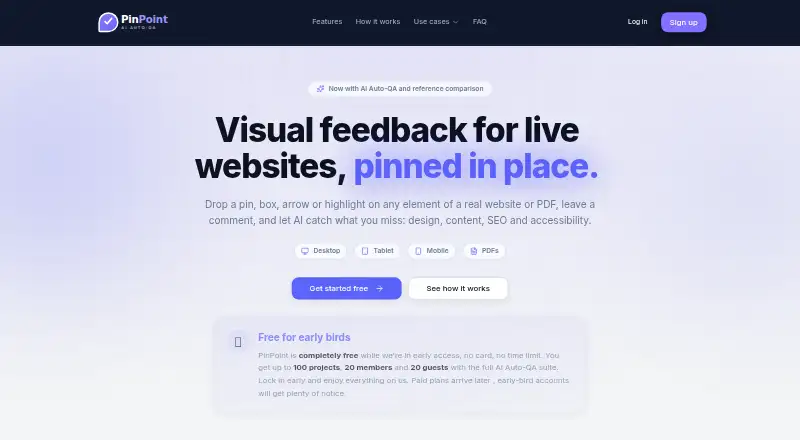
PinPoint provides visual feedback and AI quality checks for live websites and PDFs. Reviewers can attach findings and comments to specific page elements or document locations, then discuss them with replies and resolutions. Five specialist agents review general site quality, accessibility, conversion, page optimization, and PDFs. For visual comparisons, users can supply a reference page URL or PNG, and PinPoint identifies layout, spacing, and style adjustments to adapt the result to a brand. Website annotations attach to real page elements and stay in place during scrolling, resizing, and reflow; reviewers can also use shapes and text highlights. PDFs can be reviewed page by page with pins and comment threads. Team features include real-time cursors, presence, and member and guest roles, while workspace reports filter issues by project, status, priority, due date, and device. PinPoint handles AI without requiring API keys or a separate AI bill; reviews consume credits priced from the run's real cost. Early access is free, with limits of 100 projects, 20 members, and 20 guests.
Good
- AI agents cover five QA review areas
- Website pins stay anchored through scrolling and reflow
- Supports page-by-page PDF review
- Includes real-time collaboration and guest roles
- Free early access requires no card or time limit
Watch out
- Early access is capped at 100 projects
- Early access is capped at 20 members and 20 guests
- Paid plans are planned for later
Who it suits
PinPoint suits web agencies, freelancers, product teams, and marketing teams that need visual review of websites or PDFs.
Verdict
PinPoint combines anchored visual annotations, AI reviews, and team discussion for website and PDF feedback. Its early-access offer is free but capped, and paid plans are not yet available.
Plans and prices
From PinPoint's own pricing page, checked 3 Oct 2026.
| Plan | Price | What it gives you |
|---|---|---|
| Early access | Free | Up to 100 projects · 20 members · 20 guests · full AI Auto-QA suite · Free while in early access; no card or time limit |
The facts
Each one read from PinPoint's own pages, with the date it was checked.
What it does
- AI review
- Its five specialist agents cover general site QA, accessibility, conversion, page optimization, and PDF review.checked 3 Oct 2026
- AI setup and credits
- PinPoint manages AI without requiring API keys or a separate AI bill, and says reviews consume credits priced from the run's real cost; users can select a specific model per agent.checked 3 Oct 2026
- Annotations
- Website pins attach to real DOM elements and remain anchored through scrolling, resizing, and reflow; the tool also supports boxes, circles, arrows, and text highlights.checked 3 Oct 2026
- Early access limits
- The early-access offer is capped at 100 projects, 20 members, and 20 guests; the site says paid plans will arrive later.checked 3 Oct 2026
- Intended users
- PinPoint names web agencies, freelancers, product teams, and marketing teams among the groups it is built for.checked 3 Oct 2026
- PDF review
- Users can upload PDFs and review them page by page with pins, shapes, and comment threads.checked 3 Oct 2026
- Reference comparison
- Users can provide a reference page URL or upload a PNG, and PinPoint identifies ways to match layout, spacing, and style while adapting the result to their brand.checked 3 Oct 2026
- Reports
- Workspace reports let users filter issues across projects by project, status, priority, due date, and device, and track resolved progress.checked 3 Oct 2026
- Setup requirement
- To create a project, users paste a URL or upload a PDF and verify website ownership once using a DNS TXT record or meta tag.checked 3 Oct 2026
- Support
- The Pip workspace assistant answers using project state and can open a ticket for a human technician, with ticket status updates by email.checked 3 Oct 2026
- What it does
- PinPoint provides visual feedback and AI QA for live websites and PDFs, pinning findings and comments to specific elements or document locations.checked 3 Oct 2026
The company
- Team collaboration
- PinPoint supports real-time pins, replies, resolutions, cursors, and presence, with Owner, Admin, and Editor member roles and Commenter and Viewer guest roles.checked 3 Oct 2026
The full review of PinPoint
PinPoint combines visual feedback and AI-assisted QA for live websites and PDFs, with findings pinned to the place they concern. It best suits teams that need to coordinate reviews across both formats; its capped early-access plan makes it worth considering now, but not as a settled long-term budget choice.
Overview
PinPoint brings annotations, automated reviews, and team discussion into one workspace. Website pins attach to DOM elements, so they stay with the target through scrolling, resizing, and reflow rather than drifting away from it. PDF reviews use page-by-page pins, shapes, and comment threads.
Starting a project means entering a website URL or uploading a PDF. Website owners must verify ownership once with a DNS TXT record or meta tag. That verification is a sensible gate for site feedback, though it adds a setup step that reviewers working only on PDFs can avoid.
Key features
Anchored feedback and AI review
Alongside pins, reviewers can mark up sites with boxes, circles, arrows, and text highlights. Five specialist AI agents cover general site QA, accessibility, conversion, page optimization, and PDF review. This breadth gives teams a way to surface different kinds of issues in one review flow, but AI findings should complement—not replace—human judgment.
For visual comparisons, users can provide a reference URL or PNG. PinPoint identifies layout, spacing, and style differences and adapts the result to the user's brand. That makes it more useful for checking a target against a specific design direction than for general-purpose markup alone.
Team workflows and reporting
Real-time pins, replies, resolutions, cursors, and presence support shared review rather than isolated feedback. Owner, Admin, and Editor roles cover members; Commenter and Viewer roles allow guests to participate with narrower responsibilities. Workspace reports filter issues across projects by project, status, priority, due date, and device, and track resolution progress—useful when feedback spans several active projects.
PinPoint manages AI without requiring API keys or a separate AI bill. Reviews consume credits priced from each run's real cost, and users can choose a model for each agent. This removes model-account setup, but credit-based usage still warrants attention when planning repeated reviews. The Pip workspace assistant answers from project state and can open a ticket for a human technician, with status updates by email.
Pricing
Early access
The Early access plan is free, billed Free while in early access, with no card or time limit. It includes the full AI Auto-QA suite and caps usage at 100 projects, 20 members, and 20 guests. Those limits are generous for an individual or a small team evaluating the workflow, but agencies or larger teams could outgrow the member and guest allowances. Paid plans are expected later, so teams that need predictable paid tiers should wait for those terms before committing.
Platforms
PinPoint is a web app. Its support for websites and PDFs makes it suitable for teams that review both pages and documents, while its browser-capture capability complements the anchored website annotations.
Who it's for
Web agencies, freelancers, product teams, and marketing teams are among PinPoint's intended users. It is a particularly good fit when several people need to review live pages, share findings with guests, or track resolutions across projects. A solo reviewer focused only on simple page comments may not need its AI agents, reporting, and collaboration roles.
Pros and cons
- Pros: DOM-anchored pins stay attached through layout changes, reducing ambiguity in responsive-page feedback.
- Pros: Website and PDF reviews, plus five specialist AI agents, cover several QA workflows in one workspace.
- Pros: Guest roles and cross-project reports help teams coordinate feedback and monitor what has been resolved.
- Cons: Website projects require ownership verification by DNS TXT record or meta tag, adding a hurdle before site review.
- Cons: Early access is capped at 20 members and 20 guests, which may constrain larger review groups.
- Cons: AI usage consumes credits based on each run's real cost, so frequent reviews still have a usage cost to manage.
- Cons: Paid plans are not yet available, making future pricing uncertain for teams planning a longer-term rollout.
Alternatives
For education-oriented annotation, Hypothesis has a free plan billed per student yearly, with core annotation, private groups, and self-service support. Annot8 is another web-based freemium option; its free plan is limited to 2 projects, 3 team seats, 3 guest reviewers, 50 feedback threads per month, 14-day history, and 1 GB of storage, so PinPoint's early-access project and reviewer allowances are roomier on those measures.
Pastel is a freemium option with a free plan for 1 user and 1 canvas, and a $29 a month Pro plan billed at $350/year. WebPinch offers a free plan with 2 Personal Projects, 1 Organization with 1 project, 1 free teammate, and 1 API / MCP token; consider it if those project and token allowances suit your workflow.
Huddlekit is a freemium web and API alternative. Ruttl has a free plan for 5 users, 1 project, 5 pages, unlimited guests, 10 comments, and 1 GB storage, making its stated guest allowance more accommodating than PinPoint's cap if guest volume is the priority. Perusall is a freemium web alternative. dotts offers a free Testing plan for up to 3 projects and unlimited reviewers, which may suit teams that need broader reviewer access than PinPoint allows.
Explore the Web Annotation Tools category to compare more options.
Verdict
PinPoint is a strong early-access choice for small teams that need anchored website feedback, PDF markup, AI QA, and shared resolution tracking in one web workspace. Its free offer makes those capabilities accessible without a card or time limit, but the 20-member and 20-guest caps and the absence of paid plans make it a weaker choice for larger teams or anyone who needs settled long-term pricing.
Alternatives to PinPoint
- 1

Pastel
Free planAndroidiOSWebAPI8.1From $25 a month - 2
Weava Highlighter
Free planiOSWebExtension7.6From $12 a year - 3

Annot8
Free planWebAPISelf-hosted7.3From $10 a month - 4
Huddlekit
Free planWebAPI7.3From $16 a month - 5
Hypothesis
Free planOpen sourceWebAPIExtension7.3Free plan - 6
MarkUp
WebAPIExtension7.1From $79 a month