ShiftCal
ShiftCal provides workforce scheduling, GPS or kiosk clock-ins, time-off management, and payroll exports for shift-based businesses, including gyms.
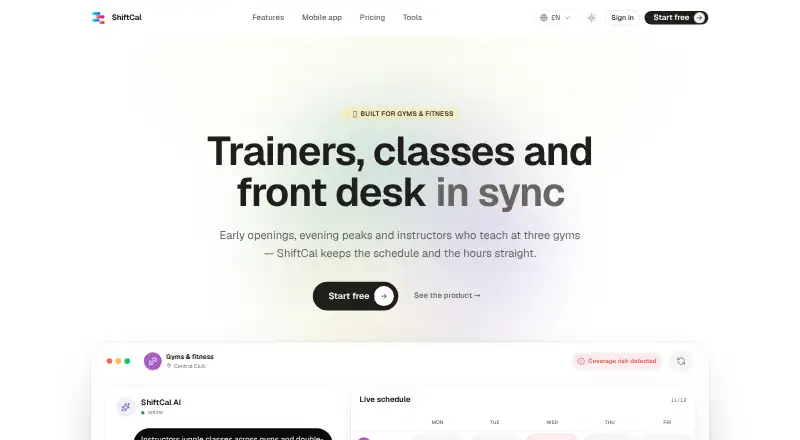
What ShiftCal is
ShiftCal provides workforce scheduling, GPS or kiosk clock-ins, time-off management, and payroll exports for shift-based businesses, including gyms. Its assistant and solver draft rosters around coverage, staff availability, rest, and fairness rules. Gym schedules can reflect classes and instructors working at multiple gyms, and employees can swap shifts to arrange cover. The assistant can extract roles, shifts, sites, rules, and coverage needs from Excel, PDF, and CSV files or schedule photos. A confirmation card appears before changes are applied or published. Employees can use the app for calendars, push notifications, clock-ins, leave requests, and shift swaps. Timesheets and payroll can be exported in CSV, Excel, or PDF formats. The Free plan is listed as free for five people and one site, with no card required and cancellation anytime. Platforms listed are Android, iOS, and web.
Good
- Drafts rosters around coverage, availability, rest, and fairness.
- Handles class-shaped shifts and multi-gym instructors.
- Imports schedules from spreadsheets, PDFs, and photos.
- Exports payroll files in CSV, Excel, or PDF.
- Employees can clock in by GPS or kiosk.
Watch out
- The Free plan is limited to five people and one site.
- The listed Pro and Crew prices are 299.00 EUR and €999 a month.
- Precise location is collected at workplace clock-in.
- Assistant messages and files can remain stored up to 12 months.
Who it suits
ShiftCal suits gyms and other shift-based businesses scheduling staff across locations. It may be useful where class coverage, clock-ins, shift swaps, and payroll-file exports are part of the workflow.
Verdict
ShiftCal combines roster drafting with clock-ins, leave, swaps, and payroll exports. Check the plan limits and location and data-retention details against your workplace needs.
Plans and prices
From ShiftCal's own pricing page, checked 30 Sep 2026.
| Plan | Price | What it gives you |
|---|---|---|
| Free | Free | 5 people · 1 site · no card · cancel anytime |
| Pro | €299 a month | Unlimited employees, locations & organizations · Unlimited AI assistant · Priority support · Monthly · launch pricing · per active employee |
| Crew | €999 a month | Up to 10 employees · 1 location · Starter AI assistant · iOS & Android app · Monthly |
| Enterprise | Priced on request | Everything in Pro · SSO & API · Dedicated onboarding · 24/7 support with SLA |
The facts
Each one read from ShiftCal's own pages, with the date it was checked.
What it does
- Controls
- The assistant presents a confirmation card before changes are applied or published.checked 30 Sep 2026
- Data retention
- AI assistant messages and provided files are stored on servers linked to the account for up to 12 months after last activity in the conversation.checked 30 Sep 2026
- Gym use
- For gyms, it supports class-shaped shifts, multi-gym instructors, GPS clock-in and shift swaps for cover.checked 30 Sep 2026
- Integrations
- The gym page names payroll file formats compatible with providers but does not name specific payroll integrations.checked 30 Sep 2026
- Payroll exports
- The gym page says timesheets and payroll can be exported in CSV, Excel or PDF formats.checked 30 Sep 2026
- Privacy
- For workplace clock-ins, precise location is collected only at clock-in and is not tracked in the background.checked 30 Sep 2026
- Purpose
- ShiftCal provides shift scheduling, GPS or kiosk clock-in, time-off management and payroll export for shift-based businesses.checked 30 Sep 2026
- Roster generation
- Its assistant and solver draft rosters around coverage, availability, rest and fairness rules.checked 30 Sep 2026
- Schedule imports
- The assistant can extract roles, shifts, sites, rules and coverage needs from Excel, PDF, CSV files and schedule photos.checked 30 Sep 2026
- Security
- The privacy policy lists HTTPS/TLS data transmission, secure authentication and infrastructure access controls.checked 30 Sep 2026
- Support
- The contact page says the team replies in English, Spanish and six more languages and offers support for scheduling, time tracking, payroll export and accounts.checked 30 Sep 2026
- Target customers
- ShiftCal describes itself as a workforce-management platform for shift-based businesses including restaurants, hotels, retail, clinics and factories.checked 30 Sep 2026
Where it runs
- Employee app
- Employees can use the app for calendars, push notifications, GPS or kiosk clock-ins, leave requests and shift swaps.checked 30 Sep 2026
The company
- Headquarters
- Spainchecked 28 Sep 2026
The full review of ShiftCal
Overview
ShiftCal is workforce software for gyms and other shift-based businesses, combining roster planning with clock-ins, leave and payroll exports. It suits gyms coordinating instructors across locations, especially when schedules begin in spreadsheets or photos. Its strongest case is bringing planning and attendance into one workflow; its plan limits and conflicting employee caps call for a close fit check.
Key features
ShiftCal’s assistant and solver draft rosters around coverage, staff availability, rest periods and fairness rules. For gyms, class-shaped shifts, multi-gym instructor scheduling and shift swaps are practical tools for covering classes across sites. The assistant can also extract roles, shifts, sites, rules and coverage needs from Excel, PDF or CSV files and schedule photos, which may shorten the work of getting an existing roster into the system.
Automation remains reviewable: a confirmation card appears before assistant changes are applied or published. Employees can use the app for calendars, push notifications, GPS or kiosk clock-ins, leave requests and swaps. Timesheets can be exported as CSV, Excel or PDF; these are payroll-compatible formats, not named payroll integrations.
GPS clock-ins collect precise location at clock-in rather than tracking employees in the background. The privacy policy also describes HTTPS/TLS transmission, secure authentication and infrastructure access controls. AI assistant messages and provided files can remain on account-linked servers for up to 12 months after the conversation’s last activity, a relevant consideration for employers handling sensitive schedules or documents.
Pricing
ShiftCal has a free plan and a 14-day trial. Its pricing note says paid plans start at €2.99/mo, but the plan figures supplied do not align cleanly with that starting price: Pro is €€299 a month, billed monthly at launch pricing per active employee, while Crew is €€999 a month. Confirm the applicable price and billing basis before choosing a paid plan.
| Plan | Price and terms | What it fits |
|---|---|---|
| Free | free; 5 people, 1 site, no card, cancel anytime. | A small gym testing core scheduling, with a firm five-person and one-site ceiling. |
| Pro | €299 a month, billed monthly; launch pricing per active employee. Unlimited employees, locations and organizations, unlimited AI assistant and priority support. | Organizations needing room to scale across sites and heavier assistant use. The per-active-employee billing basis matters when estimating cost. |
| Crew | €999 a month, billed monthly; up to 10 employees and 1 location, Starter AI assistant, iOS and Android app. | A single-site team within the ten-person cap that wants the mobile app. Its stated price is far above the pricing note’s €2.99/mo entry point, so confirm current terms. |
| Enterprise | Custom pricing; includes everything in Pro, SSO and API, dedicated onboarding, and 24/7 support with SLA. | Organizations that need those enterprise controls and service commitments. |
The Free plan is the clearest low-risk starting point, but its five people and one site are more restrictive than the separate staff-limit figure of 10 staff. Resolve which cap applies to the intended use; neither the broader figure nor the pricing note should be treated as overriding the plan’s stated limit.
Platforms
ShiftCal is available on Android, iOS and the web. The employee app supports attendance and shift-related tasks, while web access gives schedulers another way to manage the operation.
Who it's for
Gyms with class-based rosters, instructors working at multiple locations and recurring coverage changes are the natural fit. Shift swaps, availability management, trainer scheduling, multi-location scheduling and a built-in time clock address a connected set of staffing needs rather than scheduling alone. ShiftCal also targets restaurants, hotels, retail, clinics and factories, but a gym should weigh the plan caps and verify that its expected headcount fits.
The contact team supports scheduling, time tracking, payroll exports and accounts, replying in English, Spanish and six more languages. That breadth is useful for multilingual teams, though the export formats should not be mistaken for direct payroll integrations.
Pros and cons
- Pro: Roster drafting accounts for coverage, availability, rest and fairness, while importing common schedule files and photos can reduce manual setup.
- Pro: Scheduling, swaps, leave and GPS or kiosk clock-ins sit alongside CSV, Excel and PDF timesheet exports, connecting planning with attendance.
- Pro: GPS is collected at clock-in rather than in the background, and assistant edits require confirmation before application or publication.
- Con: Free is capped at five people and one site, and the separate 10-staff limit makes the applicable ceiling worth confirming.
- Con: The stated €2.99/mo starting point sits uneasily beside Pro at €€299 a month and Crew at €€999 a month; verify the paid price and billing basis before committing.
- Con: Payroll output is described as files in common formats, not integrations with named providers.
- Con: Assistant messages and supplied files may stay on account-linked servers for up to 12 months after the conversation’s last activity.
Alternatives
Compare gym staff scheduling software if you want to weigh category options against your team’s roster needs.
Connecteam is another freemium option with a free plan, trial and Android, iOS, web and API platforms. Choose it if those platform options suit your requirements; the available plan details also describe limited feature access on its free tier.
TNC Track offers five free seats, with additional seats at $5/seat, and keeps Team and Attendance free forever. Consider it when that per-seat model or its free core modules better match your budget.
Sling’s free plan supports up to 30 users and includes shift scheduling, time-off requests, available shifts, news sharing, long-term scheduling and private messaging. It is a stronger fit if a larger free user allowance and those listed team tools matter more than ShiftCal’s gym-specific class scheduling and roster imports.
Rosie has a free plan for up to 15 people at one site, with rosters, shift templates and auto-fill; its Pro plan is $3.50 a month billed per person, per month. It may suit a small single-site team seeking those roster tools at a per-person price.
Shifton offers a free-forever Basic functions plan for up to 10 team members, including shift scheduling, a calendar and a time clock. Consider it if that free headcount and core attendance setup are the priority.
Emplora provides a free plan for one location and up to 15 employees, with three teams, schedules and shifts, QR employee access and team management. It is worth considering when those free-plan limits fit better than ShiftCal’s five-person cap.
Verdict
Choose ShiftCal if your gym needs class-aware roster drafting, multi-location instructor coverage and attendance tools connected to leave and swaps. Its file imports and review-before-publish assistant workflow are meaningful advantages for schedule-heavy teams. Look elsewhere if the five-person free cap is too tight, if direct named payroll integrations are essential, or if the paid price and employee billing basis do not hold up against your budget.
Getting started
- Open the ShiftCal website.
- Choose the Free, Pro, Crew or Enterprise plan.
- Use the 14-day trial if you want to try paid access.
- Import an existing schedule from Excel, PDF, CSV or a schedule photo.
- Set availability, rest, fairness and coverage rules for roster drafting.
- Have employees install the Android or iOS app for calendars, clock-ins, leave and swaps.
Limits worth knowing
The Free plan allows five people and one site with no card required. Crew allows up to 10 employees and one location; Pro lists unlimited employees, locations and organisations at €299 a month per active employee.
Questions
Is there a free plan?
Yes. Free is listed as free for five people and one site, with no card required and cancellation anytime.
Which platforms does ShiftCal support?
ShiftCal is available on Android, iOS and the web.
Can it export payroll data?
Yes. Timesheets and payroll can be exported in CSV, Excel or PDF formats.
Does it track employee location continuously?
No. Precise location is collected only at workplace clock-in and is not tracked in the background.
Can employees swap shifts?
Yes. The employee app supports shift swaps, and gym scheduling includes swaps for arranging cover.
Alternatives to ShiftCal
- 1

Connecteam
Free planAndroidiOSWebAPI8.3From $29 a month - 2

Homebase
Free planAndroidiOSWebAPI8.2From $30 a month - 3

Sling
Free planAndroidiOSWebAPI8.2Free plan - 4
TNC Track
Free planAndroidiOSWebAPI8.1Free plan - 5

Workforce.com
AndroidiOSWebAPI7.9From C$12.80 a month - 6
Planday
AndroidiOSWebAPI7.8From £2.99 a month