Rosie
Rosie is staff scheduling and rostering software for hospitality, retail, healthcare, and service businesses, with Android, iOS, and web access.
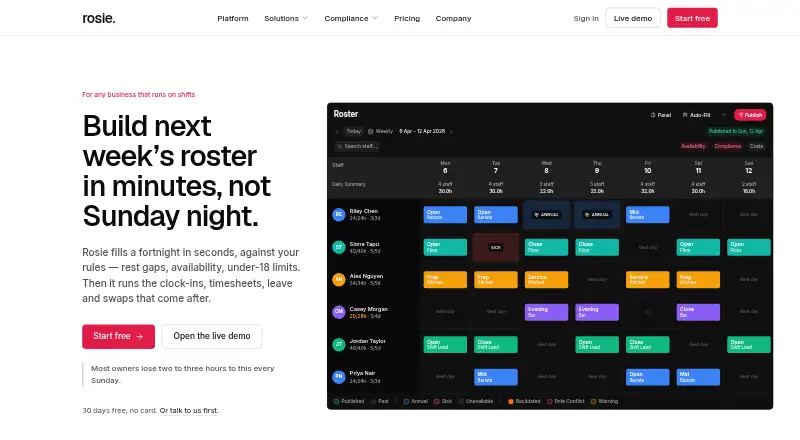
What Rosie is
Rosie is staff scheduling and rostering software for hospitality, retail, healthcare, and service businesses, with Android, iOS, and web access. Its constraint solver builds rosters using staff availability, contracted hours, qualifications, rest periods, and fairness, then managers can edit shifts in a weekly drag-and-drop grid and publish schedules. Staff can clock in and out by phone with GPS verification or through a shared tablet kiosk. Rosie says it enforces 22 scheduling rules and supports break, rest, young-worker, and leave requirements across six jurisdictions. The scheduler uses Google OR-Tools CP-SAT version 9.8.3296, not a language model. The free plan covers up to 15 people at one site. Pro is $3.50 per person per month and covers up to 75 people across five sites; Business is $5 per person per month, with up to 150 people and unlimited sites. Business plans can export approved hours to Xero. Rosie passes hours and rates to payroll but does not calculate tax or pay employees.
Good
- Free plan covers up to 15 people at one site.
- Roster solver accounts for availability and qualifications.
- Staff can clock in by phone or shared tablet.
- Supports 22 scheduling rules across six jurisdictions.
- Timesheets and reports can be exported as CSV.
Watch out
- Free plan is limited to one site.
- Payroll tax calculation and employee payments are not included.
- Pro is capped at 75 people and five sites.
- Business costs $5 per person per month.
Who it suits
Rosie suits managers who need to build and publish staff rosters around availability, qualifications, and rest rules. It may also fit teams that need phone or shared-tablet clock-ins and CSV exports.
Verdict
Rosie combines roster generation, schedule editing, and time clock options with rule-based scheduling. Its payroll role is limited to handing off hours and rates, so it does not replace tax calculation or employee payment.
Plans and prices
From Rosie's own pricing page, checked 15 Oct 2026.
| Plan | Price | What it gives you |
|---|---|---|
| Free | Free | up to 15 people · 1 site · rosters · shift templates · auto-fill · free forever |
| Pro | $3.50 a month | up to 75 people · 5 sites · timesheets · leave · shift swaps · staff app · certificates · CSV export · reports · per person, per month |
| Business | $5 a month | up to 150 people · unlimited sites · Xero hours export · shared-tablet clock-in · break rules · underpayment check · per person, per month |
The facts
Each one read from Rosie's own pages, with the date it was checked.
What it does
- AI scheduling
- Auto-scheduling uses availability, contracted hours, qualifications, rest periods and fairness to generate an optimized roster.checked 15 Oct 2026
- API and SDK
- The maker pages opened describe no public API or SDK.checked 15 Oct 2026
- Availability
- Staff can enter recurring availability and date-specific unavailability in the app.checked 15 Oct 2026
- Changelog item
- On 19 April 2026 Rosie added five Australian Modern Award presets, including hospitality, retail, restaurant, SCHADS and aged care.checked 15 Oct 2026
- Compliance
- Rosie enforces 22 scheduling rules and supports break, rest, young-worker, and leave rules across six jurisdictions.checked 1 Oct 2026
- Compliance rules
- Rosie enforces rest periods, hour limits, consecutive-day limits and minimum shift lengths.checked 15 Oct 2026
- Coverage limits
- Rosie hands hours and rates to payroll but does not calculate tax or pay employees.checked 1 Oct 2026
- Data collected on Google Play
- Google Play says the app may collect location, personal information and three other data types.checked 15 Oct 2026
- Data portability
- Users can export timesheets and reports to CSV and delete their account through a self-service route.checked 1 Oct 2026
- Documentation
- Rosie publishes a detailed rule register explaining constraints, weighted preferences, jurisdictions and dated rule changes.checked 15 Oct 2026
- Drag-and-drop grid
- Managers can edit shifts in a weekly visual grid on desktop or tablet.checked 15 Oct 2026
- Integration
- Business plans send approved hours to Xero.checked 15 Oct 2026
- Jurisdictions
- The rule engine provides defaults for New Zealand, Australia, the United Kingdom, Ireland, the United States and Canada.checked 15 Oct 2026
- Leave management
- Managers approve or decline leave requests, and approved leave blocks roster dates.checked 15 Oct 2026
- License
- The opened pages do not state an open-source license.checked 15 Oct 2026
- Limit: award advice
- The product applies configured employment rules but states that this is not legal award advice.checked 15 Oct 2026
- Limit: payroll
- Rosie hands hours and rates to payroll but does not calculate tax or pay employees.checked 15 Oct 2026
Where it runs
- Android availability
- The Google Play listing identifies the app as Rosie Roster and shows at least 10 downloads.checked 15 Oct 2026
- Apple privacy disclosure
- Apple lists linked location, contact information, identifiers and usage data, plus unlinked crash diagnostics.checked 15 Oct 2026
- Apple requirements
- The iOS app requires iOS 15.1 or later; the Mac version requires macOS 12.0 or later with Apple silicon.checked 15 Oct 2026
- Kiosk mode
- A shared workplace tablet can operate as a time-clock kiosk and synchronize after offline use.checked 15 Oct 2026
The company
- Company
- Rosie is a product of Southern Tourism Solutions Limited, a company registered in New Zealand.checked 1 Oct 2026
- Company headquarters
- Google Play lists the developer address as 10B Pop Andrew Drive, Te Anau, New Zealand.checked 15 Oct 2026
- Company legal entity
- Rosie is a product of Southern Tourism Solutions Limited, a company registered in New Zealand.checked 15 Oct 2026
The full review of Rosie
Rosie is a roster and workforce-scheduling service for hospitality, retail, healthcare, and other service operations. It fits managers who need rule-aware scheduling plus attendance capture across mobile and shared devices. The strongest case is structured roster automation with compliance controls; payroll processing remains outside its remit.
Overview
Rosie builds schedules with a constraint solver that weighs availability, contracted hours, qualifications, rest periods, and fairness. Managers can then refine the result in a drag-and-drop weekly grid and publish shifts to staff. Because the engine is Google OR-Tools CP-SAT version 9.8.3296 rather than a language model, its value is predictable rule handling rather than conversational planning.
Employees clock in and out from a phone with GPS verification or a shared tablet kiosk. Rosie enforces 22 scheduling rules, including break, rest, young-worker, and leave requirements across six jurisdictions. That is a meaningful advantage for regulated or multi-role teams. Approved hours can go to Xero on Business, while timesheets and reports export as CSV. The service passes hours and rates onward; it does not calculate tax or pay employees.
Key features
Constraint-based rostering
Automated generation considers staffing qualifications and contractual and recovery requirements together, reducing the need to reconcile those constraints manually. Fairness is part of the solver's criteria, which is useful where unpopular shifts or uneven hours need to be distributed deliberately.
Manager control and staff access
The weekly grid keeps managers in charge after automation, allowing edits before publication. Availability management, leave handling, shift swaps, trainer scheduling, and multi-location scheduling cover the operational changes that make a generated roster workable.
Attendance and compliance
GPS-verified mobile punches provide location-aware clocking, while a kiosk supports a shared-device setup. Rule enforcement covers breaks, rest, young workers, and leave, giving businesses a stronger compliance foundation than a calendar-only scheduler. The underpayment check and break rules are reserved for Business.
Exports and administration
CSV export for timesheets and reports supports businesses that need portable records or separate analysis. Business adds Xero hours export. Rosie also provides a self-service account-deletion route, and support emails are read by a person who works on the product.
Pricing
Rosie has a free plan and a 14-day trial for paid use. Paid pricing starts at $3.50 per person per month.
Free
At free, Free supports up to 15 people at one site with rosters, shift templates, and auto-fill. It is appropriate for a small single-location operation evaluating automated scheduling, but it omits the broader workforce tools found in paid tiers.
Pro
Pro costs $3.50 per person per month and supports up to 75 people across five sites. It adds timesheets, leave, shift swaps, a staff app, certificates, CSV export, and reports. This is the practical fit for growing teams that need employee-facing workflows and records without Xero transfer or the higher-tier compliance checks.
Business
Business is $5 per person per month, with up to 150 people and unlimited sites. It adds Xero hours export, shared-tablet clock-in, break rules, and an underpayment check. Choose it when multi-site scale, kiosk attendance, or payroll handoff justifies the extra per-person cost.
Platforms
Rosie runs on Android, iOS, and the web. That combination supports staff using phones, managers working in a browser, and shared-device clocking through the tablet option.
Who it's for
Rosie is best for hospitality, retail, healthcare, and service businesses whose schedules depend on qualifications, availability, rest, and fairness. Free suits a small single site; Pro suits teams up to 75 people and five sites; Business is aimed at larger or more distributed operations. It is a poor fit if the primary requirement is tax calculation or employee payment rather than scheduling and time capture.
Pros and cons
- Pro: The solver handles availability, qualifications, contracted hours, rest, and fairness together, making complex roster creation more systematic.
- Pro: Twenty-two rules across six jurisdictions provide more compliance structure than a basic shift planner.
- Pro: Mobile GPS clocking and a shared-tablet kiosk cover both individual and shared workplace setups.
- Con: Payroll stops at exporting or handing over hours and rates; tax and payment still require another system.
- Con: The free tier is limited to 15 people and one site, while multi-site and richer attendance controls require paid plans.
Alternatives
For a broader workforce platform with Android, iOS, web, and API access, consider Connecteam; its free tier has limited feature access and paid pricing starts at $35 a month.
TNC Track is another freemium Android, iOS, and web option, with five free seats and a pay-as-you-grow model.
Choose ShiftCal if a five-person, one-site free plan and a €299 a month Pro launch price match your scale.
Sling provides a free plan for up to 30 users with scheduling, time-off requests, available shifts, messaging, and related workforce features.
Shifton offers a free-forever tier for up to 10 team members with scheduling and time-clock functions.
Cicini is a web-only freemium booking product with a one-member free tier.
Emplora is an API and web option with a free tier for one location and up to 15 employees.
Homebase offers restaurant labor-management add-ons such as task lists and tip management.
For a curated category view, see Gym Staff Scheduling Software.
Verdict
Choose Rosie when your business needs automated rosters that respect qualifications, rest, fairness, and jurisdictional rules, with integrated clocking and clear team-size tiers. Its main limitation is decisive: it prepares payroll inputs but does not perform payroll calculations or payments, so businesses seeking an all-in-one payroll service should look elsewhere.
Alternatives to Rosie
- 1

Connecteam
Free planAndroidiOSWebAPI8.3From $29 a month - 2

Homebase
Free planAndroidiOSWebAPI8.2From $30 a month - 3

Sling
Free planAndroidiOSWebAPI8.2Free plan - 4
TNC Track
Free planAndroidiOSWebAPI8.1Free plan - 5

Workforce.com
AndroidiOSWebAPI7.9From C$12.80 a month - 6
Planday
AndroidiOSWebAPI7.8From £2.99 a month