
Receipt Reader AI
Receipt Reader AI captures receipts from email, PDFs, or photos, extracts expense details, and turns them into structured data.
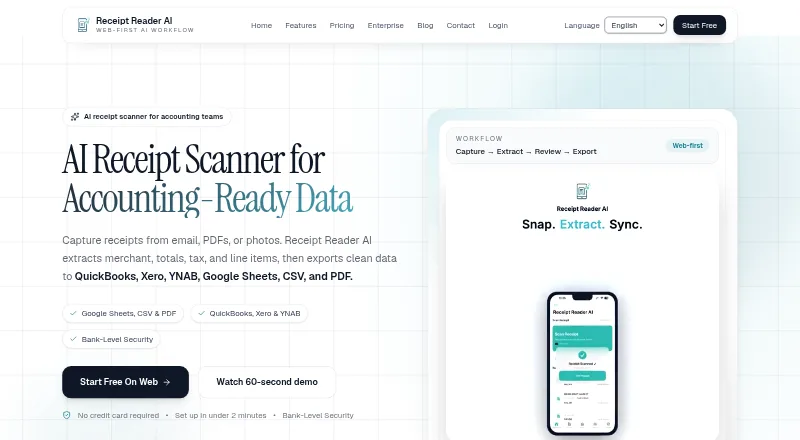
What Receipt Reader AI is
Receipt Reader AI captures receipts from email, PDFs, or photos, extracts expense details, and turns them into structured data. Its capture tools include automatic detection, edge enhancement, perspective correction, and batch scanning. It extracts merchants, amounts, dates, taxes, line items, payment methods, and categories, including details from handwritten receipts. Export choices include PDF reports, CSV, IIF for QuickBooks Desktop, and a JSON API for custom integrations. Listed destinations include Xero, QuickBooks, Google Sheets, YNAB, Google Drive, and OneDrive. The product supports offline use and syncs after a connection returns. Its features page says financial data is encrypted with 256-bit AES, Face ID or Touch ID can lock the app, and banking credentials are not stored. The Free plan includes 10 AI scans per month for one account with PDF export. Personal costs $5.99 per month and includes 50 scans, PDF, CSV, and IIF export, plus Google Sheets, Drive, and YNAB. Raw email is retained for 30 days before deletion.
Good
- Captures receipts from email, PDFs, or photos.
- Extracts line items, including from handwritten receipts.
- Supports offline use with later syncing.
- Exports include CSV, IIF, PDF, and JSON API.
- Offers Google Sheets, Xero, QuickBooks, and YNAB integrations.
Watch out
- Free plan is limited to 10 scans per month.
- Personal plan includes 50 scans per month.
- Raw email is retained for 30 days before deletion.
Who it suits
Receipt Reader AI suits individuals, freelancers, and teams that need to capture receipt details and export them to accounting or spreadsheet workflows. Small businesses may also use its listed integrations and multi-account plans.
Verdict
Receipt Reader AI combines receipt capture, expense-detail extraction, and several export and integration options. Compare scan limits and export needs across the plans before choosing one.
Plans and prices
From Receipt Reader AI's own pricing page, checked 15 Oct 2026.
| Plan | Price | What it gives you |
|---|---|---|
| Free | Free | 10 AI scans/mo · 1 account · PDF export · USD $0/mo |
| Personal | $5.99 a month | 50 scans/mo · PDF, CSV & IIF export · Google Sheets, Drive & YNAB · USD $5.99/mo |
| Pro | $14.99 a month | 200 scans/mo · all export formats · Xero and QuickBooks · email forwarding 50/mo · USD $14.99/mo |
| Business | $34.99 a month | 10 accounts · 1,000 scans/mo · all Pro features plus API access · email forwarding 500/mo · USD $34.99/mo |
| Enterprise | $99 a month | unlimited accounts · 5,000 scans/mo · all integrations plus API and webhooks · email forwarding 2,000/mo · USD $99/mo |
The facts
Each one read from Receipt Reader AI's own pages, with the date it was checked.
What it does
- Accuracy claim
- The homepage reports a 99.2% accuracy rate and more than one million receipts processed.checked 15 Oct 2026
- AI receipt capture
- The product offers automatic receipt detection, edge enhancement, perspective correction, photo or PDF uploads, and batch scanning.checked 15 Oct 2026
- API and webhooks
- API access is included in Business, while Enterprise adds API and webhooks; no public SDK details are listed on the pricing page.checked 15 Oct 2026
- Audience
- The features page describes the product as built for individuals, freelancers, and teams, and includes workflows for small businesses.checked 29 Sep 2026
- Categorisation
- AI categorises receipts into areas such as food, travel, office supplies and entertainment, with custom categories and tax mapping.checked 15 Oct 2026
- Cloud sync
- Receipts synchronize across iPhone, iPad and web with automatic backup, offline mode and Google Drive export.checked 15 Oct 2026
- Compliance
- The features page claims GDPR and SOC 2 compliance.checked 29 Sep 2026
- Data extraction
- Its AI extracts merchant, category, totals, subtotal, tax, line items, date, time and payment method, including from handwritten receipts.checked 15 Oct 2026
- Developer identity
- Apple identifies THE USEFUL APPS PTY LTD as the seller and copyright holder of the app.checked 15 Oct 2026
- Documentation depth
- The site links an API documentation endpoint, but the opened documentation page returned no readable content or implementation details.checked 15 Oct 2026
- Email forwarding
- Users can forward receipt or invoice emails with PDF or image attachments to [email protected] for extraction.checked 15 Oct 2026
- Email retention
- The homepage says raw email is retained for 30 days before deletion.checked 29 Sep 2026
- Expense reports
- Users can generate tax-oriented PDF expense reports with custom date ranges and grouping by merchant or category.checked 15 Oct 2026
- Exports
- Export formats include PDF reports with images, CSV with custom mapping, IIF for QuickBooks Desktop and a JSON API for custom integrations.checked 15 Oct 2026
- Extraction
- The product says it extracts merchant, amounts, dates, taxes, line items, payment method, and categories, including from handwritten receipts.checked 29 Sep 2026
- Google Play data disclosure
- Google Play says the developer reports no third-party data sharing, possible collection of personal information, unencrypted data, and user-requested deletion.checked 15 Oct 2026
- Google Play listing
- The Android listing shows 100+ downloads, in-app purchases and no numerical user rating in the opened page.checked 15 Oct 2026
- Integrations
- Listed integrations include Xero, QuickBooks, YNAB, Google Sheets, Google Drive, OneDrive, MYOB and Reckon One.checked 15 Oct 2026
- Legal entity
- Australian ABN Lookup identifies THE USEFUL APPS PTY LTD as an active Australian private company, ABN 74 645 515 402, with main business location QLD 4300.checked 15 Oct 2026
- Limit: editing
- The same reviewer reported being unable to enter negative amounts, seeing incorrect keyboard input and lacking a way to delete line items.checked 15 Oct 2026
Where it runs
- Apple App Store rating
- 4.0 out of 5 from 1 review on the US App Store.checked 15 Oct 2026
- Apple App Store rating Australia
- 5.0 out of 5 from 3 ratings on the Australian App Store.checked 15 Oct 2026
- App update
- Google Play records a 6 July 2026 update adding per-line-item category suggestions, editable item categories and split YNAB transactions.checked 15 Oct 2026
The company
- Company profile
- LinkedIn describes Receipt Reader AI as a privately held technology company with 2–10 employees, headquartered in Brisbane, Queensland, and founded in 2025.checked 15 Oct 2026
The full review of Receipt Reader AI
Overview
Receipt Reader AI is receipt-scanning software for people who want expense details organized as data rather than kept as images. It is best suited to individuals, freelancers, and small businesses that need flexible ways to capture receipts and export them. Its range of import and integration options is a strength, but the monthly scan caps make the right plan depend on volume.
Receipts can come from email, PDFs, or photos, and the software extracts merchant, amounts, dates, taxes, line items, payment method, and categories, including from handwritten receipts. Duplicate detection can help keep recurring expense records tidy, while offline mode lets users continue working and sync after reconnecting. Raw email is retained for 30 days before deletion, which matters when forwarding sensitive receipts.
Key features
- Flexible capture: Photo and PDF uploads, email forwarding, and batch scanning cover both occasional receipts and larger batches. Automatic detection, edge enhancement, and perspective correction are intended to make receipt images easier to process.
- Structured extraction: In addition to totals and tax, it extracts line items and other transaction details. That makes it more useful for expense categorization than a scanner that only stores images.
- Exports and integrations: PDF reports, CSV, IIF for QuickBooks Desktop, and a JSON API provide different routes for personal records, accounting workflows, and custom integrations. Destinations include Xero, QuickBooks, Google Sheets, YNAB, Google Drive, and OneDrive.
- Security and access: The product says financial data is encrypted with 256-bit AES, supports Face ID or Touch ID locks, and does not store banking credentials. It claims GDPR and SOC 2 compliance. These protections may suit users handling financial records, though email retention remains a consideration.
Pricing
The Free plan costs nothing (billed USD $0/mo) and includes 10 AI scans per month, one account, and PDF export. It is a sensible way to try the workflow, but the low scan cap and single export format limit it for regular expense tracking.
Personal costs $5.99 a month (billed USD $5.99/mo) for 50 scans per month, PDF, CSV, and IIF exports, and Google Sheets, Drive, and YNAB connections. It fits an individual with moderate volume who does not need the broader accounting options in higher tiers.
Pro costs $14.99 a month (billed USD $14.99/mo) and raises the allowance to 200 scans per month. It adds all export formats, Xero and QuickBooks, and email forwarding capped at 50 per month. That is the more suitable tier for someone who wants accounting connections or regularly submits receipts by email.
Business costs $34.99 a month (billed USD $34.99/mo) and includes 10 accounts for multi-organization use, 1,000 scans per month, all Pro features, API access, and 500 forwarded emails per month. Enterprise costs $99 a month (billed USD $99/mo) for unlimited accounts, 5,000 scans per month, all integrations, API and webhooks, and 2,000 forwarded emails per month. Those higher tiers are aimed at team workflows and heavier volumes; readers needing more than 10 accounts or API access should compare them against their requirements.
A 14-day trial is offered. The paid tiers make the most sense when their additional scan allowance, integrations, or account capacity will actually be used.
Platforms
Receipt Reader AI supports Android, iOS, web, and API access. Mobile capture makes it a fit for collecting paper receipts on the go, while web and API options cover desktop and custom workflows.
Who it's for
Individuals and freelancers can use the Free or Personal plan for capped monthly scanning and basic exports. Pro is a better fit when accounting sync or email forwarding is important. Small businesses processing receipts across multiple organizations have a clearer case for Business, while Enterprise is for larger account counts, high scan volumes, or webhook needs. It is less compelling for occasional scanners who can stay within 10 monthly scans and need only PDF export.
Pros and cons
- Pro: Multiple capture routes, batch scanning, and image correction support a wider range of receipt workflows than photo-only intake.
- Pro: Line-item extraction and exports ranging from PDF to IIF and JSON API make the results useful beyond a simple image archive.
- Pro: Offline mode and sync after reconnecting support work when connectivity is unavailable.
- Con: The free plan allows just 10 AI scans per month and one account, so regular users will likely need to pay.
- Con: Email forwarding limits rise by tier, from 50 per month on Pro to 2,000 on Enterprise, which can constrain email-heavy workflows.
- Con: Raw email is retained for 30 days before deletion, a material trade-off for users concerned about forwarded financial records.
Alternatives
For a broader comparison, browse Receipt Management Software or Receipt Scanner Apps.
- ExpenseBot may suit accountants or bookkeepers managing clients; client scanning requires the client’s own subscription or account.
- Finago eTasku has a free DOKUMENTTI plan with read access to documents added by the accountant, making that plan relevant when document access is the main need.
- Receipt Wrangler is a free, open-source, self-hosted option for readers who prefer that deployment model.
- Veryfi Invoices OCR API may fit invoice-processing workflows that can support its $500/mo minimum commitment.
- Parsio Receipt OCR offers a free plan with 30 credits per month, 30-day data retention, and one user; consider it when that allowance matches your needs.
- 1tap receipts offers Prime Lite at $2.99 a month with 100 auto-scans per year and 20GB secure cloud storage, an option for readers whose annual scan needs fit that limit.
- AutoEntry starts with a Bronze plan at $13 a month, billed per month excluding VAT, with 50 monthly credits and unlimited users; it may suit teams that value its user allowance.
- Receipt Stash offers 25 document scans per month for $6 a month plus $0.29 per additional document, which may fit a modest but paid scanning need.
Verdict
Receipt Reader AI is a strong fit for individuals, freelancers, and small businesses that need receipt details extracted into usable data, with multiple export and integration paths. Choose it when its capture flexibility and accounting options match your workflow; look elsewhere if the 10-scan free cap, paid scaling, or 30-day raw-email retention is a poor fit.
Getting started
- Visit https://receiptreader.ai/.
- Choose the web, Android, or iOS platform.
- Start with the Free plan or select a paid plan; a 14-day trial is available.
- Capture receipts by uploading photos or PDFs, or forward receipt email.
- Export records in the formats available on your plan or connect a listed destination.
Limits worth knowing
The $0/mo Free plan includes 10 AI scans per month, one account, and PDF export. Personal at $5.99/mo includes 50 scans monthly and PDF, CSV, and IIF export; broader integrations and higher quotas are on other paid plans.
Questions
Is there a free plan?
Yes. Free costs $0/mo and includes 10 AI scans per month, one account, and PDF export.
What does Personal cost?
Personal costs $5.99/mo and includes 50 scans per month, PDF, CSV, and IIF export, plus Google Sheets, Drive, and YNAB.
Which platforms are supported?
The listed platforms are Android, iOS, web, and API.
Which integrations are available?
Listed destinations include Xero, QuickBooks, Google Sheets, YNAB, Google Drive, and OneDrive.
Does it support handwritten receipts and offline use?
It extracts information from handwritten receipts and supports offline mode, syncing when the user reconnects.
What security and compliance details are stated?
The features page says financial data is encrypted with 256-bit AES, the app supports Face ID or Touch ID lock, and it does not store banking credentials. It claims GDPR and SOC 2 compliance.
Alternatives to Receipt Reader AI
- 1

Veryfi Invoices OCR API
Free planAndroidiOSWebAPI8.2From $500 a month - 2
OpenReceipts
Free planOpen sourceWebLinuxmacOSSelf-hosted7.6Free plan - 3

OCR Receipt
Free planAPILinuxmacOSWindows7.5$149 one-time - 4

Bonro
Free planAndroidiOSWeb7.3From €59.99 a year - 5
Smart Receipts
Free planAndroidiOSWeb7.3From $99.96 a year - 6
Foreceipt
Free planAndroidiOSWeb7.2From $5 a month