
Bonro
Bonro turns receipts into structured data for self-employed people in the EU and UK, with tools for organizing records and preparing tax exports.
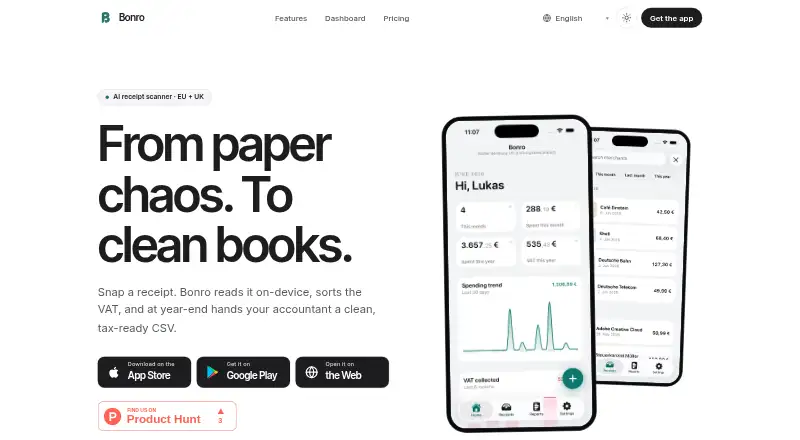
What Bonro is
Bonro turns receipts into structured data for self-employed people in the EU and UK, with tools for organizing records and preparing tax exports. Its mobile apps use on-device OCR, then AI extracts merchant, date, total, VAT, and category; each field can be edited. The browser dashboard provides KPIs, trends, recoverable VAT, searchable receipts, uploads, and tax exports. Supported export formats include DATEV, FEC, Libro de Facturas, Registro IVA Acquisti, Auditfile XAF, HMRC SA103F, Xero, and QuickBooks. Users can forward receipts to a private account inbox, and the service parses electronic invoices, including several structured e-invoice formats. Receipts can queue locally when offline and synchronize once connectivity returns. Bonro has Android, iOS, and web access. Bonro says it does not file taxes, replace a tax adviser, or provide legal or tax advice.
Good
- OCR runs on-device on iOS and Android.
- Extracted receipt fields are editable.
- Dashboard includes recoverable VAT and tax exports.
- Receipts queue locally while offline.
- Exports include DATEV, Xero, and QuickBooks formats.
Watch out
- Free plan is limited to five receipts per month.
- Free plan does not include exports.
- Bonro does not file taxes or provide tax advice.
Who it suits
Bonro suits self-employed people and small-business owners in the EU and UK who need to organize receipt data and tax exports. It may also fit working adults managing business receipts.
Verdict
Bonro combines receipt capture, editable extraction, and tax-format exports across mobile and web. Check its receipt limits and export options against your needs; it is not a substitute for tax advice.
Plans and prices
From Bonro's own pricing page, checked 1 Oct 2026.
| Plan | Price | What it gives you |
|---|---|---|
| Free | Free | 5 receipts / month · On-device OCR · AI categorization · No export · €0 forever |
| Starter | €6.99 a month | 30 receipts / month · Single-country tax export · 1 country · 1 business · €6.99 per month |
| Pro | €12.99 a month | Unlimited receipts · Every EU export format · All 10 countries · Unlimited businesses · Priority email support · 14-day free trial · €12.99 per month |
| Starter | €59.99 a year | 30 receipts / month · Single-country tax export · 1 country · 1 business · €59.99 / year |
| Pro | €119.99 a year | Unlimited receipts · Every EU export format · All 10 countries · Unlimited businesses · Priority email support · 14-day free trial · €119.99 / year |
The facts
Each one read from Bonro's own pages, with the date it was checked.
What it does
- AI extraction
- Its AI extracts merchant, date, total, VAT and category from receipt text, and every field is editable.checked 1 Oct 2026
- Audience
- Bonro is built for working adults, self-employed people and small-business owners.checked 1 Oct 2026
- E-invoices
- ZUGFeRD, XRechnung, FatturaPA, Facturae and UBL are read as structured data.checked 1 Oct 2026
- Integrations
- Bonro supports email-to-receipt forwarding through a private account inbox and parses electronic invoices.checked 1 Oct 2026
- Limitation
- Bonro does not replace a tax adviser, file taxes or provide legal or tax advice.checked 1 Oct 2026
- OCR
- OCR runs on-device using Apple Vision on iOS and ML Kit on Android.checked 1 Oct 2026
- Offline mode
- Receipts queue locally and synchronize when connectivity returns.checked 1 Oct 2026
- Privacy
- Bonro says receipt data is stored on EU servers in Frankfurt and users can export or delete their data in the app.checked 1 Oct 2026
- Purpose
- Bonro turns receipts into structured, tax-ready data for self-employed people in the EU and UK.checked 1 Oct 2026
- Security
- Data is encrypted in transit with TLS 1.2+ and at rest, while production access is limited to founders.checked 1 Oct 2026
- Support
- Support is handled by email, with messages usually answered within one working day.checked 1 Oct 2026
- Tax formats
- Exports include DATEV, FEC, Libro de Facturas, Registro IVA Acquisti, Auditfile XAF, HMRC SA103F, Xero and QuickBooks formats.checked 1 Oct 2026
- Web dashboard
- The browser dashboard provides KPIs, trends, recoverable VAT, searchable receipts, uploads and tax exports.checked 1 Oct 2026
The company
- Headquarters
- Berlin, Germanychecked 28 Sep 2026
The full review of Bonro
Bonro is a receipt and invoice organizer for self-employed people and small businesses who need structured expense records for EU or UK tax workflows. Its editable extraction and broad export coverage make it a practical fit for that job, provided its receipt quotas and tax-advice limits suit your needs.
Overview
Bonro connects mobile receipt capture with a browser dashboard for searching records, reviewing trends and preparing tax exports. That gives expense tracking a clearer path from a paper receipt or e-invoice to an organized business record than a capture-only tool. It does not file taxes or replace a tax adviser, and it does not provide legal or tax advice.
Key features
Capture and extraction
On iOS, optical character recognition uses Apple Vision; on Android, it uses ML Kit. AI extracts merchant, date, total, VAT and category, and every field can be edited. That editability matters because users can correct an imperfect extraction before relying on the record, though the review and correction remain their responsibility.
Receipts can queue locally offline and synchronize when connectivity returns. Users can also forward receipts to a private account inbox, and Bonro parses electronic invoices. ZUGFeRD, XRechnung, FatturaPA, Facturae and UBL are read as structured data, making the app relevant to businesses receiving invoices in those formats as well as paper receipts.
Dashboard and exports
The web dashboard brings together KPIs, trends, recoverable VAT, searchable receipts, uploads and tax exports. Export choices include DATEV, FEC, Libro de Facturas, Registro IVA Acquisti, Auditfile XAF, HMRC SA103F, Xero and QuickBooks formats. That range is a strong reason to consider Bonro when a user needs records shaped for a particular accounting or tax workflow; it does not, however, turn the app into tax filing or advice.
Privacy and support
Receipt data is stored on EU servers in Frankfurt, encrypted in transit with TLS 1.2+ and at rest. Production access is limited to the founders, and users can export or delete their data in the app. Email support usually replies within one working day; Pro subscribers receive priority email support.
Pricing
Bonro is freemium, with a 14-day free trial on Pro and paid plans starting at €6.99/mo. The Free plan costs €0 forever and allows five receipts per month, on-device OCR and AI categorization, but no export. That is enough to assess the capture workflow, not enough for regular expense tracking by most active businesses.
Starter costs €6.99 per month, billed €6.99 per month. It raises the allowance to 30 receipts per month and includes a single-country tax export, limited to one country and one business. This is the more measured paid choice for a sole operator with modest receipt volume and one tax jurisdiction, but it is not a fit for heavier capture or multi-country work.
Pro costs €12.99 per month, billed €12.99 per month. It removes the receipt cap and includes every EU export format, all 10 countries, unlimited businesses and priority email support, with a 14-day free trial. It suits users with high volume or multiple businesses and jurisdictions; occasional users may not need its broader coverage. The Free, Starter and Pro allowances make the practical trade-off clear: no export at no cost, one-country export at 30 receipts, or unlimited receipts and wider export access.
Platforms
Bonro runs on Android, iOS and the web. The mobile apps handle receipt capture, while the browser dashboard supports searching, reviewing and exporting records, so the service can accommodate both mobile entry and desktop administration.
Who it's for
Bonro is best suited to self-employed people and small-business owners in the EU or UK who want editable receipt extraction, invoice parsing and tax-format exports in one workflow. It is less suitable for someone who needs tax filing, professional tax advice, or a free plan capable of handling regular business expenses.
Pros and cons
- Pro: Editable extraction covers merchant, date, total, VAT and category, allowing users to correct records rather than accept every result as final.
- Pro: Exports span multiple EU and UK workflows, including DATEV and HMRC SA103F, while e-invoice support covers five named structured formats.
- Pro: Offline queuing and email forwarding help bring receipts in from more than one source.
- Con: The free allowance is only five receipts per month and excludes exports, sharply limiting its usefulness beyond trying the workflow.
- Con: Starter's 30-receipt monthly quota and one-country, one-business scope may be restrictive for growing or multi-jurisdiction operations.
- Con: Bonro organizes records but does not file taxes or provide tax or legal advice, so users still need the appropriate filing process and expertise.
Alternatives
Receipt Scanner Apps is a useful place to compare more options if Bonro's business-tax focus or receipt limits do not fit.
- Easy Expense is worth considering for a higher free monthly scan allowance: its free plan permits 10 receipt scans per month and includes manual tracking, data export and cloud storage.
- Foreceipt may suit users who value a free plan with up to 100 receipts and up to two team members, though its receipt retention is capped at 12 months.
- Receipt Reader AI offers 10 AI scans per month and PDF export on its free plan, making it an alternative for users who need a small amount of AI-assisted capture with PDF output.
- Smart Receipts is a simpler choice for manual entry and basic expense reports on its free mobile-only plan.
- Veryfi Invoices OCR API may be more appropriate for teams evaluating an invoice OCR API and a $500 a month Starter commitment.
- Receipt Pro is an iOS-only alternative with a free option and paid in-app purchases.
- Receipt Scanner is another Android and iOS option with a free plan and a Pro plan for unlimited expense tracking and report creation.
- 1tap receipts is worth comparing for users who prioritize stated scan quotas and cloud storage, including 10,000 scans per month and 50GB on Prime Pro.
Verdict
Choose Bonro if you are self-employed or run a small business in the EU or UK and need editable receipt records plus exports aligned with your tax or accounting workflow. Its strongest case is the combination of structured invoice support, a useful web dashboard and broad export coverage. Look elsewhere if you need tax filing or advice, or if the five-receipt free tier or paid-plan quotas do not match your volume.
Getting started
- Visit https://www.bonro.app/.
- Choose the Free plan or a paid plan starting at €6.99/mo.
- Install the Android or iOS app, or use the web dashboard.
- Capture receipts in the mobile app or forward receipts to your private account inbox.
- Use the dashboard to search records and access available tax exports.
Limits worth knowing
The Free plan costs nothing and allows five receipts per month, with no export. Starter allows 30 receipts per month and a single-country export; Pro offers unlimited receipts and every EU export format.
Questions
Is Bonro free?
Yes. Its Free plan is billed at €0 forever and allows five receipts per month.
How much do Bonro paid plans cost?
Starter costs €6.99 per month and Pro costs €12.99 per month. A 14-day free trial is listed for Pro.
Which platforms is Bonro available on?
Bonro is available on Android, iOS and the web.
What does the free plan include?
It includes on-device OCR and AI categorization for five receipts per month, but no export.
Can Bonro export tax records?
Yes. Formats include DATEV, FEC, HMRC SA103F, Xero and QuickBooks, among others. Starter includes a single-country tax export; Pro includes every EU export format.
Does Bonro provide tax advice or file taxes?
No. Bonro does not file taxes, replace a tax adviser or provide legal or tax advice.
Alternatives to Bonro
- 1

Veryfi Invoices OCR API
Free planAndroidiOSWebAPI8.2From $500 a month - 2

Receipt Reader AI
Free planAndroidiOSWebAPI8.0From $5.99 a month - 3
OpenReceipts
Free planOpen sourceWebLinuxmacOSSelf-hosted7.6Free plan - 4

OCR Receipt
Free planAPILinuxmacOSWindows7.5$149 one-time - 5
Smart Receipts
Free planAndroidiOSWeb7.3From $99.96 a year - 6
Foreceipt
Free planAndroidiOSWeb7.2From $5 a month