OpenReceipts
OpenReceipts scans receipt photos and extracts details on your machine, including merchant, date, total, subtotal, tax, and line items.
What OpenReceipts is
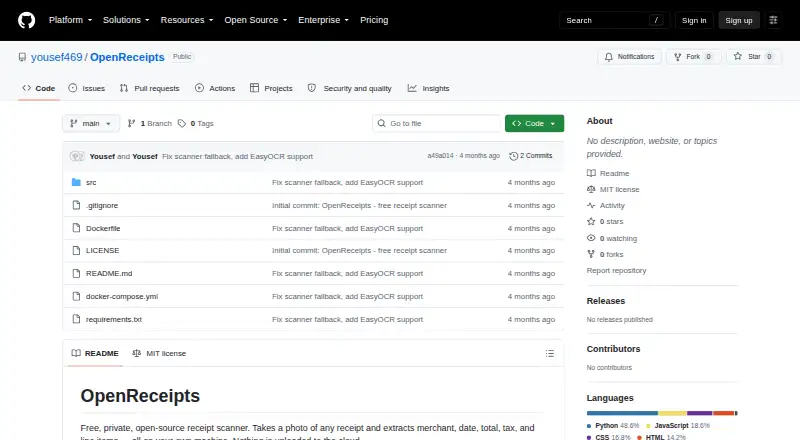
OpenReceipts scans receipt photos and extracts details on your machine, including merchant, date, total, subtotal, tax, and line items. It automatically locates the receipt, crops the image, and corrects its perspective before reading the text. The app uses Tesseract when available or EasyOCR to process the corrected image. You can edit extracted fields before exporting receipts to CSV for spreadsheets or accounting software; no specific integrations are named. The project says processing runs locally and no data leaves the computer. OpenReceipts is available for web use and can be self-hosted on Linux, macOS, or Windows. Setup instructions include Docker Compose and Python, with Tesseract installation guidance for macOS, Ubuntu, and Windows. It is released under the MIT license. The listed free plan costs nothing, with no subscriptions, limits, or accounts.
Good
- Extracts merchant, dates, totals, taxes, and line items
- Automatically crops receipts and corrects perspective
- Lets you edit fields before CSV export
- Project says no data leaves your computer
- Free plan has no subscriptions, limits, or accounts
Watch out
- CSV is the listed export format
- Requires Tesseract or EasyOCR for text reading
Who it suits
OpenReceipts suits people who want to digitize receipts locally and export their details to CSV. It may also fit users who want to self-host the app.
Verdict
OpenReceipts combines receipt detection, OCR, field editing, and CSV export in a locally processed workflow. Its listed free plan and self-hosting options may suit users who want control over where receipt data is handled.
Plans and prices
From OpenReceipts's own pricing page, checked 15 Oct 2026.
| Plan | Price | What it gives you |
|---|---|---|
| Free | Free | no limits · no accounts · No subscriptions |
| OpenReceipts | Free | No subscriptions · no limits · no accounts |
The facts
Each one read from OpenReceipts's own pages, with the date it was checked.
What it does
- Accounts
- The README states that the application requires no user accounts.checked 15 Oct 2026
- CSV export
- Receipt records can be exported as CSV for spreadsheets or accounting software.checked 15 Oct 2026
- Deployment
- The README recommends Docker Compose for a one-command setup and also provides Python run instructions.checked 9 Oct 2026
- Docker installation
- Docker Compose is presented as the recommended one-command deployment method.checked 15 Oct 2026
- Editable results
- Users can change every extracted field before exporting the receipt.checked 15 Oct 2026
- Editing
- Extracted fields can be edited before export.checked 9 Oct 2026
- Export
- Receipts can be exported to CSV for spreadsheets or accounting software.checked 9 Oct 2026
- Framework footprint
- The frontend is documented as using no JavaScript framework.checked 15 Oct 2026
- Image processing
- The scanner converts images to grayscale, detects edges, finds a four-corner contour, and applies a perspective transform.checked 15 Oct 2026
- Independent cloud claim
- The directory describes the project as avoiding transmission of receipt documents to cloud providers.checked 15 Oct 2026
- Independent description
- That directory characterizes OpenReceipts as local and private.checked 15 Oct 2026
- Independent directory listing
- A community-maintained receipt-OCR directory lists OpenReceipts among open-source receipt-processing repositories.checked 15 Oct 2026
- Independent ecosystem context
- The directory places OpenReceipts in its open-source section alongside OCR and document-processing projects.checked 15 Oct 2026
- Independent extracted data
- The directory says the project extracts merchant, total, date, and line-item data.checked 15 Oct 2026
- Independent license listing
- The community directory identifies OpenReceipts as MIT licensed.checked 15 Oct 2026
- Integrations
- The README describes CSV export for spreadsheets or accounting software; it does not name specific integrations.checked 9 Oct 2026
- License
- The repository is released under the MIT license.checked 15 Oct 2026
- Limit: API and SDKs
- The public documentation describes a FastAPI server but provides no public API reference, SDK, or integration guide.checked 15 Oct 2026
- Limit: integrations
- The README mentions CSV handoff to spreadsheets or accounting software but names no direct accounting integrations.checked 15 Oct 2026
- Limit: security disclosures
- The repository page exposes no separate security, compliance, or trust-center documentation.checked 15 Oct 2026
- Limit: support and documentation
- Documentation consists of the repository README and setup instructions; no help center, support policy, or service-level commitment is provided.checked 15 Oct 2026
- OCR engines
- The application can use Tesseract or EasyOCR for text recognition.checked 15 Oct 2026
- OCR fields
- OCR extraction covers merchant name, date, total, subtotal, tax, and line items.checked 15 Oct 2026
Where it runs
- Limit: mobile apps
- The repository documents browser-based local use and desktop operating-system setup, with no iOS or Android application instructions.checked 15 Oct 2026
The full review of OpenReceipts
OpenReceipts is a self-hosted receipt scanner that turns photographed receipts into editable expense fields and CSV files. It is best suited to privacy-conscious users who are comfortable running software locally and managing their own exports. Choose it for local processing without account or usage restrictions; look elsewhere if you need a polished, connected expense service.
Overview
OpenReceipts focuses on one job: extracting structured expense data from receipt photos on your own computer. It identifies the merchant, dates, totals, tax, subtotal, and individual line items, then lets you correct those values before saving them. The result is useful for spreadsheet-based bookkeeping, but the workflow ends at CSV rather than a named accounting integration.
Its local-first design is the defining advantage. The project says receipt data stays on the computer and does not leave it, which suits people handling sensitive purchases or operating under a policy against cloud uploads. That control also means users take responsibility for deployment, updates, and keeping their own environment working.
Key features
Receipt preparation
OpenReceipts automatically finds the receipt within a photograph, crops away surrounding material, and corrects perspective. Its scanner converts the image to grayscale, detects edges, locates a four-corner receipt contour, and applies a perspective transform. This pipeline is tailored to angled or uneven receipt photos and prepares a cleaner image for recognition.
OCR and correction
Text extraction uses Tesseract when it is available, with EasyOCR as the alternative engine. The app reads merchant name, date, total, subtotal, tax, and line items. Because every extracted field can be edited before export, users can repair recognition mistakes instead of accepting an incorrect amount into their records. OpenReceipts does not describe classification, categorization, or other document types, so its scope remains receipt capture and extraction.
CSV export
Receipts can be exported to CSV for spreadsheets or accounting software. That is a practical interchange format for a manual or semi-automated bookkeeping process, but it is not a direct sync with a named service and no other export format is described.
Pricing
The OpenReceipts plan costs exactly free. It has no subscriptions, no limits, and no accounts, and there is no free trial because the product is free rather than trial-based. The absence of quotas makes it suitable for ongoing personal use or a small operation that can provide its own storage and workflow. There are no paid tiers to unlock additional capacity or support, so organizations wanting managed service terms or commercial workflow features will need another product.
Platforms
OpenReceipts is offered as a web application and supports Linux, macOS, Windows, and self-hosted deployment. The README recommends Docker Compose for a one-command setup and also provides Python run instructions. Tesseract installation guidance covers macOS, Ubuntu, and Windows. In practice, it is a web interface backed by software you deploy, not a conventional mobile app.
Who it's for
OpenReceipts fits individuals, freelancers, and small teams that want receipt data processed locally, have access to a computer or server, and are happy to move CSV files into their existing spreadsheet or accounting routine. It is also a sensible option for technically capable users who prefer an MIT-licensed project and self-hosting over a vendor account.
It is a weaker match for people who expect phone-first capture, automatic cloud synchronization, named integrations, collaborative expense controls, or a managed setup. Those needs call for a service designed around accounts and connected workflows rather than a local scanner.
Pros and cons
Pros
- Local processing: The project says data never leaves the computer, which reduces dependence on a third-party upload service.
- Useful field coverage: Merchant, dates, totals, subtotal, tax, and line items are extracted, rather than only a single receipt total.
- Correction before export: Editable fields provide a way to fix OCR errors before figures reach a spreadsheet.
- No usage ceiling: The free plan has no limits, subscriptions, or account requirement.
- Flexible deployment: Docker Compose and Python instructions support both a quick container setup and a manually managed installation.
Cons
- CSV is the stated endpoint: Users needing direct accounting connections or another export format must add their own conversion or import step.
- Technical setup: Docker, Python, and OCR-engine installation make this less approachable than an app with a managed backend.
- Limited platform style: Although it supports multiple desktop operating systems and the web, no mobile application is described.
- No managed plans: There is no paid tier for hosted support, administration, or expanded workflow features.
Alternatives
Receipt Management Software and Receipt Scanner Apps are useful starting points when you want to compare broader categories rather than commit to a local, CSV-focused tool.
Choose ExpenseBot instead if you need Android or iOS access, an API, and a freemium service with a free trial; its accountant/bookkeeper client-management plan is free, while client scanning requires the client's own subscription or account.
Receipt Reader AI is the better fit for a cloud-style, account-based workflow with mobile and API access, a free tier of 10 AI scans per month, and PDF export; its Personal plan costs $5.99 a month for 50 scans.
Pick Finago eTasku when accountant-connected document access matters: its free DOKUMENTTI plan provides read access to documents added by the accountant at no cost per month, with a 12-month subscription period and VAT added.
OCR Receipt suits users seeking a desktop OCR tool on Linux, macOS, or Windows with a free unlimited-receipt tier.
Choose Receipt Wrangler for another free, open-source, self-hosted option spanning Android, iOS, API, web, and self-hosting.
ReceiptsAI is preferable when you want a freemium service with image/PDF extraction and basic categorization; its Start Free tier supplies 30 one-time credits.
Starlog is aimed at mobile company expense tracking, with OCR, reports, ZIP/XLSX export, and Google Drive sync on its free plan.
Choose Veryfi Invoices OCR API for an API-centered, higher-volume workflow; its Starter plan is $500 a month with a monthly commitment.
Verdict
OpenReceipts is the right choice for privacy-focused individuals and small teams that can handle a local deployment and are satisfied with editable OCR results in CSV form. Its combination of unrestricted free use, broad receipt fields, and on-device processing is compelling. Look elsewhere when you need mobile capture, hosted convenience, direct integrations, or a managed team workflow.
Alternatives to OpenReceipts
- 1

Veryfi Invoices OCR API
Free planAndroidiOSWebAPI8.2From $500 a month - 2

Receipt Reader AI
Free planAndroidiOSWebAPI8.0From $5.99 a month - 3
OCR Receipt
Free planAPILinuxmacOSWindows7.5$149 one-time - 4

Bonro
Free planAndroidiOSWeb7.3From €59.99 a year - 5
Smart Receipts
Free planAndroidiOSWeb7.3From $99.96 a year - 6
Foreceipt
Free planAndroidiOSWeb7.2From $5 a month