Easy Expense
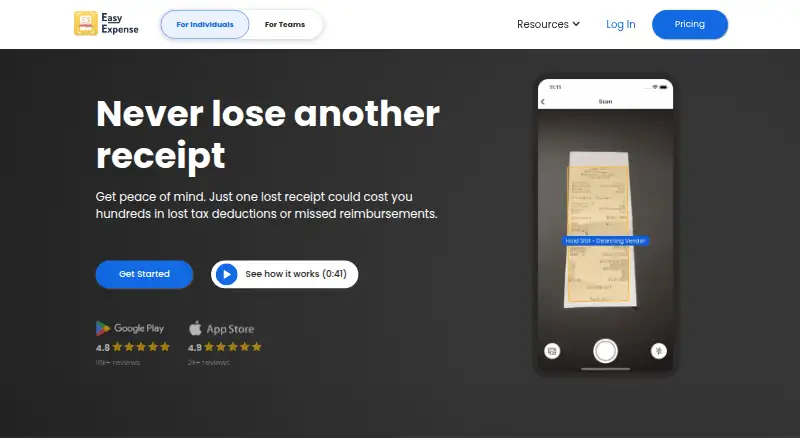
Easy Expense helps individuals, small business owners, self-employed people, and teams track receipts and expenses.
What Easy Expense is
Easy Expense helps individuals, small business owners, self-employed people, and teams track receipts and expenses. Its receipt capture can crop images and use AI to extract and categorize fields such as vendor, total, tax, date, and payment method. Users can link Gmail to scan for receipts or forward receipts by email. The app can also track drives with GPS, classify trips, apply custom mileage deduction rates, and scan linked bank and card transactions to sort tax deductions. It provides PDF expense reports and data exports to CSV or Excel. Team features include user invitations and reimbursement reports, with API access upon request. Easy Expense is available on Android, iOS, and the web. The free plan includes 10 receipt scans and two expense reports per month. Starter costs $7.99 a month, while Professional costs $23.99 a month and adds bank, card, and email connections, automated mileage, and team workflows. Email access is read-only; the privacy policy says shared email data for receipt and invoice processing may be sent to OpenAI.
Good
- AI extracts receipt details and categories
- Tracks drives with GPS and custom mileage rates
- Exports data to CSV or Excel
- PDF reports support reimbursement workflows
Watch out
- Free plan allows 10 scans monthly
- Free plan allows two reports monthly
- Web app has limited export options
- Email processing data may be sent to OpenAI
Who it suits
It suits people who want to combine receipt capture, mileage, and expense reporting, as well as teams managing reimbursements. Mobile users have exports for data and images; the web app has limited export options.
Verdict
Easy Expense brings receipt handling, mileage tracking, account connections, and reporting together across mobile and web. Check the free plan's monthly caps and the web export limitation before choosing a workflow.
Plans and prices
From Easy Expense's own pricing page, checked 2 Oct 2026.
| Plan | Price | What it gives you |
|---|---|---|
| Free | Free | 10 receipt scans per month · 2 expense reports per month · Manual tracking, data export, and cloud storage · PER MONTH |
| Starter | $7.99 a month | Unlimited receipt scanning · Unlimited expense reports · Email receipt forwarding · PER MONTH |
| Professional | $23.99 a month | Unlimited receipt scanning · Unlimited expense reports · Email receipt forwarding · Invite up to 2 other users · Connect credit card, banks, and emails · Unlimited workspaces · Automated mileage tracking · Statement reconciliation · Approval workflows · PER MONTH |
The facts
Each one read from Easy Expense's own pages, with the date it was checked.
What it does
- Bank connections
- Users can link bank accounts and credit cards, and AI scans transactions to classify tax deductions.checked 2 Oct 2026
- Customer support
- The maker advertises live in-app chat for teams and one-on-one phone support, and lists [email protected].checked 2 Oct 2026
- Email access limitation
- Connecting email grants read-only access to messages, and the policy says email data shared for receipt and invoice processing may be sent to OpenAI.checked 2 Oct 2026
- Email receipts
- Users can connect Gmail to scan for receipts or forward receipts to [email protected].checked 2 Oct 2026
- Export limitation
- The help center says mobile exports support data and images, while the web app has limited export options.checked 2 Oct 2026
- Integrations
- The privacy policy names Plaid as a third-party service and says users may connect Gmail or Outlook to retrieve financial documents.checked 2 Oct 2026
- Mileage
- The app can track drives automatically with GPS, classify trips, and use custom mileage deduction rates.checked 2 Oct 2026
- Privacy and security
- The privacy policy says automatic trip location data is encrypted, stored on the user's device and Firebase, and not sold or shared with other third parties; it also says absolute security cannot be guaranteed.checked 2 Oct 2026
- Purpose
- Easy Expense provides receipt and expense tracking for individuals, small business owners, self-employed people, and teams.checked 2 Oct 2026
- Receipt capture
- The app automatically crops receipts and uses AI to extract and categorize fields including tax category, vendor, total, tax, date, and payment method.checked 2 Oct 2026
- Reports and exports
- Easy Expense offers PDF expense reports and exports data to CSV or Excel.checked 2 Oct 2026
Where it runs
- Mobile platform availability
- The maker's help center links to Easy Expense apps for iOS and Android and identifies a web app.checked 2 Oct 2026
The company
- Team features
- The teams offering includes user invitations, expense reports for reimbursement, and API access upon request.checked 2 Oct 2026
The full review of Easy Expense
Easy Expense is an expense tracker for people who need receipt capture, mileage records, and reporting in one place. It suits self-employed users and small teams with recurring business expenses. Its broad workflow is appealing, but check the free plan’s tight monthly caps and the web app’s limited exports before committing.
Overview
Easy Expense combines receipt scanning, bank and card connections, mileage tracking, and expense reports across mobile and web. The breadth is useful for people who want more than a digital receipt folder: it can bring purchases, trips, and reports into a single expense routine.
That convenience comes with trade-offs. The free plan allows just 10 receipt scans and two reports per month, while the web app has limited export options. Email receipt processing also merits care: connecting an account gives read-only message access, and email data shared for processing may be sent to OpenAI.
Key features
Receipt and email capture
Easy Expense automatically crops receipts and uses AI to extract and categorize fields such as vendor, total, tax, date, payment method, and tax category. This can reduce manual entry for frequent purchases, though users should still review extracted data before relying on it for records. Receipts can be retrieved from Gmail or forwarded to [email protected]. Email access is read-only, but the stated OpenAI processing makes this less suitable for users who prefer not to share receipt or invoice data with an outside service.
Mileage and connected accounts
GPS can track drives automatically; users can classify trips and apply custom mileage deduction rates. Linking bank accounts and credit cards lets AI scan transactions and classify potential tax deductions. These features could spare self-employed users from reconstructing activity later, but they make the Professional plan the practical choice for an automated workflow.
Reports, exports, and teams
Easy Expense produces PDF expense reports and supports CSV or Excel exports. Team offerings add invitations, reimbursement reports, and API access upon request. Mobile exports include data and images, but the web app’s limited export options may frustrate anyone who expects the browser version to be the most complete place to retrieve records.
Pricing
Easy Expense is freemium, with a 7-day trial and paid plans from $7.99/mo. The Free plan costs nothing, billed PER MONTH, and includes 10 receipt scans per month, two expense reports per month, manual tracking, data export, and cloud storage. It is a sensible starting point for occasional expenses, but the scan cap is easy to outgrow if receipts are part of a regular work routine.
Starter costs $7.99 a month, billed PER MONTH. It removes the receipt-scanning and report limits and adds email receipt forwarding. This is the straightforward upgrade for a solo user who needs reliable capture and reporting but does not need connected accounts or automated mileage.
Professional costs $23.99 a month, billed PER MONTH. It includes Starter’s unlimited scanning and reports, plus invitations for up to 2 other users, connections to credit cards, banks, and emails, unlimited workspaces, automated mileage tracking, statement reconciliation, and approval workflows. The higher price is most defensible for small teams or independent operators who will use the connected-account and mileage tools; occasional users may not need that expanded workflow. Team support includes live in-app chat, and one-on-one phone support is advertised.
Platforms
Easy Expense is available on Android, iOS, and the web. Having mobile apps alongside a web app gives users options for capturing expenses and reviewing records, but exports are more limited on the web than on mobile.
Who it's for
Easy Expense is a good fit for self-employed people, small business owners, and small teams who want receipt capture combined with mileage, connected accounts, and reporting. Free is best for light use; Starter suits an individual with frequent receipts; Professional is the strongest fit when multiple users, bank connections, reconciliation, or automated mileage matter. It is less compelling for someone who needs generous free quotas or consistently complete exports from the web.
Pros and cons
- Pros: Automatic receipt cropping and AI extraction cover core fields including merchant, date, tax, and total, reducing manual record entry.
- Pros: Mileage tracking, transaction classification, reports, and team workflows extend the app beyond basic receipt storage.
- Pros: Free includes data export and cloud storage, while paid plans offer unlimited receipt scans and reports.
- Cons: Free is capped at 10 scans and two reports per month, which limits it for regular business use.
- Cons: Web exports are limited, so browser-first users may have a less complete retrieval workflow.
- Cons: Email processing may send receipt and invoice data to OpenAI; privacy-conscious users should weigh that before connecting an inbox.
Alternatives
Receipt Scanner Apps is a useful next stop for comparing tools in the category. Consider Bonro if a lower-priced paid entry point and on-device OCR are priorities; its free plan allows five receipts a month and has no export. Foreceipt is worth comparing if its free plan’s allowance of up to 100 receipts, two team members, and PDF/Excel reports better matches your needs.
Receipt Reader AI offers a free tier with 10 AI scans a month, one account, and PDF export, and a Personal plan at $5.99 a month. Smart Receipts is another option; its free plan is mobile-only and uses manual receipt entry. Reciro offers a free tier with up to 100 receipts and email forwarding, for users looking for a higher free receipt allowance.
Veryfi Invoices OCR API is an alternative for readers considering invoice OCR through an API. Receipt Pro is an iOS-only option. Receipt Scanner is an Android and iOS alternative with a limited-feature free plan and a Pro plan for unlimited expense tracking and report creation.
Verdict
Choose Easy Expense if you are self-employed or run a small team and want receipt capture, mileage, connected accounts, and reports under one roof. Its strongest reason to buy is the breadth of that workflow, particularly on Professional. Look elsewhere if a generous free allowance, full web exports, or tighter limits on email-data processing are more important than having those tools together.
Getting started
- Visit the Easy Expense website
- Install the Android or iOS app, or open the web app
- Choose the Free, Starter, or Professional plan, or begin the 7-day trial
- Capture receipts or forward them to [email protected]
- Connect Gmail or Outlook for document retrieval
- Link bank accounts and credit cards when supported by your plan
Limits worth knowing
The Free plan includes 10 receipt scans and two expense reports per month. It provides manual tracking, data export, and cloud storage; web exports have limited options.
Questions
Does Easy Expense have a free plan?
Yes. The Free plan costs nothing and includes 10 receipt scans and two expense reports monthly.
What does Easy Expense cost?
Starter is $7.99 a month. Professional is $23.99 a month, and a 7-day trial is available.
Which platforms are supported?
Easy Expense is available on Android, iOS, and the web.
Can it connect to email and financial accounts?
You can connect Gmail or Outlook for receipt and document retrieval, and link bank accounts and credit cards on Professional. Email access is read-only.
What export formats are available?
Expense reports can be produced as PDFs, with data exports to CSV or Excel. Mobile exports support data and images, while web export options are limited.
Alternatives to Easy Expense
- 1

Veryfi Invoices OCR API
Free planAndroidiOSWebAPI8.2From $500 a month - 2

Receipt Reader AI
Free planAndroidiOSWebAPI8.0From $5.99 a month - 3
OpenReceipts
Free planOpen sourceWebLinuxmacOSSelf-hosted7.6Free plan - 4

OCR Receipt
Free planAPILinuxmacOSWindows7.5$149 one-time - 5

Bonro
Free planAndroidiOSWeb7.3From €59.99 a year - 6
Smart Receipts
Free planAndroidiOSWeb7.3From $99.96 a year