Prizmo
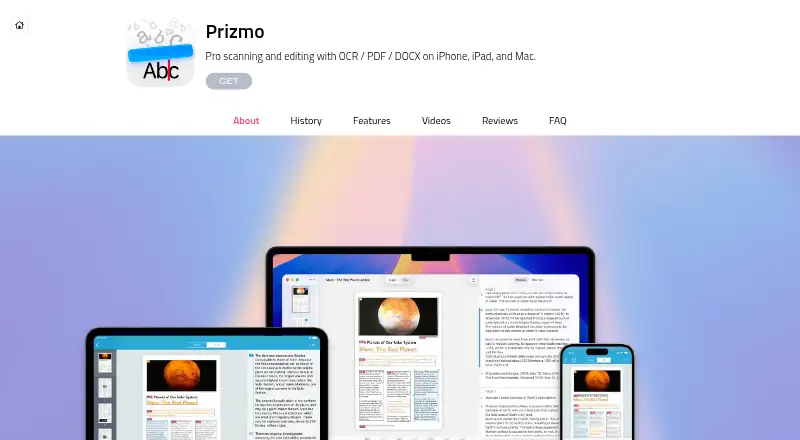
Prizmo scans and edits documents and business cards on iPhone, iPad, and Mac, then uses optical character recognition to make their contents readable as text.
What Prizmo is
Prizmo scans and edits documents and business cards on iPhone, iPad, and Mac, then uses optical character recognition to make their contents readable as text. Its on-device OCR supports over 30 languages, while Cloud OCR supports 139 languages and handwriting recognition. Image tools include perspective cropping, cleanup, brightness and contrast adjustment, edge repair, and flattening curved pages. Users can export searchable PDFs, TXT, PNG, JPEG, and Microsoft Word DOCX files, with configurable PDF compression and password protection. On iPhone and iPad, cloud uploads can use iCloud, Dropbox, OneDrive, WebDAV, or folders available through Apple Files. Those apps also support Apple Shortcuts and x-callback-url automation; the Mac app includes Prizmo Remix for scanner workflows. Accessibility features include VoiceOver, spoken capture guidance and scene descriptions, and text-to-speech reading. Free versions are available, with limited text access and watermarked exports.
Good
- On-device OCR supports over 30 languages
- Cloud OCR supports handwriting recognition
- Exports searchable PDF and Word DOCX
- Supports VoiceOver and text-to-speech reading
Watch out
- Cloud OCR requires an internet connection
- Cloud OCR requires a separate subscription
- Free versions limit text access and watermark exports
Who it suits
Prizmo suits people who scan documents or business cards on Apple devices and need OCR, searchable exports, or accessibility support. Cloud OCR is an option for handwriting recognition, provided the user has an internet connection and a Cloud Plan subscription.
Verdict
Prizmo combines document scanning, OCR, editing, and multiple export options across iPhone, iPad, and Mac. The free versions have limits, and handwriting recognition through Cloud OCR requires a separate plan.
Plans and prices
From Prizmo's own pricing page, checked 23 Sep 2026.
| Plan | Price | What it gives you |
|---|---|---|
| Cloud Plan (S) — Monthly | — | Cloud OCR · Handwriting recognition |
| Cloud Plan (S) — Yearly | — | Cloud OCR · Handwriting recognition |
| Cloud Plan (L) — Monthly | — | Cloud OCR · Handwriting recognition |
| Cloud Plan (L) — Yearly | — | Cloud OCR · Handwriting recognition |
| Prizmo for iPhone/iPad — Free version | Free | Core features; limited text access and text reader; watermarked exports; no Cloud OCR |
| Prizmo for Mac — Free version | Free | On-device OCR; limited text access; watermarked exports; no Cloud OCR or AI-based translation |
| Cloud Plan | $0.99 a month | Includes Premium Pack features and Cloud OCR; FAQ says each cloud recognition uses one unit · Plans detailed within the app; start at $0.99 / €0.99 per month |
| Prizmo 5 (Volume Ed.) | $8.99, paid once | Functionally equivalent to Premium Pack; does not support Cloud OCR · VPP Store price; minimum 20 units |
| Pro Plan | Priced on request | Enables Cloud OCR for handwriting and additional languages, plus cloud-based AI translation; includes matching Prizmo Remix features · Subscription; price not stated on the page |
| Premium Pack | — | Unlocks unlimited on-device OCR, full text access, text-to-speech and smart actions; removes export watermarks · One-time in-app purchase; price available in the app and on the App Store |
| Pro Pack | — | Unlocks on-device OCR and watermark-free outputs; Mac purchase also unlocks matching Prizmo Remix features · One-time in-app purchase; price available in the app and on the App Store |
The facts
Each one read from Prizmo's own pages, with the date it was checked.
What it does
- Accessibility
- Prizmo provides VoiceOver support, spoken guidance and scene descriptions during capture, and text-to-speech reading.checked 4 Oct 2026
- Automation
- The iPhone and iPad app supports Apple Shortcuts and x-callback-url automation; the Mac app includes the Prizmo Remix companion for scanner workflows.checked 4 Oct 2026
- Cloud OCR data handling
- The FAQ says built-in OCR processes images locally, while Cloud OCR sends images to Microsoft's cloud service for recognition.checked 4 Oct 2026
- Document scanning
- Prizmo scans and edits documents and business cards on iPhone, iPad, and Mac.checked 4 Oct 2026
- Exports
- Export formats include searchable PDF, TXT, PNG, JPEG, and Microsoft Word DOCX, with configurable PDF compression and password protection.checked 4 Oct 2026
- Handwriting OCR
- Yeschecked 23 Sep 2026
- Image processing
- Image tools include perspective cropping, cleanup, brightness and contrast adjustments, edge repair, and flattening curved pages.checked 4 Oct 2026
- Integrations
- iPhone and iPad cloud upload supports iCloud, Dropbox, OneDrive, WebDAV, and folders available through Apple Files.checked 4 Oct 2026
- Notable limit
- Cloud OCR requires an internet connection and a separate Cloud Plan subscription.checked 4 Oct 2026
- OCR
- It offers on-device OCR in over 30 languages and Cloud OCR in 139 languages with handwriting recognition.checked 4 Oct 2026
- Privacy
- The maker says most operations happen on device, cloud OCR data is deleted after processing, and Prizmo does not require an account or track users.checked 4 Oct 2026
- Searchable PDF
- Yeschecked 23 Sep 2026
- Support
- Creaceed directs users needing application support to contact the company through its About Us page.checked 4 Oct 2026
- Supported inputs
- bothchecked 23 Sep 2026
- Supported languages
- 30checked 23 Sep 2026
- Word export
- Yeschecked 23 Sep 2026
The company
- Founded
- 2009checked 23 Sep 2026
- Headquarters
- Mons, Belgiumchecked 23 Sep 2026
Money
- Free plan
- Yeschecked 23 Sep 2026
Where it runs
- Primary platform
- bothchecked 23 Sep 2026
The full review of Prizmo
Prizmo is a document-scanning and OCR app for iPhone, iPad, and Mac. It suits Apple users who want to turn scans and business cards into searchable, editable files, especially those who value accessibility features. Its strongest case is a capable on-device workflow; handwriting recognition requires paid Cloud OCR.
Overview
Prizmo combines document capture, image correction, text recognition, and export in one Apple-focused workflow. It can correct perspective, clean up an image, adjust brightness and contrast, repair edges, and flatten curved pages. These tools make it more useful than a basic OCR converter when a source document needs visual correction before recognition.
On-device OCR supports over 30 languages. Cloud OCR extends coverage to 139 languages and adds handwriting recognition, but needs an internet connection and a separate subscription. The distinction also matters for privacy: the maker says most operations happen on device, while Cloud OCR sends images to Microsoft's service and deletes them after processing. Prizmo does not require an account or track users.
Key features
Recognition, cleanup, and export
Prizmo exports searchable PDFs, TXT, PNG, JPEG, and Microsoft Word DOCX. PDF compression and password protection are configurable, giving users control over output size and access. On-device text recognition is the practical choice for routine printed documents; handwriting recognition and the wider language range mean accepting a cloud service and its per-use quota.
Capture, automation, and accessibility
On iPhone and iPad, cloud uploads support iCloud, Dropbox, OneDrive, WebDAV, and folders accessible through Apple Files. Apple Shortcuts and x-callback-url support make those apps the better fit for users who want scanning in automated workflows. On Mac, Prizmo Remix is a companion for scanner workflows.
VoiceOver support, spoken capture guidance and scene descriptions, and text-to-speech reading give Prizmo useful accessibility options beyond recognition alone.
Pricing
Prizmo is freemium, but its free versions restrict text access and add watermarks. The Mac free version includes on-device OCR, but has no Cloud OCR or AI-based translation. The iPhone and iPad free version includes core features but limits text access and the text reader, and excludes Cloud OCR. Both are suitable for trying the workflow, not for unrestricted document output.
The Cloud Plan starts at $0.99 a month, billed monthly; plans are detailed within the app. It includes Premium Pack features and Cloud OCR. Each cloud recognition uses one unit, so frequent users should weigh the quota against their workload. Cloud Plans are also offered in S and L monthly and yearly versions; the Pro Plan adds handwriting and additional-language Cloud OCR, cloud-based AI translation, and matching Prizmo Remix features. Prices for the S and L plans, Pro Plan, and Premium Pack are custom pricing.
Pro Pack is a one-time in-app purchase that unlocks on-device OCR and watermark-free output; a Mac purchase also unlocks matching Prizmo Remix features. Its price is custom pricing. For volume Mac deployment, Prizmo 5 (Volume Ed.) costs $8.99, paid once through the VPP Store, requires a minimum of 20 units, and is functionally equivalent to Premium Pack but does not support Cloud OCR. That makes it a poor fit if handwriting recognition is required.
Platforms
Prizmo is available for iPhone, iPad, and Mac. Both mobile and Mac versions support document scanning and OCR, with cloud-upload integrations and Shortcuts automation on iPhone and iPad, and the Prizmo Remix companion on Mac.
Who it's for
Prizmo is a strong fit for Apple users who scan documents or business cards and want correction tools, local OCR, and several export formats in one app. Its accessibility features also suit people who rely on spoken guidance or text-to-speech. Users who need handwritten text recognition should budget for Cloud OCR; those seeking a general-purpose OCR service beyond Apple's platforms should look elsewhere.
Pros and cons
- Pros: On-device OCR in over 30 languages supports routine recognition without sending images to cloud OCR.
- Pros: Image correction, searchable PDF and DOCX export, and PDF security options cover more of the scanning workflow than text extraction alone.
- Pros: VoiceOver, spoken capture guidance, and text-to-speech add practical accessibility support.
- Cons: Free editions limit text access and add watermarks, limiting their usefulness for ongoing work.
- Cons: Handwriting recognition requires an internet-connected Cloud Plan, and each recognition consumes a unit.
- Cons: Several paid plans use custom pricing, making costs harder to compare before opening the app or store.
Alternatives
For a mobile-first alternative on Android or iOS, consider PaddleOCR, whose Official API Free Tier has a daily document-parsing limit of 20,000 pages. OCRmyPDF is a free, self-hosted option for users comfortable installing software and relying on external OCR and PDF tools. Choose i2OCR for web-based OCR when processing one image or PDF page at a time is sufficient.
FreeOCR.AI, Tesseract OCR, Scribe OCR, Readiris PDF, and docTR are other options to compare. Browse more OCR software or Mobile Scanning Apps.
Verdict
Choose Prizmo if you want scanning, local OCR, image correction, and accessible reading tools within an Apple-device workflow. The main reason to look elsewhere is handwriting recognition: it depends on a separate, quota-based Cloud Plan, while free editions restrict text access and watermark exports.
Alternatives to Prizmo
- 1

Smallpdf
Free planAndroidiOSWebWindows8.9From $10 a month - 2

DocuWare
AndroidiOSWebAPI8.6From £1,060 a month - 3

CamScanner
Free planAndroidiOSWebmacOS8.4From $59.99 a year - 4

Docutain
Free planAndroidiOSWindows8.4From €2.08 a month - 5

Google Photos
Free planAndroidiOSWebAPI8.4Free plan - 6
Easy Scanner
Free planAndroidiOS8.2From $4.49 a month