Tesseract OCR
Tesseract OCR is a free, open-source engine that recognizes text in images.
What Tesseract OCR is
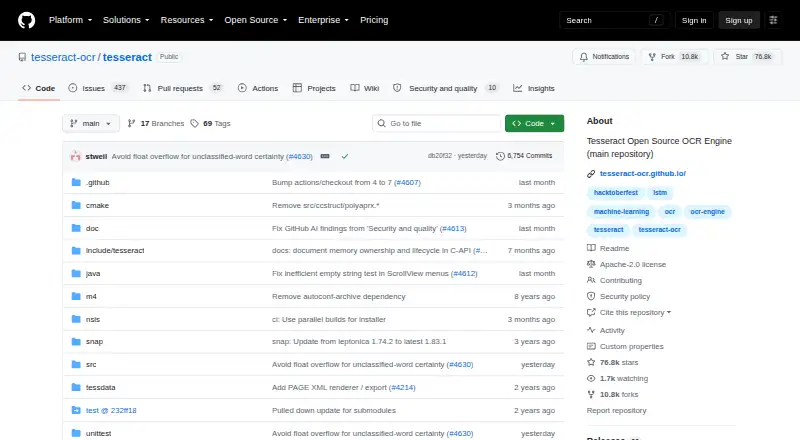
Tesseract OCR is a free, open-source engine that recognizes text in images. It runs on Linux, Windows, macOS, and Android, accepts image files such as PNG, JPEG, and TIFF, and can create searchable PDFs. Its repository code uses the Apache License 2.0. Tesseract 4 introduced an LSTM-based neural OCR engine focused on line recognition, while a Legacy OCR Engine mode supports compatibility with Tesseract 3. Developers can build applications with the libtesseract C or C++ API; wrapper documentation covers bindings for other programming languages. The project identifies major version 5 as its current stable version. Leptonica is used to open input images, and improving an image's quality may help recognition results. HP open sourced Tesseract in 2005, and Google developed it from 2006 to August 2017. Stefan Weil is identified as its current lead developer. Handwriting OCR is not supported.
Good
- Free and licensed under Apache License 2.0.
- Accepts PNG, JPEG, and TIFF images.
- Can create searchable PDFs.
- Offers a C and C++ developer API.
Watch out
- Handwriting OCR is not supported.
- Image quality may need improvement for better recognition.
- Uses Leptonica to open input images.
Who it suits
Tesseract OCR suits developers building image-text recognition into applications, as well as desktop users who need searchable PDFs. It is not suited to handwriting OCR.
Verdict
Tesseract OCR provides image text recognition across desktop and mobile platforms, with APIs for application developers. Image quality matters, and the tool does not support handwriting OCR.
Plans and prices
From Tesseract OCR's own pricing page, checked 7 Oct 2026.
| Plan | Price | What it gives you |
|---|---|---|
| Tesseract OCR | Free | Open-source OCR engine · Apache 2.0 license |
The facts
Each one read from Tesseract OCR's own pages, with the date it was checked.
What it does
- Developer API
- Developers can use the libtesseract C or C++ API to build applications.checked 27 Sep 2026
- Developer interfaces
- Developers can use the C or C++ libtesseract API, and the documentation lists third-party wrappers for other languages.checked 7 Oct 2026
- Handwriting OCR
- Nochecked 23 Sep 2026
- Image inputs
- Supported image formats include PNG, JPEG, and TIFF.checked 27 Sep 2026
- Image library dependency
- Tesseract uses Leptonica to open input images.checked 27 Sep 2026
- Image quality
- The project notes that improving the input image quality may be needed to get better OCR results.checked 7 Oct 2026
- Image quality limit
- Better OCR results may require improving the quality of the input image.checked 27 Sep 2026
- Input formats
- The project lists PNG, JPEG, and TIFF among its supported image formats.checked 7 Oct 2026
- Installation
- The documentation describes installation through Linux distributions, macOS package managers, Windows installers, and source builds.checked 7 Oct 2026
- Language bindings
- Bindings for other programming languages are available through the wrapper documentation.checked 27 Sep 2026
- Language data
- The engine and language traineddata are separate installation components, and the documentation lists packages for over 130 languages and over 35 scripts.checked 7 Oct 2026
- Languages
- The project says Tesseract supports UTF-8 and recognizes more than 100 languages out of the box.checked 7 Oct 2026
- Lead developer
- Stefan Weil is identified as the current lead developer.checked 27 Sep 2026
- Legacy engine
- Tesseract 3 compatibility is available through Legacy OCR Engine mode.checked 27 Sep 2026
- License
- The code is licensed under Apache License 2.0 and is provided without warranties under the license terms.checked 7 Oct 2026
- Neural OCR engine
- Tesseract 4 added an LSTM-based neural network OCR engine focused on line recognition.checked 27 Sep 2026
- No built-in GUI
- The project does not include a GUI application and points users to third-party interfaces.checked 7 Oct 2026
- Open-source license
- The repository code is licensed under Apache License 2.0.checked 27 Sep 2026
- Output formats
- Supported output formats include plain text, hOCR, PDF, invisible-text-only PDF, TSV, ALTO, and PAGE.checked 7 Oct 2026
- Project history
- It was open sourced by HP in 2005 and developed by Google from 2006 to August 2017.checked 27 Sep 2026
- Purpose
- Tesseract is an OCR engine and command-line program for extracting printed text from images.checked 7 Oct 2026
The company
- Founded
- 1985checked 28 Sep 2026
Money
- Free plan
- Yeschecked 23 Sep 2026
Where it runs
- Primary platform
- desktopchecked 23 Sep 2026
The full review of Tesseract OCR
Tesseract OCR is a free, open-source engine for recognizing text in images, with tools for both desktop users and developers building OCR into applications. It suits people who want a no-cost, adaptable foundation for image-to-text work; it is a weaker fit when handwriting recognition is essential or image quality is hard to control.
Overview
Tesseract’s strength is a capable OCR engine that can be used directly in software or embedded through its C and C++ API. Its Apache 2.0 license makes the code available for reuse, while wrappers support developers working in other programming languages. That flexibility is valuable if you can choose and prepare your own inputs; it does not make poor images or handwriting suitable for recognition.
The current stable major version is 5. Tesseract 4 introduced an LSTM-based neural engine focused on line recognition, and a Legacy OCR Engine mode preserves compatibility with Tesseract 3. That combination gives developers a modern engine alongside a compatibility path, rather than a separate handwriting capability.
Key features
Image recognition and searchable PDFs
Tesseract accepts image inputs, including PNG, JPEG, and TIFF, and supports searchable PDF output. This is a practical choice for turning suitable scans and image files into searchable text. Better results may require improving the input image first, so it is less compelling when files arrive inconsistently or cannot be cleaned up.
Engine and developer access
The LSTM engine’s line-recognition focus makes it useful as a component in text-recognition workflows, while the Legacy mode can help applications that need Tesseract 3 compatibility. Developers can use the libtesseract C or C++ API, with bindings for other languages described in the wrapper documentation. The API route offers room to integrate OCR into a product, but requires development work rather than providing a ready-made workflow by itself.
Pricing
Tesseract is free, with a free plan, and its repository code is licensed under Apache License 2.0. There is no paid tier to unlock in the stated offering, making it a sensible starting point for individuals and developers who want to avoid subscription costs. Its trade-off is that image preparation and application integration remain part of the work.
Platforms
Tesseract supports Linux, Windows, macOS, and Android, with desktop as its primary platform. That breadth gives developers several target environments, while Android support extends its reach beyond desktop use. Supported input is image; PNG, JPEG, and TIFF are among the formats it can open, using the Leptonica image library.
Who it's for
Choose Tesseract if you need free OCR for image-based text, searchable PDF output, or an engine you can integrate into your own software. It is especially appropriate for developers who value API access, open-source code, and a legacy-engine compatibility option. Look elsewhere if handwriting OCR is a requirement, or if you need results from low-quality images without first improving them.
Pros and cons
- Pros: Free and Apache 2.0-licensed, so there is no stated plan cost and developers can work with the repository code.
- Pros: C and C++ APIs, language bindings, and support across desktop systems and Android make it adaptable to application development.
- Pros: Searchable PDF output and PNG, JPEG, and TIFF image support cover common image-to-text needs.
- Cons: No handwriting OCR, ruling it out for handwritten notes and forms.
- Cons: Input image quality can affect results, so dependable recognition may require image improvement before processing.
Alternatives
Browse OCR software to compare options by category. Consider PaddleOCR if you want a free OCR option on Android or iOS; its Official API Free Tier has a daily document parsing limit of 20,000 pages. OCRmyPDF is a free alternative for self-hosted installations on Linux, macOS, or Windows, but depends on external OCR and PDF tools.
OnlineOCR is a web-based option with a free plan and paid weekly and monthly plans. docTR is another free choice for Linux, Windows, and macOS. FreeOCR.AI offers a free plan as well as monthly and yearly Pro plans. OCRFeeder is a free alternative for Linux. ABBYY FineReader PDF is a paid option for iOS, macOS, and Windows, with standalone licenses. i2OCR offers web-based free OCR, processing one image or PDF page at a time.
Verdict
Tesseract OCR is a strong choice for developers and technically capable users who want free, open-source image recognition across desktop and Android platforms. Its API access, searchable PDF support, and compatibility mode are meaningful advantages; the lack of handwriting OCR and dependence on image quality are clear boundaries. Choose it when you can supply suitable images or build around the engine, and look elsewhere when handwriting or less controllable inputs define the job.
Getting started
- Open the Tesseract project website on GitHub.
- Choose an installation route described for Linux, macOS, Windows, or a source build.
- Install the engine and the language traineddata you need.
- Provide PNG, JPEG, or TIFF image input to the command-line program or an application using libtesseract.
- Use a third-party interface if you need a GUI.
Questions
Is Tesseract OCR free?
Yes. The listed plan is free, and the code is licensed under Apache License 2.0.
Which platforms does it support?
The listed platforms are Android, API, Linux, macOS, self-hosted, and Windows. Installation guidance describes distribution packages, macOS package managers, Windows installers, and source builds.
Does it recognize handwriting?
No. Handwriting OCR is not supported.
What image formats can it read?
Supported image formats include PNG, JPEG, and TIFF. Tesseract uses Leptonica to open input images.
Can it create searchable PDFs?
Yes. Searchable PDF and invisible-text-only PDF are among its supported output formats.
Is Tesseract open source, and what license does it use?
Yes. The repository code is licensed under Apache License 2.0.
Alternatives to Tesseract OCR
- 1
FreeOCR.AI
Free planWebAPImacOSWindows8.2From $80 a year - 2

Open-Capture
Free planOpen sourceWebAPILinuxSelf-hosted7.9Free plan - 3
ScanScan
AndroidiOSWebmacOS7.7CN¥30 one-time - 4
Prizmo
Free planiOSmacOS7.7Free plan - 5
Tungsten OmniPage
APILinuxmacOSSelf-hosted7.6€99 one-time - 6
PaddleOCR
Free planAndroidiOS7.5Free plan