
docTR
docTR is a free deep-learning OCR library from docTR, founded in 2021, for document automation and research.
What docTR is
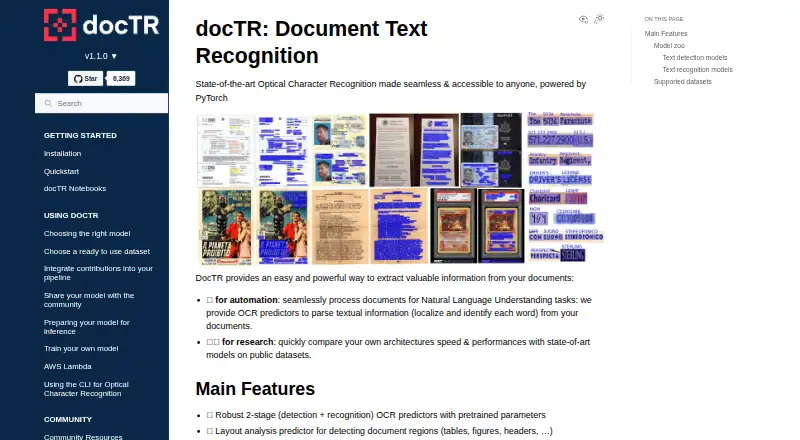
docTR is a free deep-learning OCR library from docTR, founded in 2021, for document automation and research. It detects text, then recognizes it through pretrained two-stage predictors. A separate layout predictor identifies regions including tables, figures, and headers. The library accepts PDFs and images, and can process web pages when the optional HTML extra is installed. Results can be produced as plain text or as a JSON-serializable nested dictionary. Its predictors are described as optimized for inference on both CPU and GPU. When pretrained models do not fit a project, users can train custom detection, recognition, layout, and table-structure models. Documentation covers loading and sharing models through the Hugging Face Hub, plus a minimal REST API template and browser demo. Installation is available through pip, Git, or official Docker images from GitHub Container Registry, and requires Python 3.11 or newer. Pretrained weights download on first use and remain cached locally. The contrib module adds artifact detection for logos, QR codes, and barcodes with onnxruntime. docTR uses the Apache License 2.0.
Good
- Free plan with no trial requirement
- Two-stage text detection and recognition
- Layout analysis for tables, figures, and headers
- CPU and GPU inference support
- Custom model training available
- Pip, Git, and Docker installation
Watch out
- Requires Python 3.11 or higher
- HTML input requires the optional HTML extra
- Artifact detector requires onnxruntime
Who it suits
docTR suits developers building document-automation or research workflows that need OCR for PDFs, images, or web pages. It also fits teams needing custom models, CPU or GPU inference, self-hosted deployment, or REST and browser access.
Verdict
Choose docTR when you need a free, customizable OCR library for document automation or research. Its layout analysis, model-training options, and CPU/GPU inference cover varied pipelines. Look elsewhere if your environment cannot use Python 3.11 or if you need HTML input without installing an extra.
Plans and prices
From docTR's own pricing page, checked 5 Oct 2026.
| Plan | Price | What it gives you |
|---|---|---|
| docTR open-source Python library | Free | Python 3.11 or higher · install with pip, Git, or Docker |
The facts
Each one read from docTR's own pages, with the date it was checked.
What it does
- Customization
- Users can train custom detection, recognition, layout, and table structure models when pretrained models do not meet their needs.checked 5 Oct 2026
- Deployment
- The documentation offers templates for a browser demo and API deployment, and documents running docTR on AWS Lambda.checked 5 Oct 2026
- Extra modules
- The contrib module includes an artefact detector for items such as logos, QR codes, and barcodes, and requires onnxruntime.checked 5 Oct 2026
- Inference
- The project describes its predictors as optimized for inference on both CPU and GPU.checked 5 Oct 2026
- Input formats
- docTR can read PDFs, images, and web pages, with HTML input requiring the optional html extra.checked 5 Oct 2026
- Inputs and outputs
- The quickstart shows loading PDFs, images, and web pages and exporting results as plain text or a JSON-serializable dictionary.checked 5 Oct 2026
- Installation
- The library can be installed with pip or from Git, and official Docker images are available from GitHub Container Registry.checked 5 Oct 2026
- Installation requirement
- The library requires Python 3.11 or higher and can be installed from pip, Git, or an official Docker image.checked 5 Oct 2026
- Integrations
- The documentation describes loading and sharing models through the Hugging Face Hub.checked 5 Oct 2026
- Layout analysis
- A layout predictor detects document regions such as tables, figures, and headers.checked 5 Oct 2026
- License
- The project identifies its license as Apache License 2.0.checked 5 Oct 2026
- OCR features
- It provides pretrained two-stage text detection and recognition predictors and a layout analysis predictor for regions such as tables, figures, and headers.checked 5 Oct 2026
- OCR pipeline
- Its pretrained OCR predictors use a two-stage text detection and recognition pipeline.checked 5 Oct 2026
- Output
- OCR results can be rendered as plain text or exported as a JSON-serialisable nested dictionary.checked 5 Oct 2026
- Pretrained weights
- Pretrained weights are downloaded on first use and cached locally for later calls.checked 5 Oct 2026
- Purpose
- docTR is a deep learning OCR library for locating and recognizing text in documents, intended for document automation and research.checked 5 Oct 2026
- Requirements
- The installation guide requires Python 3.11 or higher.checked 5 Oct 2026
- Security considerations
- For AWS Lambda, the guide says to disable multiprocessing and set the model cache directory within /tmp to comply with Lambda's write restrictions.checked 5 Oct 2026
- Support
- The contribution guide directs users with questions to GitHub Discussions and also mentions a #doctr channel on Slack.checked 5 Oct 2026
- Supported inputs
- bothchecked 23 Sep 2026
The company
- Founded
- 2021checked 23 Sep 2026
- Maker
- The project documentation says docTR is actively maintained by Mindee.checked 5 Oct 2026
Money
- Free plan
- Yeschecked 23 Sep 2026
Where it runs
- Primary platform
- desktopchecked 23 Sep 2026
The full review of docTR
docTR is an open-source Python library for adding document OCR to software and research workflows. It suits developers who need control over detection, recognition, layout, and deployment rather than a packaged OCR application. Its broad pipeline and customization are compelling, but the Python 3.11-or-newer requirement narrows compatibility.
Overview
docTR builds OCR around a two-stage process: pretrained predictors first detect text and then recognize it. A separate layout predictor identifies regions such as tables, figures, and headers, so applications can preserve useful page structure instead of receiving an undifferentiated text stream. That makes it a stronger foundation for document automation and research than a text-only extractor, while still requiring developers to integrate the library into their own software.
The project is free under the Apache License 2.0. Installation is available through pip or Git, with official Docker images in GitHub Container Registry. Pretrained weights download on first use and remain cached locally, which is convenient for repeated runs but should be considered when provisioning isolated or ephemeral environments.
Key features
- OCR pipeline: Detection and recognition predictors cover the core task of finding and reading text in PDFs and images. The two-stage design gives developers separate points to work with when building a processing pipeline.
- Layout analysis: Region detection for tables, figures, and headers adds document structure to OCR output. It is useful when later code must route or interpret page regions, although the documented capability is analysis rather than a complete business-field extraction system.
- Input and output choices: docTR can load PDFs, images, and web pages. HTML requires the optional html extra, an installation consideration for mixed-source workflows. Results can be rendered as plain text or exported as a nested, JSON-serializable dictionary, making the output practical for application code and data pipelines.
- CPU and GPU inference: Predictors are described as optimized for both CPU and GPU execution. That lets a deployment balance hardware cost against throughput instead of locking the project to one class of machine.
- Custom models: Users can train detection, recognition, layout, and table-structure models when pretrained weights are not suitable. This is a significant advantage for specialized documents, but it also shifts data, training, and maintenance work to the user.
- Ecosystem and deployment: Models can be loaded and shared through the Hugging Face Hub. A minimal REST API template and browser demo provide starting points for serving or showcasing a pipeline, while the contrib module adds an artefact detector for logos, QR codes, and barcodes and requires onnxruntime.
Pricing
| Plan | Price | Includes |
|---|---|---|
| docTR open-source Python library | free | Python 3.11 or higher; install with pip, Git, or Docker |
There is no trial period because the library is free rather than a time-limited service. The plan has no published seat, usage, or renewal charge; your practical costs are the engineering and infrastructure needed to run and customize it. It is the natural fit for individual developers, research projects, and teams comfortable operating their own Python or containerized pipeline.
Platforms
docTR supports API, Linux, macOS, self-hosted, and Windows environments, with desktop listed as its primary platform. Python 3.11 or higher is required. The self-hosted orientation, Docker option, and CPU/GPU inference suit controlled deployments, while AWS Lambda users must disable multiprocessing and place the model cache under /tmp to meet Lambda's write restrictions.
Who it's for
Choose docTR when you are building document automation or research software in Python and need OCR plus page-region information. It is particularly well suited to teams that expect to train their own models, share weights through Hugging Face, or expose a pipeline through an API. It is a poor fit for users wanting a finished desktop application, and the Python version requirement can rule it out of older environments. HTML-heavy workflows also need the extra installation step.
Pros and cons
Pros
- Free Apache-licensed software with pip, Git, and Docker installation paths.
- Combines text recognition with layout regions such as tables, figures, and headers.
- Supports custom detection, recognition, layout, and table-structure training.
- Offers CPU and GPU inference plus REST and browser-deployment starting points.
- Produces plain text or structured JSON-serializable output for downstream code.
Cons
- Requires Python 3.11 or newer, limiting compatibility with older stacks.
- It is a development library, so users must assemble and operate the surrounding workflow themselves.
- HTML input needs the optional html extra, and artefact detection needs onnxruntime.
- Custom models require users to supply training data and handle the resulting maintenance burden.
Alternatives
Tesseract OCR is the better choice for a broadly deployed, free Apache 2.0 OCR engine with Android, API, Linux, macOS, self-hosted, and Windows support. Pick PaddleOCR instead when Android or iOS access and an official API tier with a daily 20,000-page parsing limit matter more than docTR's Python-centered customization. OCRFeeder suits Linux users seeking free GPL software. Choose OCRmyPDF for self-hosted PDF processing across API, Linux, macOS, and Windows when depending on external OCR and PDF tools is acceptable. GNU Ocrad is a free Linux and self-hosted alternative. FreeOCR.AI fits users who prefer a hosted freemium service, with a $10 monthly Pro plan for 10,000 credits. Open-Capture is a free GPLv3 option with no user limit across API, Linux, self-hosted, and web deployments. Surya offers a free pay-as-you-go plan with request and concurrency limits for API-oriented use.
Verdict
docTR is a strong choice for Python developers and researchers who need free, self-hosted OCR with layout analysis and the option to train specialized models. Its main reason to choose it is the control it gives over a complete, CPU-or-GPU document pipeline; its main reason to look elsewhere is the Python 3.11-or-newer requirement and the integration work inherent in a library rather than a finished OCR product.
Getting started
- Open the docTR website
- Install the library with pip, Git, or an official Docker image
- Use Python 3.11 or higher
- Load PDFs, images, or web pages with the optional HTML extra
- Run the pretrained OCR and layout predictors
- Export plain text or a JSON-serializable dictionary
Questions
Is docTR free?
Yes. The listed docTR open-source Python library plan costs nothing, and a free plan is available.
Which platforms does docTR support?
It supports API, Linux, macOS, self-hosted, and Windows environments, with desktop listed as the primary platform.
What files can docTR process?
It can read PDFs and images. Web-page input is available when the optional HTML extra is installed.
Can I train my own models?
Yes. Custom detection, recognition, layout, and table-structure models can be trained when pretrained models are insufficient.
How can results be exported?
OCR results can be rendered as plain text or exported as a JSON-serializable nested dictionary.
What license does docTR use?
The project identifies its license as Apache License 2.0.
Alternatives to docTR
- 1
FreeOCR.AI
Free planWebAPImacOSWindows8.2From $80 a year - 2
Tesseract OCR
Free planAndroidAPILinuxmacOS7.9Free plan - 3

Open-Capture
Free planOpen sourceWebAPILinuxSelf-hosted7.9Free plan - 4
ScanScan
AndroidiOSWebmacOS7.7CN¥30 one-time - 5
Prizmo
Free planiOSmacOS7.7Free plan - 6
Tungsten OmniPage
APILinuxmacOSSelf-hosted7.6€99 one-time