Group-Office
Group-Office is open-source groupware and CRM software for teams that need collaboration and business tools.
What Group-Office is
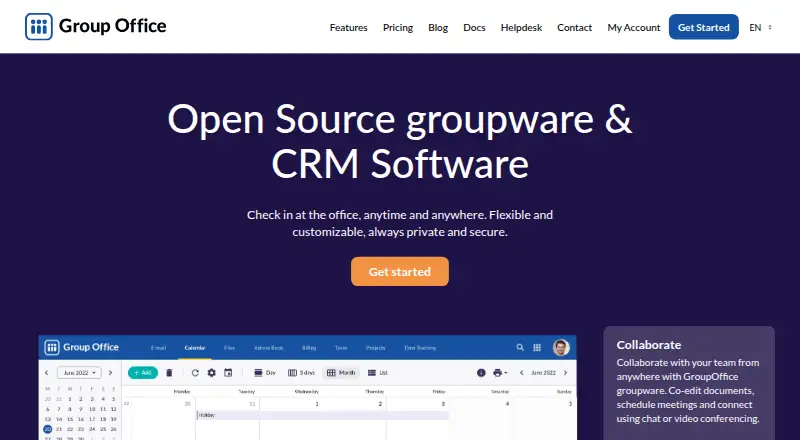
Group-Office is open-source groupware and CRM software for teams that need collaboration and business tools. It combines document co-editing, meeting scheduling, chat and video calls with shared address books, newsletters and support tickets submitted through a website or email. Project tools cover tasks, files, time tracking, reporting and invoicing project work and time. Document editing and file management connect with OnlyOffice, Collabora Online and Office 365. Finance supports online payments through services such as Mollie and PayPal, along with ZUGFeRD, XRechnung and UBL e-invoicing formats.
Teams can host Group-Office on their own server or use the hosted service, which the company says is hosted in the Netherlands. It synchronizes email, contacts, calendars, notes and tasks with native apps on iOS, macOS, Android and Windows, using protocols including IMAP, Microsoft ActiveSync, CalDAV, CardDAV and WebDAV. Group-Office offers a free Community option, paid plans and a 30-day trial. The maker, Group-Office, was founded in 2003 and is based in 's-Hertogenbosch, Netherlands.
Good
- Open-source software with a free Community option for unlimited users.
- Co-edit documents and schedule meetings, chat or make video calls.
- CRM includes shared address books, newsletters and incoming support tickets.
- Tracks project tasks, files and time, with reporting and invoicing.
- Synchronizes email, contacts, calendars, notes and tasks across supported devices.
- Supports self-hosting or a service hosted in the Netherlands.
Watch out
- Online includes 5 GB of storage per user.
- The listed Professional license covers 1–100 users.
- Online document editor, video call and chat each cost €2/user.
- Online Finance costs €12/install; Document Search costs €15/install.
Who it suits
Group-Office suits teams that want collaboration, CRM and project tools in one system, with a choice between self-hosting and hosted service. It may also suit organizations that need device synchronization, document integrations, finance tools or custom modules and fields.
Verdict
Pick Group-Office if your team wants open-source groupware that brings collaboration, CRM and project work together, with self-hosting available. The free Community plan supports unlimited users, while Online starts at €12/mo with 5 GB per user. Look elsewhere if your team needs more Online storage included or wants the listed Professional license to cover more than 100 users.
Plans and prices
From Group-Office's own pricing page, checked 22 Sep 2026.
| Plan | Price | What it gives you |
|---|---|---|
| Community | Free | Unlimited users |
| Professional | €439 a month | 1–100 users · Perpetual License |
| Professional updates | €219 a year | 1–100 users · €219 per year for updates on Professional features |
| Online | €12 a month | 5 GB storage per user · Helpdesk (9 to 5 CET) · Document editor, video call, and chat: €2/user each · Finance: €12/install · Document Search: €15/install · € 12/month |
| Community (self-hosted) | Free | Unlimited users · Email, calendar, files, document editing, notes, tasks, chat and video calls, address book, device sync · € 0 |
| Billing add-on | €219, paid once | Invoices · Online payments · Smart debtor profiles · € 219 |
| Document Search add-on | €299, paid once | Deep search of file content · Metadata search · E-Discovery · € 299 |
| Professional (self-hosted) | €439, paid once | 1–100 users · Support tickets, time tracking, projects, newsletter, Kanban, Studio, helpdesk (9 to 5 CET/CEST) · € 439 perpetual license; € 219 per year for updates on Professional features |
The facts
Each one read from Group-Office's own pages, with the date it was checked.
What it does
- Collaboration
- Teams can co-edit documents, schedule meetings, and communicate through chat or video conferencing.checked 5 Oct 2026
- CRM
- CRM features include shared address books, newsletters, and team support tickets accepted via a website or email.checked 5 Oct 2026
- Customization
- GroupOffice Studio lets power users create their own modules, and the product supports custom fields and filters.checked 5 Oct 2026
- Data location and backups
- The provider says its services are in the Netherlands and that it makes daily offsite backups there, kept for 14 days.checked 5 Oct 2026
- Document integrations
- Document editing and file management integrate with OnlyOffice, Collabora Online, and Office 365.checked 5 Oct 2026
- Hosting and deployment
- Customers can self-host on their own server or use the hosted service, which the company says is hosted in the Netherlands.checked 5 Oct 2026
- Notable limit
- The hosted Online plan includes 5 GB storage per user, with extra storage offered in monthly blocks.checked 5 Oct 2026
- Open source
- Yeschecked 22 Sep 2026
- Payments and e-invoicing
- Finance supports online payments such as Mollie and PayPal and e-invoicing formats ZUGFeRD, XRechnung, and UBL.checked 5 Oct 2026
- Product
- GroupOffice describes itself as open-source groupware and CRM software for collaboration and business tools.checked 5 Oct 2026
- Project management
- Project tools include task and file tracking, time tracking, reporting, and invoicing project work and time.checked 5 Oct 2026
- Protocols
- Device synchronization uses IMAP, Microsoft ActiveSync, CalDAV, CardDAV, and WebDAV.checked 5 Oct 2026
- Security
- The privacy policy lists SSL encryption, one-time-password two-factor authentication, fail2ban, IP address access control, and regular software security tests.checked 5 Oct 2026
- Support
- The Professional self-hosted plan includes helpdesk support from 9 to 5 CET/CEST, and service contracts list weekday phone support from 9 to 17.checked 5 Oct 2026
- Synchronization
- GroupOffice synchronizes email, contacts, calendars, notes, and tasks with native apps on iOS, macOS, Android, and Windows devices.checked 5 Oct 2026
The company
- Founded
- 2003checked 28 Sep 2026
- Headquarters
- 's-Hertogenbosch, Netherlandschecked 28 Sep 2026
Money
- Free plan
- Yeschecked 22 Sep 2026
- Free trial
- Yeschecked 22 Sep 2026
Where it runs
- Mobile app
- Yeschecked 22 Sep 2026
The full review of Group-Office
Group-Office brings groupware, CRM, project work and business tools into one open-source product, with a choice between self-hosting and the company’s hosted service. It suits teams that want shared work across those areas and can work within the paid plans’ user or storage limits.
Overview
Made by a company based in ’s-Hertogenbosch and founded in 2003, Group-Office combines collaboration tools with customer and project management. Teams can co-edit documents, schedule meetings, and communicate by chat or video call; the wider product also covers shared contacts, support tickets, task and file tracking, time tracking, reporting and invoicing project work. That breadth makes it a practical option for organizations that want these workflows together, though the fit depends on which capabilities their plan includes.
Key features
Document editing and file management integrate with OnlyOffice, Collabora Online and Office 365. Email, contacts, calendars, notes and tasks can synchronize with native apps on iOS, macOS, Android and Windows through IMAP, Microsoft ActiveSync, CalDAV, CardDAV and WebDAV. This range gives teams several routes to connect their devices and document tools.
The CRM includes shared address books, newsletters and team support tickets submitted through a website or email. Project tools add task and file tracking, time tracking, reporting and invoicing for project work and time. Online payments through Mollie and PayPal, plus ZUGFeRD, XRechnung and UBL e-invoicing, extend the finance workflow. GroupOffice Studio, custom fields and filters offer power users ways to shape modules and records around their work.
Self-hosting gives organizations control over deployment; the hosted service is in the Netherlands. The privacy policy describes SSL encryption, one-time-password two-factor authentication, fail2ban, IP address access control and regular software security tests. The provider also says it keeps daily offsite backups in the Netherlands for 14 days. These are useful safeguards for teams handling business records, alongside a Professional helpdesk available from 9 to 5 CET/CEST and weekday phone support under service contracts.
Pricing
- Community: free for unlimited users. The self-hosted Community plan includes email, calendar, files, document editing, notes, tasks, chat and video calls, address book and device sync. It is a strong starting point for teams able to host and maintain their own software. The Professional plan is where support tickets, time tracking, projects, newsletters, Kanban, Studio and helpdesk are explicitly included.
- Professional (self-hosted): €439, paid once for a perpetual license covering 1–100 users, with updates costing €219 per year. It adds the Professional features and helpdesk support from 9 to 5 CET/CEST. This suits organizations that want self-hosting and those tools, but the 100-user ceiling rules it out for larger teams.
- Professional updates: €219 a year for updates on Professional features, for 1–100 users. Budget for this recurring cost after buying the perpetual license if ongoing updates matter.
- Online: €12 a month, with 5 GB storage per user and helpdesk from 9 to 5 CET. Document editor, video call and chat cost €2/user each; Finance costs €12/install and Document Search €15/install. This is the hosted option for teams that prefer not to run their own server, but 5 GB per user and the add-on charges should factor into the total cost. Extra storage is sold in monthly blocks.
- Billing add-on: €219, paid once for invoices, online payments and smart debtor profiles.
- Document Search add-on: €299, paid once for deep file-content search, metadata search and e-discovery.
A 30-day trial is available. The free plan and trial make it possible to start without a paid commitment; the perpetual license’s annual update cost and Online’s per-user storage limit are the key terms to weigh before choosing a paid route.
Platforms
Group-Office supports Android, iOS, Linux, macOS, Windows, web access and self-hosting. Its mobile apps and device synchronization make it relevant to teams working across desktop and mobile devices.
Who it's for
Group-Office is best for teams that want collaboration, CRM and project management in one system, especially when unlimited free Community users or self-hosting matters. It is less suitable for organizations above 100 users considering Professional, or hosted teams that need more than 5 GB per user without paying for extra storage.
Pros and cons
- Pro: The self-hosted Community plan has unlimited users and covers core email, calendar, files, documents, tasks, messaging, contacts and device sync, making it useful for teams avoiding per-seat entry costs.
- Pro: CRM, project tracking, time reporting, invoicing and document integrations sit alongside collaboration tools, reducing the need to assemble those workflows from separate products.
- Pro: Self-hosting and a Netherlands-hosted option give teams a choice of deployment, with documented security controls and daily offsite backups for the hosted service.
- Con: Professional is limited to 100 users and carries a €219 per year updates charge after the 439.00 EUR perpetual license.
- Con: Online starts with 5 GB per user, while document editing, calls and chat each cost extra per user; teams relying on those features should account for add-on costs.
Alternatives
For teams focused on document management, LogicalDOC offers a free open-source Community plan with basic access control, advanced search, a web UI and SOAP and REST APIs. OpenKM is another free-plan document-management option. For a free open-source choice with a stated absence of limits on users or documents, consider SeedDMS. OpenDocMan offers a free self-installed Community edition for unlimited users with file locking and custom metadata.
Teams seeking quality-management software can compare FlinkISO, whose free on-premise plan includes unlimited concurrent users and all QMS modules. For transcription-focused work, Transkribus has a free plan with 50 free credits. Invenio is a free open-source option with self-hosted and web platforms. DocuWare offers cloud plans for 4 users with 20 GB storage and 15 users with 50 GB storage.
For category comparisons, browse Document Management Software, Project Management Software and CRM Software.
Verdict
Choose Group-Office if your team wants open-source groupware that brings collaboration, CRM and project work together, with the option to self-host and a free plan for unlimited users. Its broad feature set is the main draw; the 100-user Professional cap, annual updates charge and Online’s 5 GB per-user storage limit are the reasons to look elsewhere if your team exceeds those boundaries or needs more hosted storage.
Getting started
- Visit the Group-Office website.
- Choose the free Community plan, a Professional self-hosted license or the Online service.
- For self-hosting, deploy it on your own server; otherwise choose hosted Online.
- Use the web app or a listed platform, including Android, iOS, Linux, macOS or Windows.
- Start the available 30-day trial if you want to try the service first.
Limits worth knowing
The Online plan includes 5 GB of storage per user; additional storage is offered in monthly blocks. The free Community plans are listed for unlimited users, while the Professional self-hosted license covers 1–100 users.
Questions
Is Group-Office free?
Yes. The Community plan is free and supports unlimited users. A 30-day trial is also available.
How much does Group-Office cost?
Online is €12/mo and includes 5 GB storage per user. The Professional self-hosted license is €439 once, with updates at €219 per year; the listed Online add-on prices include €2/user each for document editor, video call and chat, €12/install for Finance, and €15/install for Document Search.
Which platforms does it support?
Listed platforms are Android, iOS, Linux, macOS, self-hosted, web and Windows. Group-Office also lists a mobile app.
Can I host Group-Office myself?
Yes. Customers can self-host it on their own server or use the hosted service.
Is Group-Office open source?
Yes, Group-Office is listed as open source, and the Community plan is available for self-hosting.
Which document editors does it integrate with?
Document editing and file management integrate with OnlyOffice, Collabora Online and Office 365.
Alternatives to Group-Office
- 1
FlinkISO
Free planOpen sourceAndroidiOSWebAPI8.6From $750 a year - 2
Box
Free planAndroidiOSWebAPI8.3From $5 a month - 3
OpenKM
Free planAndroidiOSWebAPI8.2From $100 a month - 4

DocuWare
AndroidiOSWebAPI7.9From £1,060 a month - 5
Oracle WebCenter Content
AndroidiOSWebAPI7.7$3,450 one-time - 6
Same-Page eStudio
AndroidiOSWebLinux7.2From $39 a month