
Transkribus
Transkribus uses AI to convert handwritten and printed documents into searchable text.
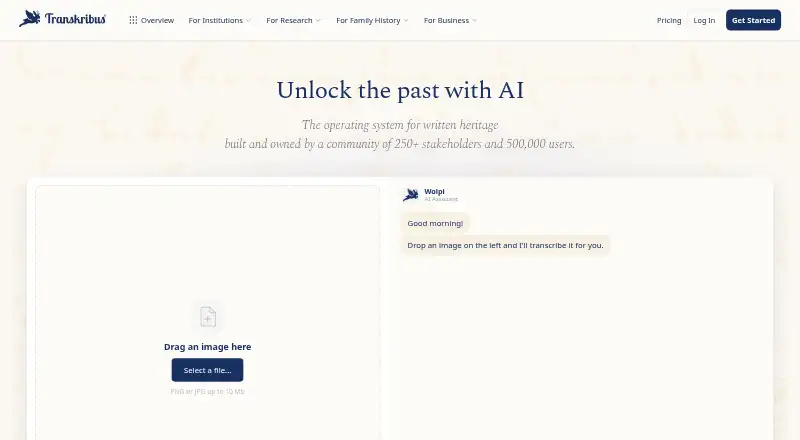
What Transkribus is
Transkribus uses AI to convert handwritten and printed documents into searchable text. Its text recognition supports more than 100 languages and historical scripts. Users can browse public models for handwriting, print, layout analysis, and table recognition, or train their own. The editor provides text and layout editing, version history, and real-time collaboration. Layout analysis identifies text regions, baselines, tables, and reading order; export options include PAGE XML, ALTO, and searchable PDF. The Developer Platform API returns structured text as JSON, a ZIP archive, or PAGE XML, but it is in beta and requires a Scholar plan or higher. Results are retained for 24 hours, and submitted JPEG, PNG, or TIFF images can be up to 20 MB. Processing uses credits; listed tasks range from 0.25 credits per page for line detection to 1 credit per page for several recognition tasks. Free includes 50 credits per month, while Scholar is €99 per year. Transkribus says data is processed and stored on servers in Austria, and users retain ownership and can delete documents and transcriptions.
Good
- Recognition supports more than 100 languages.
- Users can train their own AI models.
- Editor includes version history and real-time collaboration.
- Exports include PAGE XML, ALTO, and searchable PDF.
- Users retain ownership of documents and transcriptions.
Watch out
- Free plan includes 50 credits per month.
- API is beta and requires Scholar or higher.
- API results are retained for 24 hours.
- Older eXpert desktop software is no longer updated.
Who it suits
Transkribus may suit people and teams digitizing historical or other handwritten and printed documents, especially when searchable text, layout analysis, or collaboration is useful.
Verdict
Transkribus offers document recognition, editing, layout analysis, and multiple export formats, with a free plan and paid plans from €99 per year. API users need a Scholar plan or above, and the older desktop app no longer receives updates.
Plans and prices
From Transkribus's own pricing page, checked 21 Sep 2026.
| Plan | Price | What it gives you |
|---|---|---|
| Organisation | Priced on request | Custom user seats · Custom document storage · API access |
| Free | Free | 50 free credits per month · 1 user seat · 1 limited project · 20 GB storage · 5 training runs/month |
| Scholar | €99 a year | 900 credits per year · 1 user seat · 1 project · 200 GB storage · 30 training runs/month · priority job processing · €99/year (€8.25/month), incl. 20% VAT |
| Team | €449 a year | 1,500 credits per year · 5 user seats · 3 projects · 1 TB storage · 100 training runs/month · distribute credits across team · €449/year (€37.42/month), incl. 20% VAT |
| Credit top-up | €5,950, paid once | On-demand credits never expire · 250 credits; no subscription required |
| For Organisations | Priced on request | 15+ user seats · 75,000+ credits per year · dedicated success manager · custom onboarding · Get a quote |
The facts
Each one read from Transkribus's own pages, with the date it was checked.
What it does
- API
- The Developer Platform API accepts document images and returns structured text as JSON, a ZIP archive, or PAGE XML; it is in beta and requires a Scholar plan or above.checked 30 Sep 2026
- API limit
- API results are retained for 24 hours, and submitted images may be JPEG, PNG, or TIFF up to 20 MB.checked 30 Sep 2026
- Data rights
- Users retain ownership of their documents and transcriptions and can delete them at any time.checked 30 Sep 2026
- Desktop status
- The older Transkribus eXpert desktop software supports Windows, macOS, and Linux, but is no longer updated and new features are only available in the web app.checked 30 Sep 2026
- Editing
- The document editor supports text and layout editing, version history, and real-time collaboration.checked 30 Sep 2026
- Layout
- Layout analysis detects text regions, baselines, tables, and reading order, and supports export in PAGE XML, ALTO, searchable PDF, and other formats.checked 30 Sep 2026
- Models
- Users can browse public AI models for handwriting, print, layout analysis, and table recognition or train their own.checked 30 Sep 2026
- Purpose
- Transkribus uses AI to turn handwritten and printed documents into searchable text.checked 30 Sep 2026
- Recognition
- The maker says its text recognition supports more than 100 languages and historical scripts.checked 30 Sep 2026
- Security
- The maker says data are processed and stored on its servers in Austria, with GDPR-compliant handling.checked 30 Sep 2026
- Support
- The pricing comparison lists standard support for Free and priority support for Scholar and Team.checked 30 Sep 2026
- Usage limits
- Processing documents consumes credits, with handwriting recognition, table recognition, and field recognition each listed at 1 credit per page and line detection at 0.25 credits per page.checked 30 Sep 2026
The company
- Founded
- 2019checked 23 Sep 2026
- Headquarters
- Innsbruck, Austriachecked 23 Sep 2026
- Maker
- READ-COOP SCE is a member-owned European cooperative founded in 2019 in Innsbruck, Austria.checked 30 Sep 2026
The full review of Transkribus
Overview
Transkribus is a cloud service for turning handwritten and printed documents into searchable text. It suits researchers, archives, and teams working with historical material who need recognition alongside layout editing and export. Its free plan makes it approachable, but credit limits and the Scholar-or-higher requirement for API access shape who can use it at scale.
Made by member-owned European cooperative READ-COOP SCE, Transkribus supports more than 100 languages and historical scripts, according to its maker. Users can choose public AI models or train their own, then edit text and page structure, track versions, and collaborate in real time. The combination is more useful for document projects than a bare OCR endpoint, though API users must pay for at least Scholar.
The service processes and stores data on servers in Austria, with GDPR-compliant handling, according to the maker. Users retain ownership of documents and transcriptions and can delete them at any time. Processing runs in the cloud; the older eXpert desktop software remains usable on Windows, macOS, and Linux but is no longer updated, and new features are web-only.
Key features
- Handwriting and print recognition: Recognition for more than 100 languages and historical scripts makes Transkribus relevant to material that conventional print-focused OCR may not suit. The range is broad, but actual suitability still depends on the document and model chosen.
- Public and custom models: Users can browse models for handwriting, print, layout analysis, and table recognition, or train their own. That choice helps match recognition to a collection rather than relying on a single general-purpose model.
- Layout analysis and export: The system detects text regions, baselines, tables, and reading order. PAGE XML, ALTO, searchable PDF, and other exports support workflows that need structure as well as plain text.
- Editing and collaboration: The editor handles text and layout changes, version history, and real-time collaboration. These tools make the service more practical for ongoing transcription projects than recognition alone.
- Developer API: The beta API accepts document images and returns structured text as JSON, a ZIP archive, or PAGE XML. Images can be JPEG, PNG, or TIFF up to 20 MB; results are retained for 24 hours. API access requires Scholar or above, so it is not an option on the free plan.
- Credit-based processing: Handwriting recognition, table recognition, and field recognition each use 1 credit per page; line detection uses 0.25 credits per page. These rates make the plan allowance a meaningful constraint for large collections.
Pricing
Transkribus is freemium. Prices include 20% Austrian VAT where stated. Plans differ not just in credits but in seats, storage, and monthly training capacity, so the cheapest paid tier remains a single-user option.
| Plan | Price | Allowance and fit |
|---|---|---|
| Free | free | 50 free credits per month, 1 user seat, 20 GB storage, and 5 training runs per month. A sensible way for an individual to begin, but a small monthly processing budget. |
| Scholar | €99 a year (€8.25/month equivalent) | 900 credits per year, 1 seat, 200 GB storage, and 30 training runs per month, plus priority support and API access. The practical minimum for individual API users; credits are annual while training capacity is monthly. |
| Team | €449 a year (€37.42/month equivalent) | 1,500 credits per year, 5 seats, 1 TB storage, and 100 training runs per month, with priority support. Better suited to a small collaborative project than Scholar, though the annual credit allowance is only moderately larger. |
| Organisation | Custom pricing | Custom user seats and storage, with API access. A fit for organizations needing a tailored deployment allowance. |
| For Organisations | Custom pricing | 15+ user seats, 75,000+ credits per year, a dedicated success manager, and custom onboarding. This is aimed at larger deployments rather than individual or small-team work. |
| Credit top-up | €5,950, paid once | 250 on-demand credits, with no subscription required; these credits never expire. Useful for occasional extra processing, though the price is a substantial one-time outlay. |
Free and Scholar are limited to one seat, so teams need Team or an organizational arrangement. The free plan includes standard support; Scholar and Team include priority support. Processing consumes credits, and the listed per-page rates mean the allowance can run down quickly on substantial batches. The paid plans are presented annually, and the credit top-up does not expire.
Platforms
Transkribus is available on the web and through an API, with Linux, macOS, and Windows support for the older eXpert desktop software. Since that desktop app no longer receives updates and new features are web-only, it is a legacy option rather than the best place to start. Cloud deployment means recognition and document storage are handled on the service's servers.
Who it's for
Transkribus is a strong fit for individuals and organizations digitizing historical or handwritten records, especially when they need layout structure, custom models, collaboration, or structured exports. Scholars who need API integration must budget for Scholar or higher. Readers seeking a simple, high-volume API for general document extraction may find the plan and credit structure less suitable; the service is strongest when recognition and document editing belong in the same workflow.
Pros and cons
- Pro: Support for handwriting, historical scripts, and more than 100 languages targets material that can be difficult to process with print-only recognition.
- Pro: Model browsing and custom training let users adapt recognition to their documents rather than accept one fixed model.
- Pro: Layout editing, version history, collaboration, and structured export make it useful beyond the initial recognition step.
- Pro: The free tier offers 50 credits a month and 20 GB storage, enough to explore the workflow without a subscription.
- Con: API access starts at Scholar, excluding free users who want to build an integration.
- Con: Free and Scholar each have one seat, while their credit allowances constrain sustained processing.
- Con: The older desktop app is no longer updated, leaving the web app as the route to new features.
Alternatives
For broader category browsing, see AI OCR Software and Document Management Software.
- Hyland AP Automation is an enterprise AP automation alternative with a free plan and Android, API, iOS, and web platforms; its pricing is custom.
- Veryfi API is worth considering for a freemium API workflow with a free tier covering up to 100 documents per month and a paid Starter plan at $500 a month.
- Cloudmersive OCR API may suit API users who want a free tier of 600 calls per month, access to all APIs, and a 3.5 MB file limit.
- Nanonets Accounts Payable Automation is another freemium API and web option for accounts payable automation.
- Base64.ai is an alternative with paid OCR, a free plan, handwriting support, API access, and OCR in 165+ languages.
- LandingAI Agentic Document Extraction offers an Explore plan with 1,000 free credits to start and API, self-hosted, and web platforms.
- Mistral OCR may suit readers seeking API OCR priced at $4 a month for 1,000 pages, with a separate Document AI option.
- Doxis AI.dp is a paid alternative with a free trial and €25.00 worth of free credits on a pay-as-you-go basis.
Verdict
Choose Transkribus for historical and handwritten document projects where recognition, layout work, model choice, and export need to live together. Its free plan gives individuals a low-risk entry point, and Scholar unlocks the API at €99 a year. Look elsewhere if you need free API access, more seats at a low tier, or a fully maintained desktop app.
Getting started
- Visit the Transkribus website and create an account on the Free plan or choose a paid plan.
- Upload document images in JPEG, PNG, or TIFF format.
- Choose a public model or train your own for recognition tasks.
- Edit text and layout, then export in a supported format.
- For API use, choose Scholar or above and submit images up to 20 MB.
Limits worth knowing
Free includes 50 credits per month, one user seat, 20 GB storage, and five training runs per month. Scholar includes 900 credits per year and one seat; the beta API requires Scholar or above, and API results are retained for 24 hours.
Questions
Is Transkribus free?
Yes. Its Free plan costs €0 and includes 50 credits per month, one seat, 20 GB storage, and five training runs per month.
What do the paid plans cost?
Scholar costs €99 per year and Team costs €449 per year. Listed prices include 20% Austrian VAT.
Which platforms are supported?
The listed platforms are API, Linux, macOS, web, and Windows. The older eXpert desktop software supports Windows, macOS, and Linux but is no longer updated.
What does the API require?
The beta Developer Platform API requires Scholar or above. It accepts JPEG, PNG, or TIFF images up to 20 MB and returns structured text as JSON, a ZIP archive, or PAGE XML.
How does credit usage work?
Handwriting recognition, table recognition, and field recognition each use 1 credit per page. Line detection uses 0.25 credits per page.
Who makes Transkribus?
READ-COOP SCE is a member-owned European cooperative founded in 2019 in Innsbruck, Austria.
Alternatives to Transkribus
- 1
FlinkISO
Free planOpen sourceAndroidiOSWebAPI8.6From $750 a year - 2

Box
Free planAndroidiOSWebAPI8.3From $5 a month - 3
Group-Office
Free planOpen sourceAndroidiOSWebLinux8.2From €12 a month - 4
OpenKM
Free planAndroidiOSWebAPI8.2From $100 a month - 5

DocuWare
AndroidiOSWebAPI7.9From £1,060 a month - 6
Oracle WebCenter Content
AndroidiOSWebAPI7.7$3,450 one-time