
Basecamp
Basecamp is project management software for coordinating work, discussions, decisions, files, deadlines, and project delivery.
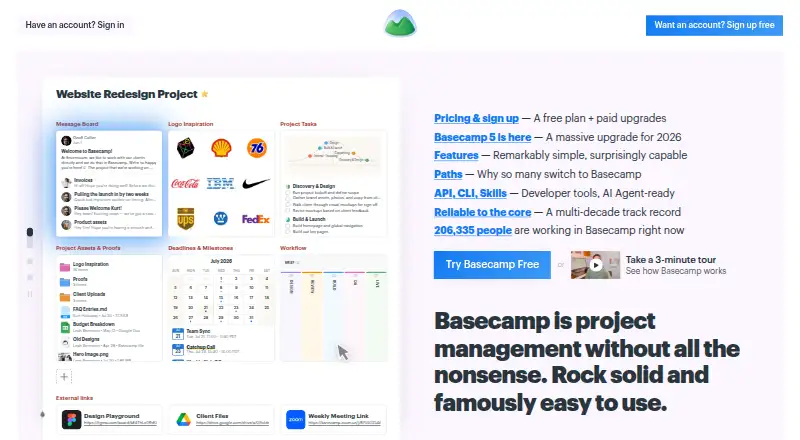
What Basecamp is
Basecamp is project management software for coordinating work, discussions, decisions, files, deadlines, and project delivery. Each project has its own page, where teams can add to-dos, message boards, chat, a calendar, and card tables. To-do lists support assignments, due dates, attachments, and subtasks. Hill Charts show progress, while Card Tables move work through stages. Project calendars track deadlines, milestones, events, and meetings, and can be subscribed to in Outlook, Google Calendar, and HEY Calendar. Client mode lets teams choose what clients can see on a project-by-project basis. Basecamp offers apps for Android, iOS, Mac, and Windows, plus web and command-line access. It also provides an API and CLI, and lists integrations such as Zapier, Clockify, Harvest, and Unito. The free plan includes one project, 1 GB of storage, and up to five users. Paid plans include Freelancer at $25 per month, Studio at $59 per month, and Pro at $99 per month; Unlimited costs $299 per month, billed annually.
Good
- To-dos support assignments, due dates, and subtasks
- Calendars track milestones and meetings
- Client visibility can be set per project
- Apps for Android, iOS, Mac, and Windows
Watch out
- Free plan limited to one project and five users
- Does not support SSO or SAML-based single sign-on
- Application databases are generally not encrypted at rest
Who it suits
Basecamp suits teams that want a shared project space for tasks, discussions, schedules, and files. Client mode may help teams control project-by-project client visibility.
Verdict
Basecamp centers project coordination around shared workspaces with task, discussion, calendar, and client tools. Check the project limits and authentication constraints before selecting a plan.
Plans and prices
From Basecamp's own pricing page, checked 3 Oct 2026.
| Plan | Price | What it gives you |
|---|---|---|
| Free | Free | 1 project · 1 GB storage · 5 users max |
| Freelancer | $25 a month | Up to 3 active projects · 5 GB storage · 20 users max · 30-day free trial |
| Studio | $59 a month | Up to 10 active projects · 25 GB storage · unlimited users and tools per project · 30-day free trial |
| Pro | $99 a month | Up to 25 active projects · 100 GB storage · unlimited users and tools per project · 30-day free trial |
| Unlimited | $299 a month | Unlimited projects, users, and tools per project · 1000 GB storage · 45-day free trial · billed annually |
The facts
Each one read from Basecamp's own pages, with the date it was checked.
Where it runs
- Apps
- Basecamp lists apps for iOS, Android, Mac, and Windows, plus access on the web and command line.checked 3 Oct 2026
What it does
- Authentication limit
- The maker's security assessment states Basecamp does not support SSO or SAML-based single sign-on.checked 3 Oct 2026
- Automation rules
- Nochecked 20 Sep 2026
- Client collaboration
- Client mode lets teams choose what clients can see on a project-by-project basis.checked 3 Oct 2026
- Developer and AI tools
- Basecamp offers an API and CLI, and its pricing page says ChatGPT and Claude connectors and full MCP support are coming soon.checked 3 Oct 2026
- Guest access
- Yeschecked 20 Sep 2026
- Integrations
- The integrations directory lists third-party services including Zapier, Clockify, Harvest, and Unito.checked 3 Oct 2026
- Progress tracking
- Hill Charts show project progress, while Card Tables let teams move work through stages.checked 3 Oct 2026
- Project workspace
- Each project has its own page where teams can add tools such as to-dos, message boards, chat, a calendar, and card tables.checked 3 Oct 2026
- Purpose
- Basecamp describes itself as project management software for organizing work, discussions, decisions, files, deadlines, and project delivery.checked 3 Oct 2026
- Scheduling
- Project calendars track deadlines, milestones, events, and meetings, and can be subscribed to in Outlook, Google Calendar, and HEY Calendar.checked 3 Oct 2026
- Security
- 37signals says data in transit uses HTTPS, uploaded files are encrypted at rest, and database backups are encrypted at rest with AES-256; application databases are generally not encrypted at rest.checked 3 Oct 2026
- Security limitation
- 37signals' security overview says the company itself has not completed a SOC audit; its hosting provider's SOC 2 Type II report covers datacenter physical and environmental controls.checked 3 Oct 2026
- Support
- Basecamp says its team reads and responds to every support message, though response times may be longer than usual; paid plans list 24/7/365 support.checked 3 Oct 2026
- Task tracking
- To-do lists support assignments, due dates, file attachments, and subtasks.checked 3 Oct 2026
- Time tracking
- Yeschecked 20 Sep 2026
Money
- Free plan
- Yeschecked 20 Sep 2026
- Free-plan user limit
- 5checked 20 Sep 2026
The full review of Basecamp
Basecamp is project management software for teams that want each project’s work and conversations gathered in a shared space. It is particularly well suited to teams collaborating with clients, while solo users or teams with strict sign-on or automation requirements should weigh its limits carefully.
Its appeal is the mix of task tracking, project communication, and controlled client visibility; the trade-off is that even paid tiers cap active projects until the top plan.
Overview
Each project has a page where teams can bring together to-dos, message boards, chat, calendars, and card tables. This structure keeps coordination alongside delivery work, which makes sense for teams that organize around distinct projects rather than needing a separate tool for every conversation or task. Basecamp also supports time tracking and guest access.
There are meaningful constraints alongside that breadth. Basecamp has no automation rules, and it does not support SSO or SAML-based single sign-on. Its security measures include HTTPS in transit and encryption at rest for uploaded files and database backups, but application databases are generally not encrypted at rest. The company has not completed a SOC audit; its hosting provider’s SOC 2 Type II report covers datacenter physical and environmental controls.
Key features
To-do lists support assignments, due dates, file attachments, and subtasks, giving teams the core tools to divide work and track ownership. Hill Charts show progress, while Card Tables let teams move work through stages. These offer more than a flat checklist, but the absence of automation means teams should not expect rules to route or advance work automatically.
Project calendars cover deadlines, milestones, events, and meetings, and can be subscribed to in Outlook, Google Calendar, and HEY Calendar. Client mode lets teams decide what clients can see for each project, a practical safeguard when external collaborators need access without the same view as the internal team.
The integrations directory includes services such as Zapier, Clockify, Harvest, and Unito. Basecamp also provides an API and CLI; ChatGPT and Claude connectors and full MCP support are coming soon. These options extend its reach, but prospective users should not treat the forthcoming AI connectors as current capabilities.
Pricing
The Free plan costs nothing and allows 1 project, 1 GB of storage, and up to 5 users. It is a narrow way for a very small team to try project-based coordination, but the single-project cap makes it a poor fit for managing several concurrent efforts.
Freelancer costs $25 a month and includes up to 3 active projects, 5 GB of storage, and up to 20 users, with a 30-day free trial. It suits a freelancer or small client-facing team that can work within those caps. Studio costs $59 a month for up to 10 active projects, 25 GB of storage, and unlimited users and tools per project, also with a 30-day trial; it is the more natural step for a growing team that needs room for contributors.
Pro costs $99 a month and raises the limits to 25 active projects and 100 GB of storage, with unlimited users and tools per project and a 30-day free trial. Unlimited costs $299 a month, billed annually, and includes unlimited projects, users, and tools per project, 1000 GB of storage, and a 45-day free trial. That top tier removes the project ceiling, but its annual billing is a substantial commitment; it is best reserved for organizations that need that headroom.
Paid plans list 24/7/365 support. Basecamp says its team reads and responds to every support message, though response times may be longer than usual.
Platforms
Basecamp has apps for Android, iOS, Mac, and Windows, plus web access and an API. Its command-line interface adds another option for teams that work through developer tools.
Who it's for
Basecamp is a strong candidate for teams that want project tasks, discussion, scheduling, and client visibility in the same project space. Client mode is especially useful when teams need to control external access project by project. It is less suitable for organizations requiring SSO or SAML, extensive automation, or more active projects than their chosen tier allows.
Pros and cons
- Project work and communication share a home: each project can bring together to-dos, messages, chat, a calendar, and card tables.
- Client visibility is configurable: teams can choose what clients see on each project.
- Several work-tracking views: Hill Charts and Card Tables complement assigned, due-dated to-do lists.
- No automation rules: teams needing automated workflow steps will need another tool or process.
- Project and storage ceilings below Unlimited: Freelancer, Studio, and Pro all cap active projects, so growing portfolios may require a more expensive tier.
- No SSO or SAML: this can rule Basecamp out for organizations that require either sign-on method.
Alternatives
Nifty is worth considering for teams seeking a lower-cost paid starting point: its Pro plan is $10 a month, while its free plan allows unlimited members but only 2 active projects and 100 MB of storage. Asana may fit personal project management better, with a free Personal plan for one or two people and a 2-user cap. ClickUp is another option for teams prioritizing a free tier with unlimited tasks and unlimited free-plan members, though its Free Forever plan includes 60MB of storage.
Hive offers a free plan with unlimited tasks and up to 10 workspace members. Wrike may appeal to teams that want unlimited users on the free tier, which includes 2 GB of storage and 200 active tasks per account. Teamwork.com has a free plan for 5 projects and 5 users. monday.com keeps its free plan to 2 seats, 3 boards, 3 Docs, and 200 items. OpenProject is an alternative for teams considering self-hosted software, with a free Community plan and Linux and web platforms.
For broader comparisons, browse Work Management Software, Game Project Management Software, Project Management Software, and Team Collaboration Software.
Verdict
Choose Basecamp if your team wants one project-centered place for tasks, discussion, calendars, and carefully scoped client access. Its combination of coordination tools is the central reason to choose it; project caps, no automation rules, and missing SSO or SAML are the clearest reasons to look elsewhere.
Getting started
- Open https://basecamp.com/
- Choose the Free plan or a paid plan
- Use the 30-day trial included with Freelancer, Studio, or Pro, or the 45-day trial with Unlimited
- Access Basecamp on the web or install its Android, iOS, macOS, or Windows app
- Create a project and add to-dos, message boards, chat, calendars, or card tables
Limits worth knowing
The Free plan allows one project, 1 GB of storage, and a maximum of five users. Freelancer permits up to three active projects, 5 GB of storage, and 20 users; higher plans increase project, storage, and user allowances.
Questions
Is there a free Basecamp plan?
Yes. The Free plan costs nothing and includes one project, 1 GB of storage, and up to five users.
How much do paid Basecamp plans cost?
Freelancer is $25 a month, Studio is $59 a month, Pro is $99 a month, and Unlimited is $299 a month billed annually.
Which platforms support Basecamp?
Basecamp is available on Android, iOS, macOS, Windows, the web, and through its API and command-line interface.
Does Basecamp offer a free trial?
Yes. Freelancer, Studio, and Pro include 30-day free trials, while Unlimited includes a 45-day free trial.
Can Basecamp connect to other services?
Its integrations directory lists Zapier, Clockify, Harvest, and Unito.
Does Basecamp support single sign-on?
No. Basecamp does not support SSO or SAML-based single sign-on.
Alternatives to Basecamp
- 1

Teamwork.com
Free planAndroidiOSWebAPI8.4From $9.99 a month - 2
RationalPlan
Free planWebLinuxmacOSSelf-hosted7.9From $4 a month - 3

Freedcamp
Free planAndroidiOSWebAPI7.8Free plan - 4
Redmine
Free planOpen sourceWebAPILinuxmacOS7.8Free plan - 5
Nutcache
Free planAndroidiOSWebAPI7.6Free plan - 6

ActiveCollab
AndroidiOSWebAPI7.5From $11 a month