
Nifty
Nifty is a workspace for projects, people and AI, available on Android, iOS, macOS, Windows, web and as an extension.
What Nifty is
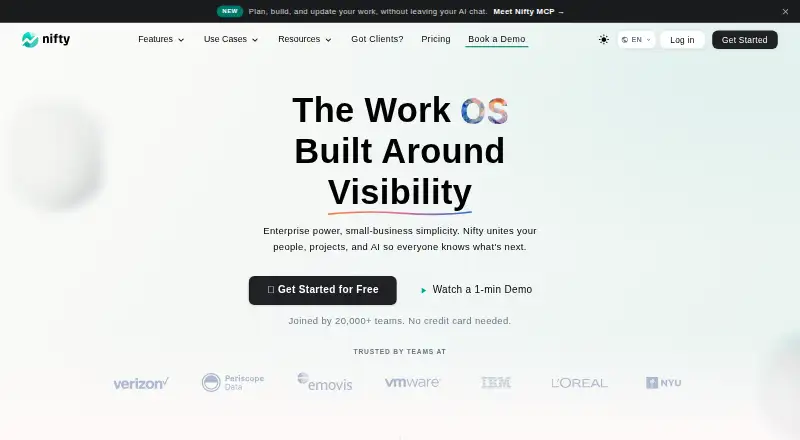
Nifty is a workspace for projects, people and AI, available on Android, iOS, macOS, Windows, web and as an extension. Project tools include tasks, milestones, discussions, documents, files, team chat, portfolios, recurring tasks and task dependencies. Its Orbit AI can build projects from descriptions, draft documents, turn chats into tasks and save patterns as templates. Paid plans list workflow automations, time tracking, reporting, cross-project overviews and team workloads. Native integrations include Harvest, Webex, Zoom, Slack, GitHub, Microsoft 365, Google Drive and Calendar, Miro and Typeform; Zapier offers access to over 2,000 apps. Nifty can import projects and related data from Asana, Basecamp, ClickUp, Jira, Trello, Wrike and CSV spreadsheets. The Free plan includes unlimited members, 100 MB of storage and two active projects. Pro costs $10 per month and Business $16 per month, both billed monthly. A 14-day trial is listed. Nifty says it is GDPR compliant and holds SOC 2 Trust Services Principles and ISO 27001:2022 certifications; it also says data is encrypted in transit and at rest.
Good
- Project tasks, discussions, files and chat are included.
- Orbit AI can turn chats into tasks.
- Zapier offers access to over 2,000 apps.
- Free plan supports unlimited members.
- Data is encrypted in transit and at rest.
Watch out
- Free plan limits storage to 100 MB.
- Free plan allows two active projects.
- Pro costs $10 per month.
- Business costs $16 per month.
Who it suits
Nifty suits teams that want project work, communication and documents in one workspace. Its import options may help teams moving projects from the listed tools or CSV spreadsheets.
Verdict
Nifty combines project management tools, AI assistance and integrations across desktop, mobile and web. The Free plan has storage and active-project limits; paid plans add automations, time tracking and reporting.
Plans and prices
From Nifty's own pricing page, checked 15 Oct 2026.
| Plan | Price | What it gives you |
|---|---|---|
| Free | Free | unlimited members · 100 MB storage · 2 active projects · forever |
| Unlimited | $399 a month | unlimited members · unlimited storage · unlimited active projects · unlimited guests and clients · billed monthly |
| Pro (per member) | $10 a month | 250 GB storage · 100 active projects · 5 guests & clients per paid seat · per member |
| Business (per member) | $16 a month | unlimited storage · unlimited active projects · unlimited guests & clients · per member |
| Pro | $79 a month | 10 team members · 500 GB storage · 100 active projects · unlimited guests and clients · billed monthly |
| Business | $124 a month | 30 team members · 1 TB storage · unlimited active projects · unlimited guests and clients · billed monthly |
| Enterprise | Priced on request | For compliance review, procurement or SLA terms, security requirements, or custom capacity · Talk to us |
The facts
Each one read from Nifty's own pages, with the date it was checked.
What it does
- AI
- Orbit AI can build projects from a description, draft docs, turn chats into tasks, and save patterns as templates.checked 3 Oct 2026
- AI data handling
- Nifty says Orbit AI sends submitted content to OpenAI but does not permit that content to train OpenAI models.checked 15 Oct 2026
- API authentication
- The public API supports personal access tokens and OAuth 2.1 bearer tokens, with scoped permissions and PKCE documented for OAuth.checked 15 Oct 2026
- API documentation depth
- The v3 reference documents endpoint methods, scopes, parameters, response schemas, errors, idempotency keys and search limits.checked 15 Oct 2026
- API version
- Nifty's developer portal documents a public v3 API while its legacy v1 API is scheduled to sunset on September 1, 2027.checked 15 Oct 2026
- Automation and reporting
- Paid plans list workflow automations, time tracking and reporting, cross-project overviews, and team workloads.checked 3 Oct 2026
- Automation rules
- Yeschecked 20 Sep 2026
- Automations and forms
- Project Control Center manages if/then automations, forms, repeating work, custom fields, forwarding email and integrations.checked 15 Oct 2026
- Data protection
- Nifty says data is encrypted in transit and at rest, and that it conducts regular independent vulnerability and penetration testing.checked 3 Oct 2026
- Encryption and backups
- Nifty states that data is encrypted in transit and at rest, with daily backups on separate servers and 24/7 security monitoring.checked 15 Oct 2026
- Guest access
- Yeschecked 20 Sep 2026
- Importing
- Nifty says it can import projects and related data from Asana, Basecamp, ClickUp, Jira, Trello, Wrike, and CSV spreadsheets.checked 3 Oct 2026
- Integrations
- Documented integrations include Google Docs, Drive and Calendar, Slack, Jira, Calendly, Zoom, Webex, Dropbox and imports from other project tools.checked 15 Oct 2026
- Latest news
- On October 12, 2026, Nifty announced rebuilt iOS and Android apps with redesigned navigation, task handling, chat, notifications and Docs.checked 15 Oct 2026
- License
- Nifty's terms state that the service and its software and content are owned and protected by Nifty and its partners, with no open-source license offered.checked 15 Oct 2026
- Limit: mobile quality
- TechRadar lists notifications and the user interface as areas needing improvement, while App Store and Google Play reviews describe mobile bugs and missing functionality.checked 15 Oct 2026
- Limit: time-log editing
- TrustRadius reviewers report that previously entered time logs cannot be edited and lack comment fields.checked 15 Oct 2026
Where it runs
- Apps
- Official downloads are provided for iOS, Android, macOS, Windows and Chrome.checked 15 Oct 2026
The company
- Company facts
- Crunchbase lists the legal name as Nifty Technologies, Inc., headquarters in New York, a private company with 11–50 employees and Shiv Kapoor as founder and CEO.checked 15 Oct 2026
- Founded
- G2 lists Nifty Technologies, Inc. as serving customers since 2017.checked 15 Oct 2026
- Headquarters
- 315 W 36th St, New York, NY 10018, United Stateschecked 28 Sep 2026
Money
- Free plan
- Yeschecked 20 Sep 2026
- Free-plan limits
- The Free plan includes unlimited members, 100 MB of storage, and two active projects.checked 3 Oct 2026
- Limit: free-tier scope
- TechRadar reports that the free plan allows only two active projects.checked 15 Oct 2026
The full review of Nifty
Nifty is a project workspace that combines task planning, team communication, documents and AI assistance. It suits teams that want those tools together across desktop, mobile and web, especially when projects need to scale beyond a small free-plan footprint. Its breadth is a strength, but storage and project caps make the free tier better for a limited trial than a growing portfolio.
Overview
Nifty brings tasks, milestones, discussions, docs, files, team chat and portfolios into one workspace, with recurring tasks and task dependencies for ongoing or connected work. That range can reduce the need to split project context across separate tools. Orbit AI adds practical creation and conversion tasks: it can build a project from a description, draft documents, turn chats into tasks and save patterns as templates.
It also supports imports from Asana, Basecamp, ClickUp, Jira, Trello, Wrike and CSV spreadsheets, making it a plausible destination for teams moving existing project data. Integrations include Harvest, Webex, Zoom, Slack, GitHub, Microsoft 365, Google Drive and Calendar, Miro and Typeform; Zapier extends access to over 2,000 apps. The built-in selection covers common collaboration needs, while teams dependent on other services may need Zapier.
Key features
Project work and coordination
Tasks, milestones, discussions, shared files and team chat place planning and project conversation in the same environment. Portfolios and cross-project overviews help teams track work across projects, while team workloads provide a view of capacity. Workflow automations, time tracking and reporting are paid-plan features, so teams that rely on those controls should budget for an upgrade rather than treat Free as a full operations platform.
AI and data handling
Orbit AI is aimed at reducing setup and follow-up work, from turning a project description into a project to converting chat into trackable tasks. Nifty says submissions go to OpenAI to generate responses and are not permitted to train OpenAI models. Organizations evaluating AI should weigh that stated handling alongside their own data requirements.
Security
Nifty states that it is GDPR compliant and holds SOC 2 Trust Services Principles and ISO 27001:2022 certifications. It says data is encrypted in transit and at rest and that it conducts regular independent vulnerability and penetration testing. Those measures make the product more suitable for teams with formal security expectations, though enterprises with custom requirements may need the Enterprise plan.
Pricing
Nifty has a free plan, a 14-day trial and paid pricing from $10/user/mo. The Free plan is billed forever at 0.00 USD and allows unlimited members, but its 100 MB storage and two active projects are tight constraints for teams sharing files or running several projects at once. It includes a self-serve help center.
Pro costs $10 a month, billed monthly, and includes 250 GB storage, 100 active projects and five guests and clients per paid seat. Its per-member listing is also $10 a month, billed per member, with the same limits. Pro fits teams that need room beyond Free while retaining a defined project and guest allowance; it lists priority support.
Business costs $16 a month, billed monthly, or $16 per member per month on the per-member listing. Both listings include unlimited storage, active projects, guests and clients. It is the more suitable step for teams whose project volume or external collaboration would outgrow Pro, and includes priority support.
Unlimited costs $399 a month, billed monthly, with an annual option also shown. It includes unlimited members, storage, active projects, guests and clients, and adds a dedicated success manager alongside priority support. This is a substantial fixed monthly commitment, so it is best suited to teams that need its uncapped capacity and can use the added support. Enterprise has custom pricing, enterprise-scale capacity, custom security requirements, and SLA and procurement support.
Platforms
Nifty is available on Android, iOS, macOS, Windows and the web, with an extension also listed. That spread suits teams mixing desktop and mobile use rather than standardizing on one operating system.
Who it's for
Nifty is a strong fit for teams coordinating multiple projects that want planning, discussions, files and chat in one workspace, with AI assistance and integrations alongside them. The Free plan can serve a small or exploratory setup if two active projects and 100 MB storage are enough. Teams needing reporting, time tracking or automations should consider paid plans; organizations with custom security or procurement needs have an Enterprise option.
It is less compelling for a team that only needs a lightweight free task list: Nifty's free storage and active-project caps can become limiting quickly. Teams should also compare the paid seat and guest allowances against their actual collaboration model before choosing Pro.
Pros and cons
- Pros: Tasks, milestones, docs, files, chat and portfolios share a workspace, keeping project coordination together.
- Pros: Orbit AI can turn descriptions and conversations into project work, helping reduce setup and manual task capture.
- Pros: Imports from seven named project sources plus CSV support a move from several established tools.
- Cons: Free allows only two active projects and 100 MB of storage, limiting its usefulness for active teams with shared files.
- Cons: Workflow automations, time tracking and reporting are paid features, so Free omits capabilities some operational teams will expect.
- Cons: Pro caps guests and clients at five per paid seat; teams with heavier external collaboration may need Business.
Alternatives
Work Management Software is a useful category comparison for readers weighing broader work coordination options. For a focused comparison of project-oriented products, see Project Management Software.
- Asana is worth considering for one or two people managing personal projects: its Personal plan is free forever for two users, with a 100 MB maximum per file.
- Basecamp may suit a very small team that wants a free starting point with one project, 1 GB storage and up to five users; its Freelancer plan is $25 a month for up to three active projects and 5 GB storage.
- ClickUp is an alternative if a free plan with unlimited tasks and unlimited free-plan members matters more than storage, which is capped at 60 MB on Free Forever.
- Hive may fit a workspace of up to 10 members looking for a free plan with unlimited tasks and 1,000 AI credits per month, though its free storage is 200 MB.
- Wrike offers a free option for teams needing unlimited users and 2 GB account storage, with 200 active tasks per account.
- EGroupware is an open-source alternative for readers seeking that model; its eCloud NGO plan is €21.90 a month, with annual-payment discount and prices plus VAT.
- Teamwork.com offers a free plan with five projects, five users and 100 automations, which may suit teams prioritizing those specific allowances.
- monday.com may be a better fit for a very small team that can work within its free plan's two seats, three boards, three Docs, 200 items and 500 MB storage.
Verdict
Choose Nifty if your team wants project planning, communication, files and AI assistance in one place, with paid options for automations, tracking and reporting as work expands. The strongest reason to look elsewhere is the tight Free cap, while Pro's guest allowance and per-member cost also deserve scrutiny for teams with many external collaborators. For teams that need the integrated workspace and can match a plan to their project scale, Nifty is a capable, broad-based choice.
Getting started
- Visit https://niftypm.com/.
- Choose the free plan or review paid plans starting at $10 per user per month.
- Use the listed 14-day trial if you want to try a paid plan.
- Access Nifty on Android, iOS, macOS, Windows, the web, or through its extension.
- Import project data from a supported project service or CSV spreadsheet if needed.
Limits worth knowing
The Free plan includes unlimited members, 100 MB of storage, and two active projects. Pro is $10 per month per member and includes 250 GB of storage, 100 active projects, and five guests and clients per paid seat.
Questions
Is there a free plan?
Yes. The Free plan is billed forever and includes unlimited members, 100 MB of storage, and two active projects.
How much do paid plans cost?
Pro is $10 per member per month, and Business is $16 per member per month; both are billed monthly. Unlimited is listed at $399 per month, with an annual option also shown.
Is a free trial available?
Yes. Nifty lists a 14-day trial.
Which devices and platforms support Nifty?
Nifty is available on Android, iOS, macOS, Windows, the web, and as an extension.
What integrations and imports does Nifty offer?
Native integrations listed include Harvest, Webex, Zoom, Slack, GitHub, Microsoft 365, Google Drive and Calendar, Miro, and Typeform. Nifty can import projects and related data from Asana, Basecamp, ClickUp, Jira, Trello, Wrike, and CSV spreadsheets.
Who makes Nifty, and where is it based?
The maker is Nifty. Its headquarters are at 315 W 36th St, New York, NY 10018, United States.
Alternatives to Nifty
- 1

Jira
Free planAndroidiOSWebAPI9.2Free plan - 2

Wrike
Free planAndroidiOSWebAPI9.2From $10 a month - 3
Teamwork.com
Free planAndroidiOSWebAPI9.2From $9.99 a month - 4

Trello
Free planAndroidiOSWebAPI9.2From $5 a month - 5

Linear
Free planAndroidiOSWebAPI9.2From $10 a month - 6

Hive
Free planAndroidiOSWebAPI9.0From $5 a month