
XMReality Remote Guidance
XMReality Remote Guidance connects on-site workers with remote experts through video and augmented reality tools for visual support.
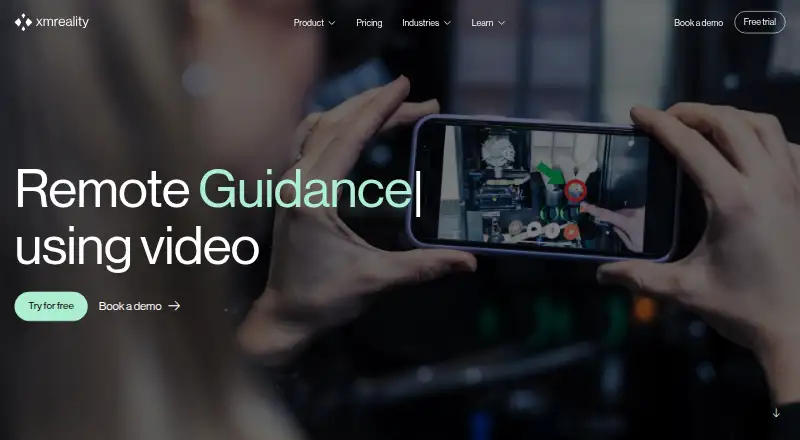
What XMReality Remote Guidance is
XMReality Remote Guidance connects on-site workers with remote experts through video and augmented reality tools for visual support. Its Hands Overlay lets an expert demonstrate instructions with their hands in real time. People receiving help can join from a mobile browser link without an account or software download. Calls support up to 20 participants depending on the plan. Users can capture snapshots, recordings, notes, and step-by-step instructions, then produce PDF reports. When bandwidth declines, video quality adjusts automatically, and a high-quality still image can remain visible for guidance. Ready-made integrations include Salesforce Service Cloud, Microsoft Dynamics 365, Outlook, OneDrive, and Teams; Professional and Enterprise plans also offer Zapier integrations. Custom integrations can use REST APIs, webhooks, and embeddable interface components, with APIs available to Enterprise customers. The service has Android, iOS, web, Windows, macOS, and Linux platforms. Basic costs $35 per user per month with annual billing, and a 14-day trial is available; there is no free plan.
Good
- Hands Overlay provides real-time visual instructions.
- Guests can join through a mobile browser link.
- Creates recordings, notes, instructions, and PDF reports.
- Adjusts video quality when bandwidth drops.
Watch out
- There is no free plan.
- Basic costs $35 per user monthly with annual billing.
- Basic supports up to five users.
- APIs are available to Enterprise customers.
Who it suits
It suits technical helpdesk teams, inspectors, auditors, and trainers who need to guide on-site workers remotely. It can also fit organizations using the listed business integrations.
Verdict
XMReality Remote Guidance combines live video, visual instruction, and documentation tools for remote support. Its Basic plan has a five-user limit, while larger group calls and APIs depend on plan access.
Plans and prices
From XMReality Remote Guidance's own pricing page, checked 2 Oct 2026.
| Plan | Price | What it gives you |
|---|---|---|
| Basic | $35 a month | Up to 5 users · unlimited calls · unlimited features not implied · $35 per user per month with yearly billing; $42 with monthly billing |
| Professional | $68 a month | Up to 20 users · 10 Gb storage per user included · 2,000 AI credits per user per month · $68 per user per month with yearly billing; $78 with monthly billing |
| Enterprise | Priced on request | Unlimited users · flexible AI credit allocation · dedicated support · Custom quote; invoiced annually |
The facts
Each one read from XMReality Remote Guidance's own pages, with the date it was checked.
What it does
- APIs
- REST APIs, webhooks and embeddable UI components are available for custom integrations, and APIs are available to Enterprise customers.checked 2 Oct 2026
- Data storage
- Call content can be stored in XMReality’s managed cloud, locally on the device, or through Microsoft OneDrive; the core service infrastructure is hosted on AWS in Ireland.checked 2 Oct 2026
- Documentation
- The product can capture snapshots, video recordings, notes and step-by-step instructions, and generate PDF reports.checked 2 Oct 2026
- Group calls
- Calls can include up to 20 participants depending on the plan; Enterprise supports up to 20 participants.checked 2 Oct 2026
- Guest access
- People receiving support can join from a link in their mobile browser without an account or software download.checked 2 Oct 2026
- Hands Overlay
- The Hands Overlay feature uses augmented reality to let an expert give real-time instructions with their own hands.checked 2 Oct 2026
- Integrations
- Ready-made integrations include Salesforce Service Cloud, Microsoft Dynamics 365, Outlook, OneDrive and Teams; Professional and Enterprise plans also support Zapier integrations.checked 2 Oct 2026
- Intended users
- The maker describes use cases including technical helpdesk support, inspections and audits, and remote training.checked 2 Oct 2026
- Low bandwidth
- The software automatically adjusts video quality when bandwidth drops and offers a high-quality pause image for continued guidance.checked 2 Oct 2026
- Purpose
- XMReality Remote Guidance is video software with augmented reality tools that connects on-site workers with remote experts for visual guidance and support.checked 2 Oct 2026
- Security
- XMReality says its cloud infrastructure and processes comply with GDPR, are certified to ISO 27001, and encrypt data in transit and at rest.checked 2 Oct 2026
- Support
- The pricing page lists email support for Basic, priority email support for Professional, and phone and email support for Enterprise.checked 2 Oct 2026
The company
- Founded
- 2007checked 28 Sep 2026
- Headquarters
- Linköping, Swedenchecked 28 Sep 2026
Alternatives to XMReality Remote Guidance
- 1

Blitzz Visual Remote Assistance
AndroidiOSWebAPI7.8From $19 a month - 2
OnSight RVX
AndroidiOSWeb7.0From $29 a month - 3
Visual Assistance
AndroidiOSWebmacOS7.0From 800 NZD a year - 4
Viewabo
AndroidiOSWeb6.9From $79 a month - 5

IFS Cloud Field Service Management
AndroidiOSWebAPI6.8 - 6
Natterbox
AndroidiOSWebExtension6.8From $82 a month