
Whatfix
Whatfix is an enterprise digital adoption platform for helping organizations and users get more value from their software.
What Whatfix is
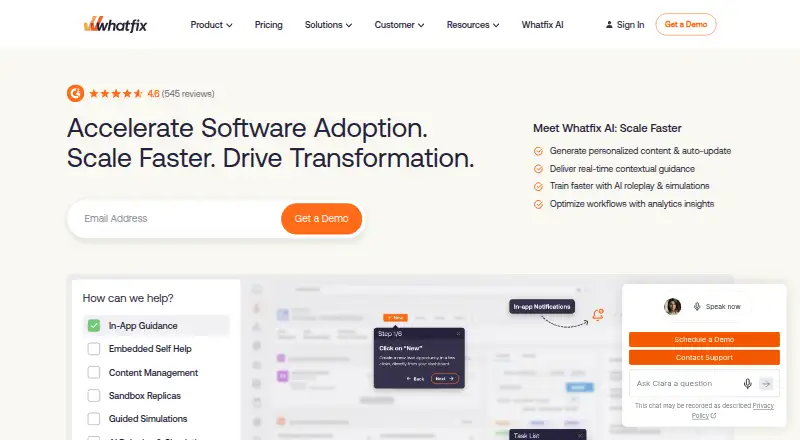
Whatfix is an enterprise digital adoption platform for helping organizations and users get more value from their software. It provides in-app guidance through Self Help, task lists, Smart Tips, step-by-step Flows, Beacons, Pop-Ups, and Launchers. Product Analytics can track user actions and application adoption; its Standard plan is included at no charge with a DAP Web & Desktop plan. Whatfix Mobile supports native, React Native, Xamarin, Cordova, Flutter, and Ionic apps on Android and iOS. The platform also lists desktop and virtual desktop support, including Citrix and Azure Virtual Desktop. Its integrations directory includes Salesforce, ServiceNow, Confluence, Workday, Microsoft Azure, Amplitude, and Power BI. Organizations can choose cloud or self-hosted deployment, though some Standard and Premium features may not be available when self-hosted. Listed security controls include SSO, IP whitelisting, audit logs, and data residency selection. Pricing is on request for most plans; subscriptions combine a product and plan fee with user license fees based on employee counts or customer-facing monthly active users. A free analytics plan is available only with a DAP Web & Desktop plan, and a free trial is listed.
Good
- Guidance includes task lists, Flows, Smart Tips, and Pop-Ups.
- Product Analytics tracks actions and application adoption.
- Mobile support covers Android and iOS app frameworks.
- Cloud and self-hosted deployment options are listed.
- A free analytics plan accompanies DAP Web & Desktop.
Watch out
- Most plan prices are available only on request.
- Some features may be unavailable with self-hosting.
- Analytics free plan requires a DAP Web & Desktop plan.
Who it suits
Whatfix suits organizations seeking in-app guidance and adoption analytics across web, desktop, mobile, or virtual desktop environments. Its self-hosted option may suit organizations considering that deployment model, with some feature availability limits to note.
Verdict
Whatfix brings in-app guidance and adoption analytics together, with support spanning mobile, desktop, and virtual desktop environments. Check plan pricing and self-hosted feature availability against your deployment needs.
Plans and prices
From Whatfix's own pricing page, checked 15 Oct 2026.
| Plan | Price | What it gives you |
|---|---|---|
| Product Analytics Standard | Free | standard product analytics · included with any DAP Web & Desktop plan |
| DAP Web & Desktop Enterprise | Priced on request | Multi-app plans for employee- or customer-facing apps; talk to sales for pricing |
| DAP Web & Desktop Premium | Priced on request | Employee- or customer-facing apps; cloud or self-hosted deployment; get a demo for pricing |
| DAP Web & Desktop Standard | Priced on request | Employee- or customer-facing apps; integrations limited to 2; get a demo for pricing |
| Enterprise | Priced on request | multi-app or unlimited DAP implementations · employee or customer-facing applications · flat fee plus user-license fees |
| Premium | Priced on request | employee or customer-facing applications · all listed DAP features · cloud or self-hosted deployment · flat fee plus user-license fees |
| DAP Mobile Standard | Priced on request | Employee- or customer-facing apps; get a demo for pricing |
| Standard | Priced on request | employee or customer-facing applications · cloud or self-hosted deployment · Standard integrations limited to 2 · flat fee plus user-license fees |
The facts
Each one read from Whatfix's own pages, with the date it was checked.
What it does
- AI capabilities
- Whatfix documents AI features for authoring, content summaries, behavioral insights, recommendations and roleplay training.checked 15 Oct 2026
- Analytics
- Product Analytics can track user actions and application adoption, and its Standard plan is included free with a DAP Web & Desktop plan.checked 30 Sep 2026
- API
- The public API is REST-based, exposes resources through URLs and uses dashboard-generated tokens with x-whatfix-integration-key authentication.checked 15 Oct 2026
- Chrome extension scale
- Whatfix Studio lists 10,000 users and supports creating walkthroughs, simulations, roleplay scenarios, Smart Tips, task lists and Pop-Ups.checked 15 Oct 2026
- DAP guidance
- Its DAP provides Self Help, task lists, Smart Tips, step-by-step Flows, Beacons, Pop-Ups and launchers.checked 15 Oct 2026
- Deployment limitation
- Whatfix warns that some Standard and Premium features may be unavailable in self-hosted deployments.checked 15 Oct 2026
- Desktop and virtual environments
- Whatfix lists desktop application support and virtual desktop support for environments including Citrix and Azure Virtual Desktop.checked 30 Sep 2026
- Developer documentation
- The support developer guide describes the API as covering operations available in the Whatfix web client and links to an API reference.checked 15 Oct 2026
- Documentation scope
- The support portal is organized into DAP Web, Desktop, Mobile and OS documentation plus Product Analytics, Mirror and AI-agent sections.checked 15 Oct 2026
- Encryption
- Whatfix states that data is encrypted in transit with TLS 1.2 or higher and at rest with AES-256 or equivalent.checked 15 Oct 2026
- Google Play availability
- Whatfix publishes a Banking Demo app on Google Play with 100+ downloads; the listing does not display a star rating.checked 15 Oct 2026
- Integrations
- Published integrations include Salesforce, Salesforce Survey, SAP SuccessFactors, ServiceNow, SurveyMonkey and Workday.checked 15 Oct 2026
- Licence
- Whatfix is proprietary commercial software governed by its EULA; the EULA prohibits reverse engineering, decompiling and disassembly.checked 15 Oct 2026
- Limit: G2 users
- G2’s review summary says initial setup can be complex and requires continuing maintenance.checked 15 Oct 2026
- Limit: Software Advice reviewers
- Reported drawbacks include high pricing, difficult configuration, limited analytics in an older review and challenges supporting large web applications.checked 15 Oct 2026
The company
- Company headquarters and founding
- LinkedIn lists headquarters in San Jose, California and a 2013 founding year.checked 15 Oct 2026
- Company legal name
- The Apple App Store identifies the developer as Whatfix Private Limited.checked 15 Oct 2026
- Company origin
- Whatfix says it was co-founded by Khadim Batti and Vara Kumar in 2014.checked 30 Sep 2026
- Company size
- LinkedIn lists Whatfix as a privately held software-development company with 501–1,000 employees.checked 15 Oct 2026
- Founded
- 2014checked 23 Sep 2026
- Headquarters
- Bengaluru, Indiachecked 23 Sep 2026
Where it runs
- Cross-platform overlay
- Whatfix says it can overlay web, desktop, mobile and Citrix or other VDI applications, including custom applications.checked 15 Oct 2026
- In-app guidance
- Its guidance includes Self Help, task lists, Smart Tips, step-by-step Flows, Beacons, Pop-Ups, and Launchers.checked 30 Sep 2026
Money
- Free trial
- Whatfix says users can sign up for a free trial; the pricing page does not state its duration.checked 30 Sep 2026
The full review of Whatfix
Overview
Whatfix is an enterprise digital adoption platform for organizations rolling out software to employees or customers. It suits teams that need in-product guidance across web, desktop, mobile, or virtual desktop environments, especially when adoption analytics and deployment flexibility matter. Its breadth is a strength, but custom pricing makes a close fit check important before committing.
Key features
Guidance in the product
Whatfix combines Self Help, task lists, Smart Tips, Beacons, Pop-Ups, Launchers, and step-by-step Flows. Product tours, walkthroughs, and onboarding checklists give teams several ways to introduce software and guide users through tasks. The no-code builder and localization can help teams produce guidance for different workflows and audiences without making the platform a one-format tour tool.
Adoption analytics
Product Analytics tracks user actions and application adoption, giving teams a way to assess whether software is being used. Its Standard plan is included at no charge with a DAP Web & Desktop plan; it is not presented as a standalone free tier.
Deployment and integrations
Whatfix supports cloud and self-hosted deployment. That choice can matter to organizations with deployment constraints, but some Standard and Premium features may be unavailable in self-hosted environments. Its integrations directory includes Salesforce, ServiceNow, Confluence, Workday, Microsoft Azure, Amplitude, and Power BI, which can connect adoption work with tools teams already use.
Security and support
Pricing-page features include SSO, IP whitelisting, audit logs, and data residency selection. Standard customer support is available 24 hours a day, Monday through Friday; plans also list a named Customer Success Manager and content author training. These are useful provisions for enterprise rollouts, though the exact plan fit should be confirmed.
Pricing
Whatfix is paid, with pricing on request. Subscription cost combines a flat product and plan fee with user-license fees based on employee user counts or customer-facing monthly active users, so the final price depends on deployment and audience scale.
- Product Analytics Standard: free, exclusively with any DAP Web & Desktop plan. It adds analytics without a separate listed charge, but does not provide a standalone free Whatfix plan.
- DAP Web & Desktop Standard: custom pricing for employee- or customer-facing apps; integrations are limited to 2. The cap may suit a narrower rollout, but teams needing more connections should compare higher tiers.
- DAP Web & Desktop Premium: custom pricing for employee- or customer-facing apps, with cloud or self-hosted deployment. Self-hosting is a meaningful option, though feature availability can vary in that deployment.
- DAP Web & Desktop Enterprise: custom pricing for multi-app employee- or customer-facing plans, aimed at broader deployments.
- DAP Mobile Standard: custom pricing for employee- or customer-facing apps.
Whatfix offers a free plan and a free trial, but the free Product Analytics plan is tied to a Web & Desktop subscription.
Platforms
Whatfix spans Android, iOS, macOS, Windows, web, browser extension, API, and self-hosted environments. Whatfix Mobile supports native, React Native, Xamarin, Cordova, Flutter, and Ionic apps on Android and iOS. Desktop application support and virtual desktop support include environments such as Citrix and Azure Virtual Desktop. This range is suited to organizations guiding users across varied software estates, rather than teams seeking a single-platform tool.
Who it's for
Whatfix is best suited to organizations that need structured guidance and adoption measurement across employee or customer-facing applications, with mobile or virtual desktop coverage as part of the requirement. Smaller teams with one narrow workflow may find the enterprise-oriented breadth and custom quote process more than they need.
Pros and cons
- Pros: Multiple guidance formats, from Self Help to Flows and tours, support more than one onboarding approach.
- Pros: Mobile framework coverage and desktop and virtual desktop support extend guidance beyond web apps.
- Pros: Cloud and self-hosted deployment, plus security controls such as SSO and audit logs, address varied enterprise requirements.
- Cons: Pricing is custom, and user-license fees vary with employee counts or customer-facing monthly active users, making budget comparison less direct.
- Cons: Standard limits integrations to 2, while self-hosted deployment may lack some Standard and Premium features.
- Cons: The free Product Analytics plan requires a DAP Web & Desktop plan, so it is not a low-cost standalone starting point.
Alternatives
Stonly is worth considering for a guide-focused option with a free plan and a Basic tier capped at 400 guide views per month, 5 published guides, 1 language, 100 steps per guide, and 1 team member.
Candu may suit teams seeking a freemium overlays tool: its free tier allows 3 live experiences and unlimited user licenses, while Starter costs $199 a month billed annually.
Cornerstone Learning is another paid option, with pricing varying by organization needs and size and a quote required.
WalkMe is a paid alternative with no free plan and coverage across Android, iOS, desktop, web, and self-hosted environments.
Nexthink Adopt is a paid alternative spanning mobile, desktop, and web platforms; an additional license may be required depending on the licensing model.
Userpilot may be a better fit when published usage limits and prices help narrow the choice: Starter is $299 a month for up to 2,000 MAU, 10 segments, 3 seats, and 1-year data retention.
Appcues is another paid option, with a Start plan covering up to 3,000 MAUs, 10 published experiences, and 12 months of reporting history.
Zoho Digital Adoption Platform is a freemium, web-based alternative.
Compare options in Digital Adoption Platforms, Product Adoption Software, and Customer Self-Service Software.
Verdict
Choose Whatfix if your organization needs guidance and adoption analytics across multiple kinds of applications, with mobile, desktop, virtual desktop, and self-hosted options in scope. Its strongest case is breadth paired with enterprise deployment controls; look elsewhere if you need transparent pricing, a standalone free analytics product, or a straightforward low-cost starting tier.
Getting started
- Visit the Whatfix website.
- Choose a relevant plan and request a demo or contact sales for pricing.
- Select cloud or self-hosted deployment where available.
- Use the free Analytics Standard plan with a DAP Web & Desktop plan.
Limits worth knowing
Product Analytics Standard is free only with a DAP Web & Desktop plan. DAP Web & Desktop Standard limits integrations to two; some Standard and Premium features may not be available with self-hosted deployment.
Questions
Is Whatfix free?
Product Analytics Standard is free with a DAP Web & Desktop plan. Whatfix also lists paid plans with pricing available on request.
What platforms does Whatfix support?
Listed platforms include Android, iOS, macOS, Windows, web, API, extensions and self-hosted deployment. Whatfix also lists desktop and virtual desktop support.
Can Whatfix be self-hosted?
Yes. Whatfix offers cloud and self-hosted deployment, though some Standard and Premium features may not be available with self-hosting.
How is Whatfix pricing calculated?
Subscriptions combine a flat product and plan fee with user license fees based on employee counts or customer-facing monthly active users.
Which integrations are listed?
Examples include Salesforce, ServiceNow, Confluence, Workday, Microsoft Azure, Amplitude and Power BI.