
Twilio Studio
Twilio Studio is a low-code/no-code visual builder for creating, editing, and managing communication workflows.
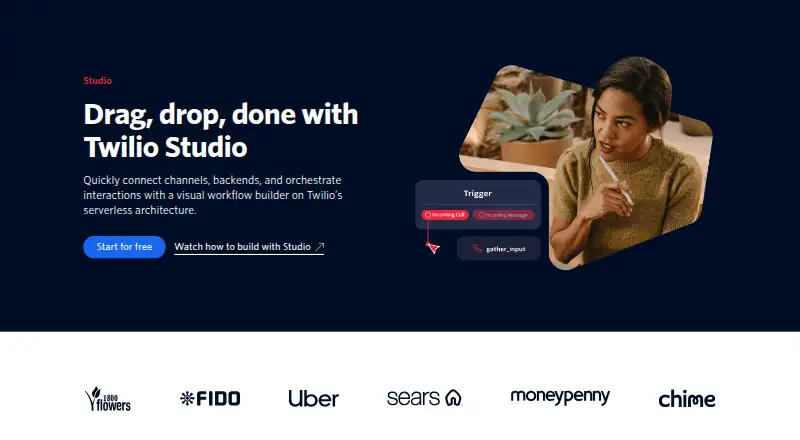
What Twilio Studio is
Twilio Studio is a low-code/no-code visual builder for creating, editing, and managing communication workflows. Users arrange widgets on a canvas and can add code for custom logic. Flows can start from inbound messages, voice calls, webhooks, or other Studio Flows, and can handle voice, messaging, and other communication applications. Studio can exchange data with backend systems to add context to Twilio-powered conversations. Twilio lists IVRs, appointment reminders, SMS surveys, call center workflows, autoresponders, and call forwarding as use cases. Its documentation includes tutorials for Slack, WhatsApp customer support menus, Twilio Conversations, and RCS messaging. The free tier includes 1,000 flow executions per month. A Flow can contain up to 2,000 widgets, including Subflows; an Execution ends after 1,000 steps or 30 days, and Execution and Step data is retained for 30 days after an Execution starts. Outbound HTTP requests from specified widgets are limited to 10 seconds. Additional Twilio communications charges are separate.
Good
- Visual canvas supports low-code and custom-code workflows.
- Flows can start from messages, calls, webhooks, or other flows.
- Free tier includes 1,000 executions per month.
- Automatically generates an API key for Flow requests.
Watch out
- Flows are limited to 2,000 widgets.
- Executions end after 1,000 steps or 30 days.
- Execution data is retained for 30 days.
- Additional Twilio communications charges are separate.
Who it suits
Studio suits teams building communication workflows for voice or messaging who want to arrange visual steps and optionally add custom code. It may also suit users connecting Twilio conversations to backend systems or building the listed IVR, reminder, survey, and call-center workflows.
Verdict
Twilio Studio provides a visual way to build voice and messaging workflows, with triggers, backend connections, and optional code. Check its execution, widget, and data-retention limits, and account separately for communications charges.
Plans and prices
From Twilio Studio's own pricing page, checked 30 Sep 2026.
| Plan | Price | What it gives you |
|---|---|---|
| Free tier | Free | 1,000 flow executions per month are free |
| Pay-as-you-go | Free | 1,000 flow executions per month are free · unlimited flows · additional Twilio communications charges are separate · per flow execution |
The facts
Each one read from Twilio Studio's own pages, with the date it was checked.
What it does
- Authentication
- Studio automatically generates an API key for Twilio API requests during a Flow Execution, so users do not need to provide their Twilio Auth Token to Studio.checked 30 Sep 2026
- Backend connections
- Studio can send data to and from backend systems to add context to Twilio-powered conversations.checked 30 Sep 2026
- Channels
- Studio workflows can handle voice, messaging, and other communication applications.checked 30 Sep 2026
- Execution data retention
- Studio retains Execution and Step data for 30 days after an Execution starts.checked 30 Sep 2026
- Flow limits
- A Flow is limited to 2,000 widgets including Subflows, and an Execution ends after 1,000 steps or 30 days.checked 30 Sep 2026
- Integrations
- Studio documentation includes tutorials for Slack, WhatsApp customer support menus, Twilio Conversations, and RCS messaging.checked 30 Sep 2026
- PCI limitation
- Studio does not support the PCI Mode setting in Programmable Voice, and its Gather Input widget does not redact collected Gather data.checked 30 Sep 2026
- Request limit
- Outbound HTTP requests from the HTTP Request and Run Function widgets are limited to 10 seconds.checked 30 Sep 2026
- Security certifications
- Twilio states that its services are certified under ISO/IEC 27001 and have attestations to ISO/IEC 27017 and ISO/IEC 27018.checked 30 Sep 2026
- Support
- Twilio directs Studio users to its support team and the Twilio tag on Stack Overflow for help.checked 30 Sep 2026
- Triggers
- Flows can be triggered by inbound messages, inbound voice calls, webhooks, or other Studio Flows.checked 30 Sep 2026
- Use cases
- Twilio identifies IVRs, appointment reminders, SMS surveys, call center workflows, autoresponders, and call forwarding as Studio use cases.checked 30 Sep 2026
- Visual builder
- Users build workflows by dragging widgets onto a canvas and can add code for custom logic.checked 30 Sep 2026
- What it does
- Twilio Studio is a low-code/no-code visual builder for creating, editing, and managing communication workflows.checked 30 Sep 2026
The company
- Founded
- 2008checked 28 Sep 2026
The full review of Twilio Studio
Twilio Studio is a visual workflow builder for automating voice, messaging, and other communications. It suits teams connecting customer interactions to backend systems, especially when they want a low-code starting point with room for custom logic. Its free execution allowance is useful, but strict workflow limits and a significant data-handling caveat narrow its fit for sensitive or complex use cases.
Overview
Studio combines a drag-and-drop canvas with optional code, letting teams build and manage communication flows without writing every step from scratch. Inbound messages, voice calls, webhooks, and other Studio Flows can start an execution; backend connections can supply or receive data to add context to conversations.
Twilio identifies IVRs, appointment reminders, SMS surveys, call-center workflows, autoresponders, and call forwarding as use cases. That range makes Studio relevant to teams automating both routine notifications and customer-service interactions, though it is a workflow tool rather than a complete communications service: Twilio communications charges are separate.
Key features
The visual builder supports voice and messaging workflows, with widgets arranged on a canvas and code available for custom logic. This is a practical middle ground for teams that want to shape flows visually but need backend connections or tailored behavior. Studio also supports self-service data lookup, speech recognition, and API access.
Twilio documentation includes integration tutorials for Slack, WhatsApp customer-support menus, Twilio Conversations, and RCS messaging. These give teams starting points for connecting Studio to other Twilio and messaging workflows. Studio automatically generates an API key for Twilio API requests during an execution, so users do not need to provide their Twilio Auth Token to Studio.
Flow size and execution duration impose firm boundaries: a Flow can contain up to 2,000 widgets, including Subflows, and an Execution ends after 1,000 steps or 30 days. Outbound HTTP requests made by the HTTP Request and Run Function widgets are limited to 10 seconds. These limits are worth factoring into designs with extensive branching, long-running interactions, or slow backend responses.
Studio retains Execution and Step data for 30 days after an Execution starts. It does not support the PCI Mode setting in Programmable Voice, and its Gather Input widget does not redact collected Gather data. Teams handling payment-card data should not treat Studio as a PCI-safe way to collect it. Twilio states that its services are certified under ISO/IEC 27001 and have attestations to ISO/IEC 27017 and ISO/IEC 27018; those credentials do not remove the specific limitation around PCI Mode and Gather data.
Pricing
The Free tier costs nothing and includes 1,000 flow executions per month. It is a useful starting point for small workflows or initial development, but the monthly execution allowance makes it a poor fit for sustained higher-volume use.
Pay-as-you-go costs nothing, billed per flow execution. It includes 1,000 flow executions per month free and unlimited flows, with additional Twilio communications charges billed separately. This suits teams whose usage varies or grows beyond the free execution allowance, but the 0.00 USD monthly price is not the total cost of running communications through Twilio.
Platforms
Studio is available on the web and through an API, and deployment is cloud-based. Those options suit teams building or managing workflows as part of a Twilio-connected software stack; they do not provide a self-hosted deployment option.
Who it's for
Studio is a strong fit for teams building IVRs, reminders, surveys, or automated customer-service flows that need voice or messaging triggers and backend context. The visual builder can reduce the amount of custom flow code, while API access and optional code give developers room to extend workflows.
It is a weaker fit for teams that need self-hosting, long executions beyond the stated caps, or PCI Mode support and redacted Gather data. Anyone planning production use should also account for separate communications charges and the 30-day retention period for execution data.
Pros and cons
- Pros: A visual builder with optional code supports both straightforward flows and custom logic.
- Pros: Voice, messaging, multiple trigger types, and backend connections cover a broad set of communication workflows.
- Pros: The first 1,000 monthly executions are free, and the pay-as-you-go plan allows unlimited flows.
- Cons: Separate Twilio communications charges mean the 0.00 USD monthly plan price is not the full operating cost.
- Cons: The 2,000-widget, 1,000-step, 30-day, and 10-second limits can constrain complex or slow workflows.
- Cons: The PCI Mode and Gather data limitations make it unsuitable for certain payment-data collection flows.
Alternatives
For a broader comparison of category options, see Interactive Voice Response Software.
- Telnyx TeXML is worth considering when a paid, usage-based option with automatic tier discounts and no contract suits your calling needs better.
- Ozonetel IVR System is an alternative with a free trial and web access.
- 8x8 Intelligent IVR may suit teams seeking voice experiences and call routing, with usage from $0.05 a month and custom quotes available.
- BizPlus IVR is an option for teams looking for a plan that includes a virtual number, agents, a two-level IVR menu, recording, missed-call capture, and basic reports.
- Plum Fuse is another paid API and web option.
- FreeSWITCH is a free, self-hosted alternative for teams prepared to run open-source software and rely on community support.
- Zappix Visual IVR is another API and web option.
- NCH IVM Telephone Answering Attendant is a Linux and Windows alternative with a free trial.
Verdict
Choose Twilio Studio if you want a cloud-based visual way to build voice and messaging workflows, connect them to backend systems, and start with 1,000 free monthly executions. Look elsewhere if your flows require PCI Mode, redacted Gather data, self-hosting, or more room than its execution and request limits allow.
Alternatives to Twilio Studio
- 1
Voicent
Free planAndroidiOSWebAPI8.2From $163 a month - 2

Wazo Platform
Free planAndroidiOSWebAPI7.5Free plan - 3

Avaya Experience Platform
WebAPISelf-hosted7.0From $48 a month - 4

BizPlus IVR
WebAPISelf-hosted6.8From ₹2,499 a month - 5

FreeSWITCH
Free planAPILinuxmacOSSelf-hosted6.4Free plan - 6
Cloud IVR
Web6.3From €99.99 a year