
Synology Photos
Synology Photos is a photo and video management service that runs in DSM and requires a Synology NAS for private storage.
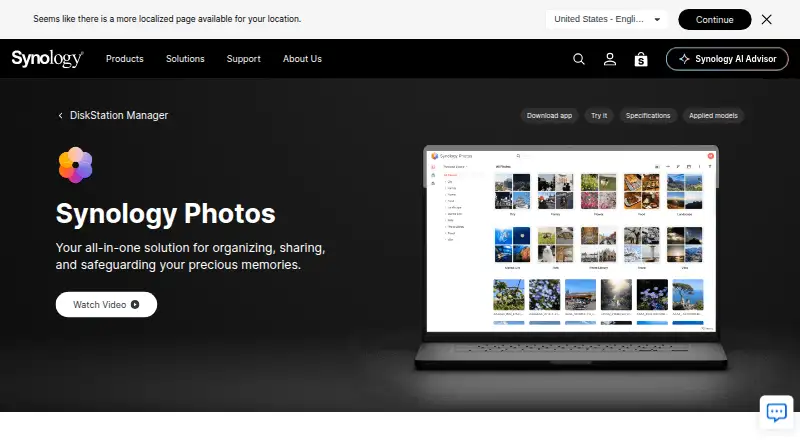
What Synology Photos is
Synology Photos is a photo and video management service that runs in DSM and requires a Synology NAS for private storage. It lets users browse, search, upload, preview, share, and organize media. The mobile app can automatically back up photos and videos to the NAS. Users can share individual items or albums through links protected with passwords or expiration dates. Shared Space lets selected users collaborate, with access and editing rights controlled at folder level. Organization options include custom and conditional albums, automatic grouping, and facial and object recognition on supported NAS models. RAW files are supported; previewing HEIC/HEVC files and compressed videos requires Synology Image Assistant. Synology Photos is free, with no paid premium tiers listed. Its mobile apps require iOS 16 or later or Android 11 or later, and TV apps are available for Apple TV and Android TV. Chrome and Safari are recommended for web use.
Good
- Automatic mobile backup to a Synology NAS
- Share links can require passwords or expiration dates
- Shared Space supports folder-level access and editing rights
- Includes custom albums and automatic grouping
Watch out
- Requires a Synology NAS for private storage
- Face and object recognition works only on certain NAS models
- HEIC/HEVC previews require Synology Image Assistant
- Drag-and-drop uploads are limited to 5,000 files per upload
Who it suits
It suits Synology NAS owners who want to organize, back up, and share photos and videos privately. Shared Space may also suit households or groups that need folder-level collaboration.
Verdict
Synology Photos combines private NAS storage with media backup, organization, and link-based sharing. Its usefulness depends on owning a Synology NAS, and some previews and recognition features have additional requirements or model limits.
Plans and prices
From Synology Photos's own pricing page, checked 21 Sep 2026.
| Plan | Price | What it gives you |
|---|---|---|
| Free | Free | Requires a Synology NAS |
| Synology Photos | Free | No paid premium tier · Requires a Synology NAS running DSM 7.0 or later |
The facts
Each one read from Synology Photos's own pages, with the date it was checked.
What it does
- Automatic albums
- The package can automatically group media into People, Subjects, Places, Tags, Videos, and Recently Added albums.checked 21 Oct 2026
- Backup
- The mobile app can automatically back up photos and videos to the user's Synology NAS.checked 3 Oct 2026
- Collaboration
- Shared Space allows selected users to collaborate, with access and editing rights set at folder level.checked 3 Oct 2026
- Conditional albums
- Conditional albums automatically include photos that match the conditions a user sets.checked 21 Oct 2026
- Developer API
- The pages reviewed did not provide an official Synology Photos API guide; community documentation describes reverse-engineered Foto and FotoTeam web APIs for browsing, searching, albums, and downloads.checked 21 Oct 2026
- Documentation and install
- Synology’s Quick Start guide explains installation through DSM Package Center, setup of personal and shared spaces, and basic web and mobile navigation.checked 21 Oct 2026
- Extensibility
- The community API documentation describes authentication through Synology’s API endpoints and lists separate API families for Personal Space and Shared Space.checked 21 Oct 2026
- Face recognition
- People albums use face recognition, and users can name, hide, or merge recognized faces.checked 21 Oct 2026
- Format compatibility
- The listed image formats include common formats such as JPEG, PNG, WebP, and RAW variants; additional previews for HEIC, HEIF, and HIF require Image Assistant.checked 21 Oct 2026
- Formats
- RAW files are supported, while HEIC/HEVC previews or compressed videos require Synology Image Assistant.checked 3 Oct 2026
- Hosting model
- Synology Photos requires a Synology NAS and stores the library on that NAS, making it a self-hosted product rather than a standalone cloud service.checked 21 Oct 2026
- Image Assistant requirements
- The Image Assistant desktop app supports Windows 11 22H2 or later on non-ARM computers and macOS 12.3 or later, while its extension supports Chrome, Edge, Firefox, and Safari.checked 21 Oct 2026
- Integrations
- Synology Photos works with Synology Image Assistant, whose desktop app and browser extension generate previews for formats including HEIC and HEVC media.checked 21 Oct 2026
- Limit: backup reliability and organization
- An App Store reviewer reported incomplete mobile uploads and said large libraries were hard to organize because albums and tags appeared in flat lists.checked 21 Oct 2026
- Limit: format changes
- A Trustpilot reviewer complained that a recent update removed support for some image formats in Synology Photos.checked 21 Oct 2026
- Limit: NAS dependency
- Synology Photos cannot be used without a Synology NAS, and the Android listing requires DSM 7.0 or later.checked 21 Oct 2026
Where it runs
- Browser support
- Synology Photos recommends Chrome and Safari for web use.checked 3 Oct 2026
The company
- Company facts
- LinkedIn lists Synology as founded in 2000, headquartered in New Taipei City, Taiwan, with 501–1,000 employees.checked 21 Oct 2026
- Company name and ownership
- LinkedIn identifies the company as Synology and lists it as a public company.checked 21 Oct 2026
- Company review rating
- Synology’s Trustpilot company profile shows 1.6 out of 5 from 318 reviews; this is a company-wide rating, not a Synology Photos product rating.checked 21 Oct 2026
- Founded
- 2000checked 28 Sep 2026
- Headquarters
- Banqiao District, New Taipei City, Taiwanchecked 28 Sep 2026
- Maker founded
- Synology says it was founded in 2000.checked 3 Oct 2026
Money
- Free plan
- Yeschecked 21 Sep 2026
The full review of Synology Photos
Overview
Synology Photos is a photo and video library tool for people who already own a Synology NAS. It is best suited to households and individuals who want mobile backup and control over where their collection is stored. The trade-off is clear: it costs nothing, but it is not a standalone photo service.
Key features
Backup and organization
The mobile app can automatically back up photos and videos to a Synology NAS, giving NAS owners a way to keep a phone library backed up without moving it to a separate cloud service. Custom and conditional albums and automatic grouping help organize a growing collection. Face and object recognition, along with face search, can make discovery easier, but recognition works only on certain NAS models; check compatibility if those tools are central to your choice.
Sharing and collaboration
Users can share individual photos, videos, or albums through links protected by a password or an expiration date. Shared Space allows selected users to collaborate, with folder-level settings for access and editing. This is useful for families or small groups who want managed access to a shared NAS library, though it is less convenient than a service that hosts the collection for you.
Formats and uploads
Synology Photos supports original-quality storage and RAW files. HEIC and HEVC previews, as well as compressed video playback, require Synology Image Assistant, which adds a dependency for people working with those formats. Drag-and-drop uploads support up to 5,000 files per upload, a practical constraint when importing a very large library at once.
Pricing
Synology Photos is free: both the Free and Synology Photos plans cost nothing, and there are no paid premium tiers. The plan includes original-quality storage, face search, shared albums, family sharing, a desktop app, and video backup. The important qualification is the hardware requirement: a Synology NAS is needed, so the software's zero price does not cover the storage device or make this a cloud account for users without a NAS.
Platforms
Synology Photos supports Android, iOS, macOS, Windows, web, and extension platforms, with TV apps for Apple TV and Android TV. The mobile app requires iOS 16 or above or Android 11 or above. Chrome and Safari are the recommended browsers for web use. RAW files work, while HEIC/HEVC previews and compressed videos need Synology Image Assistant.
Who it's for
Choose Synology Photos if you own a Synology NAS and want automatic mobile backup, original-quality storage, organized albums, and link sharing while keeping the library on your own NAS. It is especially suited to households that can make use of folder-controlled Shared Space. Look elsewhere if you need photo storage without buying or maintaining a Synology NAS, or if your preferred formats depend on previews and playback without an additional assistant app.
Pros and cons
- Pro: Free software includes mobile photo and video backup to a Synology NAS, with original-quality storage and RAW support.
- Pro: Passwords and expiration dates on shared links, plus folder-level collaboration controls, give owners useful ways to manage access.
- Con: A Synology NAS is required, ruling it out as a standalone cloud photo library.
- Con: Face and object recognition are limited to certain NAS models, and HEIC/HEVC previews or compressed video playback require Synology Image Assistant.
- Con: Drag-and-drop uploads stop at 5,000 files per upload, which can complicate large one-time imports.
Alternatives
For a different route to photo storage, compare Photo Storage Services or Photo Management Software. If the need is broader infrastructure rather than photo-library management, the NAS Backup Software category is a better starting point.
- Obstor is a free, Apache 2.0-licensed, self-hosted option for users looking for open-source storage software rather than a Synology photo manager.
- SeaweedFS offers free community support for any cluster size, but response time is not guaranteed; choose it when distributed storage is the need, not a ready-made photo workflow.
- LINBIT DRBD offers a free open-source community version with documentation, tech guides, and community support, while its LINBIT Starter plan costs $1,000 a year.
- XtreemFS is free, open-source BSD-licensed software for readers seeking self-hosted storage rather than photo organization and sharing.
- OpenEBS is free open-source Kubernetes storage, making it an infrastructure choice rather than a consumer photo library.
- Amazon S3 uses pay-as-you-use pricing with no minimum charge and charges across storage and related usage; consider it for usage-based object storage rather than Synology Photos' NAS-centered library.
- Longhorn is free open-source distributed block storage for Kubernetes, not a photo management service.
- Resilio Active Everywhere prices by devices or endpoints rather than data volume or transfer usage; consider it when that pricing basis suits your storage workflow.
Verdict
Synology Photos is a strong choice for Synology NAS owners who want free mobile backup, organized browsing, and controlled sharing without handing their photo library to a hosted service. Its main reason to choose it is the combination of NAS-based storage and useful household sharing at no software cost. Its main reason to look elsewhere is just as simple: without a Synology NAS, it is not the right tool.
Getting started
- Set up a Synology NAS for private photo storage.
- Use Synology Photos in DSM, or install the mobile app on iOS 16 or later or Android 11 or later.
- For web access, use a recommended browser such as Chrome or Safari.
- For Apple TV or Android TV viewing, use the Synology Photos TV App.
- Use the mobile app to enable automatic photo and video backup to the NAS.
Limits worth knowing
Synology Photos is free, but requires a Synology NAS. Face and object recognition is available only on certain NAS models, HEIC/HEVC previews or compressed video previews require Synology Image Assistant, and drag-and-drop uploads support up to 5,000 files per upload.
Questions
How much does Synology Photos cost?
The listed plan is free at no cost, and there are no paid premium tiers listed.
Do I need a Synology NAS?
Yes. Synology Photos requires a Synology NAS to privately store photos.
Which phones can run Synology Photos Mobile?
The mobile app supports iOS 16 or above and Android 11 or above.
Can I share albums with access controls?
Yes. Links for individual photos, videos, or albums can have passwords or expiration dates. Shared Space lets selected users collaborate with folder-level access and editing rights.
Does Synology Photos support RAW files?
Yes. RAW files are supported. HEIC/HEVC previews and compressed video previews require Synology Image Assistant.
Which media features have device or upload limits?
Face and object recognition is available only on certain NAS models. Drag-and-drop uploads support up to 5,000 files per upload.
Alternatives to Synology Photos
- 1

SpinOne
WebAPIExtensionLinux7.6From $3 a month - 2
Spanning Backup
AndroidiOSWebAPI7.3 - 3

Acronis Cyber Disaster Recovery Cloud
AndroidiOSWebLinux6.8 - 46.6From $18 a year
- 5

AvePoint Cloud Backup
AndroidiOSWeb6.4 - 6
 6.3From $3 a month