Stept
Stept is a web-based tool for creating AI bots that answer questions using a knowledge base and can hand conversations to a person.
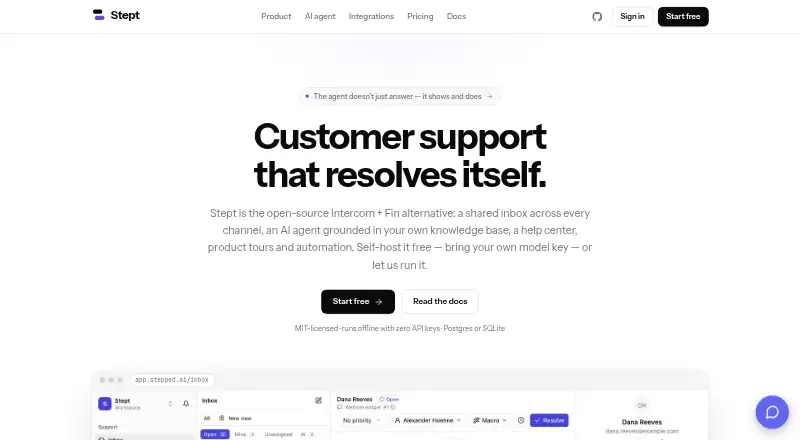
What Stept is
Stept is a web-based tool for creating AI bots that answer questions using a knowledge base and can hand conversations to a person. It supports multichannel deployment and lists 500 included conversations. The free Self-hosted plan is MIT-licensed, is listed as free forever, and includes unlimited seats. Stept also lists Cloud at $19 per month with 500 AI resolutions per month, and Business at $49 per month with 2,000 AI resolutions per month. Both cloud plans carry a note that pricing is coming, and Stept Cloud is free during early access, so those listed amounts appear alongside a different current-access note. The listed capabilities include AI bot generation, knowledge-base answers, and human handoff. Stept may suit teams deciding between self-hosting and a cloud option, though the cloud plan terms should be read with their early-access and pricing-status notes.
Good
- Generates AI bots with knowledge-base answers
- Supports human handoff
- Multichannel deployment is listed
- Self-hosted plan includes unlimited seats
- Free Self-hosted plan is MIT-licensed
Watch out
- Cloud pricing is marked as coming
- Cloud is free during early access
- Self-hosted is the only listed free plan
Who it suits
Stept suits teams that want a knowledge-based AI bot with a way to pass a conversation to a person. It offers both a free self-hosted plan and cloud tiers.
Verdict
Stept combines AI bot generation with knowledge-base answers and human handoff. Compare the self-hosted and cloud options carefully, since cloud pricing is marked as coming and the service is free during early access.
Plans and prices
From Stept's own pricing page, checked 11 Oct 2026.
| Plan | Price | What it gives you |
|---|---|---|
| Self-hosted | Free | Every channel · unlimited seats · AI agent with your own model key · knowledge base, RAG & help center · product tours, checklists & surveys · Docker Compose, Postgres or SQLite · Free MIT · forever |
| Cloud | $19 a month | Everything in self-hosted · 500 AI resolutions / month · managed Postgres & nightly backups · automatic updates · email support · $19 per seat / month |
| Business | $49 a month | Everything in Cloud · 2,000 AI resolutions / month · custom roles & audit log · SLA management & working hours · priority support · $49 per seat / month |
The facts
Each one read from Stept's own pages, with the date it was checked.
What it does
- Agent safeguards
- Sensitive tools can require human approval, password fields are off-limits and actions are capped per run.checked 11 Oct 2026
- Agent setup
- Teams can choose the model, write the agent persona and set each tool to run automatically, require approval or remain off.checked 11 Oct 2026
- AI agent
- The AI agent reads a company’s documents, guides visitors through its interface and can act on a page with the visitor’s explicit opt-in.checked 11 Oct 2026
- AI bot generation
- Yeschecked 22 Sep 2026
- Automation and reporting
- Stept lists rules, macros, campaigns, SLAs, webhooks and analytics for volume, resolution rate, CSAT and AI deflection.checked 11 Oct 2026
- Cloud pricing status
- The pricing page says Stept Cloud is free during early access and that the displayed Cloud and Business prices are upcoming pricing.checked 11 Oct 2026
- Data location
- Stept says self-hosted data stays in the customer’s own database and Cloud workspaces run on EU infrastructure; it says conversations are not used to train anything.checked 11 Oct 2026
- Deployment channels
- multichannelchecked 22 Sep 2026
- Human handoff
- Yeschecked 22 Sep 2026
- Included conversations
- 500checked 22 Sep 2026
- Integrations
- Listed channels include email, Slack, Telegram, WhatsApp, Messenger, Instagram, LINE, a web widget and API; knowledge sources include Notion, Confluence, Google Drive, Zendesk, GitHub and Microsoft 365.checked 11 Oct 2026
- Knowledge base
- Knowledge sources can be crawled, uploaded or synced, then re-indexed on a schedule with disappeared pages pruned.checked 11 Oct 2026
- Knowledge-base answers
- Yeschecked 22 Sep 2026
- Models
- The site lists OpenAI, Anthropic, Google, Ollama and OpenAI-compatible endpoints as supported model options.checked 11 Oct 2026
- Product
- Stept describes itself as an open-source customer-support platform with a shared inbox, AI agent, help center, product tours and automation.checked 11 Oct 2026
- Product tours
- The Chrome extension records product flows, and tour steps are described as self-healing when page markup changes.checked 11 Oct 2026
- Security
- The site lists role-based access control with custom roles, an audit log, scoped API keys and encrypted provider secrets.checked 11 Oct 2026
- Self-hosting
- The self-hosted version is MIT-licensed, can use Postgres or SQLite, supports offline operation with a mock AI provider and has no seat caps.checked 11 Oct 2026
- Shared inbox
- The inbox supports assignment, snoozing, tags, notes, resolution, SLAs, saved views, macros and real-time team collaboration.checked 11 Oct 2026
Money
- Free plan
- Yeschecked 22 Sep 2026
The full review of Stept
Stept is a customer-support platform for teams combining AI answers and visitor guidance with a human-run inbox. It suits organizations that want control over deployment and model choice, especially those equipped to self-host. Its broad toolkit is compelling, but cloud pricing is still in early access and self-hosting carries operational responsibility.
Overview
Stept brings an AI agent, shared inbox, help center, product tours and automation into one support platform. The agent can answer from company documents, guide visitors through an interface and, with a visitor’s explicit opt-in, act on a page. That combination is useful when support includes both routine questions and in-product guidance, while human handoff keeps a person in the loop when automation is not enough.
Teams can select a model, shape the agent’s persona and choose whether individual tools run automatically, require approval or stay disabled. Sensitive tools can be approval-gated; password fields are off-limits, and actions are capped per run. These safeguards support controlled automation, but the team still has to decide which actions are appropriate to enable.
Key features
Knowledge and support operations
Knowledge sources can be crawled, uploaded or synced, then re-indexed on a schedule with vanished pages pruned. Sources include Notion, Confluence, Google Drive, Zendesk, GitHub and Microsoft 365. This gives teams several ways to keep answers grounded in existing material, though maintaining useful source content remains part of the job.
The shared inbox supports assignment, snoozing, tags, notes, resolution, saved views, macros, SLAs and real-time collaboration. Listed conversation channels include email, Slack, Telegram, WhatsApp, Messenger, Instagram, LINE, a web widget and API. The range can help teams coordinate service across channels, while features such as macros and saved views address repetitive work rather than relying solely on AI.
Guidance, automation and controls
A Chrome extension records product tours, whose steps are described as self-healing when page markup changes. Rules, campaigns, webhooks and analytics for volume, resolution rate, CSAT and AI deflection extend the platform beyond answering individual queries. The range is useful to teams connecting support with customer guidance and measurement; it also means there is more workflow to configure than a simple chat widget requires.
Stept lists OpenAI, Anthropic, Google, Ollama and OpenAI-compatible endpoints as model options. Security features include custom roles, an audit log, scoped API keys and encrypted provider secrets. Self-hosted data remains in the customer’s database; Cloud workspaces use EU infrastructure, and conversations are not used to train anything.
Pricing
The Self-hosted plan is free, billed Free MIT · forever. It includes every channel, unlimited seats, an AI agent using your own model key, knowledge base, RAG and help center, product tours, checklists and surveys, and Docker Compose with Postgres or SQLite. It is the strongest fit for teams able to operate their own deployment and supply a model key; unlimited seats avoid per-seat fees, but the team takes on hosting rather than buying a managed service.
Cloud is priced at $19 a month, billed $19 per seat / month. It includes everything in self-hosted, 500 AI resolutions / month, managed Postgres with nightly backups, automatic updates and email support. The managed infrastructure and updates suit teams that prefer not to run the platform, but the per-seat charge and resolution quota matter as usage and team size grow. Stept Cloud is free during early access; the displayed Cloud and Business prices are upcoming pricing, so the stated price should not be treated as the current early-access charge.
Business is $49 a month, billed $49 per seat / month. It adds 2,000 AI resolutions / month, custom roles and an audit log, SLA management and working hours, and priority support to Cloud. This is the more appropriate tier for teams needing those controls and support terms, but it costs more per seat and raises the included resolution allowance rather than removing a quota. Its displayed price is also upcoming.
Platforms
Stept supports API, extension, Linux, macOS, self-hosted, web and Windows, with multichannel deployment. The self-hosted edition supports Postgres or SQLite and offline operation with a mock AI provider. Its MIT license and lack of seat caps make it adaptable for teams with deployment capacity; teams wanting managed hosting can instead consider Cloud.
Who it's for
Stept is a good match for support teams that want an AI agent alongside a shared human inbox, maintain their own knowledge sources and use product tours or automation in the same environment. Its model choices, self-hosting and uncapped self-hosted seats particularly suit technically capable organizations that value control. It is less suitable for teams seeking a straightforward, fully priced managed service today or unwilling to own setup and operational decisions.
Pros and cons
- Pros: The combination of knowledge answers, human handoff, inbox workflows and product tours covers more of the support journey than an answer bot alone.
- Pros: Self-hosting is MIT-licensed, supports Postgres or SQLite, permits offline operation with a mock provider and has no seat caps.
- Pros: Model selection, configurable tool approval, password-field exclusion and per-run action caps give teams meaningful control over agent behavior.
- Cons: Self-hosting requires the organization to run the software, which makes it a poor fit for teams seeking managed operations.
- Cons: Cloud and Business prices are upcoming, and Cloud’s 500 monthly AI resolutions and per-seat pricing make future costs difficult to plan around.
Alternatives
Enjo AI Support Agent is worth comparing for teams prioritizing unlimited seats and a free plan with 200 AI replies per month, shared inbox and Help Center. Dalo is a simpler option to consider for a chat widget, with a free tier of 100 monthly conversations and a Starter tier at $10 a month for 1,000 monthly conversations.
Freshdesk may suit teams considering a free program for 1-2 agents over 6 months or a Growth plan at $19 a month billed annually. Voiceflow is another option for readers comparing an agency-oriented plan with a free trial, usage-based billing and multi-client workspace management.
Webex App offers a free meetings plan with unlimited meetings up to 40 minutes and up to 100 attendees. Agentforce Vibes, Klaviyo and Yellow.ai are also alternatives to compare. Browse AI Customer Service Agents or Chatbot Builders for more options.
Verdict
Choose Stept if your team wants AI-assisted support, human workflows and product guidance in one platform, with the option to self-host and select its model. The self-hosted edition is its clearest proposition for organizations able to run it; choose elsewhere if you need predictable, established cloud pricing before committing.
Getting started
- Visit https://stepped.ai/.
- Choose self-hosted or Stept Cloud during its free early-access period.
- For self-hosting, use Docker Compose with Postgres or SQLite.
- Connect channels such as email, messaging apps, a web widget, or API.
- Add knowledge sources by crawling, uploading, or syncing them.
- Choose a supported model and configure the agent persona and tool permissions.
Limits worth knowing
The self-hosted plan is free forever and has no seat caps. The displayed Cloud tier lists 500 AI resolutions per month and Business lists 2,000; both prices are marked upcoming, and Cloud is free during early access.
Questions
Is Stept open source?
Yes. The self-hosted version is MIT-licensed.
What does self-hosting cost?
The Self-hosted plan is free forever and includes unlimited seats.
What are the listed Cloud and Business prices?
Cloud is listed at $19 per seat per month, and Business at $49 per seat per month. Both prices are marked as upcoming; Cloud is free during early access.
Which platforms and deployment options are listed?
Stept lists API, extension, Linux, macOS, self-hosted, web, and Windows, with multichannel deployment.
Which channels can connect to Stept?
Listed channels include email, Slack, Telegram, WhatsApp, Messenger, Instagram, LINE, a web widget, and API.
Does Stept use conversations to train anything?
Stept says conversations are not used to train anything.