Prime Timetable
Prime Timetable provides automatic and manual timetable scheduling for schools, universities, and similar institutions.
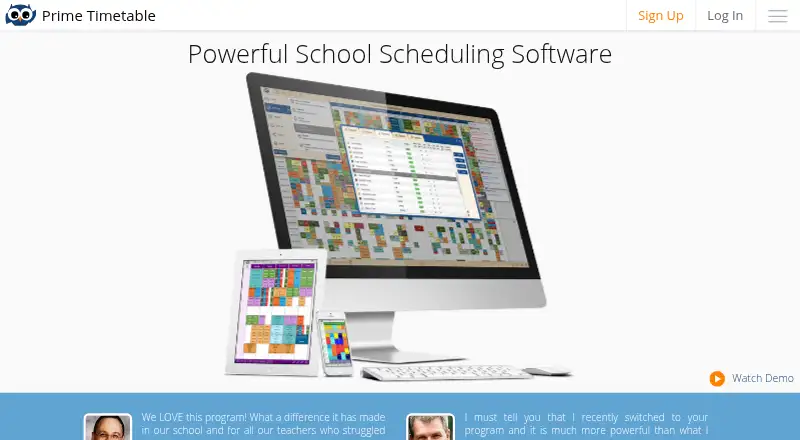
What Prime Timetable is
Prime Timetable provides automatic and manual timetable scheduling for schools, universities, and similar institutions. Users can schedule multiple weeks at flexible times, move cards in master or individual views, and split classes into groups for electives. The automatic generator can account for pinned cards and forbidden time slots, and optimize teacher and student loads, gaps, room use, and building moves. Timetables can be customized, accessed from any device, printed in master or individual views, and exported to formats and apps. Data can be imported by copy and paste. The maker says timetables are backed up every 24 hours and the service is used in over 120 countries. The free plan is for evaluation, includes premium support, and runs as a web app for all devices; it requires an internet connection. Commercial plans enable offline work. Basic is for small and medium schools and supports up to 40 teachers; Premium is for larger and campus schools and supports up to 100 teachers. Commercial plan prices depend on the selected duration, and the free plan includes a 30-day trial period.
Good
- Supports automatic and manual scheduling.
- Generator handles pinned cards and forbidden time slots.
- Timetables can be printed and exported.
- Timetables are backed up every 24 hours.
- Commercial plans enable offline work.
Watch out
- Free plan requires an internet connection.
- Free plan is for evaluation.
- Basic supports up to 40 teachers.
- Commercial plan prices depend on selected duration.
Who it suits
It suits schools, universities, and similar institutions scheduling classes, teachers, rooms, and student groups. Basic is aimed at smaller and medium schools, while Premium is aimed at larger and campus schools.
Verdict
Prime Timetable offers both manual timetable editing and automated scheduling with multiple constraint types. The free plan is evaluation-focused and online-only; commercial plans support offline work, with prices determined by selected duration.
Plans and prices
From Prime Timetable's own pricing page, checked 14 Oct 2026.
| Plan | Price | What it gives you |
|---|---|---|
| Free | Free | evaluation only · web app · premium support · 30-day trial |
| Basic | $299 a year | web app · premium support · up to 40 teachers · $299/yr. |
| Premium | $499 a year | web app · premium support · up to 100 teachers · $499/yr. |
The facts
Each one read from Prime Timetable's own pages, with the date it was checked.
What it does
- Automatic generator
- Its generator handles constraints such as teacher and student loads, gaps, room use, building moves and forbidden slots.checked 14 Oct 2026
- Backup
- The homepage says timetables are backed up every 24 hours.checked 7 Oct 2026
- Backups
- The home page states that timetables are backed up every 24 hours.checked 14 Oct 2026
- Collaboration
- Multiple timetable editors can collaborate on shared timetables with synchronized changes.checked 14 Oct 2026
- Conflict validation
- The software shows real-time notifications, visual indicators and tools for resolving timetable conflicts.checked 14 Oct 2026
- Data location
- The GDPR page states that its cloud data centres are in the US and its US hosting provider is ISO/IEC 27001:2013 certified.checked 7 Oct 2026
- Data retention
- After a customer terminates a subscription, current system data and associated backups are retained for a maximum of one year, and the page says backup data is encrypted.checked 7 Oct 2026
- Documentation depth
- The maker says its revised user guide contains more than 150 how-to articles.checked 14 Oct 2026
- Exports and integrations
- Built-in exports target PowerSchool, iSAMS, SmartSchool, Siged and Excel or Google Sheets.checked 14 Oct 2026
- Import
- Data can be imported for days, periods, subjects, rooms, teachers, classes, groups, students, activities and clips, including advanced custom fields.checked 14 Oct 2026
- Independent pricing report
- EdTech Impact lists a 30-day trial, Basic at $149 per year for up to 40 teachers and Premium at $299 per year for up to 100 teachers.checked 14 Oct 2026
- Integrations
- The site describes importing data by copy and paste and exporting to various formats and apps, without naming specific integrations on the page.checked 7 Oct 2026
- Licence
- Terms grant a limited, non-exclusive, revocable licence and prohibit redistribution, derivative works and reverse engineering without permission, indicating proprietary software.checked 14 Oct 2026
- Manual editing
- Users can drag timetable cards in master and individual views and pin cards to protect them from generator changes.checked 14 Oct 2026
- Offline support
- Commercial plans support offline work, while the free plan requires an internet connection.checked 14 Oct 2026
- Offline use
- The maker states that commercial plans enable offline work, while the free plan requires an internet connection.checked 7 Oct 2026
Money
- Billing
- Subscriptions are prepaid for selected periods and are not automatically renewed without explicit consent.checked 14 Oct 2026
- Limit: plan capacity
- Published Basic and Premium plans cap scheduled teachers at 40 and 100 respectively, with larger deployments requiring direct pricing discussions.checked 14 Oct 2026
- Limit: trial expiry
- After the evaluation period, saving changes is disabled, accounts may later be locked and data may eventually be deleted unless a paid plan is purchased.checked 14 Oct 2026
The company
- Company founded
- CompanyWall records the business as founded on 24 January 2013.checked 14 Oct 2026
- Company headquarters
- CompanyWall lists Micria at Vladislava Bajčevića 23/6/26, 11000 Belgrade, Serbia.checked 14 Oct 2026
- Company legal name
- The terms identify the operator as Danijel Štulić PR Micria.checked 14 Oct 2026
- Company ownership
- CompanyWall lists Danijel Štulić as owning 100 percent of the business.checked 14 Oct 2026
- Company size
- CompanyWall classifies Micria as a micro enterprise and reports one employee for 2025.checked 14 Oct 2026
The full review of Prime Timetable
Prime Timetable is scheduling software for schools, universities and similar institutions. It is best for planners who need to coordinate teachers, students and rooms with a mix of manual editing and automated scheduling. The free plan is for evaluation; continuing offline work requires a commercial plan.
Overview
Prime Timetable targets institutional timetabling rather than everyday calendar management. It supports schedules spanning multiple weeks, flexible times, elective groups and multiple campuses. That breadth makes it a plausible fit for schools managing competing requirements, while smaller organizations with uncomplicated schedules may not need a dedicated scheduling system.
The maker says the service is used in more than 120 countries. Timetables are backed up every 24 hours, and commercial plans enable offline work; the free plan requires an internet connection. Those distinctions matter to planners who need to work without reliable connectivity or want a recovery copy of schedule data.
Key features
Planners can move timetable cards in master and individual views, then divide classes into groups for electives. This gives staff direct control over the schedule while accommodating students who do not all follow the same timetable. The automatic generator can also work around pinned cards and forbidden time slots, so fixed commitments need not be discarded to optimize the rest of the schedule.
The generator can optimize teacher and student loads, gaps, room use and building moves. Teacher and room constraints, conflict detection and multi-campus support make those controls relevant to institutions balancing several kinds of requirements at once. They are less valuable when a schedule is simple enough to arrange without constraint-based planning.
Timetables can be accessed from any device, customized, printed as master or individual schedules, and exported to formats and apps. Data can be imported by copy and paste. That covers basic movement of schedule data, but institutions looking for a named integration should confirm that their specific workflow is supported before choosing the product.
The service describes traffic encryption, vulnerability safeguards, network protections, access policies, audit logs, and physical and procedural security measures. Its cloud data centres are in the US, and the US hosting provider is ISO/IEC 27001:2013 certified. Student data is not used for advertising or sold, and is kept only as long as needed to provide the educational service. After subscription termination, current system data and associated encrypted backups may be retained for up to one year. Institutions assessing data location and post-termination retention should account for those terms.
Premium support comes with each plan. A user guide, video tutorials and a support contact option give planners several routes to get help.
Pricing
The Free plan costs nothing and is expressly for evaluation. It includes the web app for all devices, premium support and a 30-day trial period, but requires an internet connection. That makes it suitable for assessing the workflow, not for a school seeking ongoing offline use.
Basic is aimed at small and medium schools and includes the web app for all devices, premium support and capacity for up to 40 teachers. Premium targets larger and campus schools, with the same web-app access and support and a limit of up to 100 teachers. Both commercial plans enable offline work and require choosing a duration of 1–5 years; the total price is shown after selecting a plan and duration. The teacher caps and multi-year commitment are important buying constraints, so schools should match their staffing needs and preferred term before settling on a plan.
Platforms
Prime Timetable supports Android, iOS, Linux, macOS, web and Windows. The web app works across devices, while offline work is reserved for commercial plans.
Who it's for
Prime Timetable is a strong fit for schools, universities and campus-based institutions that need to juggle teacher and room constraints, elective groups, multiple weeks or locations, and want both manual adjustments and automated optimization. It is less suited to a brief evaluation that must work offline, a school exceeding the selected plan's teacher cap, or a buyer unwilling to commit to a 1–5-year commercial term.
Pros and cons
- Pros: Manual card editing and automated scheduling can coexist, giving planners control without forgoing optimization.
- Pros: The generator accounts for pinned cards, forbidden slots, loads, gaps, rooms and building moves, which suits schedules with interacting constraints.
- Pros: Master and individual timetable publishing, printing and export support sharing schedules beyond the planning view.
- Pros: Premium support is included with every plan, including the evaluation plan.
- Cons: The free plan is evaluation-focused, online-only and limited to a 30-day period.
- Cons: Commercial plans require a 1–5-year duration, and their teacher limits are 40 for Basic and 100 for Premium.
- Cons: Data centres are in the US and post-termination retention can last up to one year, considerations for institutions with strict data-location or deletion requirements.
Alternatives
For a wider comparison of school scheduling tools, start with School Scheduling Software; institutions focused specifically on exam timetables can browse Exam Scheduling Software.
- Peñalara GHC is another freemium option with a free plan and trial across Android, iOS, web and Windows; consider it when those platform and pricing characteristics better suit your school.
- UniTime is free, open-source software for Linux, macOS, web, Windows, API and self-hosted use, with commercial support available for a fee. Choose it when free open-source or self-hosted deployment is the priority.
- FET is free for Linux, macOS and Windows, with no stated usage limits. It is worth considering when those desktop platforms and a free plan are more important than Prime Timetable's commercial offline option.
- SchoolGrid offers a free annual plan for one school, with staff entry and roster import and a 30-day scheduling and publishing evaluation that allows up to 15 drafts. Consider it when a single-school evaluation with those draft limits fits.
- TimetableMaster is a freemium alternative with a free trial and support for Android, API, iOS, Linux, macOS, web and Windows.
- aSc Timetables is a paid alternative with a free trial and support for Android, iOS, Linux, macOS, web and Windows.
- GC Education Analytics K–12 Master Scheduler is a free web-based alternative.
- Untis is a paid alternative with a free trial across Android, iOS, Linux, macOS, web and Windows; WebUntis pricing is provided through a sales request.
Verdict
Its main advantage is the range of scheduling controls; its main drawback is that ongoing offline use means accepting a 1–5-year commercial term with teacher caps. Schools seeking a free ongoing option or unwilling to commit should compare alternatives first.
Getting started
- Visit https://primetimetable.com/.
- Choose the Free plan for evaluation or review Basic and Premium commercial plans.
- Select a commercial plan term from 1–5 years to display its total price.
- Use the web app; the Free plan requires an internet connection, while commercial plans enable offline work.
Limits worth knowing
The Free plan is for evaluation, requires an internet connection and includes a 30-day trial period. Basic supports up to 40 teachers and Premium up to 100; their total prices are shown after choosing a plan and duration.
Questions
Is there a free plan?
Yes. The Free plan costs nothing and is for evaluation purposes. It includes a 30-day trial period and premium support.
Which platforms does Prime Timetable support?
The listed platforms are Android, iOS, Linux, macOS, web and Windows. The plans describe the app as a web app for all devices.
Can it work offline?
The Free plan requires an internet connection. Commercial plans enable offline work.
How many teachers do the commercial plans support?
Basic supports up to 40 teachers and Premium supports up to 100 teachers.
How does it handle data and security?
The service states that traffic is encrypted and describes vulnerability safeguards, network protections, access policies, audit logs, and physical and procedural security measures. Its cloud data centres are in the US, and current system data and associated backups may be retained for up to one year after subscription termination.
Alternatives to Prime Timetable
- 1

OpenEduCat
Free planAndroidiOSAPILinux7.9Free plan - 2

Optime Exam
Free planAndroidiOSWebAPI7.9From £1 a year - 3

UniTime
Free planOpen sourceWebAPILinuxmacOS7.7Free plan - 4
EMS Academic Scheduling
AndroidiOSWebAPI7.2From $9,000 a year - 5
Skoolia
AndroidiOSWebAPI6.9From $299 a year - 6

Wise Timetable
AndroidiOSWebAPI6.9From €90 a month