FET
FET is free timetable-scheduling software for schools, high schools and universities.
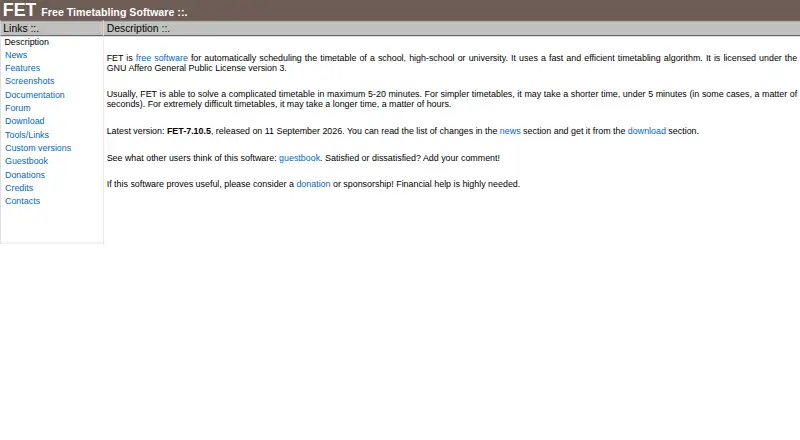
What FET is
FET is free timetable-scheduling software for schools, high schools and universities. It can allocate activities automatically, semi-automatically or manually, with time and space constraints covering teacher and student availability, preferred times and rooms, gaps, working hours, and room or building changes. FET accepts flexible XML input and imports CSV; completed timetables can be exported as HTML, XML or CSV. The maker states algorithm limits of 500,000 activities, 30,000 student subgroups, 30,000 rooms and 30,000 buildings. It runs on Linux, macOS and Windows and is licensed under the GNU Affero General Public License version 3. The maker provides documentation and a user forum, and lists third-party tools to convert FET XML results to Microsoft Excel or import compatible timetables into RosarioSIS. It also says it may help institutions create a custom variant for changes that are not too difficult, or advise on implementation. The stated generation time varies with complexity: simpler schedules can take under five minutes, while extremely difficult ones may take hours.
Good
- Free software under the GNU AGPL version 3
- Automatic, semi-automatic and manual allocation
- Imports CSV and flexible XML
- Exports HTML, XML and CSV
Watch out
- Very difficult schedules may take hours
- Custom changes are offered only when not too difficult
Who it suits
FET suits schools and universities that need to generate schedules while accounting for staff, student, room and time constraints. Its manual and semi-automatic modes may also suit users who want to intervene in allocation.
Verdict
FET offers broad scheduling controls and several import and export formats at no stated cost. Users should account for the maker's note that generation time can vary substantially with timetable complexity.
Plans and prices
From FET's own pricing page, checked 3 Oct 2026.
| Plan | Price | What it gives you |
|---|---|---|
| FET | Free | No stated usage limits |
The facts
Each one read from FET's own pages, with the date it was checked.
What it does
- Customization
- FET authors say they can help make a custom variant for an institution if the requested change is not too difficult, or advise on how to do it.checked 3 Oct 2026
- Data formats
- FET imports and exports CSV, accepts input in a flexible XML format, and exports resulting timetables as HTML, XML, and CSV.checked 3 Oct 2026
- Generation time
- The maker says complicated timetables usually take 5–20 minutes, simpler ones under five minutes, and extremely difficult ones may take hours.checked 3 Oct 2026
- Integrations
- The maker lists third-party tools for converting FET XML timetable results to Microsoft Excel and for importing FET-compatible timetables into RosarioSIS.checked 3 Oct 2026
- License
- FET is free software licensed under the GNU Affero General Public License version 3.checked 3 Oct 2026
- Purpose
- FET automatically schedules timetables for schools, high schools, and universities.checked 3 Oct 2026
- Scale limits
- The stated algorithm limits include 500,000 activities, 30,000 student subgroups, 30,000 rooms, and 30,000 buildings.checked 3 Oct 2026
- Scheduling constraints
- Its time and space constraints cover teacher and student availability, preferred times and rooms, gaps, working hours, and room or building changes.checked 3 Oct 2026
- Scheduling modes
- FET supports fully automatic, semi-automatic, and manual allocation.checked 3 Oct 2026
- Security and integrity
- The download page publishes SHA256 checksums for release files and an ASCII signature for the source archive.checked 3 Oct 2026
- Support
- The maker provides a user forum and documentation, including manuals, instructions, tips, and frequently asked questions.checked 3 Oct 2026
Where it runs
- Platforms
- The current release is available for GNU/Linux, Windows, and macOS.checked 3 Oct 2026
The full review of FET
FET is a timetable generator for schools, high schools, and universities, best suited to institutions with complex constraints and no budget for scheduling software.
Overview
FET can generate a timetable automatically, or support semi-automatic and manual allocation. That range is useful when administrators need to retain control over difficult decisions, but institutions wanting a consistently quick, fully hands-off result should account for potentially long generation times. The maker says simpler timetables usually take under five minutes, complicated ones 5–20 minutes, and extremely difficult ones may take hours.
Key features
Its time and space constraints address teacher and student availability, preferred times and rooms, gaps, working hours, and room or building changes. This breadth helps schools represent the restrictions that make real schedules workable; the cost is that complex timetables may take longer to generate.
FET accepts input in flexible XML format and imports and exports CSV. Completed timetables can be exported as HTML, XML, or CSV, giving institutions several options for working with or sharing results. Separate third-party tools can convert FET XML timetables to Microsoft Excel or import FET-compatible schedules into RosarioSIS; these are not built-in integrations.
The stated algorithm limits reach 500,000 activities, 30,000 student subgroups, 30,000 rooms, and 30,000 buildings. That scale makes FET worth considering for large institutions, while the stated ceilings remain relevant for organizations whose requirements approach them. The maker also publishes SHA256 checksums for release files and an ASCII signature for the source archive, useful for verifying downloads.
Documentation includes manuals, instructions, tips, and frequently asked questions, alongside a user forum. The authors also say they may help create an institution-specific variant when a requested change is not too difficult, or advise on how to make it.
Pricing
FET is free software under the GNU Affero General Public License version 3. The FET plan costs nothing, has no stated usage limits, and there is no free trial because the software is free. This is a strong fit for schools that want full scheduling capability without a recurring software fee; institutions that need custom changes should weigh the authors’ limited customization offer rather than assume dedicated development.
Platforms
FET is available for Linux, macOS, and Windows. That covers the major desktop operating systems, but institutions specifically seeking a web-based or mobile scheduling product should consider another option.
Who it's for
FET is a good match for schools, high schools, and universities that need detailed control of teacher, student, room, and time constraints, and are comfortable managing timetable generation on desktop software. Its free license and high stated scale ceilings are especially appealing to institutions avoiding per-seat or usage charges. It is less suited to teams that require predictable turnaround on exceptionally difficult schedules or a web and mobile workflow.
Pros and cons
- Pros: No-cost software with no stated usage limits, alongside automatic, semi-automatic, and manual allocation.
- Pros: Detailed teacher, student, room, and time constraints, with multiple import and export formats.
- Pros: Published scale ceilings are substantial, and documentation, a forum, and download verification data are provided.
- Cons: Generation can take hours for extremely difficult timetables, making turnaround less predictable for demanding cases.
- Cons: It targets desktop platforms; the stated platforms do not include web or mobile.
- Cons: Excel conversion and RosarioSIS importing rely on separate third-party tools, not built-in integrations.
Alternatives
For a broader comparison, browse School Scheduling Software or Exam Scheduling Software.
- Peñalara GHC is a freemium option with a free plan and trial, and supports Android, iOS, web, and Windows; consider it if those platforms matter.
- Prime Timetable offers a free evaluation plan with premium support and a 30-day trial period, across web and desktop and mobile platforms. Choose it if that evaluation period and platform reach suit your needs.
- UniTime is free, open-source software with commercial support available for a fee, and supports web, self-hosted, and API options as well as desktop systems. It may suit institutions seeking those deployment options or paid support.
- SchoolGrid has a free annual plan for one school, with staff entry and roster import and a 30-day scheduling and publishing evaluation capped at 15 drafts. Consider it if that school-focused evaluation fits your process.
- TimetableMaster is a freemium alternative with a free trial and support across mobile, web, desktop, and API platforms.
- aSc Timetables offers an unlimited free trial with no purchase required until after generating a schedule, but export is unavailable on the trial plan. It may fit teams evaluating before purchase, provided that export restriction is acceptable.
- GC Education Analytics K–12 Master Scheduler is a free web-based alternative focused on elementary, middle, and high schools.
- Untis is a paid option with WebUntis pricing provided through a sales request. Consider it if you prefer a sales-led pricing process.
Verdict
Choose FET if your school or university needs detailed timetable constraints, flexible allocation, and broad scale without paying for the software. Its strongest reason to choose is the combination of a free open-source license and substantial scheduling controls; look elsewhere if you need web or mobile access, or cannot accommodate generation times that may stretch to hours.
Getting started
- Open the FET website
- Choose the download for Linux, macOS, or Windows
- Install and launch FET
- Prepare timetable data in CSV or flexible XML format
- Set teacher, student, time, room, and building constraints
- Generate the timetable automatically, semi-automatically, or manually
- Export the result as HTML, XML, or CSV
Limits worth knowing
FET is free at 0.00 USD with no stated usage limits. Generation time can extend to hours for extremely difficult timetables.
Questions
How much does FET cost?
FET has a free plan listed as free, with no stated usage limits.
Which operating systems support FET?
FET runs on Linux, macOS, and Windows.
Is FET open source?
FET is free software licensed under the GNU Affero General Public License version 3.
What data formats can FET use?
FET imports CSV and accepts flexible XML input. It exports timetables as HTML, XML, and CSV.
Does FET offer scheduling integrations?
The maker lists tools for converting FET XML results to Microsoft Excel and importing FET-compatible timetables into RosarioSIS.
Where can users get help?
The maker provides a user forum and documentation with manuals, instructions, tips, and frequently asked questions.
Alternatives to FET
- 1
Prime Timetable
Free planAndroidiOSWebAPI8.0From $299 a year - 2
Peñalara GHC
Free planAndroidiOSWebWindows7.9From $8,300 a year - 3

UniTime
Free planOpen sourceWebAPILinuxmacOS7.7Free plan - 4

TimetableMaster
AndroidiOSWebAPI6.9 - 5
aSc Timetables
AndroidiOSWebLinux6.5 - 6

SchoolGrid
Free planWeb6.5From $99 a year