
SchoolGrid
SchoolGrid is a browser-based master-scheduling app for elementary schools.
What SchoolGrid is
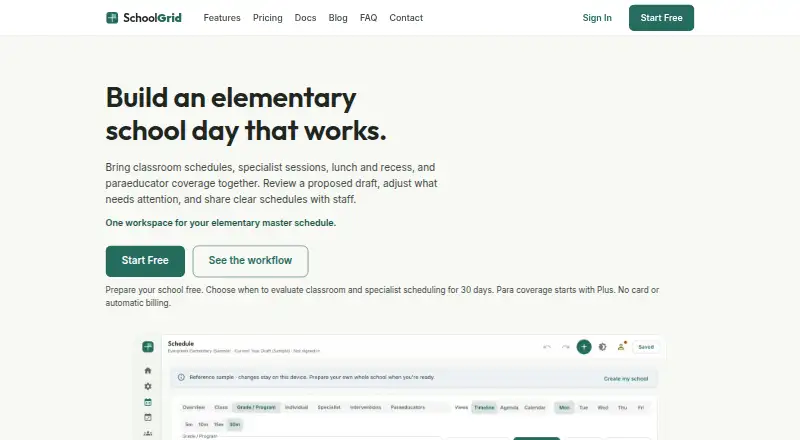
SchoolGrid is a browser-based master-scheduling app for elementary schools. It brings classrooms, specialists, interventions, lunch, recess, instructional minutes, and paraeducator coverage into one scheduling workflow. Its auto-scheduler drafts schedules from configured school constraints, and users can review and revise the results in Timeline, Agenda, or Calendar views. Schedules can be exported as PDF or CSV files or published to Google Drive or Microsoft OneDrive. SchoolGrid says it does not ask for student names, rosters, grades, or student accounts and is not designed to hold student records. The Free plan is free and provides a 30-day scheduling and publishing evaluation, with up to 15 drafts during evaluation; it has no para coverage or Schedule Transfer credits. SchoolGrid Plus costs $99 a year and includes para and student-support coverage, exports, publishing, and five monthly Schedule Transfer credits. SchoolGrid Pro costs $499 a year and supports up to three schools or sites, with unlimited drafts, 15 monthly setup credits, priority email support, and three hours of video onboarding. The app runs in a browser and requires no installation.
Good
- Auto-scheduler drafts schedules from school constraints
- Timeline, Agenda, and Calendar schedule views
- Exports to PDF and CSV
- Publishes to Google Drive and OneDrive
Watch out
- Free plan is a 30-day evaluation
- Free plan has no para coverage
- Free plan has no Schedule Transfer credits
- Pro costs $499 a year
Who it suits
SchoolGrid suits elementary principals, assistant principals, office managers, instructional coaches, and support staff leads coordinating school schedules. The Free plan offers an evaluation for one school, while Plus and Pro add features and capacity at stated annual prices.
Verdict
SchoolGrid combines schedule drafting, review, and publishing for elementary schools. Compare the plan limits and annual prices, especially if you need para coverage, multiple sites, or ongoing Schedule Transfer credits.
Plans and prices
From SchoolGrid's own pricing page, checked 1 Oct 2026.
| Plan | Price | What it gives you |
|---|---|---|
| SchoolGrid Free | Free | 1 school · staff entry and roster import · 30-day scheduling/publishing evaluation · up to 15 drafts during evaluation · no para coverage · no Schedule Transfer credits · annual |
| SchoolGrid Plus | $99 a year | 1 school/site · up to 15 drafts · Auto-Build Draft · para and student-support coverage · PDF/CSV and roster import/export · Google Drive and OneDrive publishing · 5 monthly Schedule Transfer credits · annual |
| SchoolGrid Pro | $499 a year | up to 3 schools/sites · unlimited drafts · 15 monthly setup credits · priority email support · 3 hours video onboarding · annual |
The facts
Each one read from SchoolGrid's own pages, with the date it was checked.
What it does
- Audience
- SchoolGrid is built for elementary principals, assistant principals, office managers, instructional coaches, and support staff leads.checked 1 Oct 2026
- Auto-scheduling
- Its auto-scheduler drafts schedules from configured school constraints, and users can review and revise the result.checked 1 Oct 2026
- Data practices
- SchoolGrid says it does not sell or rent personal information, use advertising trackers, or use schedule data except to provide the service.checked 1 Oct 2026
- Exports
- SchoolGrid supports PDF and CSV exports and publishing schedule files to Google Drive or Microsoft OneDrive.checked 1 Oct 2026
- Integrations
- Google Drive publishing uses the drive.file permission and OneDrive publishing uses the Files.ReadWrite.AppFolder permission.checked 1 Oct 2026
- Purpose
- SchoolGrid is a browser-based master-scheduling app for elementary schools that combines classrooms, specialists, interventions, lunch, recess, instructional minutes, and paraeducator coverage.checked 1 Oct 2026
- Schedule Transfer
- Plus and Pro can use monthly setup credits to turn related spreadsheets or PDFs into a reviewable schedule proposal.checked 1 Oct 2026
- Schedule views
- The app provides Timeline, Agenda, and Calendar views for reviewing schedules.checked 1 Oct 2026
- Security
- Passwords use PBKDF2 one-way hashing, connections use HTTPS encryption, and payment details are handled by PCI-DSS-certified Stripe.checked 1 Oct 2026
- Student data
- SchoolGrid says it does not ask for student names, rosters, grades, or student accounts and is not designed to hold student records.checked 1 Oct 2026
- Support
- Free users can use the contact form, while Pro includes priority email support and three hours of video onboarding.checked 1 Oct 2026
The company
- Headquarters
- Snohomish, Washington, United Stateschecked 28 Sep 2026
Where it runs
- Platform
- The app runs at app.schoolgrid.app in a browser and requires nothing to install.checked 1 Oct 2026
The full review of SchoolGrid
SchoolGrid is a browser-based master-scheduling app for elementary schools, aimed at principals, office managers, instructional coaches, and support-staff leads. It is strongest when a school must coordinate instruction, specialist time, interventions, lunch, recess, rooms, and paraeducator coverage in one process. The free tier is useful for a defined evaluation, while schools needing continuing use, para coverage, or multiple sites will need a paid plan.
Overview
SchoolGrid generates a schedule draft from configured school constraints, then leaves staff to review and revise the result. Automatic timetable creation, conflict detection, teacher constraints, and room constraints address the arithmetic of fitting competing requirements together, but the workflow sensibly keeps human judgment in the loop. Multi-campus support is present, although the number of sites depends on the plan.
The service is deliberately not a student-record system: it does not ask for student names, rosters, grades, or student accounts and is not designed to hold student records. It says it does not sell or rent personal information, use advertising trackers, or use schedule data beyond providing the service. Passwords use PBKDF2 one-way hashing, connections use HTTPS encryption, and Stripe handles payment details under PCI-DSS certification. Those practices reduce exposure for a scheduling application, but schools remain responsible for assessing their own data policies.
Key features
Timeline, Agenda, and Calendar views let staff inspect the same schedule at different levels of detail. PDF and CSV exports suit printed schedules and spreadsheet workflows, while publishing to Google Drive or Microsoft OneDrive supports shared file distribution. Google Drive publishing uses the drive.file permission; OneDrive uses Files.ReadWrite.AppFolder, keeping the integration scopes focused on the app’s files.
The Plus and Pro plans add Schedule Transfer credits. These credits turn related spreadsheets or PDFs into a reviewable schedule proposal, which can shorten migration from an existing process; the monthly allowance matters if a school expects repeated transfers. Free users receive contact-form support. Pro adds priority email support and three hours of video onboarding, a meaningful advantage for a multi-site rollout or a team that wants guided setup.
Pricing
SchoolGrid Free costs nothing, billed annual. It covers one school, staff entry and roster import, a 30-day scheduling and publishing evaluation, and up to 15 drafts during that evaluation. It excludes para coverage and Schedule Transfer credits, so it is an assessment vehicle rather than a durable free operating plan.
SchoolGrid Plus costs $99 a year, billed annual. It supports one school or site and up to 15 drafts, with Auto-Build Draft, para and student-support coverage, PDF/CSV and roster import/export, Google Drive and OneDrive publishing, and five monthly Schedule Transfer credits. This is the practical fit for a single elementary school that needs the core production features but can work within a draft quota.
SchoolGrid Pro costs $499 a year, billed annual. It raises capacity to up to three schools or sites and unlimited drafts, provides 15 monthly setup credits, priority email support, and three hours of video onboarding. Pro earns its premium where several sites, frequent revisions, or guided implementation justify the additional annual cost.
Platforms
SchoolGrid runs at app.schoolgrid.app in a web browser and requires no installation. Its web-only delivery suits schools managing mixed device fleets, but it does not provide a separately listed native desktop or mobile application.
Who it's for
This is a focused choice for elementary principals, assistant principals, office managers, instructional coaches, and support-staff leads who own the master schedule. Schools wanting a permanent no-cost service, or a general student-information platform, should look elsewhere.
Pros and cons
Pros
- Constraint-based auto-scheduling and conflict detection create a structured starting point for complex elementary schedules.
- Para coverage, specialist time, interventions, and student-support needs are handled in the same workflow rather than separate spreadsheets.
- PDF, CSV, Google Drive, and OneDrive options make sharing and downstream editing practical.
- The service avoids student records and advertising trackers, with stated HTTPS and PBKDF2 protections.
Cons
- The Free plan ends after a 30-day evaluation and omits para coverage, limiting it for ongoing use.
- Plus is capped at 15 drafts and five monthly transfer credits, which may constrain iterative or frequently changing schedules.
- Multi-site capacity and unlimited drafts require the much higher-priced Pro plan.
- Web-only access may not suit teams that require a dedicated offline or native app.
Alternatives
Choose Peñalara GHC instead if you need Android, iOS, web, and Windows coverage alongside freemium access. Prime Timetable is a broader cross-platform option with a free evaluation and 30-day trial. Pick UniTime for free open-source software with commercial support available for a fee, or FET when a free Windows, macOS, or Linux timetable tool with no stated usage limits is the priority. TimetableMaster is another cross-platform scheduling service with a free trial. aSc Timetables offers an unlimited free trial but does not allow export during that trial. GC Education Analytics K–12 Master Scheduler is a web-based free beta spanning elementary, middle, and high school use. Untis suits organizations seeking a paid platform with modules and extensions priced through a sales request.
See the school scheduling software category for more options.
Verdict
SchoolGrid is a strong match for an elementary-school leadership team that wants automated schedule drafts, explicit constraint handling, para coverage, and straightforward publishing without installing software. Choose Plus for a single site with moderate revision needs, or Pro for up to three sites and unlimited drafts. Look elsewhere if you require an ongoing free plan, native apps, or scheduling outside the elementary-school focus.
Alternatives to SchoolGrid
- 1
Prime Timetable
Free planAndroidiOSWebAPI8.0From $299 a year - 2
Peñalara GHC
Free planAndroidiOSWebWindows7.9From $8,300 a year - 3

UniTime
Free planOpen sourceWebAPILinuxmacOS7.7Free plan - 4

TimetableMaster
AndroidiOSWebAPI6.9 - 5
aSc Timetables
AndroidiOSWebLinux6.5 - 6

Untis
AndroidiOSWebLinux6.4