
LogBook360
LogBook360 is an AI-powered visitor management system that covers a visit from invitation through exit.
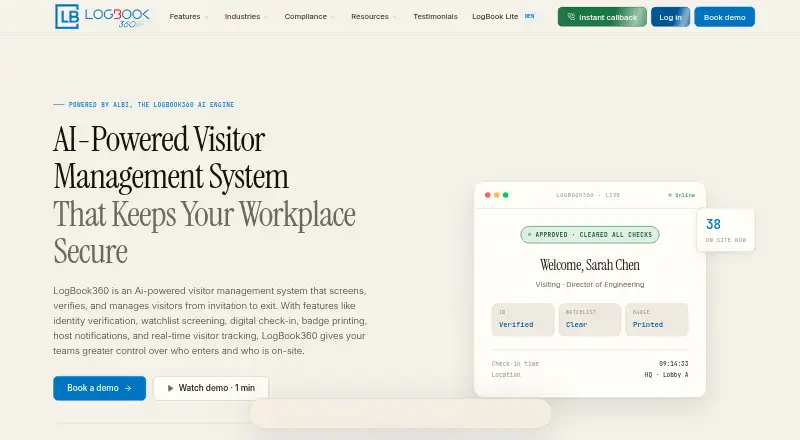
What LogBook360 is
LogBook360 is an AI-powered visitor management system that covers a visit from invitation through exit. Its workflow can include pre-registration, QR check-in, identity verification, badge issuance, host notification, and visit recording. Listed capabilities also include watchlist screening, live monitoring, emergency management, access control, automatic number plate recognition, and delivery tracking. The platform connects to more than 50 services, including Slack, Microsoft Teams, WhatsApp, Okta, Workday, Genetec, Salesforce, and ServiceNow. REST API access and webhooks cover visitor, screening, and emergency events. Security controls include AES-256 encryption at rest, TLS 1.3 in transit, SSO/SAML, MFA, tamper-evident audit logs, and 10-level role-based access control. Users can export visitor audit reports as PDF or CSV and filter them by date range, location, visitor type, or screening result. LogBook360 runs on an organization's existing tablet or computer. The free plan allows up to 150 visitor check-ins per month; paid-plan prices are not listed. The product is positioned for corporate, healthcare, manufacturing, government, higher-education, and residential settings.
Good
- Free plan allows up to 150 check-ins per month.
- Connects to more than 50 platforms.
- Provides REST API access and event webhooks.
- Audit reports can be exported as PDF or CSV.
- Runs on an organization's existing tablet or computer.
Watch out
- Paid-plan prices are not listed.
- Free plan caps usage at 150 monthly check-ins.
- Most organizations are reported as operational within 24 hours; setup time may vary.
Who it suits
LogBook360 is aimed at organizations managing visitors at offices, healthcare or manufacturing sites, government facilities, higher education institutions, or residential communities. It may suit teams that need check-in, screening, audit exports, or emergency tools.
Verdict
LogBook360 combines visitor workflows with screening, integrations, and audit exports across several organization types. The free plan's monthly check-in cap is clear, but paid-plan costs are not listed.
Plans and prices
From LogBook360's own pricing page, checked 30 Sep 2026.
| Plan | Price | What it gives you |
|---|---|---|
| Free | Free | up to 150 visitor check-ins per month |
| Free Plan | Free | 150 visits/month · single location · QR check-in · visitor tracking · basic dashboard · email notifications |
| All-in-one per location | $15,000 a year | Unlimited visitors and hosts · hardware included · implementation, integrations, support and updates included · yearly per location |
| Enterprise Plan | Priced on request | Unlimited visits · multi-location management · advanced compliance workflows · AI automation · ERP/HRIS and calendar integrations · watchlist screening · identity verification · emergency evacuation · role-based access · pricing unavailable on listing |
| Paid plans | Priced on request | visitor screening · compliance reporting · multi-site management |
The facts
Each one read from LogBook360's own pages, with the date it was checked.
What it does
- ALBi assistant
- ALBi is a voice and chat assistant that supports scheduling, check-in, navigation, host alerts and checkout.checked 15 Oct 2026
- API and webhooks
- The integration page says customers can use REST API endpoints and webhooks for visitor, screening and emergency events, with custom integration work available from the vendor.checked 15 Oct 2026
- API capabilities
- The integrations platform provides REST API access and webhooks for visitor, screening, and emergency events.checked 30 Sep 2026
- Audit exports
- Users can export full visitor audit reports for any date range as PDF or CSV and filter them by location, visitor type, or screening result.checked 30 Sep 2026
- Availability commitment
- The homepage advertises a 99.9% uptime SLA.checked 15 Oct 2026
- Badge printing
- Check-in can automatically print visitor badges.checked 15 Oct 2026
- Compliance
- LogBook360 addresses GDPR, ITAR, SOC 2, HIPAA, ISO 27001, NDAA/OFAC, OSHA, FERPA, Clery Act, and DPDP controls.checked 30 Sep 2026
- Compliance controls
- Official compliance material lists GDPR, ITAR, SOC 2, HIPAA, ISO 27001, OSHA, FERPA, Clery Act, NDAA/OFAC and DPDP coverage claims.checked 15 Oct 2026
- Core workflow
- The workflow includes invitation, pre-registration, QR check-in, identity verification, badge issuance, host notification, and visit recording.checked 30 Sep 2026
- Delivery and contractor management
- Delivery, courier and contractor visits can be recorded alongside ordinary visitor entries.checked 15 Oct 2026
- Deployment model
- An official GlobalVox solution page describes both cloud-based and on-premise-hosted deployment options.checked 15 Oct 2026
- Digital check-in
- Visitors can pre-register and use QR codes for contactless arrival and checkout.checked 15 Oct 2026
- Emergency management
- The system provides live occupancy views, emergency alerts and digital muster reports.checked 15 Oct 2026
- Feature coverage
- The platform provides AI visitor check-in, watchlist screening, smart badge printing, pre-registration, live monitoring, emergency management, access control, ANPR, and delivery tracking.checked 30 Sep 2026
- G2 dashboard score
- The single G2 listing reports a 10.0/10 dashboard score.checked 15 Oct 2026
- Google Play data safety
- Google Play shows the developer declaring no data shared with third parties and no data collected.checked 15 Oct 2026
- Host notifications
- Hosts receive automatic arrival, delay and other visit notifications through configured channels.checked 15 Oct 2026
- Identity verification
- The product verifies visitor identities during the entry workflow.checked 15 Oct 2026
- Integrations
- The maker advertises more than 50 integrations, including Slack, Teams, WhatsApp, Zoom, Microsoft 365, Google Workspace, Okta, Workday, Salesforce and ServiceNow.checked 15 Oct 2026
Where it runs
- Apple system requirement
- The iOS app requires iOS 15.5 or later; iPad requires iPadOS 15.5 or later, and Apple-silicon Mac support requires macOS 12.4 or later.checked 15 Oct 2026
- Independent platform coverage
- GetApp lists web, Android and iPhone/iPad support, plus email/help-desk, phone, FAQ/forum and chat support.checked 15 Oct 2026
The company
- Company identity
- The app store identifies the developer as GlobalVox LLC, with a Herndon, Virginia address.checked 15 Oct 2026
- Headquarters
- 13401 Calm View Way, Herndon, VA 20171, United Stateschecked 23 Sep 2026
Money
- Limit: enterprise price opacity
- GetApp lists the Enterprise plan without a price or quote amount.checked 15 Oct 2026
The full review of LogBook360
Overview
LogBook360 is a visitor-management system for organizations that need a structured process from invitation to exit. It is best suited to sites where screening, emergency response and audit records matter alongside reception check-in. Its broad workflow is a strength, though the free plan’s 150 monthly check-ins may be too restrictive for busier locations.
Key features
Visitor workflow
Pre-registration, kiosk-based QR check-in, ID scanning and photo capture feed into identity verification, badge issuance and host notification. That gives reception teams a fuller record of each visit than a sign-in step alone. Watchlist screening, live monitoring, access control and emergency tools add value for organizations managing visitors in controlled or safety-sensitive environments.
Smart badge printing, ANPR and delivery tracking extend the system beyond people entering through a lobby. Those functions may suit sites that also need to manage vehicle arrivals or deliveries, though the core offering remains visitor management.
Integrations and oversight
LogBook360 connects to more than 50 platforms, including Slack, Microsoft Teams, WhatsApp, Okta, Workday, Genetec, Salesforce and ServiceNow. REST API access and webhooks cover visitor, screening and emergency events, giving organizations options for connecting workflows to other systems.
Security controls include AES-256 encryption at rest, TLS 1.3 in transit, SSO/SAML, MFA, tamper-evident audit logs and 10-level role-based access control. The platform addresses GDPR, ITAR, SOC 2, HIPAA, ISO 27001, NDAA/OFAC, OSHA, FERPA, Clery Act and DPDP controls. Users can export visitor audit reports for any date range as PDF or CSV, filtered by location, visitor type or screening result. This combination is a practical fit for organizations that need configurable access and reviewable records.
The service advertises average check-ins below 10 seconds and a 99.9% uptime SLA. Most organizations are reported as operational within 24 hours, using a tablet or computer they already own. Those claims suggest a relatively light hardware requirement, but do not remove the need to configure the workflow for each site.
Pricing
LogBook360 uses a freemium model. The Free plan costs nothing and allows up to 150 visitor check-ins per month. That is useful for a small site or a low-volume location evaluating a visitor workflow, but the cap makes it a poor fit for a busy reception desk.
Paid plans have custom pricing and include visitor screening, compliance reporting and multi-site management. They are the relevant option for organizations that need those capabilities or expect to exceed the free monthly quota. The plan information does not establish seat limits or billing terms, so prospective customers should confirm scope and cost before committing.
Platforms
LogBook360 supports Android, iOS, macOS, Windows and web, as well as API access. The organization can run it on an existing tablet or computer, rather than needing dedicated hardware according to the stated setup requirement.
Who it's for
The product is positioned for corporate offices, healthcare facilities, manufacturing sites, government facilities, higher education and residential communities. Its screening, emergency tools, access controls and audit exports are especially relevant where visitor records and site procedures need closer oversight. A low-volume organization can start with the free tier; multi-site operators or those needing compliance reporting should consider paid plans. Teams wanting only a simple visitor log may find this breadth unnecessary.
Pros and cons
- Pros: A complete invitation-to-exit workflow combines pre-registration, kiosk check-in, screening, badges and host alerts.
- Pros: More than 50 integrations, REST API access and event webhooks offer several ways to connect visitor operations with existing systems.
- Pros: Date-range PDF and CSV exports, filtering, audit logs and layered access controls support oversight across sites.
- Cons: The free plan stops at 150 visitor check-ins per month, limiting its usefulness at higher-volume locations.
- Cons: Paid plans use custom pricing, so organizations cannot readily compare their cost without seeking a quote.
Alternatives
Compare visitor management software if you want to weigh LogBook360 against a broader category of options.
Lobbytrack is another freemium choice, with a free tier capped at 100 visitors per month and unlimited hosts and users; consider it if that smaller allowance fits your volume.
KyberAccess offers a free plan for one location and 50 visitors per month, including basic check-in, badges, QR check-in, email notifications and email support. It may suit a smaller single-site operation with those needs.
VisitorLog.io is another freemium visitor-management option.
InstaCheckin is another freemium option, available on web and iOS.
Envoy Desks charges $5 a month billed annually per bookable resource, excluding the platform fee; consider it if that resource-based pricing fits your requirements.
iLobby (now FacilityOS VisitorOS) is a paid option whose Corporate plan starts at $225 a month and includes an MDM-enrolled 10.9-inch iPad, unlimited users, visitors and sign-ins, plus badge printing and pre-registration. It may suit teams seeking that included hardware and stated unlimited usage.
OHello! charges $99 a month month-to-month for the first office, then $39 a month for each additional office, with all features included. It is worth considering when that per-office structure fits better than custom-priced plans.
VisitFlow is another freemium option available on web.
Verdict
LogBook360 is a strong fit for organizations that need visitor processing, screening and auditable records in one system, particularly when integrations or multi-site oversight matter. Its free tier makes a low-volume starting point possible, but the 150-check-in ceiling and custom pricing for paid plans are the main reasons to look elsewhere if usage is high or predictable costs are essential.
Getting started
- Visit the LogBook360 website.
- Use an organization-owned tablet or computer to run the system.
- Choose the free plan for up to 150 visitor check-ins per month.
- Select a paid plan for visitor screening, compliance reporting, or multi-site management.
Limits worth knowing
The free plan allows up to 150 visitor check-ins per month. Paid plans include visitor screening, compliance reporting, and multi-site management.
Questions
Is LogBook360 free?
Yes. Its free plan costs nothing and supports up to 150 visitor check-ins per month.
Which platforms does LogBook360 support?
It is listed for Android, iOS, macOS, web, Windows, and API.
Can it connect to other services?
Yes. It connects to more than 50 platforms, including Slack, Microsoft Teams, WhatsApp, Okta, Workday, Genetec, Salesforce, and ServiceNow. REST API access and webhooks cover visitor, screening, and emergency events.
What do paid plans include?
Paid plans include visitor screening, compliance reporting, and multi-site management.
Can users export visitor reports?
Yes. Full visitor audit reports can be exported as PDF or CSV and filtered by date range, location, visitor type, or screening result.
What device does an organization need to run it?
LogBook360 runs on a tablet or computer the organization already owns.
Alternatives to LogBook360
- 1

KyberAccess
Free planAndroidiOSWebAPI8.1From $4,200 a year - 2

Sine
Free planAndroidiOSWebAPI8.1From $49 a month - 3

iLobby (now FacilityOS VisitorOS)
Free planAndroidiOSWebAPI7.9From $225 a month - 4

Greetly
AndroidiOSWebAPI7.5From $99 a month - 5
The Receptionist
AndroidiOSWebAPI7.5From $630 a year - 6
Lobbytrack
Free planAndroidiOSWebWindows7.4From $50 a month