ClockOut
ClockOut is a GPS time clock, scheduling, and payroll-preparation tool for hourly teams, available on Android, iOS, and web, with an API.
What ClockOut is
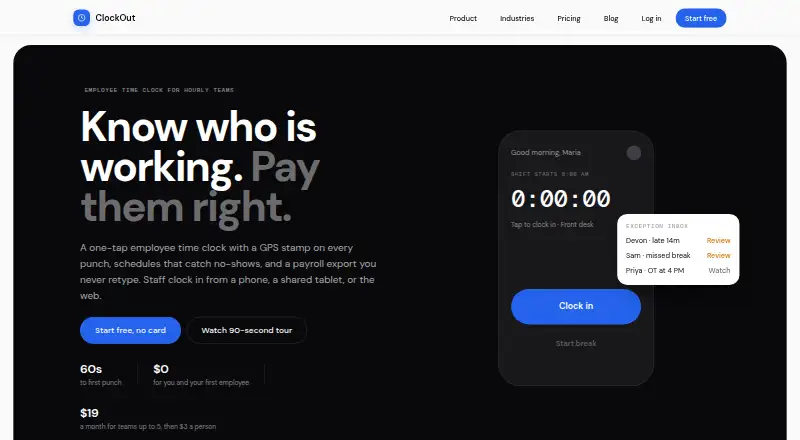
ClockOut is a GPS time clock, scheduling, and payroll-preparation tool for hourly teams, available on Android, iOS, and web, with an API. Employees can clock in and out using a phone app, web browser, or shared-tablet kiosk with a PIN or QR badge. Each punch records time and GPS location. Scheduling covers recurring shifts, open shifts, swaps, and confirmations; an exception inbox collects missed clock-outs, late arrivals, skipped breaks, and overtime alerts. Starter includes PTO balances and accrual, requests and approvals, and kiosk mode. Pro creates payroll-formatted CSV files for ADP, Gusto, and QuickBooks, which must be downloaded and imported manually. Clock-in and clock-out punches can be saved offline and sync with their original tap time when reconnected; breaks need a connection. ClockOut says it records location at punches, discards optional boundary checks during shifts, and does not track location off the clock. The free plan is free for up to two people. Starter is $19 a month; Pro is $39 a month.
Good
- Records time and GPS location for each punch.
- Supports shift swaps and open shifts.
- Offline punches sync with their original tap time.
- Free plan covers up to two people.
Watch out
- Breaks require an internet connection.
- Payroll CSVs require manual download and import.
- Free plan is limited to two people.
Who it suits
ClockOut suits hourly and shift-based teams that need time punches, schedules, and attendance review. Teams needing PTO or payroll exports should note which paid plan includes those features.
Verdict
ClockOut combines timekeeping, scheduling, and payroll preparation for hourly teams, with a free tier for up to two people. Consider the offline break limitation and manual payroll-file workflow when choosing a plan.
Plans and prices
From ClockOut's own pricing page, checked 2 Oct 2026.
| Plan | Price | What it gives you |
|---|---|---|
| Free | Free | Up to 2 people, including you · GPS punches · Basic scheduling · Pay estimates · CSV export · $0 forever |
| Starter | $19 a month | Unlimited employees · Geofence enforcement · Recurring schedules · PTO · Kiosk mode · Exception inbox · $19 per month; includes 5 people, then $3 per extra person per month |
| Pro | $39 a month | Unlimited employees · Multiple locations · Payroll runs · ADP, Gusto, QuickBooks export · Compliance rules · API access · $39 per month; includes 5 people, then $6 per extra person per month |
The facts
Each one read from ClockOut's own pages, with the date it was checked.
What it does
- Attendance review
- An exception inbox collects issues such as missed clock-outs, late arrivals, skipped breaks, and overtime alerts.checked 2 Oct 2026
- Clock-in
- Employees can clock in and out from the app, with each punch recording the time and GPS location.checked 2 Oct 2026
- Customer support
- The site invites customers to email [email protected] and says a human replies.checked 2 Oct 2026
- Intended users
- ClockOut is presented for hourly and shift-based teams, including small businesses and teams in industries such as restaurants, healthcare, construction, cleaning, and home care.checked 2 Oct 2026
- Location privacy
- ClockOut stores location at clock-in and clock-out; its optional boundary checks while clocked in are discarded, and it says it does not track location off the clock.checked 2 Oct 2026
- Offline use
- Clock-in and clock-out punches can be saved offline and sync with their original tap time when the device reconnects; breaks require a connection.checked 2 Oct 2026
- Payroll exports
- Pro generates payroll-formatted CSV files for ADP, Gusto, and QuickBooks; the files must be downloaded and imported manually.checked 2 Oct 2026
- Product
- ClockOut is a GPS time clock, scheduling, and payroll-preparation tool for hourly teams.checked 2 Oct 2026
- PTO
- Starter includes PTO balances and accrual, and supports PTO requests and approvals.checked 2 Oct 2026
- Scheduling
- The product supports recurring schedules, open shifts, shift swaps, and shift confirmations.checked 2 Oct 2026
The company
- Headquarters
- Houston, Texas, United Stateschecked 28 Sep 2026
Where it runs
- Kiosk
- Starter and Pro include kiosk mode for shared tablets, where employees clock in with a PIN or QR badge.checked 2 Oct 2026
The full review of ClockOut
ClockOut is built for hourly and shift-based employers that need GPS-backed attendance, scheduling, and payroll preparation in one system. It is particularly suitable for small operations using phones or a shared kiosk, while larger or payroll-automation-focused teams may find its manual export process restrictive. The free tier makes it practical to evaluate with a very small crew before committing.
Overview
ClockOut combines mobile, browser, and tablet time capture with scheduling and attendance review. Every clock-in and clock-out records time and GPS location, giving managers a traceable timesheet rather than a simple honor system. The product is aimed at restaurants, healthcare providers, construction companies, cleaning services, home-care businesses, and other teams whose staff work shifts away from a desk.
Scheduling, exceptions, PTO, and payroll preparation are connected, but Pro payroll files still have to be downloaded and imported into another service. That suits businesses comfortable with a file-based payroll routine, not organizations seeking a fully automatic payroll sync.
Key features
Workers can use the phone app, web browser, or a shared tablet kiosk. Kiosks support a PIN or QR badge, which is useful at a fixed workplace where employees do not need individual devices. GPS punches establish where a shift started and ended. Optional boundary checks can enforce location rules while an employee is clocked in; ClockOut says those checks are discarded and that it does not track location off the clock, a meaningful privacy distinction for employers using geofencing.
Scheduling handles recurring schedules, open shifts, shift swaps, and confirmations. Managers get an exception inbox for missed clock-outs, late arrivals, skipped breaks, and overtime alerts. This concentrates follow-up work in one queue, although supervisors still have to investigate each issue and approve timesheets.
Clock-in and clock-out taps can be stored without connectivity and later sync with their original tap time. Breaks require a connection, so teams in unreliable-coverage environments gain resilience for punches but not for the complete break workflow. Break tracking, attendance reports, and timesheet approvals round out the time-and-attendance tools.
Starter adds PTO balances and accruals plus employee requests and manager approvals. Pro adds multiple locations, payroll runs, compliance rules, and API access. Its payroll-formatted CSV output targets ADP, Gusto, and QuickBooks, but the process remains a manual download and import rather than a live integration.
Pricing
Free — free, billed $0 forever. This plan covers up to two people, including the account holder, with GPS punches, basic scheduling, pay estimates, and CSV export. It is a sensible fit for an owner and one worker or for a small trial, but the two-person ceiling rules it out for most operating teams.
Starter — $19 a month, billed $19 per month. The plan includes five people, then charges $3 per extra person per month, while providing unlimited-employee support, geofence enforcement, recurring schedules, PTO, kiosk mode, and the exception inbox. It is the practical step up for a growing single-location team that needs structured scheduling and leave management without Pro's multi-location and payroll-run features.
Pro — $39 a month, billed $39 per month. It includes five people, then costs $6 per extra person per month, with unlimited employees, multiple locations, payroll runs, ADP/Gusto/QuickBooks export, compliance rules, and API access. Choose it when payroll preparation, location management, or system integration justifies the higher per-person rate. A 14-day trial is available; paid plans should be evaluated against the manual import step before renewal.
Platforms
ClockOut supports Android, iOS, web access, and an API. The combination covers personal mobile punches, browser-based use, shared-tablet kiosks, and integration work for teams on Pro.
Who it's for
ClockOut fits small and midsize hourly teams that need location-aware punches, shift coordination, and a manager-facing exception queue. It is strongest for operators moving from paper or basic clock-ins to a governed process, especially where a kiosk is useful. Teams requiring offline breaks, automatic payroll transmission, or extensive payroll automation should look elsewhere.
Pros and cons
- Pro: GPS time and location records support accountable attendance without stated off-the-clock tracking.
- Pro: Recurring schedules, swaps, confirmations, PTO, and exception alerts cover the administrative work around a punch.
- Pro: Offline clock-in and clock-out syncing preserves original tap times during connectivity gaps.
- Con: Breaks cannot be recorded offline, limiting the offline workflow for field teams.
- Con: Payroll exports require manual download and import, adding a recurring handoff.
- Con: The free plan's two-person cap is too restrictive beyond a tiny operation.
Alternatives
Choose Fareclock instead if you want a paid service with a Basic tier for up to five users and a Pro plan charging $1.65 per user plus an $11 base, alongside GPS tracking and shift scheduling.
Jibble is a better comparison for teams seeking a freemium option with unlimited users on its free plan, two geofences, and one work schedule.
Consider ClockIt if its free-for-life plan and broad clock-in options, including mobile, web, kiosk, Slack, Teams, desktop, and biometric methods, match your operation.
PunchFlow suits a very small team wanting a free plan for two employees, one kiosk, core time clock functions, and basic reports with CSV export.
TimeClock Wizard offers unlimited users on its free tier with basic employee time tracking.
Punchly is a free early-access project for teams comfortable with that stage of development.
PunchClock Pro provides a web-only free plan for one company, one site, and up to 10 employees, with PDF reports, geofencing, and kiosk support.
EmploTime is a paid alternative with a free trial and a plan capped at five employees.
Browse the Time Clock Software category for more options.
Verdict
ClockOut is a strong choice for small hourly teams that want GPS timekeeping, practical shift scheduling, and a clear exception-review workflow, with a free entry point for two people. Choose it when manual CSV payroll handoffs and connected break tracking are acceptable; look elsewhere if payroll must sync automatically or every timekeeping action must work offline.
Alternatives to ClockOut
- 1

Jibble
Free planAndroidiOSWebAPI8.0From $4.49 a month - 2

Workforce.com
AndroidiOSWebAPI7.9From C$12.80 a month - 3
QuickBooks Time
AndroidiOSWebAPI7.8From $20 a month - 4

Timeero
AndroidiOSWebAPI7.7From $5 a month - 5

Fareclock
Free planAndroidiOSWebLinux7.5Free plan - 6
PunchFlow
Free planAndroidiOSWebmacOS7.4From A$10 a month