
PunchFlow
PunchFlow is a browser-based employee time clock for small businesses and shift-based teams.
What PunchFlow is
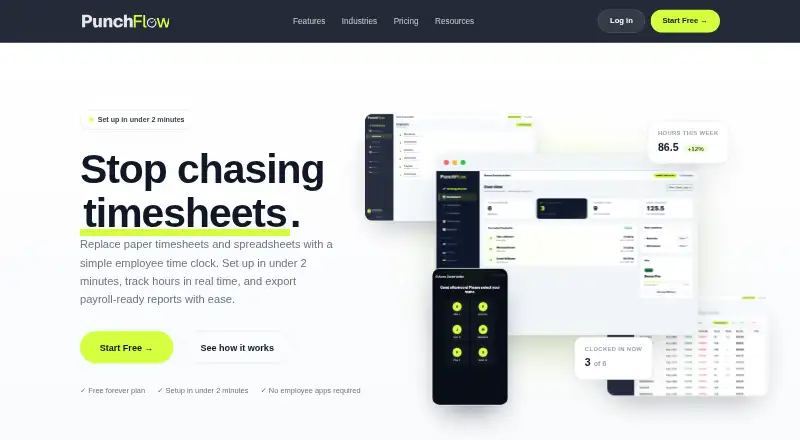
PunchFlow is a browser-based employee time clock for small businesses and shift-based teams. It replaces paper timesheets and spreadsheets with shared kiosk clock-ins and reports prepared for payroll workflows. At a kiosk, employees select their name and enter a unique four-digit PIN; they do not need an app, login or individual account. Managers can maintain employee pay rates and history, manage multiple kiosk locations, and see current staffing on a live dashboard. Reports show hours, breaks and estimated pay by employee and date range, with CSV and PDF exports. Xero, MYOB and QuickBooks are listed as export destinations, but the workflow is to export and upload a CSV rather than use a native payroll API. The kiosk works in a browser on tablets, phones, laptops and desktops without installation. A free plan covers up to two employees and one kiosk.
Good
- Kiosk clock-in requires only a four-digit PIN
- Browser kiosk needs no installation
- Reports include hours, breaks and estimated pay
- GPS and IP restrictions are available
- Full audit log records manual punch changes
Watch out
- Mobile clock-in is not available
- Payroll workflow uses CSV export and upload
- Free plan is limited to two employees and one kiosk
Who it suits
PunchFlow suits small businesses and shift-based teams, including cafes, retail stores, trades businesses and small offices. It may work for employers who want shared PIN kiosks and CSV-based payroll exports rather than mobile clock-ins or a native payroll API.
Verdict
PunchFlow centers on shared kiosks and straightforward time reports, with employee portals and location restrictions on higher plans. Check the employee and kiosk limits, and confirm that CSV upload fits your payroll process.
Plans and prices
From PunchFlow's own pricing page, checked 30 Sep 2026.
| Plan | Price | What it gives you |
|---|---|---|
| Free | Free | Up to 2 employees · 1 kiosk · Core time clock · Basic reports & CSV export |
| Basic | A$10 a month | Up to 6 employees · 3 kiosks · Email notifications · Break tracking · PDF exports & pay slips · Pay tracking · Raw punch log |
| Pro | A$25 a month | Up to 15 employees · 10 kiosks · GPS & IP restrictions · Employee portal · Full audit log |
| Unlimited | A$99 a month | Unlimited employees · Unlimited kiosks · Priority support |
The facts
Each one read from PunchFlow's own pages, with the date it was checked.
What it does
- Audit history
- The product records clock-in and clock-out events, and its full audit log records manual punch changes with the editor, time, and original value.checked 30 Sep 2026
- Backups
- PunchFlow says its database is automatically backed up daily, weekly, and monthly.checked 30 Sep 2026
- Data use
- PunchFlow says it does not sell or share customer data and uses it only to run the account.checked 30 Sep 2026
- Employee portal
- On Pro and higher plans, employees can view their timesheets and earnings and flag a punch for an administrator to approve or decline.checked 30 Sep 2026
- Location controls
- GPS radius and IP address restrictions can limit where employees clock in, and GPS/IP capture is optional.checked 30 Sep 2026
- Management
- The product manages employee pay rates and history, supports multiple kiosk locations, and provides a live dashboard of who is working.checked 30 Sep 2026
- Payroll exports
- PunchFlow lists Xero, MYOB, QuickBooks, and CSV-compatible payroll tools as export destinations; its current workflow is CSV export and upload rather than a native payroll API integration.checked 30 Sep 2026
- Purpose
- PunchFlow is a browser-based employee time clock intended to replace paper timesheets and spreadsheets with kiosk clock-ins and payroll-ready reports.checked 30 Sep 2026
- Reports
- Reports show hours, breaks, and estimated pay by employee and date range, with CSV and PDF exports.checked 30 Sep 2026
- Security
- PunchFlow says employee PINs are bcrypt-hashed, failed attempts trigger automatic lockout, and connections use HTTPS encryption.checked 30 Sep 2026
- Support
- The Help Centre says PunchFlow replies to support inquiries within one business day; the Unlimited plan includes priority support.checked 30 Sep 2026
- Who it serves
- PunchFlow describes its audience as small businesses and shift-based teams, including cafes, retail stores, trades businesses, and small offices.checked 30 Sep 2026
The company
- Headquarters
- Campbellfield, Victoria, Australiachecked 28 Sep 2026
Where it runs
- Kiosk clock-in
- Employees select their name and enter a unique 4-digit PIN on a shared kiosk; they do not need an app, login, or individual account.checked 30 Sep 2026
- Setup and devices
- PunchFlow says the kiosk runs in a browser on tablets, phones, laptops, and desktops without installation, and setup takes under two minutes.checked 30 Sep 2026
The full review of PunchFlow
PunchFlow is a browser-based time clock for small businesses and shift-based teams that want staff to clock in at a shared kiosk. Its strongest case is simple PIN-based attendance with payroll-ready reports; the main trade-offs are employee caps on lower plans and a CSV upload step for payroll.
Overview
Employees select their name and enter a unique four-digit PIN on a shared device, without installing an app or signing into an individual account. Managers get a live view of who is working, can maintain pay rates and employee history, and can run multiple kiosk locations. That approach fits workplaces where employees share a clock-in point, such as cafes, retail stores, trades businesses and small offices; it is less suited to teams that need mobile clock-ins.
Reports summarize hours, breaks and estimated pay by employee and date range. CSV and PDF exports cover common handoffs, and PunchFlow names Xero, MYOB, QuickBooks and compatible payroll tools as destinations. The process is export and upload, not a native payroll API connection, so businesses expecting automatic payroll syncing should look elsewhere.
Key features
Break tracking and pay tracking begin on Basic. Free includes basic reports and CSV export, while PDF exports and pay slips start at Basic. On Pro and above, the employee portal lets staff review timesheets and earnings and flag a punch for an administrator to approve or decline. That adds a useful correction channel, though approval remains an administrator decision.
Pro also adds GPS-radius and IP restrictions for clock-ins. GPS and IP capture are optional, giving managers location controls without making capture mandatory. PIN protection, HTTPS connections, automatic lockout after failed attempts and a full audit log on Pro address access and change tracking; manual edits record who changed a punch, when, and its original value. PunchFlow says its database is backed up daily, weekly and monthly, and that customer data is used only to run the account, not sold or shared.
The kiosk runs in a browser on tablets, phones, laptops and desktops without installation. PunchFlow says setup takes under two minutes, making shared-device deployment a practical strength for teams that do not want individual employee app accounts.
Pricing
PunchFlow has a free plan and paid plans priced in AUD per month. There is no free trial, so the free tier is the way to assess the core clock-in and reporting workflow before paying.
- Free — free: Up to 2 employees, 1 kiosk, core time clock, basic reports and CSV export. It suits a very small team testing a shared kiosk, but the two-employee ceiling makes it a narrow long-term option.
- Basic — A$10 a month: Up to 6 employees and 3 kiosks, plus email notifications, break tracking, PDF exports and pay slips, pay tracking and a raw punch log. This is the practical entry point for small teams needing more than basic CSV reports; it still lacks the employee portal and Pro location controls.
- Pro — A$25 a month: Up to 15 employees and 10 kiosks, with GPS and IP restrictions, the employee portal and full audit log. It suits growing teams that need location limits or employee access to records, but the 15-person cap may make Unlimited necessary as headcount grows.
- Unlimited — A$99 a month: Unlimited employees and kiosks, plus priority support. It is the clear fit for larger or expanding operations that would outgrow Pro; smaller teams should weigh the substantially higher monthly price against their need for uncapped capacity.
The Help Centre says support inquiries receive a reply within one business day; Unlimited adds priority support. No paid plan requires an individual mobile clock-in app, since clock-ins use the PIN kiosk.
Platforms
PunchFlow lists Android, iOS, macOS, web and Windows. Its browser-based kiosk can run on phones, tablets, laptops and desktops, but mobile clock-in is not supported: employees clock in at a kiosk rather than from their own devices.
Who it's for
PunchFlow is best for small, shift-based workplaces that can put a shared kiosk at a suitable clock-in point and want hours and pay estimates exported for payroll processing. Businesses needing individual mobile clock-ins, automatic payroll integration, or more than 15 employees without moving to the $99.00 AUD monthly Unlimited plan have stronger reasons to compare alternatives.
Pros and cons
- Pro: Kiosk clock-ins require no employee app or account. A shared browser device keeps onboarding simple for teams with a common clock-in location.
- Pro: Reports cover hours, breaks and estimated pay. CSV is available on Free, with PDF exports and pay slips on Basic and above.
- Pro: Pro adds employee self-service and traceable edits. Employees can view records and flag punches, while the full audit log retains the editor and original value.
- Con: Payroll is a manual handoff. CSV export and upload is less convenient than an API-based connection for businesses seeking automatic synchronization.
- Con: Lower plans have tight employee limits. Free stops at 2 employees, Basic at 6 and Pro at 15, so growth can mean a move to Unlimited.
- Con: No mobile clock-in. Employees must use a kiosk, which does not suit teams whose work takes them away from a shared device.
Alternatives
Time Clock Software is the broader category page for comparing time-clock options.
- Fareclock is worth considering if GPS time tracking and shift scheduling are priorities; it has a free trial but no free plan, and its Pro plan is $1.65 a month billed at $11.00 base plus $1.65 per user.
- Jibble is another freemium option with a free plan for unlimited users, two geofences and one work schedule, plus a free trial.
- ClockIt offers a free-for-life plan with unlimited users and time tracking across mobile, web, kiosk, Slack, Teams, desktop and biometric channels.
- ClockOut has a free tier for up to two people that includes GPS punches, basic scheduling, pay estimates and CSV export; consider it if those features matter alongside its small-team cap.
- TimeClock Wizard offers free basic employee time tracking for unlimited users, making it an alternative for teams focused on broad free-tier capacity.
- PunchClock Pro has a free web plan for one company, one site and up to 10 employees, with basic PDF reports, geofencing and kiosk included.
- Aladtec is a paid option with Android, iOS and web platforms.
- OnTheClock combines employee time tracking, scheduling and PTO management for $4 a month, billed at $4 per employee plus a $5 monthly base fee after a free 30-day trial.
Verdict
Choose PunchFlow if a small shift-based team wants shared PIN kiosks, straightforward time and pay reports, and a low-cost way to start without employee app accounts. Its strongest reason to buy is the focused kiosk workflow with useful reporting and audit options as plans grow. Look elsewhere if mobile clock-ins or automatic payroll syncing are essential, or if your headcount makes the lower-plan caps impractical.
Alternatives to PunchFlow
- 1

Jibble
Free planAndroidiOSWebAPI8.0From $4.49 a month - 2

Workforce.com
AndroidiOSWebAPI7.9From C$12.80 a month - 3
QuickBooks Time
AndroidiOSWebAPI7.8From $20 a month - 4

Timeero
AndroidiOSWebAPI7.7From $5 a month - 5

Fareclock
Free planAndroidiOSWebLinux7.5Free plan - 6

ClockIt
Free planAndroidiOSWebAPI7.3From $29.90 a year