
ClockIt
ClockIt is a business time clock and productivity tool for time tracking, scheduling, task management, payroll reporting, and attendance.
What ClockIt is
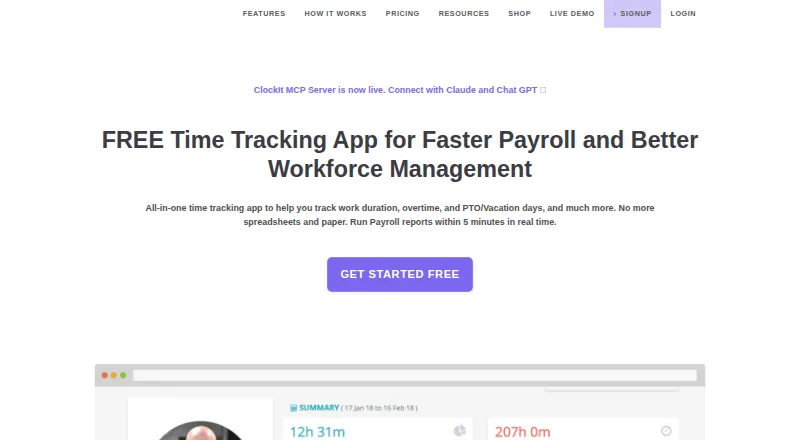
ClockIt is a business time clock and productivity tool for time tracking, scheduling, task management, payroll reporting, and attendance. Employees can clock in and out using mobile, web, Slack, Microsoft Teams, Google Chat, kiosk, desktop, or biometric methods, with attendance data synced in real time. Managers can set job-site geofences and location capture to control where employees clock in or out. The service supports custom shifts and schedules, notifications, PTO accruals, leave requests, and approval flows. Project and task tracking records billable hours, projects, and job codes for reporting and client billing. Reports cover work duration, overtime, and PTO, with CSV and Excel export. ClockIt offers Android, iOS, Linux, macOS, Windows, web, and API access. Its desktop app can track project and task hours and capture periodic screenshots. The free plan costs nothing and supports unlimited users with basic time tracking. ClockIt runs only on its own servers and does not support on-site installation.
Good
- Free plan supports unlimited users.
- Clock-ins can use multiple methods, including biometrics.
- Geofences can restrict clock-in and clock-out locations.
- Reports export to CSV and Excel.
Watch out
- On-site installation is not supported.
- Desktop app can capture periodic screenshots.
- Organizations with over 100 users must contact support for special pricing.
Who it suits
ClockIt suits businesses that need employee attendance, scheduling, leave tracking, and payroll reporting. Its desktop tracking is also described as suitable for freelancers, remote teams, and project managers.
Verdict
ClockIt combines attendance, scheduling, PTO, and project tracking, with a free plan for unlimited users. Consider its screenshot capture and cloud-only hosting limits when deciding whether it fits your workplace.
Plans and prices
From ClockIt's own pricing page, checked 28 Sep 2026.
| Plan | Price | What it gives you |
|---|---|---|
| FREE | Free | Unlimited Users · Basic Time Tracking · Mobile, Web, Kiosk, Slack, Teams, Desktop and Biometrics · Basic real time attendance dashboards · Online Support · FREE for Life |
| Monthly | $2.99 a month | Everything from Free · PTO and vacation tracking · Corrections and manual time · Schedules and shifts · Notifications · Projects and task tracking · Payroll reports · Route planning · IP restrictions, geofencing and location capture · API access · Priority Support · USD/user/mo |
| Annually | $29.90 a year | Everything from Free · PTO and vacation tracking · Corrections and manual time · Schedules and shifts · Notifications · Projects and task tracking · Payroll reports · Route planning · IP restrictions, geofencing and location capture · API access · Priority Support · USD/user/year |
The facts
Each one read from ClockIt's own pages, with the date it was checked.
What it does
- Attendance
- Employees can clock in and out through mobile, web, Slack, Teams, kiosk, desktop or biometric methods, with data synced in real time.checked 28 Sep 2026
- Audience
- ClockIt describes its desktop time tracking as suitable for freelancers, remote teams and project managers.checked 28 Sep 2026
- Desktop monitoring
- The desktop app for Mac, Windows and Linux can track project and task hours and capture periodic screenshots.checked 28 Sep 2026
- Hosting
- ClockIt says it runs only on its own servers and does not support on-site installation on a customer’s infrastructure.checked 28 Sep 2026
- Integrations
- The integrations page describes clocking in and out through Slack, Microsoft Teams and Google Chat, and lists QuickBooks, Xero, ADP, Asana and Paychex, several marked Coming Soon.checked 28 Sep 2026
- Location controls
- Managers can configure job-site geofences and location capture to restrict where employees clock in or out.checked 28 Sep 2026
- Payroll reports
- ClockIt reports provide work duration, overtime and PTO data with one-click CSV and Excel export.checked 28 Sep 2026
- Product
- ClockIt is a time clock and productivity tool for business time tracking, scheduling, task management, payroll and reporting.checked 28 Sep 2026
- Project tracking
- Project and task tracking supports billable hours, tasks, projects and job codes for reporting and client billing.checked 28 Sep 2026
- PTO
- PTO features include accruals, holiday and leave tracking, employee leave requests and approval flows.checked 28 Sep 2026
- Scheduling
- ClockIt supports custom employee shifts and schedules, with shift notifications and work and break durations.checked 28 Sep 2026
- Security and privacy
- ClockIt’s privacy policy says sensitive and credit information is encrypted using SSL and personal information is held behind secured networks with limited access.checked 28 Sep 2026
- Support
- The site offers online support on its free plan and priority support on its paid plans, and links to a help site and scheduled calls.checked 28 Sep 2026
The company
- Founded
- 2016checked 28 Sep 2026
Money
- Plan limits
- The pricing page directs organizations with more than 100 users to contact support for special pricing plans with dedicated support.checked 28 Sep 2026
The full review of ClockIt
Overview
ClockIt is a business time clock and productivity platform for employers coordinating attendance, shifts, time off, and project hours. It best suits teams that want multiple clock-in routes and operational reporting in one service. Its free plan supports unlimited users, while several workforce-management tools require a paid plan.
Attendance can be captured through mobile, web, desktop, kiosk, chat tools, or biometric devices, and records sync in real time. That flexibility can accommodate different workplace routines; organizations that require software installed on their own infrastructure should look elsewhere, since ClockIt runs only on its own servers.
For more options in the category, see our Time Clock Software list.
Key features
Attendance and location controls
Employees can clock in and out using mobile apps, web, kiosks, desktop software, Slack, Microsoft Teams, Google Chat, or biometric devices. Real-time syncing gives managers current attendance data across those methods. Paid plans add geofencing and location capture, including controls to restrict clock-ins or clock-outs to configured job sites. Those controls are useful for distributed or field teams, but location capture may not suit workplaces that prefer less employee monitoring.
Schedules, breaks, and leave
Custom shifts and schedules can include work and break durations, with notifications to keep employees informed. PTO tools handle accruals, holidays, leave requests, and approval flows. Since schedules and PTO are paid-plan features, the free tier is a narrower fit for teams that only need basic timekeeping.
Projects and reporting
Project and task tracking records billable hours, tasks, projects, and job codes for reporting and client billing. Payroll reports cover work duration, overtime, and PTO, with CSV and Excel export. The combination makes ClockIt more useful than a basic punch clock for managers reconciling hours across projects, though these reporting and tracking tools sit on paid plans.
Integrations and desktop monitoring
Clocking is supported through Slack, Microsoft Teams, and Google Chat. ClockIt also lists QuickBooks, Xero, ADP, Asana, and Paychex integrations, with several marked as coming soon; teams should not assume every listed connection is ready to use. The Mac, Windows, and Linux desktop app can track project and task hours and take periodic screenshots, a monitoring trade-off that may be appropriate for some remote project work but intrusive for other teams.
ClockIt says sensitive and credit information is encrypted using SSL and personal information is held behind secured networks with limited access. Free-plan users receive online support; paid plans include priority support, and the site links to help resources and scheduled calls.
Pricing
ClockIt has a free plan and paid plans, with a 14-day trial. The free plan is billed free for life and supports unlimited users. It includes basic time tracking, mobile, web, kiosk, Slack, Teams, desktop, and biometric clock-ins, basic real-time attendance dashboards, and online support. That is a substantial starting point for organizations that need attendance collection without paying per seat, but it omits the listed paid features for managing leave, schedules, projects, and payroll reports.
The Monthly plan costs $2.99 a month, billed USD/user/mo. It includes everything in Free plus PTO and vacation tracking, corrections and manual time, schedules and shifts, notifications, project and task tracking, payroll reports, route planning, IP restrictions, geofencing and location capture, API access, and priority support. It is the practical step up for teams needing controls and reporting, though per-user billing means cost rises with headcount.
The Annually plan costs $29.90 a year, billed USD/user/year, and includes the same listed features as Monthly. It suits organizations prepared to pay annually for those tools; the stated annual rate is a different billing term, so compare the commitment as well as the price. For organizations with more than 100 users, ClockIt directs customers to contact support for special pricing plans with dedicated support.
Platforms
ClockIt supports Android, iOS, Linux, macOS, web, and Windows, and offers an API. Its variety of clock-in channels also includes kiosks, Slack, Microsoft Teams, Google Chat, and biometric devices. The broad reach helps mixed-device teams, but there is no customer-hosted installation option.
Who it's for
ClockIt is a strong fit for businesses that need attendance plus scheduling, PTO, or project-hour reporting, particularly those with employees working across job sites or using different devices to clock in. Its desktop tracking is also positioned for freelancers, remote teams, and project managers. Teams that want unlimited-user basic timekeeping can start free; those needing the full workforce and reporting toolkit should budget for per-user paid plans. It is a weaker fit for organizations requiring on-premise hosting or unwilling to use periodic screenshot capture where desktop monitoring is enabled.
Pros and cons
- Pros: The free plan supports unlimited users and multiple clock-in methods, making it viable for broad basic attendance use without a per-seat charge.
- Pros: Paid plans combine PTO, schedules, geofencing, project tracking, and payroll exports, reducing the need to stitch together separate timekeeping workflows.
- Pros: Real-time attendance syncing and CSV and Excel exports support timely oversight and payroll handoffs.
- Cons: PTO, scheduling, project tracking, and payroll reports are paid features, limiting the free plan to more basic timekeeping.
- Cons: The desktop app can capture periodic screenshots, which may be unacceptable in workplaces that avoid employee monitoring.
- Cons: Hosting is limited to ClockIt's own servers, ruling it out for organizations that require installation on their own infrastructure.
Alternatives
Jibble is worth comparing for teams that want a free plan with stated caps of two geofences and one work schedule, or need a self-hosted option among its listed platforms.
PunchFlow may suit a very small operation: its free plan supports up to two employees and one kiosk, while its Basic plan supports up to six employees.
ClockOut is another freemium option, with a free plan capped at two people and including GPS punches, basic scheduling, pay estimates, and CSV export.
Aladtec is a paid alternative with pricing provided through a demo request.
OnTheClock may fit teams seeking paid time tracking, scheduling, and PTO management, with a free 30-day trial.
TimeClock Wizard is a freemium alternative available on web, iOS, and Android.
VeriClock is a paid alternative with a free trial and a Standard plan priced at $6.50 a month, plus an account fee.
Buddy Punch is a paid alternative with a free trial and a Starter plan that charges for employees and managers while administrators are free.
Verdict
Choose ClockIt if your business wants an unlimited-user free starting point and a clear upgrade path to schedules, PTO, location controls, project hours, and payroll exports. Its breadth of clock-in methods and paid management tools are the main reasons to shortlist it. Look elsewhere if your team needs on-premise hosting or considers desktop screenshots too intrusive, and weigh per-user pricing before moving a large workforce onto a paid plan.
Getting started
- Open the ClockIt website.
- Choose the free plan or a paid plan; a 14-day trial is available.
- Use ClockIt through the web or select a listed platform such as Android, iOS, Windows, macOS, or Linux.
- Set up employee clock-ins through supported mobile, web, kiosk, desktop, chat, or biometric methods.
Limits worth knowing
The free plan includes basic time tracking and basic real-time attendance dashboards. PTO and vacation tracking, schedules, project tracking, payroll reports, geofencing, location capture, and API access are included in paid plans.
Questions
Is ClockIt free?
Yes. Its FREE plan is free, billed FREE for Life, and supports unlimited users with basic time tracking.
How much do paid plans cost?
The Monthly plan is $2.99 a month, billed USD/user/mo. The Annually plan is $29.90 a year, billed USD/user/year.
Is there a free trial?
Yes, ClockIt offers a 14-day trial.
Which platforms does ClockIt support?
ClockIt lists Android, iOS, Linux, macOS, web, Windows, and API access.
Which integrations are listed?
Clocking in and out is described for Slack, Microsoft Teams, and Google Chat. The integrations page also lists QuickBooks, Xero, ADP, Asana, and Paychex, with several marked Coming Soon.
Can ClockIt be installed on a company’s own servers?
No. ClockIt says it runs only on its own servers and does not support on-site installation on customer infrastructure.
Alternatives to ClockIt
- 1

Jibble
Free planAndroidiOSWebAPI8.0From $4.49 a month - 2

Workforce.com
AndroidiOSWebAPI7.9From C$12.80 a month - 3
QuickBooks Time
AndroidiOSWebAPI7.8From $20 a month - 4

Timeero
AndroidiOSWebAPI7.7From $5 a month - 5

Fareclock
Free planAndroidiOSWebLinux7.5Free plan - 6
PunchFlow
Free planAndroidiOSWebmacOS7.4From A$10 a month