
Cirua
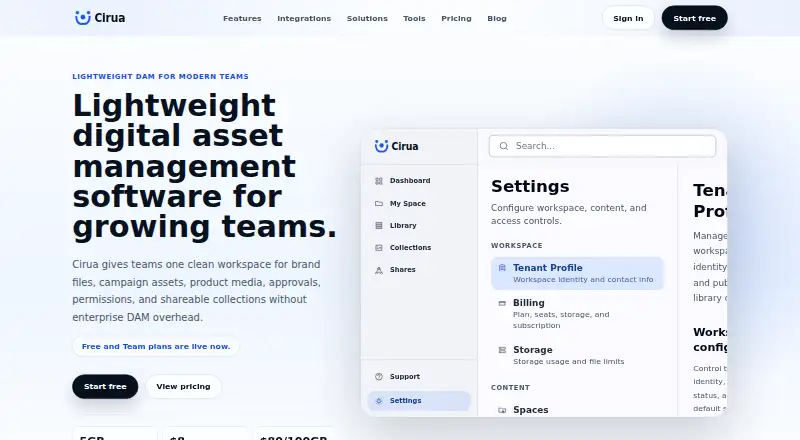
Cirua is a web-based digital asset management workspace for organizing, finding, approving and sharing brand and media assets.
What Cirua is
Cirua is a web-based digital asset management workspace for organizing, finding, approving and sharing brand and media assets. Its central library can hold brand files, campaign assets, sales collateral and product media. Users can search by name, metadata, collection, file type or usage context, then organize assets with tags. Branded sharing links and portals include access controls for teammates and external partners. Microsoft OneDrive is the production-ready integration for connecting approved files and team folders; SharePoint, Google Drive, Dropbox, Box, Amazon S3, Cloudflare R2, Azure Blob Storage and Google Cloud Storage are listed as in progress. The Always Free plan includes one user seat and 5 GB of workspace storage. Team costs $8 per seat / month and includes 20 GB per seat in storage. Additional storage costs $80 per 100 GB per year across active plans. Enterprise is listed at $20 per seat / month but is marked as coming later, not currently available. Cirua is aimed at growing teams that have outgrown shared folders but do not need enterprise DAM complexity. Its listed content approval workflows are marked unavailable.
Good
- Searches assets by name, metadata and usage context.
- Branded sharing links include access controls.
- Microsoft OneDrive integration is available.
- Always Free includes one user seat and 5 GB.
Watch out
- Content approval workflows are not available.
- Most listed storage integrations are still in progress.
- Enterprise is marked as coming later.
- Additional storage costs $80 per 100 GB per year.
Who it suits
Cirua suits growing marketing, sales, creative, operations and founder-led teams looking to organize and share assets beyond shared folders. The free and Team plans are self-serve, according to the maker.
Verdict
Cirua provides a searchable asset library, controlled sharing and a production-ready OneDrive integration for growing teams. Review storage limits and integration availability, and note that Enterprise is not currently available.
Plans and prices
From Cirua's own pricing page, checked 29 Sep 2026.
| Plan | Price | What it gives you |
|---|---|---|
| Always Free | Free | 1 user seat · 5 GB workspace storage · personal asset library · folders, upload, preview, download, search, tags, metadata, collections, shareable links · $0 forever |
| Team | $8 a month | Unlimited team seats · 20 GB x seats included storage · shared library spaces · team roles and permissions · branded sharing links and buyer rooms · extra storage add-ons · $8 per seat / month |
| Enterprise | $20 a month | Higher storage limits · brand portals · advanced permissions · workflow approvals · custom domain · SSO · dedicated onboarding · priority support · planned, not currently available · $20 per seat / month · Coming later |
The facts
Each one read from Cirua's own pages, with the date it was checked.
Money
- Annual billing offer
- The pricing page says paid plans receive two months free with annual billing from 07/01/2026 through 12/31/2026, and Team is billed as 10 months during that period.checked 29 Sep 2026
- Free plan
- Yeschecked 20 Sep 2026
What it does
- Central library
- The central asset library supports brand files, campaign assets, sales collateral, and product media.checked 29 Sep 2026
- Integration available
- Microsoft OneDrive is the production-ready integration for connecting approved files and team folders.checked 29 Sep 2026
- Integrations in progress
- SharePoint, Google Drive, Dropbox, Box, Amazon S3, Cloudflare R2, Azure Blob Storage, and Google Cloud Storage are listed as in progress.checked 29 Sep 2026
- Intended users
- Cirua is aimed at growing marketing, sales, creative, operations, and founder-led teams that have outgrown shared folders but do not need enterprise DAM complexity.checked 29 Sep 2026
- Paid from
- 8checked 20 Sep 2026
- Product
- Cirua is a lightweight digital asset management workspace for organizing, searching, approving, and sharing brand and media assets.checked 29 Sep 2026
- Search
- Users can search by name, metadata, collection, file type, or usage context and organize assets with tags.checked 29 Sep 2026
- Self-serve
- The maker says Free and Team are self-serve plans and users can start without a sales-led rollout or custom onboarding.checked 29 Sep 2026
- Sharing and permissions
- Cirua offers branded sharing links and portals, with access controls for teammates and external partners.checked 29 Sep 2026
- Storage add-on
- Additional storage is priced at $80 per 100 GB per year across active plans.checked 29 Sep 2026
- Support
- The pricing comparison lists self-serve support for Always Free and standard support for Team; priority support is planned for Enterprise.checked 29 Sep 2026
- Workflow
- The maker describes a workflow to upload assets, organize them with collections, metadata, permissions, and approvals, then share controlled links and portals.checked 29 Sep 2026
The company
- Company
- The About page describes Cirua’s mission as helping growing teams keep approved brand, campaign, product, and sales assets organized, searchable, and shareable.checked 29 Sep 2026
The full review of Cirua
Cirua is a lightweight digital asset workspace for teams that need a reliable home for brand, campaign, sales, and product files. It fits growing marketing, sales, creative, operations, and founder-led groups moving beyond shared folders without wanting an enterprise DAM rollout. The free tier is useful for an individual library, while Team is the meaningful choice for collaborative sharing; integration coverage and storage costs need careful review.
Overview
Cirua puts brand files, campaign assets, sales collateral, and product media in one searchable library. Retrieval can use names, metadata, collections, file types, or usage context, and tags add another layer of structure. The intended process runs from uploading and organizing through permissions, approvals, and controlled distribution. In practice, that gives a growing team more discipline than a conventional folder tree while keeping the product lighter than a full enterprise DAM. Content approval workflows are not currently available, so teams needing formal review gates should treat the approval portion of that process as a gap.
Key features
Library and search
Searching beyond filenames is valuable when a user remembers a campaign, format, collection, or intended use rather than the exact title. Folders, tags, metadata, and collections support a personal library on the free plan; Team adds shared library spaces for group work.
Sharing and access
Branded sharing links and portals provide a more presentable route to teammates and external partners than exposing a raw shared folder. Access controls help limit who can use distributed material. Team adds buyer rooms, making the paid tier better suited to sales and partner handoffs. Advanced permissions and broader brand-portal capabilities belong to the planned Enterprise tier, not the current product.
OneDrive connection
Microsoft OneDrive is the production-ready integration for connecting approved files and team folders. SharePoint, Google Drive, Dropbox, Box, Amazon S3, Cloudflare R2, Azure Blob Storage, and Google Cloud Storage are in progress, so organizations dependent on those repositories should not assume equivalent connectivity today.
Pricing
Always Free
Always Free costs $0.00 per user forever and includes one user seat, 5 GB of workspace storage, and a personal asset library. Folders, upload, preview, download, search, tags, metadata, collections, and shareable links cover the basics for an individual or very small proof of concept. There are no shared library spaces or team roles, and 5 GB will constrain sizeable media collections.
Team
Team is $8.00 per seat per month, with unlimited team seats and 20 GB of included storage per seat. Shared library spaces, team roles and permissions, branded sharing links, buyer rooms, and extra storage make it the practical plan for a growing group. Additional storage costs $80 per 100 GB per year across active plans, an expense worth adding to any media-heavy budget. Paid plans receive two months free with annual billing from 07/01/2026 through 12/31/2026; during that period, Team is billed as 10 months. Team is self-serve with standard support.
Enterprise
Enterprise is shown at $20.00 per seat per month but is coming later and is not currently available. Its proposed package includes higher storage limits, brand portals, advanced permissions, workflow approvals, custom domain, SSO, dedicated onboarding, and priority support. It should not influence a present purchasing decision.
Platforms
Cirua runs on the web, making it suitable for browser-based access across a team’s existing devices. No native desktop or mobile platform is provided.
Who it's for
Choose Cirua if a growing marketing, sales, creative, operations, or founder-led team has outgrown shared folders and wants searchable organization plus controlled external sharing. Free is aimed at a single user; Team suits collaborative asset operations without a sales-led rollout, since both plans are self-serve. It is a weaker fit for organizations requiring formal approvals now, broad storage-provider integrations, native apps, or enterprise controls such as SSO.
Pros and cons
- Pro: Search by metadata, collections, file type, and usage context reduces dependence on exact filenames.
- Pro: Team combines shared spaces, roles, branded links, and buyer rooms at $8 per seat per month.
- Pro: A permanent free tier offers a practical personal library without a subscription.
- Con: The free workspace is limited to one seat and 5 GB, making it unsuitable for team repositories.
- Con: OneDrive is the only production-ready integration; several common storage services remain in progress.
- Con: Content approval workflows and the advertised Enterprise controls are not currently available.
- Con: Extra storage at $80 per 100 GB per year can materially increase costs for large media collections.
Alternatives
For broader category comparisons, see Digital Asset Management Software and Sales Content Management Software.
- YourShowroom is worth considering when iOS or self-hosted deployment, up to three users, and 10 GB on its free plan matter more than Cirua’s metadata-led DAM structure.
- Airstride is a partner-management option with web and API access, a free tier for up to three partners, and CRM integration.
- Attach is a simpler choice for document sharing when a free allowance of up to three documents is sufficient.
- Bigtincan Digital Sales Rooms targets teams wanting dedicated digital sales rooms across a broad set of desktop and mobile platforms.
- Content Camel suits a content-library use case with a free one-user tier, basic search, collections, and one published site.
- Dock is an alternative for deal workspaces with assets, playbooks, courses, and order forms.
- QuarkXPress is a paid publishing application rather than a lightweight shared asset library.
- Templafy Email Signature Management is aimed at enterprise email-signature management with custom licensing.
Verdict
Cirua is a sensible starting point for growing teams that need a searchable asset library, shared spaces, and controlled branded distribution without enterprise implementation overhead. Pick Team when collaboration and buyer-facing sharing are central, and use Free for a single user’s organized library. Look elsewhere if formal approvals, native apps, multiple live storage integrations, or currently available enterprise governance are essential.
Alternatives to Cirua
- 1
Brandworkz
Free planAndroidiOSWebAPI8.9$500 one-time - 2

Air
Free planiOSWebAPIExtension8.6From $25 a month - 3

Unity
Free planAndroidiOSWebAPI8.4Free plan - 4

Razuna
Free planAndroidiOSWebAPI8.3From $99 a month - 5
Playbook
Free planAndroidiOSWebAPI8.3From $10 a month - 6

Artwork Flow
Free planAndroidiOSWeb8.2From $30 a month