Attach
Attach helps sales teams share document links and track how recipients engage with the files.
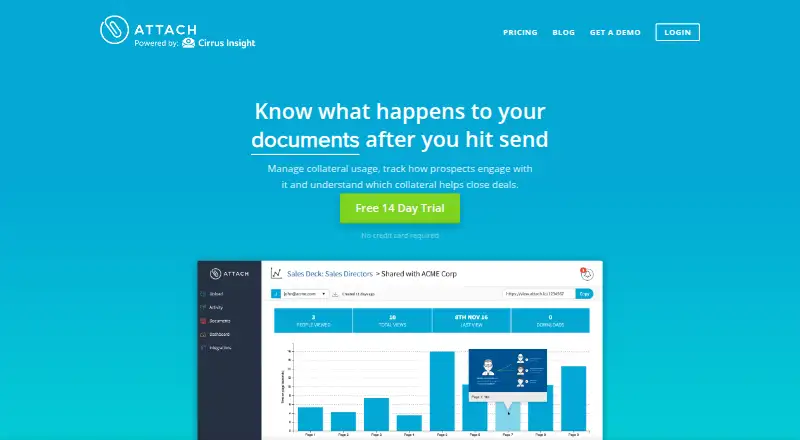
What Attach is
Attach helps sales teams share document links and track how recipients engage with the files. It records opens, viewers, page-by-page time, navigation and close events, approximate city, device type, and viewer count. Senders can password-protect documents, prevent downloads or viewing, set an expiration, and delete or replace a document after sharing it. A central library holds approved sales and marketing content so teams can share current versions and review performance. Attach lists integrations with Dropbox, Box, Google Drive, Microsoft OneDrive, Salesforce, Gmail, Outlook, Zapier, and Base. Its Gmail Chrome extension supports tracked sharing from Gmail. Uploads accept PDF, PowerPoint, and Word files up to 30 MB, with no stated upload-count limit. The free plan covers up to three documents and requires no credit card; the site also advertises a 14-day trial. Attach is available on the web and as an extension. Its pricing page does not display plan prices.
Good
- Tracks page time, navigation, and viewer details.
- Can password-protect, expire, or replace documents.
- Central library holds approved team content.
- Free plan covers up to three documents.
Watch out
- Uploads are limited to 30 MB each.
- Free plan is limited to three documents.
- Pricing page displays no plan prices.
Who it suits
It suits sales representatives, marketers, startups, and sales leaders who share documents and want recipient engagement details or controls over access.
Verdict
Attach combines tracked document sharing with access controls and a shared content library. Its free plan is small, so check document limits and the undisplayed plan pricing against your needs.
Plans and prices
From Attach's own pricing page, checked 30 Sep 2026.
| Plan | Price | What it gives you |
|---|---|---|
| Attach free plan | Free | Free up to 3 documents · No credit card required |
| Free | Free | Cloud |
| SOLO | $10 a month | Cloud · billed annually |
| ADVANCED | Priced on request | Cloud |
| TEAM | $30 a month | Cloud · billed annually |
The facts
Each one read from Attach's own pages, with the date it was checked.
What it does
- Access controls
- Documents can be password protected, expired, revoked, download restricted or replaced after sending.checked 15 Oct 2026
- API and SDK
- Attach's public homepage and help center provide no public API or SDK documentation link.checked 15 Oct 2026
- Attach relationship
- Inc. says 250,000 people use Cirrus Insight and its sister product Attach.io.checked 15 Oct 2026
- Authentication
- OAuth 2.0 is used for connected mail and CRM services, and passwords are not stored.checked 15 Oct 2026
- Capterra customer service
- Capterra reports a customer-service score of 3.5 out of 5 from 4 reviews.checked 15 Oct 2026
- Chrome extension
- The Gmail Chrome Extension lets users share tracked documents from Gmail.checked 30 Sep 2026
- Cloud uploads
- Attach lists Dropbox, Box, Google Drive and Microsoft OneDrive as cloud upload sources.checked 15 Oct 2026
- Compatibility
- Attach says recipients can view documents on any device without compatibility issues.checked 15 Oct 2026
- Content hub
- A centralized library stores approved sales and marketing collateral for team use.checked 15 Oct 2026
- Document analytics
- Reports show overall content performance, engagement and drop-off.checked 15 Oct 2026
- Document controls
- Users can password protect documents, disable downloads or viewing, set an expiration date, and delete or replace documents after sending.checked 30 Sep 2026
- File formats and size
- Uploads accept PDF, PowerPoint (.ppt, .pptx), and Word (.doc, .docx) files up to 30 MB; the FAQ says there is no limit on the number of uploads.checked 30 Sep 2026
- Gmail extension
- A Chrome extension lets users send tracked documents from Gmail.checked 15 Oct 2026
- Hosting
- The service runs on Microsoft Azure infrastructure.checked 15 Oct 2026
- Integrations
- Attach lists Dropbox, Box, Google Drive, Microsoft OneDrive, Salesforce, Gmail, Outlook, Zapier, and Base among its integrations.checked 30 Sep 2026
- Intended users
- Attach describes use by sales representatives, marketers, startups, and sales leaders.checked 30 Sep 2026
- Lead insights
- Viewer details, interests and forwarding activity can be captured for follow-up.checked 15 Oct 2026
The company
- Company and pricing status
- The Attach pricing and about links redirect to Cirrus Insight pages, and the opened pricing page displays a JavaScript pricing configurator without plan prices.checked 30 Sep 2026
- Company founding
- Cirrus Insight's official About page says the company was founded in 2011.checked 15 Oct 2026
- Company legal identity
- The official site identifies the maker as Cirruspath, Inc., operating from Raleigh, North Carolina.checked 15 Oct 2026
- Company location listing
- Inc.'s verified profile lists Cirrus Insight's location as Irvine, California.checked 15 Oct 2026
- Company size
- Inc.'s verified company profile lists Cirrus Insight at 51–200 employees.checked 15 Oct 2026
- Founded
- 2011checked 28 Sep 2026
- Headquarters
- Raleigh, North Carolina, United Stateschecked 28 Sep 2026
The full review of Attach
Overview
Attach is a document-sharing and content library tool for teams that need to manage sales materials after they leave the inbox. It suits sales representatives and marketers who want both access controls and a view of recipient engagement. Its strongest case is controlled, trackable sharing; the free plan’s three-document ceiling makes it a limited starting point for ongoing use.
Key features
Controlled sharing and engagement
Senders can password-protect documents, disable downloads or viewing, set an expiration date, and delete or replace a file after sending. That combination is useful when access needs to be restricted or an outdated version withdrawn, rather than relying on recipients to keep track of revisions.
Analytics cover opens, viewer counts, page-by-page time, navigation, close events, approximate city, device type, and forwarding. This gives sales teams more context than an open notification alone: they can see which sections held attention and whether a document was passed on. Approximate city and device type are useful signals, not a complete picture of a buyer’s circumstances.
Shared content library
A centralized library holds approved sales and marketing content, helping teams share current versions and review performance. Content approval workflows and basic personalization add some structure to distribution, though the personalization is described as basic rather than extensive.
File handling and integrations
Uploads accept PDF, PowerPoint and Word files up to 30 MB each; there is no stated cap on the number of uploads. The maximum file size may rule out larger presentations, but supported formats cover common sales documents. Integrations include Dropbox, Box, Google Drive, Microsoft OneDrive, Salesforce, Gmail, Outlook, Zapier, and Base. A Gmail Chrome extension lets users share tracked documents from Gmail, a practical fit for teams that already work in that inbox.
Pricing
Attach uses a freemium model and advertises a free 14-day trial. The Attach free plan costs nothing, requires no credit card, and allows up to 3 documents. That is enough to try controlled sharing on a small set of materials, but a team with a broader active library will quickly encounter the cap.
Paid plans have custom pricing. The plan terms and prices are not displayed through the pricing configurator, so teams should confirm the cost and any seat or usage limits before committing. The trial lasts 14 days; the free plan and trial are separate options.
Platforms
Attach is available as a web product and an extension. The Gmail Chrome Extension supports sharing tracked documents from Gmail; no other platform details are established.
Who it's for
Attach is a sensible fit for sales representatives, marketers, startups, and sales leaders who need to circulate approved documents, control access, and understand recipient engagement. It is less compelling for teams that need a large free library or must budget against known paid-plan prices before evaluating a tool.
Pros and cons
- Pro: Controls include passwords, viewing and download restrictions, expiry, and post-send deletion or replacement, giving teams practical ways to manage access and stale files.
- Pro: Page-level engagement and forwarding information can help sales teams judge what content drew attention and where follow-up may be useful.
- Pro: A shared approved-content library, workflows, and integrations connect content upkeep with distribution.
- Con: The free plan stops at 3 documents, which is restrictive for a team maintaining multiple active sales assets.
- Con: Paid plans use custom pricing, making costs harder to assess before contacting the provider.
- Con: Uploads are limited to 30 MB, and content personalization is basic.
Alternatives
For a wider category comparison, browse Sales Content Management Software.
- Airstride is worth considering when partner management, account mapping, or deal management matters more than tracked document sharing; its free plan covers up to 3 partners and includes basic partner management, a dashboard, deal management, account mapping, and CRM integration.
- Bigtincan Digital Sales Rooms is an option for teams seeking Digital Sales Rooms & Shares across a broader range of platforms; its plans require contacting sales for pricing.
- Cirua may suit teams prioritizing an asset library: its free plan includes 1 user seat, 5 GB workspace storage, and tools for organizing and sharing assets.
- Content Camel is another freemium content-library option; its Solo plan includes one user, a content library, basic search, collections, and one published site.
- Dock is a fit to compare when workspaces and deal-desk materials are central; its free plan includes 10 workspaces, 25 CMS assets, and limited amounts of several other assets.
- QuarkXPress is a paid alternative for readers seeking a tool across desktop and mobile platforms.
- Scaura is another paid option with a free trial and annual-billed add-ons for additional users and storage.
- Enablix is a paid alternative with custom annual-contract pricing and per-user costs.
Verdict
Choose Attach if your team needs to share sales documents with access controls and wants to see how recipients engage with them. The shared approved-content library and granular engagement signals are its clearest advantages. Look elsewhere if three free documents are not enough or you need predictable paid pricing before starting a buying process.
Getting started
- Open Attach on the web
- Create a free account without a credit card
- Upload a PDF, PowerPoint, or Word file up to 30 MB
- Share a tracked link or use the Gmail Chrome extension
- Connect a listed storage, CRM, email, or automation integration
Limits worth knowing
The free plan covers up to three documents and requires no credit card. Each uploaded file can be up to 30 MB.
Questions
Is Attach free?
Yes. The Attach free plan costs nothing and covers up to three documents without a credit card.
Does Attach offer a trial?
Yes. The site advertises a free 14-day trial.
What file types can Attach upload?
Uploads accept PDF, PowerPoint (.ppt and .pptx), and Word (.doc and .docx) files up to 30 MB.
Which platforms support Attach?
Attach is available as a web product and an extension, including its Gmail Chrome Extension.
What integrations does Attach list?
Listed integrations include Dropbox, Box, Google Drive, Microsoft OneDrive, Salesforce, Gmail, Outlook, Zapier, and Base.
Who owns uploaded documents?
Attach says uploaded documents remain the user's property and can be deleted or downloaded again.