BrowserOS
BrowserOS is a free, open-source browser based on Chromium that uses AI agents to handle web tasks from natural-language instructions.
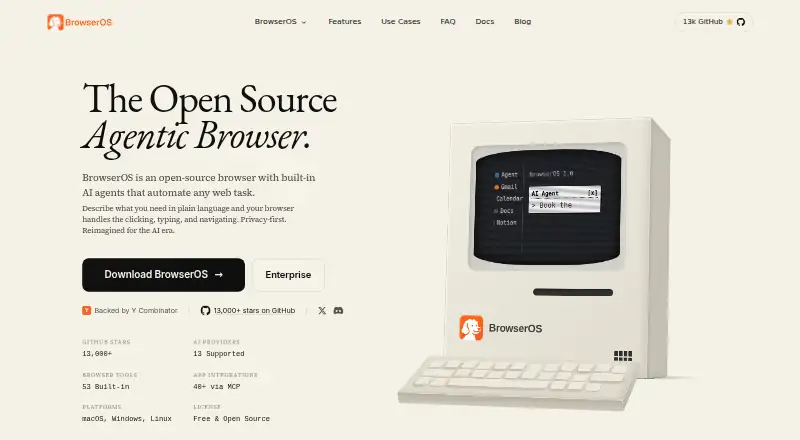
What BrowserOS is
BrowserOS is a free, open-source browser based on Chromium that uses AI agents to handle web tasks from natural-language instructions. Its agent can navigate, click, type, fill forms, extract data, and complete workflows involving multiple steps. Chat Mode answers questions about the page currently open; a visual Graph Mode for repeatable workflows is marked as coming soon. BrowserOS works with Gemini, Claude, and OpenAI, and can also run local models through Ollama or LM Studio. The maker lists more than 40 app integrations through MCP, including Gmail, Slack, Notion, and Calendar, as well as 53 built-in browser tools.
An included MCP server can connect BrowserOS with Claude Code, Gemini CLI, or Codex. As a Chromium fork, it supports Chrome extensions and lets users import Chrome bookmarks, passwords, and settings. BrowserOS is available for macOS, Windows, and Linux, and is licensed under AGPL-3.0. The maker says browsing data stays on the device unless cloud syncing is enabled; syncing is off by default, and synced activity is encrypted on BrowserOS servers. BrowserOS says it does not store or log AI prompts or responses, though providers may handle submitted data under their own policies. The default AI model has limited daily usage, and local models are not yet powerful enough for Agent Mode.
Good
- Free and open source under the AGPL-3.0 license.
- AI agents can handle multi-step web workflows.
- Supports Chrome extensions and Chrome data import.
- Offers more than 40 app integrations through MCP.
- Browsing data stays on-device unless cloud syncing is enabled.
- Available for macOS, Windows, and Linux.
Watch out
- The default AI model has limited daily usage.
- Cloud AI providers may charge based on API usage.
- Local models are not yet powerful enough for Agent Mode.
- Visual Graph Mode is marked as coming soon.
Who it suits
BrowserOS suits people who want an open-source desktop browser with AI assistance for page questions and automated web tasks. It also fits users who want Chrome extension support, MCP connections, or a choice of cloud and local AI providers.
Verdict
Pick BrowserOS if you want a free, open-source Chromium browser with AI agents, extension support, and MCP integrations. Look elsewhere if you need Agent Mode with local models or a visual Graph Mode that is available now.
Plans and prices
From BrowserOS's own pricing page, checked 19 Sep 2026.
| Plan | Price | What it gives you |
|---|---|---|
| Free | Free | Open source · Built-in AI agents · Runs on macOS, Windows, and Linux |
| BrowserOS | Free | Default AI model has limited daily usage · Other cloud AI providers charge based on API usage · Local models are free · Free and open source; AI provider usage may cost extra. |
| BrowserOS Free | Free | Open-source desktop browser · AI-provider/API costs may apply · local models via Ollama or LM Studio |
The facts
Each one read from BrowserOS's own pages, with the date it was checked.
What it does
- Ad blocking
- The repository README states that BrowserOS bundles uBlock Origin with Manifest V2 support.checked 14 Oct 2026
- Agent actions
- Its agent can click, type, navigate, fill forms, extract data, and run multi-step workflows.checked 8 Oct 2026
- AI data handling
- BrowserOS says it does not store or log AI prompt or response content, while selected AI providers may handle submitted data under their own policies.checked 8 Oct 2026
- AI providers
- The product lists support for more than 11 providers, including OpenAI, Anthropic, Google Gemini, Moonshot Kimi, OpenRouter, Ollama and LM Studio.checked 14 Oct 2026
- API and SDKs
- Public developer extensibility is provided through the built-in MCP server and custom MCP servers; the cited documentation does not present a separate REST SDK.checked 14 Oct 2026
- Changelog/news
- A March 24, 2026 release added OAuth connections for ChatGPT Pro, GitHub Copilot and Qwen Code so existing subscriptions could drive BrowserOS without separate API keys.checked 14 Oct 2026
- Chat and workflows
- Chat Mode answers questions about the current page, while visual Graph Mode for repeatable workflows is marked as coming soon.checked 8 Oct 2026
- Chrome compatibility
- Because BrowserOS is a Chromium fork, the maker says Chrome extensions, bookmarks and passwords can be imported.checked 14 Oct 2026
- Collected account data
- The privacy policy says BrowserOS Software Limited collects names, email addresses and product-engagement events such as workspace creation and page views.checked 14 Oct 2026
- Developer use
- BrowserOS includes an MCP server that can connect with Claude Code, Gemini CLI, or Codex.checked 8 Oct 2026
- Documentation
- The documentation site covers installation, connecting agents, watching sessions, replaying runs and local-data handling, and links to a guided first-run walkthrough.checked 14 Oct 2026
- Extensions
- BrowserOS is a Chromium fork and supports Chrome extensions; users can also import Chrome bookmarks, passwords, and settings.checked 8 Oct 2026
- Extension support
- chrome_storechecked 19 Sep 2026
- Funding
- Crunchbase classifies BrowserOS as a private seed-stage company in San Francisco with 1–10 employees and names Lightscape Partners as an investor.checked 14 Oct 2026
- Installation
- The README documents Homebrew installation plus direct macOS, Windows, Linux AppImage and Debian downloads.checked 14 Oct 2026
Where it runs
- Browser engine
- chromiumchecked 19 Sep 2026
- Browser tools
- The product page lists 53 built-in browser tools.checked 8 Oct 2026
- Built-in browser tools
- The maker advertises 53 built-in browser tools for automation.checked 14 Oct 2026
The company
- Company founded
- LinkedIn lists BrowserOS (YC S24) as founded in 2024.checked 14 Oct 2026
- Company legal entity
- The privacy policy and terms identify the operating entity as BrowserOS Software Limited, with a registered office in Redwood City, California.checked 14 Oct 2026
- Company owner branding
- The product footer identifies Felafax, Inc. as the copyright holder.checked 14 Oct 2026
- Company size
- LinkedIn lists the company size as 2–10 employees and headquarters in San Francisco, California.checked 14 Oct 2026
- Headquarters
- Redwood City, California, United Stateschecked 28 Sep 2026
Money
- Free plan
- Yeschecked 19 Sep 2026
The full review of BrowserOS
BrowserOS is an open-source Chromium browser that adds natural-language agents to ordinary web browsing. It suits automation-minded desktop users, developers, and Chrome users who want connected app workflows without abandoning extensions. Its strongest case is broad agent and MCP support at no software price; the main compromise is that its most capable Agent Mode currently relies on cloud models.
Overview
BrowserOS can click, type, navigate, fill forms, extract information, and execute multi-step web tasks from instructions. That makes it useful for repetitive research, data collection, and form work where a conventional browser leaves every action to the user. Chat Mode answers questions about the page currently open, while visual Graph Mode for building repeatable workflows is still coming soon. Choose BrowserOS for on-demand automation today, not for a finished visual workflow canvas.
Key features
Agents and AI providers
The browser works with Gemini, Claude, and OpenAI. It can also connect to local models through Ollama or LM Studio, giving privacy-conscious users a route that avoids provider API charges. However, the documentation says local models are not yet powerful enough for Agent Mode, so the practical choice for full agent automation is currently a cloud provider. The default model has limited daily usage, and other cloud providers bill according to their own API rates.
Tools, MCP, and extensions
BrowserOS lists 53 built-in browser tools and more than 40 MCP integrations, including Gmail, Slack, Notion, and Calendar. Those connections make it more than a page assistant: browser actions can participate in workflows that span communication, notes, scheduling, and other services. Developers can expose the browser through its MCP server to Claude Code, Gemini CLI, or Codex.
Because BrowserOS is a Chromium fork, Chrome Web Store extensions remain usable. Importing Chrome bookmarks, passwords, and settings reduces the cost of switching, especially for users with an established Chrome setup.
Privacy and openness
BrowserOS says browsing data remains on the device unless cloud syncing is enabled. Sync is off by default; when enabled, activity is encrypted on BrowserOS servers. The maker says it does not store or log AI prompts or responses, although the selected AI provider may process submitted data under its own policy. The browser is open source under AGPL-3.0, with Discord for support and feedback and GitHub for contributions.
Pricing
| Plan | Price | What you get |
|---|---|---|
| Free | free | Open source, built-in AI agents, and macOS, Windows, and Linux support. |
| BrowserOS | free | Free and open source; default AI model with limited daily usage, local models at no model cost, and other cloud providers charged by API usage. |
There is no paid software tier or seat charge. The meaningful limit is AI consumption: the included default model has a daily cap, while Gemini, Claude, and OpenAI can create separate usage bills. Local inference is free from provider charges but does not yet deliver Agent Mode capability. This pricing fits individuals and developers willing to manage their own provider accounts; organizations needing predictable, fully hosted AI spend should budget for external API usage.
Platforms
BrowserOS is a desktop browser for Windows, macOS, and Linux, distributed as an extension alongside its desktop platforms. Its Chromium base and Chrome extension compatibility make it a practical alternative for desktop Chrome users, but it is not presented as a mobile browser.
Who it's for
Pick it for people who automate browser chores, connect web work to apps through MCP, or build developer workflows around Claude Code, Gemini CLI, or Codex. It also suits Chrome users who want to keep extensions, bookmarks, passwords, and settings. Look elsewhere if you require local-model Agent Mode now, a visual workflow editor today, or a mobile-first browser.
Pros and cons
Pros
- Free and open source: AGPL-3.0 licensing and no software subscription keep the core browser accessible and auditable.
- Broad automation surface: Natural-language actions, 53 browser tools, and more than 40 MCP integrations cover tasks beyond page-level chat.
- Chrome continuity: Chrome extensions and imported browser data ease migration.
- Choice of AI providers: Gemini, Claude, OpenAI, Ollama, and LM Studio let users balance capability, privacy, and cost.
- Developer connectivity: The built-in MCP server links browser operations with Claude Code, Gemini CLI, and Codex.
Cons
- Local models are not ready for Agent Mode: privacy-first users cannot currently get the full agent experience entirely on-device.
- AI costs can move outside the browser: cloud providers charge according to API usage, and the default model has limited daily usage.
- Graph Mode is not available yet: users seeking a visual, repeatable workflow builder must wait.
- Desktop-only scope: there is no listed mobile platform.
Alternatives
Browse AI Browsers for a wider category comparison, or AI Browser Agents when task automation is the priority. The Web browsers list is the better starting point for conventional browser selection.
Norton Neo is a free option across desktop, mobile, and web, with unlimited AI and a VPN allowance. Choose Comet for a free, closed-source browser spanning Android, iOS, macOS, and Windows. Genspark AI Browser offers 169 on-device open-weight models without subscriptions or limits, plus a $30-per-month Team plan. Arc Search is a free mobile-focused choice with desktop platforms as well. Aside suits users who prefer routine-based automation with a 500-credit monthly free tier and paid expansion. BrowserOS neo is another free AGPL-3.0 BrowserOS variant that brings your own AI provider. Dia is a macOS freemium browser whose free plan has no AI features. MoltBrowser is a free-forever, fully open-source alternative.
Verdict
BrowserOS is the right pick for desktop users who want a free, open Chromium browser with capable web agents, Chrome extensions, and MCP links into everyday apps. Its breadth and openness are compelling, but users who insist on local Agent Mode or a ready-made visual workflow builder should choose another browser until those limitations change.
Getting started
- Visit https://browseros.com/browseros/.
- Install BrowserOS for macOS, Windows, or Linux.
- Choose a supported AI provider, or set up a local model through Ollama or LM Studio.
- Import Chrome bookmarks, passwords, and settings if desired.
- Use Chat Mode for questions about the current page or ask the agent to perform a web task.
Limits worth knowing
The default AI model has limited daily usage, and other cloud AI providers may charge based on API usage. Local models are not yet powerful enough for Agent Mode.
Questions
Is BrowserOS free?
Yes. BrowserOS is free and open source. Local models are free, while cloud AI provider usage may cost extra.
Which operating systems does it support?
BrowserOS is available for macOS, Windows, and Linux.
Which AI providers can I use?
BrowserOS supports Gemini, Claude, and OpenAI, as well as local models through Ollama or LM Studio.
Does BrowserOS support Chrome extensions?
Yes. BrowserOS is a Chromium fork and supports Chrome extensions. Users can also import Chrome bookmarks, passwords, and settings.
How does BrowserOS handle browsing and AI data?
Browsing data stays on the device unless cloud syncing is enabled, and syncing is off by default. BrowserOS says it does not store or log AI prompts or responses, though selected providers may handle submitted data under their own policies.
Alternatives to BrowserOS
- 1

Brave Browser
Free planOpen sourceAndroidiOSLinuxmacOS9.2Free plan - 2

AVG Secure Browser
Free planAndroidWebExtensionmacOS8.8From $39.99 a year - 3

Kameleo
Free planAndroidiOSWebAPI8.8Free plan - 4

DuckDuckGo Browser
Free planAndroidiOSmacOSWindows8.7Free plan - 5

Opera
Free planAndroidiOSWebExtension8.6From $48 a year - 6
Waterfox
Free planOpen sourceAndroidExtensionLinuxmacOS8.6From $5 a month