
DuckDuckGo Browser
DuckDuckGo Browser is a free browser for Windows, Mac, Android, and iOS, with protections that block third-party trackers and most ads, including ads on vide…
What DuckDuckGo Browser is
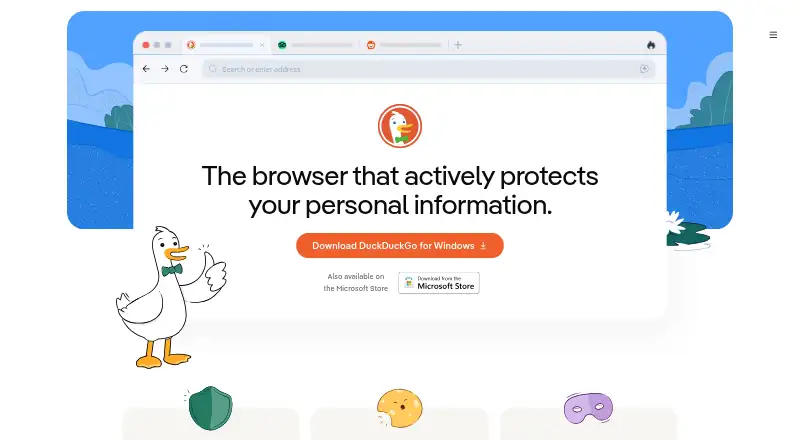
DuckDuckGo Browser is a free browser for Windows, Mac, Android, and iOS, with protections that block third-party trackers and most ads, including ads on videos and YouTube. It can block most cookie pop-ups and may opt users out automatically. A one-click option clears tabs, browsing history, and other browsing data. The browser includes a password manager, email protection against hidden trackers, and cross-device sync. Duck.ai is an optional private chat feature for popular AI models; DuckDuckGo says chats are not used to train AI. The company also says it does not track searches, and its tracker list and exceptions are open source. Plus costs $9.99 a month or $99.99 a year and adds VPN protection, advanced AI models, personal information removal, and identity restoration. Pro costs $19.99 a month or $199.99 a year and adds Claude Opus 4.8 and GPT-5.6 Sol, higher reasoning effort, and twice Plus’s Duck.ai usage limits. DuckDuckGo is based in Paoli, Pennsylvania, and has been independent since its founding in 2008.
Good
- Free browser for Windows, Mac, Android, and iOS.
- Blocks most ads and third-party trackers.
- One-click deletion clears tabs and browsing data.
- Cross-device sync is supported.
Watch out
- VPN protection requires a paid subscription.
- Advanced AI models and higher usage limits are paid features.
- Cookie pop-up blocking applies to most pop-ups, not all.
Who it suits
DuckDuckGo Browser may suit people seeking a free browser with tracker, ad, cookie pop-up, and email-tracker protections across desktop and mobile platforms. Paid plans may appeal to users who also want VPN protection or expanded AI features.
Verdict
DuckDuckGo Browser combines privacy protections with optional Duck.ai chat and a free core browser. Compare Plus and Pro plan terms if you want VPN, personal information removal, identity restoration, or expanded AI access.
Plans and prices
From DuckDuckGo Browser's own pricing page, checked 21 Sep 2026.
| Plan | Price | What it gives you |
|---|---|---|
| Free Browser | Free | DuckDuckGo Private Browser · Search and browsing protections |
| Plus Monthly | $9.99 a month | VPN · Advanced AI models in Duck.ai · Personal Information Removal · Identity Theft Restoration · $9.99 a month |
| Plus Annual | $99.99 a year | VPN · Advanced AI models in Duck.ai · Personal Information Removal · Identity Theft Restoration · $99.99 a year |
| Pro Monthly | $19.99 a month | Everything in Plus · Claude Opus 4.8 and GPT-5.6 Sol · Higher reasoning effort · 2x higher usage limits than Plus in Duck.ai · $19.99 a month |
| Pro Annual | $199.99 a year | Everything in Plus · Claude Opus 4.8 and GPT-5.6 Sol · Higher reasoning effort · 2x higher usage limits than Plus in Duck.ai · $199.99 a year |
| Pro | $199.99 | Includes everything in Plus, Claude Opus 4.8, GPT-5.6 Sol, higher reasoning effort, and 2x higher Duck.ai usage limits. · billed monthly at $19.99 |
The facts
Each one read from DuckDuckGo Browser's own pages, with the date it was checked.
What it does
- Ad blocking
- Blocks most ads, including ads on videos and YouTube.checked 28 Sep 2026
- AI training policy
- Duck.ai conversations are never used to train AI.checked 28 Sep 2026
- Built-in ad blocking
- Yeschecked 21 Sep 2026
- Cookie popup blocking
- Blocks most cookie pop-ups and may opt users out automatically.checked 28 Sep 2026
- Data deletion
- Can delete all tabs, history, and browsing data with one click.checked 28 Sep 2026
- Email protection
- Blocks hidden trackers in emails.checked 28 Sep 2026
- Identity restoration
- Offers help restoring a user's identity.checked 28 Sep 2026
- Open-source lists
- The tracker list and its exceptions are open source.checked 28 Sep 2026
- Paid from
- 9.99checked 21 Sep 2026
- Password manager
- Includes a simple, secure password manager.checked 28 Sep 2026
- Personal data removal
- Can remove personal details from sites that sell them.checked 28 Sep 2026
- Private AI chat
- Duck.ai provides private chats with popular AI models and is optional.checked 28 Sep 2026
- Search privacy
- DuckDuckGo says it never tracks users' searches.checked 28 Sep 2026
- Tracker blocking
- Blocks third-party trackers from companies including Facebook and Google.checked 28 Sep 2026
- VPN availability
- VPN protection is included with the paid subscription.checked 28 Sep 2026
The company
- Company location
- DuckDuckGo is based in Paoli, Pennsylvania.checked 28 Sep 2026
- Founded
- 2008checked 28 Sep 2026
- Headquarters
- Paoli, Pennsylvania, United Stateschecked 28 Sep 2026
- Independent company
- DuckDuckGo has been independent since its founding in 2008.checked 28 Sep 2026
Where it runs
- Cross-device sync
- Yeschecked 21 Sep 2026
- Supported platforms
- Available on Windows, Mac, Android, and iOS.checked 28 Sep 2026
Money
- Free browser
- The DuckDuckGo browser is free.checked 28 Sep 2026
- Free plan
- Yeschecked 21 Sep 2026
The full review of DuckDuckGo Browser
DuckDuckGo Browser is a free browser for Android, iOS, macOS, and Windows, built around blocking trackers and giving users quick privacy controls. It suits people who want everyday browsing protections without assembling separate tools. Its free browser is the strongest fit for that job; paid plans make more sense if you also want VPN and identity-protection services.
Overview
The browser blocks third-party trackers, including those from Facebook and Google, and most ads, even on videos and YouTube. It also blocks most cookie pop-ups and may opt users out automatically. Fingerprint protection and a one-click option to erase tabs, history, and browsing data add practical control over a browsing session.
DuckDuckGo says it never tracks users’ searches. Its tracker list and exceptions are open source, so the rules behind its blocking can be inspected. Cross-device sync is supported, though privacy protections—not sync—are the clearest reason to choose this browser.
Key features
The included password manager is described as simple and secure, which should cover basic saved credentials but is not a reason to expect a dedicated password suite. Email protection blocks hidden trackers in messages. Optional Duck.ai chats with popular AI models are not used to train AI, a useful privacy boundary for people who want an AI assistant without making it part of their browsing by default.
Paid subscriptions add VPN protection, removal of personal details from sites that sell them, and help restoring a user’s identity. Those services broaden the offer beyond browser privacy, but they are unnecessary expenses for readers who only want tracker and ad blocking.
Pricing
| Plan | Price | What it includes |
|---|---|---|
| Free Browser | free | DuckDuckGo Private Browser and search and browsing protections |
| Plus Monthly | $9.99 a month | VPN, advanced AI models in Duck.ai, Personal Information Removal, and Identity Theft Restoration |
| Plus Annual | $99.99 a year | The Plus features, billed annually |
| Pro Monthly | $19.99 a month | Everything in Plus, Claude Opus 4.8 and GPT-5.6 Sol, higher reasoning effort, and 2x higher Duck.ai usage limits than Plus |
| Pro Annual | $199.99 a year | The Pro features, billed annually |
The free plan is the sensible choice if browsing protections are all you need; it gives up VPN, personal-information removal, identity restoration, and the paid AI features. Plus suits people who want that bundle without Pro’s expanded AI models and usage limits. Pro costs more for those higher limits and models, so it is difficult to justify if you rarely use Duck.ai. Annual Plus and Pro are billed at the listed yearly prices rather than monthly rates.
Platforms
DuckDuckGo Browser is available on Windows, Mac, Android, and iOS, with cross-device sync supported. That makes it a practical option for people using a mix of desktop and mobile devices.
Who it's for
Choose it if you want tracker blocking, broad ad blocking, cookie-pop-up handling, and a quick way to clear browsing data in one free browser. It is also a fit for people who value optional private AI chat or want VPN and identity-protection services in the same subscription. Look elsewhere if your priority is a browser whose main appeal is a different privacy approach or if you want a free plan with no paid extras to consider.
Pros and cons
- Pros: Blocks third-party trackers, most ads, and many cookie pop-ups, including on video sites, without requiring separate blocking tools.
- Pros: Free use includes the browser’s search and browsing protections, while the tracker list and exceptions are open source.
- Pros: Optional Duck.ai chats are not used to train AI, and paid plans add VPN and identity-related services.
- Cons: VPN, personal-information removal, identity restoration, and advanced AI features require a paid subscription.
- Cons: Pro’s main step up over Plus is expanded AI access and higher usage limits, so it is a poor fit for users who do not rely on Duck.ai.
Alternatives
For more options, browse our Privacy browsers, Web browsers, and Ad blockers lists.
- Brave Browser is another freemium choice with a free browser and ad and tracker blocking.
- Tor Browser is a free, open-source option for Android, Linux, macOS, and Windows.
- Waterfox is a free, open-source browser with no premium tier.
- Mullvad Browser is a free, open-source option for Linux, macOS, and Windows.
- LibreWolf is a free, community-driven open-source browser for Linux, macOS, and Windows.
- IronFox is a free, open-source Android browser.
- SnowHaze is a freemium option with tracker blocking, ad blocking, fingerprinting protection, and Tor integration in its free iOS browser.
- Midori Browser is a free option that does not require an account.
Verdict
DuckDuckGo Browser is a strong choice for people who want broad privacy protections in a free browser across desktop and mobile. Its blocking, quick data deletion, and optional private AI chat give it a clear everyday case. Choose Plus or Pro only if VPN, identity services, or expanded Duck.ai access justify the ongoing cost; otherwise, the free browser is the better fit.
Getting started
- Open https://duckduckgo.com/app
- Choose the Android, iOS, macOS, or Windows version
- Install the browser on your device
- Use the Free Browser plan or select Plus or Pro
- Sign in where required for paid features and cross-device use
Limits worth knowing
The free browser does not include the paid subscription’s VPN, advanced Duck.ai models, Personal Information Removal, or Identity Theft Restoration. Pro’s Duck.ai usage limits are twice those of Plus.
Questions
Is DuckDuckGo Browser free?
Yes. The Free Browser plan costs nothing, and a paid subscription is optional.
Which devices does it support?
It supports Android, iOS, macOS, and Windows, with cross-device sync.
What does Plus cost?
Plus costs $9.99 a month or $99.99 a year.
What does Pro include?
Pro includes Plus features, Claude Opus 4.8, GPT-5.6 Sol, higher reasoning effort, and twice Plus’s Duck.ai usage limits. It costs $19.99 a month or $199.99 a year.
Is Duck.ai private?
Duck.ai is optional, and DuckDuckGo says its conversations are never used to train AI.
Alternatives to DuckDuckGo Browser
- 1

Brave Browser
Free planOpen sourceAndroidiOSLinuxmacOS9.2Free plan - 2

AVG Secure Browser
Free planAndroidWebExtensionmacOS8.8From $39.99 a year - 3

Kameleo
Free planAndroidiOSWebAPI8.8Free plan - 4

Opera
Free planAndroidiOSWebExtension8.6From $48 a year - 5
Waterfox
Free planOpen sourceAndroidExtensionLinuxmacOS8.6From $5 a month - 6
360 Secure Browser
AndroidiOSLinuxmacOS8.4From CN¥58 a year