
Mullvad Browser
Mullvad Browser is a free, open-source browser designed to minimize tracking and browser fingerprinting.
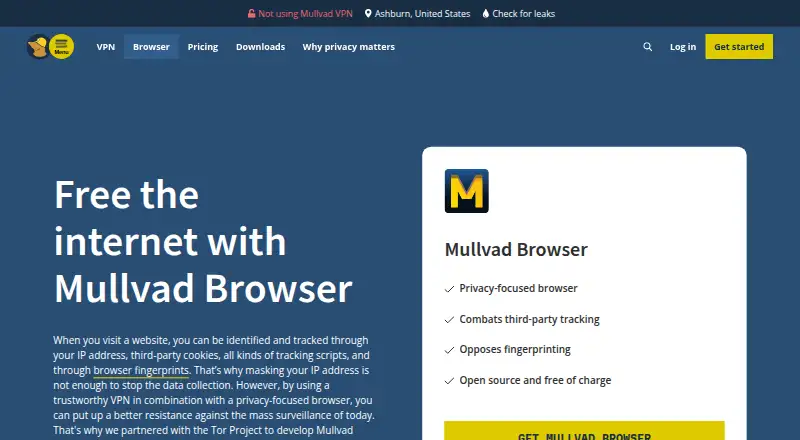
What Mullvad Browser is
Mullvad Browser is a free, open-source browser designed to minimize tracking and browser fingerprinting. It uses the Gecko engine and is available for supported versions of Linux, macOS and Windows; the Windows version requires Windows 10 or later and 64-bit Windows. Its protections include uBlock Origin for blocking third-party trackers, built-in ad blocking and fingerprint protection intended to make users appear similar to one another. Private mode is on by default, and cookies, cache and history are not saved between sessions. A reset button starts a clean session in one click, and Mullvad says it has removed browser telemetry. The browser works with or without a VPN, but does not use the Tor Network. It was developed in collaboration with the Tor Project. Cross-device sync is not available. Mullvad says it does not earn money from the browser and receives income from its VPN service instead.
Good
- Free and open source
- Private mode does not retain cookies, cache or history between sessions
- Includes uBlock Origin and built-in ad blocking
- Reset button starts a clean session
Watch out
- No cross-device sync
- Does not use the Tor Network
- Windows requires Windows 10 or later and 64-bit Windows
Who it suits
Mullvad Browser suits people seeking a browser with tracker and fingerprinting protections on Linux, macOS or Windows. It may fit users who do not need cross-device sync and understand that it does not use the Tor Network.
Verdict
Mullvad Browser centers on reducing tracking and fingerprinting, with private mode and a session reset built in. It is not a Tor Network browser, and cross-device syncing is not available.
Plans and prices
From Mullvad Browser's own pricing page, checked 3 Oct 2026.
| Plan | Price | What it gives you |
|---|---|---|
| Mullvad Browser | Free | Free for anyone · supported Linux, macOS and Windows |
The facts
Each one read from Mullvad Browser's own pages, with the date it was checked.
Where it runs
- Browser engine
- geckochecked 21 Sep 2026
- Cross-device sync
- Nochecked 21 Sep 2026
- Supported platforms
- bothchecked 21 Sep 2026
- Windows requirement
- The Windows version works on Windows 10 or later and requires 64-bit Windows.checked 3 Oct 2026
What it does
- Built-in ad blocking
- Yeschecked 21 Sep 2026
- Business model
- Mullvad says it does not earn money from the browser and earns income from its VPN service.checked 3 Oct 2026
- Fingerprint protection
- The browser uses fingerprinting protection intended to make users appear similar to one another.checked 3 Oct 2026
- Open source
- Mullvad describes the browser as open source and free of charge.checked 3 Oct 2026
- Private mode
- Private mode is enabled by default, and cookies, cache and history are not saved between sessions.checked 3 Oct 2026
- Purpose
- Mullvad Browser is designed to minimize tracking and browser fingerprinting.checked 3 Oct 2026
- Release history
- Mullvad says it released the browser in collaboration with the Tor Project in April 2023.checked 3 Oct 2026
- Session reset
- The browser includes a reset button that creates a clean session in one click.checked 3 Oct 2026
- Support
- Mullvad lists [email protected] as its contact address for questions about the browser.checked 3 Oct 2026
- Supported systems
- The browser is available for supported versions of Linux, macOS and Windows.checked 3 Oct 2026
- Telemetry
- Mullvad says it has removed all browser telemetry.checked 3 Oct 2026
- Tor collaboration
- Mullvad says the browser was developed in collaboration with the Tor Project.checked 3 Oct 2026
- Tracker blocking
- It includes uBlock Origin to block third-party trackers.checked 3 Oct 2026
- Tracking protection
- advancedchecked 21 Sep 2026
- VPN use
- The browser connects to the internet with or without a VPN and does not use the Tor Network.checked 3 Oct 2026
The company
- Company and location
- Mullvad VPN AB lists its address in Gothenburg, Sweden, and says it is owned by parent company Amagicom AB.checked 3 Oct 2026
- Founded
- 2021checked 28 Sep 2026
- Headquarters
- Gothenburg, Swedenchecked 28 Sep 2026
Money
- Free plan
- Yeschecked 21 Sep 2026
The full review of Mullvad Browser
Overview
Mullvad Browser is a free, open-source desktop browser built around limiting tracking and browser fingerprinting. It suits privacy-conscious users who want strong session isolation and tracker blocking without routing every connection through Tor. The trade-off is a desktop-only experience with no cross-device sync, so it is a weaker fit for people who move between devices.
Mullvad developed the browser with the Tor Project and released it in April 2023. The company is based in Gothenburg, Sweden, and says browser revenue is not part of its business; its income comes from its VPN service. That separation gives the product a clear privacy purpose, but a VPN remains a separate choice when network-level privacy is required.
Key features
Fingerprinting protection is designed to make browsers appear more alike to websites, reducing the identifying distinctiveness that can be used for tracking. This is useful for people who want to reduce passive identification while browsing, although it does not make a connection anonymous by itself.
uBlock Origin blocks third-party trackers, and built-in ad, malware and adult-content blocking provide additional filtering. These controls can reduce intrusive page elements and unwanted requests without requiring separate extensions. They are a practical advantage for privacy-focused everyday browsing, but they do not turn Mullvad Browser into a full security suite.
Private mode is enabled by default. Cookies, cache and history are not retained between sessions, which suits shared computers, temporary research and users who prefer not to maintain local browsing records. A one-click reset creates a clean session immediately, avoiding the need to clear data manually. The design is convenient for compartmentalized browsing, though users who rely on persistent logins and long-lived site preferences may find it restrictive.
Mullvad says it has removed all browser telemetry. The browser uses the Gecko engine and is open source, allowing its implementation to be examined and maintained as open software. It can connect to the internet with or without a VPN, but it does not use the Tor Network. The Tor collaboration therefore informs the privacy design rather than providing Tor routing; users seeking that specific anonymity network should choose a Tor browser instead.
Pricing
Mullvad Browser: free. The plan is free for anyone and includes supported Linux, macOS and Windows versions. There is no paid tier, no trial period and no seat or usage quota to manage. Every core privacy feature is therefore available without renewal charges or an upgrade decision.
The free plan is best for individuals who want a privacy-oriented desktop browser at no cost. Its limitation is not a reduced feature set but scope: it does not provide VPN service, Tor routing or cross-device synchronization. Anyone needing those capabilities must select separate software or a different browser.
Platforms
Mullvad Browser runs on supported versions of Linux, macOS and Windows. The Windows build requires 64-bit Windows 10 or later. There are no Android or iOS versions in the supported platform list, so mobile users cannot use the same browser across phone and desktop.
Who it's for
Choose Mullvad Browser if your priority is minimizing tracking and fingerprinting on a desktop, with private sessions, aggressive tracker blocking and no telemetry. It is particularly well suited to shared machines, temporary accounts and browsing where retaining cookies or history is undesirable.
Look elsewhere if you need browser data synchronized between devices, a mobile app, built-in Tor access or a bundled VPN. Mullvad Browser protects the browser environment; it does not conceal network traffic through Tor or supply a VPN subscription.
Pros and cons
- Pros: Free for anyone, with no paid tier or renewal cost.
- Pros: Fingerprinting protection and uBlock Origin address both browser uniqueness and third-party tracking.
- Pros: Private mode by default and one-click session reset make disposable browsing straightforward.
- Pros: Open-source Gecko browser with no telemetry, according to Mullvad.
- Cons: No cross-device sync means bookmarks and browsing state are not shared between computers.
- Cons: Desktop-only support excludes Android and iOS users.
- Cons: It does not use the Tor Network and does not include a VPN, so network anonymity requires other software.
Alternatives
Privacy browsers is the broader category to browse when you want to compare privacy-focused options. For a general catalogue, see Web browsers.
Brave Browser is the better choice if you need Android or iOS support, a freemium model and a free browser with ad and tracker blocking. Tor Browser is the direct alternative when routing through the Tor Network is the requirement rather than optional VPN use.
Waterfox suits users seeking a free, open-source browser with broader platform coverage, including Android and extensions. DuckDuckGo Browser is worth choosing for its free private browser and search and browsing protections, with optional paid service tiers.
LibreWolf is another free, open-source desktop option for users who want a community-driven browser. IronFox is an Android-only free and open-source alternative. SnowHaze is aimed at iOS users wanting tracker blocking, ad blocking, fingerprinting protection and Tor integration. Cromite is a free open-source choice with Android, Windows and Linux builds.
Verdict
Mullvad Browser is an excellent fit for desktop users who want private-by-default sessions, serious tracker and fingerprinting defenses, and an open-source browser without paying. Choose it for minimizing browser-based tracking, especially on shared or temporary sessions. Look elsewhere if you need mobile support, synchronized browsing, Tor routing or a VPN included in the same product.
Alternatives to Mullvad Browser
- 1
Brave Browser
Free planOpen sourceAndroidiOSLinuxmacOS9.2Free plan - 2

AVG Secure Browser
Free planAndroidWebExtensionmacOS8.8From $39.99 a year - 3

Kameleo
Free planAndroidiOSWebAPI8.8Free plan - 4

DuckDuckGo Browser
Free planAndroidiOSmacOSWindows8.7Free plan - 5

Opera
Free planAndroidiOSWebExtension8.6From $48 a year - 6
Waterfox
Free planOpen sourceAndroidExtensionLinuxmacOS8.6From $5 a month