
Opera
Opera is a free web browser for Android, iOS, Linux, macOS, Windows and the web, with extension support and cross-device sync.
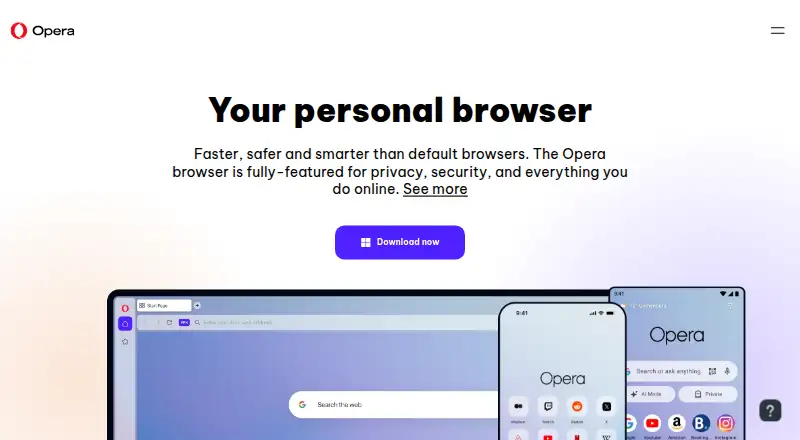
What Opera is
Opera is a free web browser for Android, iOS, Linux, macOS, Windows and the web, with extension support and cross-device sync. Built-in tools include ad blocking, a free VPN with no data cap and three general locations, and Tab Islands for grouping related tabs. Opera AI can use open-tab context, generate images, summarize PDFs, and translate or summarize YouTube videos. ChatGPT and Gemini are available in the sidebar, and Opera says its AI tools can be used without signing up. The sidebar also includes messaging services such as WhatsApp, Slack, Discord, Messenger and Telegram, while its Music Player supports services including Apple Music, Spotify, YouTube Music and Deezer. Users can set browsing data such as history, cookies, passwords and autofill data to clear on exit. VPN Pro is a separate paid option that protects up to six devices and lists 48 locations and 3,000+ servers. Plans are $4 per month billed $48 yearly, $5 per month billed $30 every six months, or $8 per month billed monthly. Opera is based in Oslo, Norway, and was founded in 1995.
Good
- Free VPN has no data cap and three general locations.
- Tab Islands group related tabs.
- AI tools include PDF and video summaries.
- Browsing data can be cleared on exit.
Watch out
- VPN Pro is a separate paid option.
- VPN Pro monthly plan is $8 per month.
- Free VPN offers three general locations.
Who it suits
Opera suits people looking for a browser across devices with extension support, cross-device sync and built-in browsing tools. Its sidebar and tab-grouping features may also appeal to users who want messaging and music services alongside open tabs.
Verdict
Opera combines browsing, tab organization, AI tools and sidebar integrations in a free browser. VPN Pro is separate, with pricing and billing terms that vary by plan.
Plans and prices
From Opera's own pricing page, checked 2 Oct 2026.
| Plan | Price | What it gives you |
|---|---|---|
| Opera browser | Free | Browser features include free VPN, ad blocker, Flow, and Opera AI · Free |
| VPN Pro — six months | $5 a month | Protects up to 6 devices · 48 locations · 3,000+ servers · $30 every six months ($5 per month) |
| VPN Pro — one month | $8 a month | Protects up to 6 devices · 48 locations · 3,000+ servers · $8 monthly |
| VPN Pro — one year | $48 a year | Protects up to 6 devices · 48 locations · 3,000+ servers · $48 every year ($4 per month) |
The facts
Each one read from Opera's own pages, with the date it was checked.
What it does
- Ad blocking
- Opera’s built-in ad blocker can block ads and cryptocurrency-mining scripts.checked 2 Oct 2026
- AI features
- Opera AI can use open-tab context, generate images, summarize PDFs, and translate or summarize YouTube videos.checked 2 Oct 2026
- AI integrations
- ChatGPT and Gemini are accessible from Opera’s sidebar, and Opera says its AI tools can be used without signing up.checked 2 Oct 2026
- Built-in ad blocking
- Yeschecked 21 Sep 2026
- Extension support
- bothchecked 21 Sep 2026
- Intended audience
- Opera describes its browsers as products for people seeking a fast, customizable browsing experience across devices.checked 2 Oct 2026
- Messaging integrations
- Opera lists WhatsApp, Slack, Discord, Messenger, and Telegram among the messengers available in its sidebar.checked 2 Oct 2026
- Music integrations
- Opera’s sidebar Music Player supports services including Apple Music, Spotify, YouTube Music, and Deezer.checked 2 Oct 2026
- Paid VPN
- VPN Pro protects an entire device, supports up to six devices, and lists 48 locations and 3,000+ servers.checked 2 Oct 2026
- Privacy controls
- Opera lets users clear browsing data on exit, including history, cookies, passwords, and autofill data.checked 2 Oct 2026
- Product
- Opera is a web browser with built-in tools for browsing, communication, and AI assistance.checked 2 Oct 2026
- Support
- Opera directs users to its Help Center, community forums, and bug report wizard for assistance and issue reports.checked 2 Oct 2026
- Tab organization
- Tab Islands group related tabs so users can collapse or expand them.checked 2 Oct 2026
Where it runs
- Browser engine
- chromiumchecked 21 Sep 2026
- Cross-device sync
- Yeschecked 21 Sep 2026
- Platforms
- Opera offers downloads for Windows, macOS, Linux, Android, iOS, and Chromebook.checked 2 Oct 2026
- Supported platforms
- bothchecked 21 Sep 2026
The company
- Founded
- 1995checked 23 Sep 2026
- Headquarters
- Oslo, Norwaychecked 23 Sep 2026
Money
- Free plan
- Yeschecked 21 Sep 2026
- Free VPN
- Opera’s free VPN is built into the browser, has no data cap, and offers three general locations.checked 2 Oct 2026
The full review of Opera
Overview
Opera is a Chromium-based browser that brings browsing, communication and AI tools together across desktop and mobile platforms. It suits people who want tab grouping, a built-in ad blocker and sidebar services in one free browser, without adding a separate extension for every task. Its free VPN has no data cap, but whole-device VPN protection is a paid add-on.
Key features
Tab Islands group related tabs and let you collapse or expand them, which can make a busy set of open pages easier to manage. Opera AI can use open-tab context, generate images, summarize PDFs, and translate or summarize YouTube videos. ChatGPT and Gemini are also accessible from the sidebar, and Opera says its AI tools can be used without signing up. That breadth will appeal to users who want assistance inside the browser; those who do not need AI may find it less central to the choice.
The built-in ad blocker can block ads and cryptocurrency-mining scripts, giving users controls beyond the page itself. Opera’s free VPN is included in the browser, has no data cap and offers three general locations. It is a browser-level option rather than full-device protection: VPN Pro extends protection to up to six devices and lists 48 locations and 3,000+ servers.
The sidebar combines messengers such as WhatsApp, Slack, Discord, Messenger and Telegram with a Music Player that supports Apple Music, Spotify, YouTube Music and Deezer. This puts frequently used services alongside browsing, although its value depends on whether those integrations match a user’s habits. Privacy controls let users clear browsing data on exit, including history, cookies, passwords and autofill data. For assistance or issue reports, Opera directs users to its Help Center, community forums and bug report wizard.
Pricing
The Opera browser is free at no cost. It includes the free VPN, ad blocker, Flow and Opera AI, making it the natural choice for browser features without a subscription.
VPN Pro is a separate purchase for users who want whole-device protection on up to six devices, with 48 locations and 3,000+ servers:
- One year: $4 a year, billed $48 every year ($4 per month). This has the lowest monthly equivalent, in return for an annual billing commitment.
- Six months: $5 a month, billed $30 every six months ($5 per month). It costs more per month than the annual plan but commits for a shorter period.
- One month: $8 a month, billed $8 monthly. This avoids a multi-month billing term but is the most expensive monthly option.
Choose among these plans based on billing term as well as price: the listed terms specify recurring billing, and the free browser remains an option if browser-level VPN access is enough.
Platforms
Opera is available on Android, iOS, Windows, macOS and Linux, as well as on the web and as an extension. Cross-device sync and extension support make it a broad fit for people who use more than one device or want browser add-ons.
Who it's for
Opera is a strong fit for people who want a free browser with grouped tabs, ad blocking, AI tools and communication or music services close at hand. Its built-in VPN is useful for browser-level access with no data cap; users seeking protection across a whole device should weigh VPN Pro’s price and device limit. Readers who want a simpler browser without these bundled tools may prefer a different option.
Pros and cons
- Pro: The free browser includes an uncapped VPN, ad blocker, Flow and Opera AI, so its main bundled tools do not require a paid plan.
- Pro: Tab Islands, sidebar messaging and music integrations bring organization and commonly used services into the browser.
- Pro: VPN Pro covers up to six devices and lists 48 locations and 3,000+ servers.
- Con: The free VPN offers three general locations and is built into the browser; whole-device coverage requires VPN Pro.
- Con: VPN Pro’s cheapest monthly equivalent requires annual billing at $48 every year, while monthly billing costs $8 per month.
Alternatives
For a browser choice by category, see Mobile Browser Software or Web browsers.
- Microsoft Edge is a free alternative across Android, iOS, Windows, macOS, Linux, web and extension platforms.
- Vivaldi is another free browser, available on Android, iOS, Windows, macOS, Linux and as an extension.
- Ecosia Browser is a free option for desktop and mobile browser access on Android, iOS, Windows, macOS and Linux.
- Google Chrome is a free alternative across Android, iOS, Windows, macOS, Linux, web and extension platforms, subject to supported operating systems and system requirements.
- JioSphere is a free browser for Android, iOS, Windows, macOS, Linux and web.
- Yandex Browser is a free alternative for Android, iOS, Windows, macOS and Linux.
- Safari is a free choice for Apple device users, with iOS, macOS and extension availability.
- NAVER Whale is a free alternative for Windows, macOS, Linux, iOS and Android.
Verdict
Choose Opera if you want a free, cross-platform browser that combines tab grouping, ad blocking, AI assistance and sidebar integrations, with an uncapped browser-level VPN included. Look elsewhere if your priority is whole-device VPN protection without an additional subscription, or if these bundled tools are not useful to you.
Alternatives to Opera
- 1

Brave Browser
Free planOpen sourceAndroidiOSLinuxmacOS9.2Free plan - 2

AVG Secure Browser
Free planAndroidWebExtensionmacOS8.8From $39.99 a year - 3

Kameleo
Free planAndroidiOSWebAPI8.8Free plan - 4

DuckDuckGo Browser
Free planAndroidiOSmacOSWindows8.7Free plan - 5
Waterfox
Free planOpen sourceAndroidExtensionLinuxmacOS8.6From $5 a month - 6
360 Secure Browser
AndroidiOSLinuxmacOS8.4From CN¥58 a year