
Work Planner
Work Planner provides job scheduling, customer management, quotes, invoicing, payments, and team tools for window cleaners and other appointment-based servic…
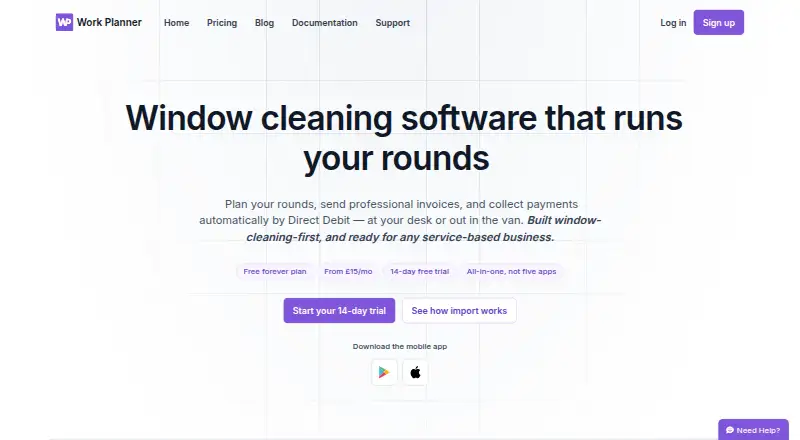
What Work Planner is
Work Planner provides job scheduling, customer management, quotes, invoicing, payments, and team tools for window cleaners and other appointment-based service businesses. Its visual planner supports drag-and-drop scheduling, recurring jobs, and round-based work planning. Customer records hold contact details, notes, and job and payment history. Users can send quotes, turn accepted quotes into scheduled jobs, and create branded, itemised PDF invoices. GoCardless supports Direct Debit and Instant Bank Payment; it is a bolt-on for Essential and included from Pro. Email and SMS reminders and invoice or payment alerts are available, with email delivery a bolt-on for Essential and included in Pro and Team. Native Android and iOS apps let field teams view jobs, mark work complete, take photos, and add notes that sync to the office. Offline mode is marked planned, while the pricing page lists daily backups and real-time sync. The free plan is limited to 20 jobs, one user, and one business.
Good
- Planner supports recurring and round-based jobs.
- Customer records include job and payment history.
- Field apps sync photos and notes to the office.
- Accepted quotes can become scheduled jobs.
Watch out
- Free plan allows only 20 jobs.
- Free plan is limited to one user and business.
- Offline mode is planned, not listed as available.
- GoCardless is a bolt-on on Essential.
Who it suits
It suits window cleaners and other appointment-based service businesses that need scheduling, customer records, quotes, invoices, and field-team tools. The Team plan includes up to five users.
Verdict
Work Planner brings scheduling, customer administration, invoicing, and field updates together for service businesses. Check the free-plan limits and which paid-plan features your workflow needs.
Plans and prices
From Work Planner's own pricing page, checked 30 Sep 2026.
| Plan | Price | What it gives you |
|---|---|---|
| Free | Free | Up to 20 jobs · 1 user · 1 business · No time limit |
| Essential | £15 a month | Unlimited jobs · single user · Monthly |
| Pro | £25 a month | Everything in Essential · GoCardless Direct Debit · customer emailing · Monthly |
| Team | £35 a month | Everything in Pro · up to 5 users · Monthly |
The facts
Each one read from Work Planner's own pages, with the date it was checked.
What it does
- Backups and offline use
- The pricing page lists daily backups and real-time sync, while offline mode is marked planned.checked 30 Sep 2026
- Communications
- The product supports email and SMS reminders and invoice or payment alerts; email delivery is a bolt-on for Essential and included in Pro and Team.checked 30 Sep 2026
- Customer records
- Customer records include contact details, notes, and job and payment history.checked 30 Sep 2026
- Data portability
- The company says imports from Cleaner Planner or Squeegee can bring across customer and job data, quotes, invoices, ledger balances, notes and visit history in about two minutes.checked 30 Sep 2026
- Integrations and imports
- The site lists GoCardless, SMS and email documents, and supports data imports from Cleaner Planner and Squeegee.checked 30 Sep 2026
- Payments
- GoCardless supports Direct Debit and Instant Bank Payment, and the pricing page lists GoCardless as a bolt-on for Essential and included from Pro.checked 30 Sep 2026
- Purpose
- Work Planner provides job scheduling, customer management, invoicing, payments and team tools, built with window cleaners in mind and also intended for other appointment-based service businesses.checked 30 Sep 2026
- Quotes and invoices
- Users can send quotes, turn accepted quotes into scheduled jobs, and create branded, itemised PDF invoices.checked 30 Sep 2026
- Scheduling
- Its visual planner supports drag-and-drop scheduling, recurring jobs and round-based work planning.checked 30 Sep 2026
- Security
- The mobile app offers passkey sign-in, and the privacy notice says the company uses technical and organisational security measures while noting it cannot guarantee absolute security.checked 30 Sep 2026
- Support
- Customers can contact support by email or create a support ticket inside the app when signed in.checked 30 Sep 2026
The company
- Headquarters
- Grantham, Lincolnshire, England, United Kingdomchecked 28 Sep 2026
Where it runs
- Mobile app
- Native apps for iPhone, iPad and Android let field teams view jobs, mark work complete, take photos and add notes that sync to the office.checked 30 Sep 2026
Money
- Plan limits
- The free plan is limited to 20 jobs, one user and one business; the Team plan includes up to five users.checked 30 Sep 2026
The full review of Work Planner
Overview
Work Planner is a job and customer-management system built with window cleaners in mind, while also serving other appointment-based businesses. It is best suited to operators who need office scheduling and field updates alongside quotes, invoices and payment administration.
Its strongest case is the combination of recurring and round-based planning with mobile job updates. The free plan is useful for a small trial run, but its 20-job and single-user caps make it a limited fit for an operating business.
Key features
Schedule recurring work and update it from the field
The visual planner supports drag-and-drop scheduling, recurring jobs and round-based planning. Route optimization is also included, a relevant tool for businesses making repeat visits across a service area. Native apps for iPhone, iPad and Android let field teams view jobs, mark work complete, take photos and add notes that sync to the office. Crew management is available, though the Team plan’s five-user limit puts a ceiling on how many staff can work in the system.
Keep customer, quote and invoice records together
Customer records bring contact details, notes, and job and payment history into one place. Users can build estimates, send quotes and convert accepted quotes into scheduled jobs. Branded, itemised PDF invoices provide a clear next step after work is completed. For businesses moving from Cleaner Planner or Squeegee, imports can bring across customers, jobs, quotes, invoices, ledger balances, notes and visit history in about two minutes, reducing the cost of switching.
Collect payments and send updates
GoCardless supports Direct Debit and Instant Bank Payment. Email and SMS reminders, as well as invoice and payment alerts, can help keep customers informed. Access depends on plan: GoCardless is a bolt-on for Essential and included with Pro, while email delivery is a bolt-on on Essential and included with Pro and Team. SMS and email documents are also listed as integrations.
Consider mobile and data safeguards
Mobile sign-in supports passkeys. The company describes technical and organisational security measures but does not guarantee absolute security. Daily backups and real-time sync are listed; offline mode is planned, so teams needing to work without a connection should not rely on it.
Pricing
Work Planner has a free plan, monthly paid plans and a 14-day trial. The free plan has no time limit, but stops at 20 jobs, one user and one business. That makes it a low-risk way for a solo operator to assess the workflow, not a durable choice for a growing schedule.
- Free — £free: Up to 20 jobs, one user and one business. It gives a solo business room to try the core workflow, but the job cap is restrictive once regular work builds up.
- Essential — ££15 a month: Unlimited jobs for a single user. It removes the free plan’s job cap, but remains a one-person setup; GoCardless and email delivery are bolt-ons.
- Pro — ££25 a month: Everything in Essential, plus GoCardless Direct Debit and customer emailing. It suits a solo operator who wants payment collection and customer email built into the plan.
- Team — ££35 a month: Everything in Pro, for up to five users. It is the relevant step for a small crew, but businesses needing more than five users will outgrow its stated seat allowance.
All paid prices are monthly. Support is available by email or through an in-app ticket for signed-in customers.
Platforms
Work Planner is available on Android, iOS and the web. Its native iPhone, iPad and Android apps support field job viewing and updates, while real-time sync connects those updates with the office. Offline mode is planned rather than a current capability.
Who it's for
Window cleaners are the clearest audience, particularly those managing recurring rounds and needing customer, quote, invoice and payment records alongside field work. Other appointment-based service businesses may also benefit from the scheduling and mobile updates. A solo operator can start on Essential or Pro, while a small team can use Team up to its five-user limit. It is a weaker fit for larger crews or businesses that need offline job access.
Pros and cons
- Pro: Recurring jobs, round-based planning and route optimization address the repeated-visit pattern common to window cleaning.
- Pro: Quotes can become scheduled jobs, and customer records retain job and payment history, linking sales and service administration.
- Pro: Field staff can mark jobs complete and send photos and notes back to the office through mobile apps.
- Pro: A no-time-limit free plan lets a solo business try the system before paying.
- Con: The free plan’s 20-job cap and one-user limit make it unsuitable as a lasting option for most active businesses.
- Con: Essential is single-user, and even Team stops at five users, limiting the choices for businesses with larger crews.
- Con: GoCardless and email delivery are add-ons on Essential, so the ££15 a month plan may not cover a business that needs those functions.
- Con: Offline mode is only planned, which leaves field teams dependent on connectivity for the stated mobile workflow.
Alternatives
For a broader comparison of tools in this niche, see Window Cleaning Software.
- Squeegee is another freemium option with a free plan and support for Android, iOS, macOS, web and Windows; consider it if desktop platform coverage matters.
- Scrubix has a free core app with unlimited customers and team users included, making it worth considering if those particular caps matter more than Work Planner’s stated job-planning workflow.
- getSoapy is a paid option with a free trial and a £4.90 monthly Starter plan covering customer management, balances, invoicing, a customer portal and scheduling; SMS is charged per message. Consider it if those Starter capabilities fit and a lower monthly entry price is the priority.
- CleanerPlanner is a paid option with a free trial; its £19.00 per month Basic plan includes a single user and unlimited rounds and jobs. It may suit a solo operator comparing round-based tools, though Work Planner has a lower-priced paid entry plan.
- Tallie is a paid alternative available on web and iOS.
- Aworka is a paid alternative with a free trial and Android, iOS and web apps.
- Fieseros offers a free plan with a 100-lifetime-job allowance, leads and customers, quotes and estimates, a basic calendar, invoices and payments, and before-and-after photos. Consider it if those listed capabilities match your needs and a finite lifetime job allowance is acceptable.
- FieldBin is a paid alternative with a flat $19/mo Basic plan for one user, including CRM, estimates and invoicing, job scheduling and inventory management.
Verdict
Work Planner is a strong fit for window cleaners and other small appointment-based service businesses that want recurring-work planning, customer administration and field updates in one system. Its standout reason to choose it is the link between rounds, scheduled jobs and mobile completion updates; its main reasons to look elsewhere are the five-user ceiling and lack of current offline mode. Start with the free plan to assess the workflow, then choose Essential for solo scheduling, Pro for included GoCardless and customer email, or Team for up to five users.
Getting started
- Open the Work Planner website
- Choose the free plan or a paid plan
- Use the 14-day trial if you want to evaluate paid features
- Install the Android or iOS app for field teams
- Import data from Cleaner Planner or Squeegee if needed
Limits worth knowing
The free plan allows up to 20 jobs, one user and one business. Essential supports unlimited jobs but only one user; Team supports up to five users.
Questions
What platforms does Work Planner support?
It runs on Android, iOS and the web. Native apps are available for iPhone, iPad and Android.
Is there a free plan?
Yes. The Free plan costs nothing and has no time limit.
How much do paid plans cost?
Essential costs £15 per month, Pro costs £25 per month and Team costs £35 per month.
Does Work Planner offer a trial?
A 14-day trial is listed.
Which payment services are supported?
GoCardless supports Direct Debit and Instant Bank Payment. It is a bolt-on for Essential and included from Pro.
Can existing data be imported?
Imports from Cleaner Planner and Squeegee can bring in customer and job data, quotes, invoices, ledger balances, notes and visit history.
Alternatives to Work Planner
- 1

Fieseros
Free planAndroidiOSWebAPI8.1From $10 a month - 2

Scrubix
Free planAndroidiOSWebAPI7.9From £9.99 a month - 3

WorkBee
Free planAndroidiOSWebAPI7.9From £25 a month - 4
NSuite Solo
Free planAndroidiOSWebAPI7.8From $19 a month - 5
PayRoute
AndroidiOSWebAPI7.6From $49 a month - 6
Smarfle
AndroidiOSWebAPI7.2From $19 a month