
TripLog
TripLog is mileage and expense software for individuals and organizations, available on Android, iOS, and the web.
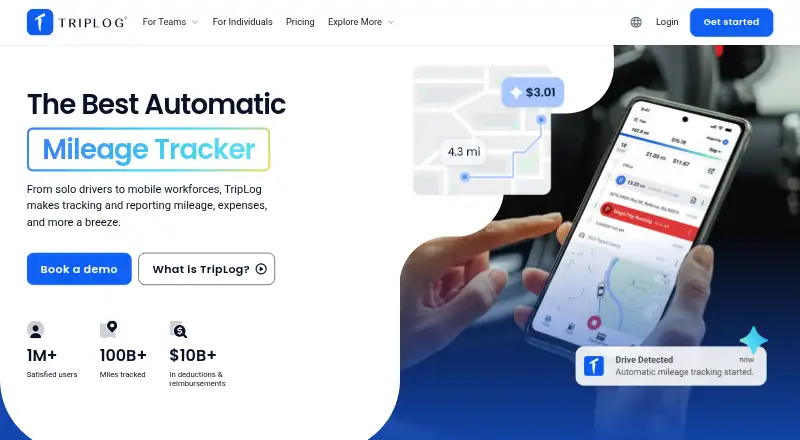
What TripLog is
TripLog is mileage and expense software for individuals and organizations, available on Android, iOS, and the web. Its free Basic plan includes unlimited automatic GPS mileage tracking and basic expense management. Drivers can classify trips as business or personal, or set work hours for automatic categorization. Expense tools include receipt scanning, transaction categorization, and reporting. TripLog offers tax-compliant mileage reports; Basic users can use an annual seven-day Premium Pass to access an annual report. Premium costs $59.99 per year, listed as $4.99 per month, and adds unlimited reporting, automatic expense tracking, and integrations. Connections include payroll, accounting, sales, and calendar services, as well as US and Canadian bank or credit card accounts. Organizations can use cents-per-mile, FAVR, car allowance, or company vehicle reimbursement programs. Administrators can configure options to hide personal trips and expenses, unsubmitted trips, and vehicle speed from admins. TripLog says customer data is stored and processed in the United States or another region based on customer requirements.
Good
- Free Basic plan includes unlimited automatic GPS mileage tracking.
- Classify drives as business or personal.
- Receipt scanning and transaction categorization are included.
- Offers tax-compliant mileage reports.
- Supports several company reimbursement programs.
Watch out
- Annual report access for Basic users requires a seven-day Premium Pass.
- Premium costs $59.99 per year.
- The listed Time add-on requires Premium.
Who it suits
TripLog suits individuals tracking mileage and expenses, as well as businesses managing employee or contractor travel and reimbursements. Its listed customer groups include gig drivers, realtors, and home healthcare and construction workers.
Verdict
TripLog combines mileage logs, expense tools, and reimbursement options for individual drivers and organizations. Check which reporting and integration capabilities are included in the plan you choose.
Plans and prices
From TripLog's own pricing page, checked 2 Oct 2026.
| Plan | Price | What it gives you |
|---|---|---|
| Basic | Free | Unlimited automatic GPS mileage tracking · basic expense management · Free forever |
| Time add-on | $4 a month | Premium only · GPS-accurate location · in-app notifications · Per month |
| TripLog Beacon | $19.99, paid once | USB-powered Bluetooth beacon · automatic trip tracking using phone GPS · Each |
| Premium | $59.99 a year | Unlimited reporting · automatic expense tracking · integrations · Paid annually as $59.99; $4.99 per month |
| TripLog Drive | $79.99, paid once | Dedicated GPS mileage log device · trip classification button · Each |
The facts
Each one read from TripLog's own pages, with the date it was checked.
What it does
- Automatic tracking
- The individual mileage page describes unlimited automatic mileage tracking as free and offers six trip tracking methods.checked 2 Oct 2026
- Data location
- TripLog states that customer data is stored and processed in the United States or an alternate region based on the customer's requirement.checked 2 Oct 2026
- Expenses
- TripLog supports expense tracking, receipt scanning, transaction categorization, and reporting.checked 2 Oct 2026
- Integrations
- TripLog lists integrations including ADP, SAP Concur, UKG, QuickBooks Online, Salesforce, Emburse, Paylocity, Paychex, Outlook, Google Calendar, and US and Canadian bank or credit card accounts.checked 2 Oct 2026
- Privacy controls
- Company admins can configure options to hide personal trips and expenses, unsubmitted trips, and vehicle speed from admins.checked 2 Oct 2026
- Product
- TripLog tracks mileage, expenses, time, location, and other financial data for individuals, employers, contractors, and employees.checked 2 Oct 2026
- Reports
- TripLog offers tax-compliant mileage reports, and Basic users can use an annual 7-day Premium Pass to access an annual report.checked 2 Oct 2026
- Security
- TripLog announced that it achieved SOC 2 Type II compliance.checked 2 Oct 2026
- Support
- TripLog says it is dedicated to customer service and provides a contact form and support email.checked 2 Oct 2026
- Trip classification
- Users can classify drives as business or personal and set work hours to automatically categorize trips.checked 2 Oct 2026
- Who it serves
- TripLog identifies customers including small and large businesses, nonprofits, owner-operators, company car drivers, gig drivers, realtors, and home healthcare and construction workers.checked 2 Oct 2026
The company
- Company reimbursement
- The company offering supports cents-per-mile, FAVR, car allowance, and company vehicle programs.checked 2 Oct 2026
The full review of TripLog
Overview
TripLog is a mileage and expense tracking service for drivers, contractors, and organizations that need to distinguish business travel from personal trips. It is a strong fit when mileage capture needs to sit alongside expense reporting or company reimbursement; individual drivers seeking only a simple mileage log may find its broader toolkit unnecessary.
Key features
Trip capture and classification
Basic includes unlimited automatic GPS mileage tracking, and TripLog describes six trip-tracking methods for individuals. Drivers can mark trips as business or personal, or set work hours to categorize them automatically. That combination suits people with frequent work travel, though automatic classification still depends on drivers setting up their work rules and reviewing how trips are categorized.
TripLog also sells a Bluetooth beacon that uses a phone's GPS for automatic tracking and a dedicated GPS mileage device with a trip-classification button. These are one-time purchases, so they may appeal to drivers who prefer a separate capture aid over relying on the phone alone.
Expenses, reports, and integrations
Receipt scanning, transaction categorization, expense tracking, and reporting extend TripLog beyond mileage. It offers tax-compliant mileage reports, but Basic users get access to an annual report through a seven-day Premium Pass rather than unlimited reporting. Premium adds unlimited reporting, automatic expense tracking, and integrations, making it the more practical tier for users who need regular reports or connected workflows.
Integrations include payroll, accounting, expense, customer-management, and calendar services such as ADP, SAP Concur, QuickBooks Online, Salesforce, Outlook, and Google Calendar, as well as US and Canadian bank or credit card accounts. The breadth can help organizations connect travel records to existing processes. TripLog also supports company reimbursement programs using cents-per-mile, FAVR, car allowances, or company vehicles.
Company controls and security
Company administrators can configure privacy controls to hide personal trips and expenses, unsubmitted trips, and vehicle speed from admins. TripLog says it has achieved SOC 2 Type II compliance and stores and processes customer data in the United States or an alternate region according to customer requirements. It provides a contact form and support email.
Pricing
TripLog uses a freemium model. Basic is free forever and includes unlimited automatic GPS mileage tracking and basic expense management. It is a useful starting point for individual mileage capture, but regular reporting, automatic expense tracking, and integrations require Premium.
Premium costs $59.99 per year, billed annually, equivalent to $4.99 per month. It includes unlimited reporting, automatic expense tracking, and integrations. This is the clearest fit for an individual who needs more than the free mileage and basic expense tools. TripLog also gives its paid starting price as $4.99/user/mo annually.
The Time add-on costs $4.00 per month and is Premium-only; it adds GPS-accurate location and in-app notifications. It makes sense only for Premium users who need those additions. TripLog Beacon costs $19.99 each, while TripLog Drive costs $79.99 each; the former is a phone-GPS Bluetooth beacon and the latter a dedicated GPS mileage device with a classification button. Both are one-time purchases rather than recurring plans.
The listed company reimbursement capabilities may suit employers, but no separate company-plan price is given; expect custom pricing.
Platforms
TripLog is available on Android, iOS, and the web, giving drivers mobile trip capture and organizations a browser-based option.
Who it's for
TripLog serves small and large businesses, nonprofits, owner-operators, company-car drivers, gig drivers, realtors, and workers in home healthcare and construction. Its strongest case is for drivers or employers combining mileage logs with expenses, reporting, or reimbursement. A user who only needs occasional mileage records may be better served by a narrower tool.
Pros and cons
- Pros: Unlimited automatic GPS mileage tracking on the free Basic plan keeps routine mileage capture accessible without a subscription.
- Pros: Trip classification, expense tools, reporting, and company reimbursement options bring several work-travel needs into one service.
- Pros: Integrations and configurable privacy controls make TripLog more adaptable to organizational workflows and employee travel.
- Cons: Basic limits reporting access to an annual seven-day Premium Pass, so users who prepare reports regularly need a paid plan.
- Cons: Automatic expense tracking and integrations are Premium features, which may make the free plan inadequate for users who need connected expense workflows.
- Cons: The separate beacon and GPS device add upfront costs for drivers who want dedicated tracking hardware.
Alternatives
Compare mileage tracking software if you want to weigh TripLog against other options by category.
- MileIQ may suit drivers who want automatic mileage tracking and auto-generated reports, with a free allowance of 40 drives per month.
- MyCarTracks is worth considering if fleet-oriented capabilities such as vehicle limits, geofences, or real-time fleet positions matter more than TripLog's expense and reimbursement combination.
- Everlance may fit users who can work within 30 automatically detected trips per month on its free Basic plan, with unlimited manual trip starts and stops.
- Driversnote is an alternative for users seeking unlimited trips and reports on its Pro plan, or a Teams plan designed for teams.
- Hurdlr may be preferable to self-employed users who want real-time tax estimates alongside semi-automatic mileage tracking and finance tracking on its free plan.
- Psngr may suit users whose needs fit a free limit of 40 trips and one report per month.
- MileLog is an option for drivers who want automatic detection and CSV export, and can keep free cloud trips within its monthly limit of 15.
- Expensify may be a better fit when expense reports and receipt scanning are central, with mileage tracking included in its free Submit plan.
Verdict
Choose TripLog if you need mileage tracking that can extend into expenses, reporting, integrations, or employer reimbursement. Its free unlimited automatic mileage capture is a meaningful starting point, while Premium brings the reporting and connected expense tools many regular users will need. Look elsewhere if you only want a lightweight mileage log or need frequent reports without moving beyond the free tier.
Alternatives to TripLog
- 1

Expensify
Free planOpen sourceAndroidiOSWebAPI8.7From $5 a month - 2

Everlance
Free planAndroidiOSWebAPI8.1From $10.99 a month - 3

MileIQ
Free planAndroidiOSWebAPI8.1From $80 a year - 4

Driversnote
Free planAndroidiOSWebAPI8.0From $11 a month - 5

MileLog
Free planAndroidiOSWeb7.9From $6.99 a month - 6
MileageWise
AndroidiOSWeb7.4From $69.99 a year