
MileIQ
MileIQ automatically tracks mileage and creates reports for taxes or reimbursements, with apps for Android and iOS plus web access.
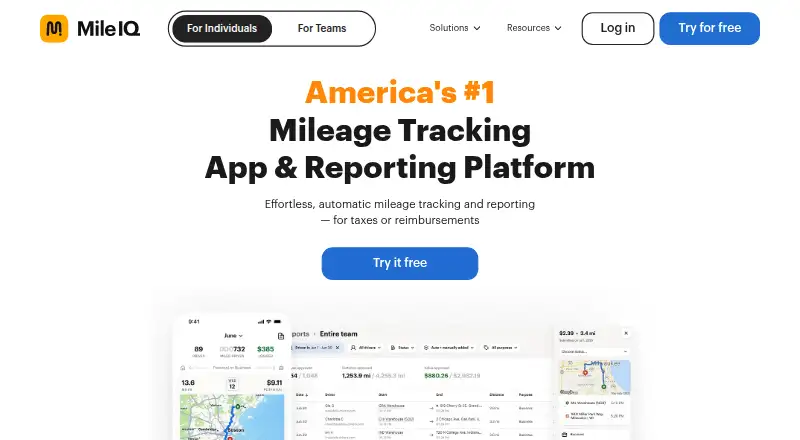
What MileIQ is
MileIQ automatically tracks mileage and creates reports for taxes or reimbursements, with apps for Android and iOS plus web access. Drivers can mark drives as business or personal with a swipe, or use Work Hours, Named Locations and Frequent Drives to help classify trips. They can submit mileage reports with a tap, export reports as PDF or CSV, and email them to a manager, accountant or themselves. MileIQ for Teams adds a web dashboard where administrators can review drives and approve or reject them. The Free plan is free and includes 40 drives each month, automatic tracking and auto-generated reports. Teams Lite is $8 a month per user; Teams is $9 a month per user; Teams Pro is $10 a month per user. Unlimited is $11.66 a year, billed annually and shown as $11.66 per month. MileIQ says it does not sell user data, and administrators only see drives included in reports submitted by drivers. It stores drive data for up to seven years for mileage records. It does not offer live location tracking.
Good
- Automatic mileage tracking and auto-generated reports.
- Drivers can classify trips with a swipe.
- Reports export as PDF or CSV.
- Team admins can review and approve or reject drives.
- Available on Android, iOS and web.
Watch out
- Free plan includes 40 drives each month.
- Drive data may be stored for up to seven years.
- Does not offer live driver location tracking.
Who it suits
MileIQ suits individuals tracking mileage for tax deductions or reimbursements, as well as teams managing employee mileage. Its report exports may help drivers share records with a manager or accountant.
Verdict
MileIQ combines automatic mileage capture with trip classification and shareable reports, while team plans add review tools. Note the monthly free-drive limit and the distinction between mileage reporting and live location tracking.
Plans and prices
From MileIQ's own pricing page, checked 15 Oct 2026.
| Plan | Price | What it gives you |
|---|---|---|
| Free | Free | automatic mileage tracking · auto-generated reports · 40 drives/month · $0; 40 free drives every month |
| Teams Lite | $8 a month | unlimited mileage · add/remove drivers · streamlined billing · reporting dashboard · Per user, billed monthly |
| Teams | $9 a month | Teams Lite features · submit and review reports · Per user, billed monthly |
| Teams Pro | $10 a month | reporting · custom mileage rates · priority support · Per user, billed monthly; 30-day free trial, no credit card required |
| Unlimited | $13.99 a month | automatic mileage tracking · auto-generated reports · unlimited drives · Billed monthly |
| Teams Lite | $80 a year | unlimited mileage · add/remove drivers · streamlined billing · reporting dashboard · Per user, billed annually |
| Teams | $90 a year | Teams Lite features · submit and review reports · Per user, billed annually |
| Teams Pro | $100 a year | reporting · custom mileage rates · priority support · Per user, billed annually |
The facts
Each one read from MileIQ's own pages, with the date it was checked.
What it does
- Acquisition history
- Crunchbase identifies Mobile Data Labs as the MileIQ maker, founded in 2012 in San Francisco, later acquired by Microsoft, with one seed funding round listed.checked 15 Oct 2026
- API
- An independent API catalog describes a request-based, read-only OAuth 2.1 external API exposing user profiles, drives, geolocation, distance, value, groups, and reported drives.checked 15 Oct 2026
- API surface
- The catalog lists separate MileIQ users and groups APIs with OpenAPI descriptions.checked 15 Oct 2026
- Audience
- MileIQ presents its service for individuals seeking tax deductions or reimbursements and teams managing employee mileage.checked 30 Sep 2026
- Auto-classification
- Work Hours, named locations, and frequent drives can automatically classify trips.checked 15 Oct 2026
- Automatic detection
- The mobile app detects drives in the background using motion and location data.checked 15 Oct 2026
- Concur integration
- Concur integration is available only to Teams Pro customers and requires administrator and driver activation.checked 15 Oct 2026
- Current legal entity
- The MileIQ website footer identifies Bending Spoons US Inc. as the 2026 operator.checked 15 Oct 2026
- Data retention
- MileIQ says it stores drive data for up to seven years for mileage records in case of an IRS audit.checked 30 Sep 2026
- Data sale
- MileIQ states that it does not sell user data to third parties.checked 15 Oct 2026
- Documentation and support
- The Help Center covers onboarding, billing, drive detection, classification, reporting, Teams administration, and legal or privacy topics.checked 15 Oct 2026
- Drive classification
- Users classify trips as business, personal, or custom purposes by swiping.checked 15 Oct 2026
- Licence and hosting
- MileIQ is presented as a subscription hosted service and its public pages do not publish an open-source licence or self-hosting package.checked 15 Oct 2026
- Limit: administrator tools
- A G2 reviewer says administrators cannot pull reports on behalf of employees and finds the paid admin tools less complete than alternatives.checked 15 Oct 2026
- Limit: classification controls
- G2 reviewers report imperfect start and stop segmentation, tedious personal-drive cleanup, and insufficient business-hour parameters.checked 15 Oct 2026
- Limit: missed or inaccurate drives
- Google Play reviewers report overlapping, phantom, incomplete, or incorrectly grouped drives and address errors.checked 15 Oct 2026
- Limit: pricing complaints
- Trustpilot and Google Play reviewers complain about substantial subscription price increases and say the cost is no longer justified for unreliable tracking.checked 15 Oct 2026
- Limit: setup dependence
- Capterra reviewers say incorrect settings or low battery can prevent tracking and require manual trip entry.checked 15 Oct 2026
- Live tracking
- MileIQ does not offer live tracking of drivers’ locations.checked 30 Sep 2026
Money
- Business trial
- The Teams Pro page offers a 30-day free trial and says no credit card is required.checked 30 Sep 2026
The company
- Company headquarters and size
- LinkedIn lists MileIQ as a privately held San Francisco company founded in 2012 with 51–200 employees.checked 15 Oct 2026
- Company history
- MileIQ says it began in 2012, joined Microsoft in 2015, and became independent again in 2021.checked 15 Oct 2026
- Founded
- 2012checked 28 Sep 2026
- Headquarters
- New York, New York, USAchecked 28 Sep 2026
The full review of MileIQ
Overview
MileIQ is a mileage tracker for people who need records for tax deductions or reimbursements, and for teams reviewing employee mileage. Automatic capture and reports make it a practical fit when the goal is documenting trips, not watching drivers’ live locations.
Key features
Automatic mileage tracking feeds into a simple business-or-personal classification flow: drivers can swipe to classify drives, or use Work Hours, Named Locations, and Frequent Drives as classification aids. That can reduce sorting work for recurring trips, while still leaving drivers responsible for distinguishing business mileage from personal travel.
Drivers can submit a mileage report with a tap, and submitted reports include business drives. Reports can also be exported as PDF or CSV and emailed to a manager, accountant, or the driver. For an individual, that is a straightforward route from captured mileage to a shareable record; it does not by itself provide expense management beyond mileage reporting.
Teams get a web dashboard for report review. Teams Pro adds the ability to approve or reject drives, along with commute mileage deduction, Team Locations, multiple admins, and custom rates. This makes the higher tier more appropriate for organizations that need a defined review process; MileIQ is not a live fleet-position tool, since it does not track drivers’ locations live.
MileIQ says it does not sell user data and that administrators can see only drives drivers submit in mileage reports. Drive data is stored for up to seven years for mileage records in case of an IRS audit. That retention supports recordkeeping, while the administrator visibility rule gives drivers some control over what they share with a team.
Pricing
The Free plan costs nothing and includes automatic mileage tracking and auto-generated reports, but caps usage at 40 free drives every month. It suits a low-volume driver; anyone routinely exceeding that allowance will need a paid plan or another option.
Teams Lite costs $8 a month per user, billed monthly. It adds automatic tracking, driver add/remove controls, and streamlined billing, making it the entry point for teams that mainly need to manage seats and billing rather than review reports in a dashboard.
Teams costs $9 a month per user, billed monthly, and adds a reporting dashboard plus report submission and review. Choose it when managers need a review workflow; Teams Lite gives up those reporting tools.
Teams Pro costs $10 a month per user, billed monthly. It includes the reporting dashboard, drive approval or rejection, commute mileage deduction, Team Locations, multiple admins, and custom rates. The 30-day free trial requires no credit card. Pro is the strongest fit for teams that need explicit drive decisions and additional administration controls, but the per-user monthly price rises with each seat.
Unlimited costs $11.66 a year, billed annually and shown as $11.66 per month. It includes unlimited drives, automatic tracking, and auto-generated reports, making it the individual option for drivers who outgrow Free’s monthly cap. Its annual billing differs from the monthly team terms. The listed paid starting price is 8 /user/mo.
Platforms
MileIQ is available on Android, iOS, and the web, covering mobile drive capture and browser-based access for reports and team administration. The web dashboard is particularly relevant to teams reviewing submitted mileage.
Who it's for
MileIQ is a sensible choice for individuals who want automatic mileage records and shareable tax or reimbursement reports, especially if 40 monthly drives are enough on Free or unlimited drives justify the annual Unlimited plan. Teams should consider it when employee mileage needs report review or approval. It is a poor fit for organizations that need live location monitoring.
Pros and cons
- Pros: Automatic tracking, several classification aids, and PDF or CSV exports create a useful mileage-record workflow without requiring a team plan.
- Pros: Team plans scale from seat and billing management to report review and drive approval, so organizations can pay for a more involved workflow only when they need it.
- Pros: Admins only see drives drivers submit in reports, according to MileIQ, and drive records are retained for up to seven years for audit purposes.
- Cons: Free is limited to 40 drives a month, which may be restrictive for frequent drivers.
- Cons: Team reporting and approval require paid tiers, and monthly per-user billing can add up across a larger workforce.
- Cons: There is no live location tracking, so MileIQ cannot serve teams that need to monitor current vehicle positions.
Alternatives
Compare mileage tracking software if you want to weigh MileIQ against a broader set of mileage tools. Expensify is worth considering when receipt scanning, expense reports, categories, and tags matter alongside mileage; its free Submit plan covers those expense-oriented tools. Driversnote offers a free plan and paid Pro and Teams options, with Pro including unlimited trips and reports, an edit log, and a public API.
Everlance may suit drivers who want a free tier with 30 automatically detected trips per month per user, plus unlimited manual trip tracking. Hurdlr is a relevant alternative for users who want mileage tracking alongside manual finance tracking and real-time tax estimates on its free plan. MileLog may fit someone who wants free automatic drive detection, basic classification, and CSV export, with up to 15 free cloud trips per month.
MyCarTracks is another mileage and vehicle-tracking option. Psngr offers a free tier with 40 trips per month and one report per month, which may suit someone whose reporting needs are limited. TripLog has a free Basic plan with unlimited automatic GPS mileage tracking and basic expense management.
Verdict
Choose MileIQ if you want automatic mileage capture that leads to tax or reimbursement reports, or if your team needs a clear review and approval path for employee drives. Its main advantage is that connected workflow; look elsewhere if the free 40-drive cap is too low or your team needs live location tracking.
Alternatives to MileIQ
- 1

Expensify
Free planOpen sourceAndroidiOSWebAPI8.7From $5 a month - 2

Everlance
Free planAndroidiOSWebAPI8.1From $10.99 a month - 3

Driversnote
Free planAndroidiOSWebAPI8.0From $11 a month - 4

MileLog
Free planAndroidiOSWeb7.9From $6.99 a month - 5
MileageWise
AndroidiOSWeb7.4From $69.99 a year - 6

TripLog
Free planAndroidiOSWeb7.4From $59.99 a year