
MileLog
MileLog is a mileage and expense tracker for US professionals, including freelancers, contractors, small businesses, and realtors.
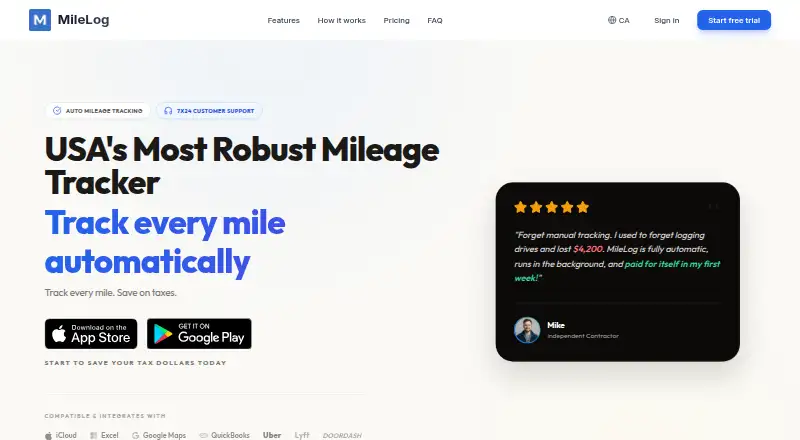
What MileLog is
MileLog is a mileage and expense tracker for US professionals, including freelancers, contractors, small businesses, and realtors. It detects drives and logs them in the background, so users do not have to open the app to capture each trip. Users can classify drives as business or personal by swiping. MileLog produces IRS- and CRA-formatted mileage reports in PDF and CSV, and users can photograph receipts and record parking, fuel, and vehicle maintenance expenses linked to business trips. It also tracks bridge tolls, highway passes, and toll road fees alongside mileage. The service is available on Android, iOS, and the web. Its free Basic plan offers unlimited miles but includes up to 15 cloud trips per month. Premium costs $6.99 per month and adds advanced classification, IRS-ready reports, direct email reports, trip categorization, and 7x24 customer support. Unlimited tracking is available during a free 7-day trial, which can be canceled anytime. MileLog collects precise location data with permission and says personal data is encrypted in transit and at rest.
Good
- Automatically detects and logs drives in the background.
- Produces IRS- and CRA-formatted PDF and CSV reports.
- Lets users link receipt and vehicle expenses to business trips.
- Basic plan includes unlimited miles.
Watch out
- Basic plan allows up to 15 cloud trips monthly.
- Precise location data is collected with permission.
- Premium costs $6.99 per month after the free plan.
Who it suits
MileLog may suit US freelancers, contractors, small businesses, and realtors who need mileage and business expense records. It is also relevant to users who want PDF or CSV mileage reports and trip-linked expense logging.
Verdict
MileLog combines background trip tracking with mileage reports, expense logging, and toll tracking. The free plan's cloud-trip limit and the paid plan's $6.99 monthly cost are key distinctions.
Plans and prices
From MileLog's own pricing page, checked 15 Oct 2026.
| Plan | Price | What it gives you |
|---|---|---|
| Basic | Free | Automatic drive detection · Basic classification · CSV export · Up to 15 free cloud trips per month · Unlimited miles |
| Premium | $6.99 a month | Automatic drive detection · Advanced classification · IRS-ready reports · Email reports · Trip categorization · 7x24 customer support · Unlimited miles · monthly |
The facts
Each one read from MileLog's own pages, with the date it was checked.
Where it runs
- Android limitation
- Google Play says Android reports are for quick reference and directs users to the web dashboard for full compliance workflows and account management.checked 15 Oct 2026
- GetApp platform listing
- GetApp lists web, Android and iPhone/iPad support.checked 15 Oct 2026
What it does
- Automatic detection
- The app detects trip starts and ends, routes, distance and duration through device location services.checked 15 Oct 2026
- Automatic tracking
- The app detects drives and logs them in the background without requiring users to open it.checked 2 Oct 2026
- Background tracking
- Automatic tracking continues when the app is closed and uses filtering to distinguish transportation modes.checked 15 Oct 2026
- CarPlay
- CarPlay can automatically start tracking, display trip details and end tracking when disconnected.checked 15 Oct 2026
- Cloud sync
- An account can synchronize trip data across platforms, while iCloud backup is offered for Apple devices.checked 15 Oct 2026
- Documentation scope
- The documentation site provides introduction, features, setup, tax-compliance, support, privacy and legal pages; it has no listed API or SDK section.checked 15 Oct 2026
- Expenses
- The product site says users can photograph receipts and record parking, fuel, maintenance, toll and bridge expenses linked to trips.checked 15 Oct 2026
- Exports
- Reports can be exported as PDF or CSV, emailed or printed.checked 15 Oct 2026
- Google Play data practices
- Google Play states that the app shares no data with third parties, may collect location, personal information and device IDs, encrypts data in transit and supports deletion requests.checked 15 Oct 2026
- Integrations
- The marketing site lists iCloud, Excel, Google Maps, QuickBooks, Uber, Lyft and DoorDash as compatible or integrated services.checked 15 Oct 2026
- Limit: continuous location permission
- An App Store reviewer objected that the app needs location access outside active use; the developer said iOS does not provide a separate time-of-day permission for mileage tracking.checked 15 Oct 2026
- Limit: subscription activation
- An App Store reviewer reported being charged for a subscription without the premium upgrade activating; the developer called it a temporary bug.checked 15 Oct 2026
- Manual entry
- Users can add trips with start and end addresses, distance, date, time, purpose and notes.checked 15 Oct 2026
- Offline use
- Trip data is stored locally and the app is designed to work without an internet connection.checked 15 Oct 2026
- Praise: automatic tracking
- App Store reviewers praise the app for tracking drives automatically and helping separate business and personal trips for tax time.checked 15 Oct 2026
The company
- Company
- MileLog says it was built by small business owners in Canada and describes its team as developers and designers who also run businesses.checked 2 Oct 2026
- Company description
- MileLog says it was built by Canadian small-business owners and is developed by a small team that uses the product themselves.checked 15 Oct 2026
- Company headquarters
- The Google Play developer address is 195-6433 Bowness Rd NW, Calgary, Alberta, Canada.checked 15 Oct 2026
- Company legal name
- The Google Play listing identifies the developer as RockieStar Inc.checked 15 Oct 2026
- Headquarters
- Calgary, Alberta, Canadachecked 28 Sep 2026
Money
- Free plan limit
- The Basic plan includes up to 15 free cloud trips per month and unlimited miles.checked 2 Oct 2026
- GetApp price listing
- GetApp lists a free Basic plan with up to 25 trips per month and Premium at 6.99 per month.checked 15 Oct 2026
The full review of MileLog
MileLog is a mileage and expense tracker for US professionals who need business-trip records without manually starting every drive. It fits freelancers, contractors, small businesses, and realtors who want automatic capture across mobile and web. Its best use is a focused, tax-oriented logbook, provided the Basic plan’s monthly cloud-trip allowance is sufficient.
Overview
MileLog detects drives in the background and records them without requiring the app to be open. Trips can be classified as business or personal with a right or left swipe, making routine sorting quick. Vehicle profiles, reimbursement rates, mileage reports, and expense export extend it beyond a basic distance counter.
Expense capture includes photographed receipts and entries for parking, fuel, and vehicle maintenance linked to business trips. The service also tracks bridge tolls, highway passes, and toll-road fees alongside mileage, which is useful when travel costs extend beyond the vehicle itself. Compatibility is listed for iCloud, Excel, Google Maps, QuickBooks, Uber, Lyft, and DoorDash.
Key features
Automatic trip capture
Background detection removes the need to remember a start or stop action for every journey. That is the clearest reason to choose MileLog over a purely manual log. Basic classification handles straightforward business-versus-personal records; Premium adds advanced classification and trip categorization for users who need more detailed sorting.
Reports, expenses, and tolls
MileLog generates mileage reports in IRS- and CRA-formatted PDF and CSV files, giving US and Canadian tax workflows a ready reporting format. Premium adds IRS-ready reports and direct email delivery. Receipt photos and categorized travel expenses create a more complete reimbursement record, while automatic toll capture helps account for fees that mileage alone would omit.
Privacy and support
Personal data is encrypted in transit and at rest, stored on secure servers, and restricted to authorized personnel. MileLog says it does not sell, trade, or rent personal information, although precise location collection requires user permission. Email support is available, with a “Send Feedback” option in the iOS settings; Premium includes 7x24 customer support.
Pricing
| Plan | Price | What you get |
|---|---|---|
| Basic | free | Automatic drive detection, basic classification, CSV export, up to 15 free cloud trips per month, and unlimited miles. |
| Premium | $6.99 a month | Automatic detection, advanced classification, IRS-ready reports, emailed reports, trip categorization, 7x24 customer support, unlimited miles, and cancellation anytime. |
The free Basic plan suits occasional drivers who can stay within 15 cloud trips per month and only need CSV output. Unlimited miles prevent distance itself from becoming the constraint, but the cloud-trip quota can matter for regular commuters or delivery work. Premium is the practical choice for heavier use, richer categorization, IRS-oriented reporting, and emailed reports. It is billed monthly at $6.99, and the service offers a 7-day trial with unlimited tracking and cancellation anytime. A reader choosing Basic gives up advanced classification, trip categorization, IRS-ready reports, emailed reports, and included 7x24 support.
Platforms
MileLog runs on Android, iOS, and the web, so records can be captured on either major mobile platform and reviewed in a browser. Both Android and iOS are supported for trip capture, with web access useful for report and record work away from the phone.
Who it's for
Freelancers, contractors, realtors, and small-business owners who drive for work are the natural audience. It is especially suitable when automatic logging, reimbursement rates, tolls, receipts, and tax-format reports belong in one workflow. Occasional users should consider whether 15 cloud trips per month is enough; drivers with frequent journeys are better candidates for Premium.
Pros and cons
- Pro: Background drive detection captures mileage without requiring a manual start.
- Pro: IRS- and CRA-formatted PDF and CSV reports support tax and reimbursement records.
- Pro: Receipt capture, linked expense categories, and toll tracking cover costs beyond mileage.
- Pro: Android, iOS, and web access accommodate mixed-device workflows.
- Con: Basic limits free cloud storage to 15 trips per month, which can be restrictive for frequent drivers.
- Con: Advanced classification, trip categorization, IRS-ready reports, emailed reports, and 7x24 support require Premium at $6.99 per month.
Alternatives
Expensify is the better fit when receipt scanning, expense reports, categories, and tags matter as much as mileage, with a free Submit plan across more platforms including Windows and macOS.
Everlance suits users who want 30 automatically detected trips per month on its Basic plan, plus unlimited manually started and stopped tracking.
Hurdlr is preferable when real-time tax estimates and manual finance tracking belong alongside mileage; its Free plan also offers unlimited semi-automatic tracking and report exports.
MileIQ offers 40 free drives per month with automatic tracking and auto-generated reports, making it worth considering for users whose main requirement is a larger free drive quota.
Driversnote is an alternative for users who need unlimited trips and reports, an edit log, or a public API on its Pro plan.
MyCarTracks fits readers seeking vehicle and fleet-oriented controls such as multiple vehicles, geofences, real-time positions, and cloud history.
Psngr provides 40 trips per month and one report per month on its free plan, with an annual Pro option for unlimited trips and reports.
Ramp Mileage Reimbursement is aimed at company reimbursement workflows, with a free plan for domestic reimbursements and a Plus plan priced at $15 a month per user.
For a broader category comparison, see Mileage Tracking Software.
Verdict
MileLog is a strong choice for self-employed professionals and small businesses that want automatic mileage, expense, and toll capture with tax-oriented reports on Android, iOS, or the web. Choose it for the background tracking and integrated trip-cost record; look elsewhere if 15 free cloud trips per month is too restrictive or if a different app’s tax, fleet, or expense specialization better matches your workflow.
Alternatives to MileLog
- 1

Expensify
Free planOpen sourceAndroidiOSWebAPI8.7From $5 a month - 2

Everlance
Free planAndroidiOSWebAPI8.1From $10.99 a month - 3

MileIQ
Free planAndroidiOSWebAPI8.1From $80 a year - 4

Driversnote
Free planAndroidiOSWebAPI8.0From $11 a month - 5
MileageWise
AndroidiOSWeb7.4From $69.99 a year - 6

TripLog
Free planAndroidiOSWeb7.4From $59.99 a year