TAPIMaster
TAPIMaster integrates telephony functions into company software through client-side or server-side interfaces.
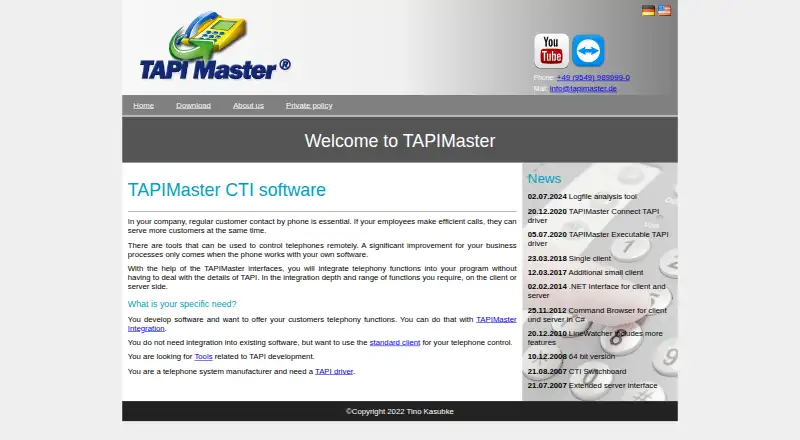
What TAPIMaster is
TAPIMaster integrates telephony functions into company software through client-side or server-side interfaces. Its client/server product controls workplace telephones connected to a central telephone system. A plugin can let employees place calls from their programs and receive incoming-call notifications; interfaces can also support controls such as call forwarding and call pickup. Client interfaces add telephony functions to program interfaces, while server interfaces provide a central integration point. For web applications, the provider directs users to the TAPIMaster Server IP interface. Tools include a line monitor for testing TAPI drivers, a TSP Emulator for installing a virtual telephone system on a PC, an executable TAPI driver that can start programs or HTTP(S) calls, and TMConnect, which adds a Third Party TAPI interface to a telephone system. Downloads include 32-bit and 64-bit product versions, drivers, an SDK, and the emulator. The free small-business plan is limited to four employees or one workstation, with a maximum of four clients; some server functions are disabled and non-customers generally receive no support.
Good
- Free small-business plan available.
- Supports screen pops, click-to-dial, and in-call controls.
- Client and server interfaces support integration.
- Tools include a TAPI driver line monitor and emulator.
Watch out
- Windows is the only listed platform.
- Free plan supports a maximum of four clients.
- Some server functions are disabled on the free plan.
- Non-customers generally receive no support.
Who it suits
TAPIMaster suits Windows users who need to connect workplace telephones or TAPI-compatible phone systems with company software. Its free small-business plan is aimed at up to four employees or one workstation.
Verdict
TAPIMaster combines phone controls, software integration interfaces, and TAPI tools in a Windows offering. Its free plan has clear size limits and limited support for non-customers.
Plans and prices
From TAPIMaster's own pricing page, checked 4 Oct 2026.
| Plan | Price | What it gives you |
|---|---|---|
| TAPIMaster client/server for small businesses | Free | Up to 4 employees or one workstation · maximum 4 clients · programming interfaces supported for one client · some server functions disabled · generally no support for non-customers |
The facts
Each one read from TAPIMaster's own pages, with the date it was checked.
What it does
- Call integration
- A plugin can let employees place calls from their programs and receive incoming-call notifications.checked 4 Oct 2026
- Downloads
- The download page lists 32-bit and 64-bit versions of the client/server, single-user version, LineWatcher, and TAPI drivers, plus an SDK and TSP Emulator.checked 4 Oct 2026
- Driver development
- The provider offers TAPI driver development for hardware telephone systems and soft PBX, 32-bit to 64-bit porting, and driver testing.checked 4 Oct 2026
- Driver tools
- The Executable TAPI driver can start programs or HTTP(S) calls using TAPI MakeCall, and TMConnect adds a Third Party TAPI interface to a telephone system.checked 4 Oct 2026
- Programming interfaces
- Client interfaces integrate telephony into program user interfaces, while server interfaces support integration at a central point.checked 4 Oct 2026
- Provider
- The provider identification names Tino Kasubke as the contact person and gives an address in Walsdorf, Germany.checked 4 Oct 2026
- Purpose
- TAPIMaster integrates telephony functions into a company’s software through its interfaces, on the client or server side.checked 4 Oct 2026
- Standard client
- The client/server product is for controlling workplace telephones connected to a central telephone system.checked 4 Oct 2026
- Support
- Non-customers using the free small-business version generally receive no support, including by email; installation and usage videos are available on the provider’s YouTube channel.checked 4 Oct 2026
- TAPI tools
- The tools include a line monitor for testing TAPI drivers and a TSP Emulator for installing a virtual telephone system on a PC.checked 4 Oct 2026
- Telephony controls
- The programming interfaces can support functions such as switching call forwarding and picking up calls.checked 4 Oct 2026
The company
- Headquarters
- Walsdorf, Germanychecked 28 Sep 2026
Where it runs
- Web applications
- The site directs users who want to place calls from a web-based application to the TAPIMaster Server IP interface.checked 4 Oct 2026
The full review of TAPIMaster
TAPIMaster is a Windows, on-premises integration toolkit that links compatible business telephone systems with software. It is best suited to organizations maintaining a TAPI-compatible PBX and developers or administrators who need telephony controls inside existing applications. The free small-business edition is a credible way to serve a very small installation, but its hard limits and lack of general support make larger or support-dependent deployments a poor fit.
Overview
The client/server product controls workplace telephones connected to a central telephone system. A plugin can enable click-to-dial from employees’ programs and notifications for incoming calls, keeping calling in established workflows instead of replacing the underlying PBX. That makes compatibility and integration requirements decisive: TAPIMaster is useful when a business already has suitable telephony infrastructure and wants software connectivity.
Key features
Client interfaces place telephony functions in a program’s user interface, while server interfaces support integration at a central point. Supported controls include switching call forwarding and picking up calls. Screen pop, click-to-dial and in-call controls cover the everyday desktop requirements, while web applications can use the TAPIMaster Server IP interface to place calls.
Tools for technical teams extend the package beyond a basic dialer. The line monitor helps test TAPI drivers, and the TSP Emulator installs a virtual telephone system on a PC for development or troubleshooting. The Executable TAPI driver can start programs or make HTTP(S) calls through TAPI MakeCall; TMConnect adds a Third Party TAPI interface to a telephone system. These components are particularly relevant when an organization is diagnosing drivers, prototyping integrations or adapting telephony hardware and soft-PBX systems.
The provider also offers TAPI driver development for hardware telephone systems and soft PBX, 32-bit-to-64-bit porting and driver testing. Downloads include 32-bit and 64-bit client/server and single-user versions, LineWatcher, TAPI drivers, an SDK and the TSP Emulator, giving teams options for both deployment and engineering work.
Pricing
TAPIMaster client/server for small businesses
The free plan costs nothing and covers up to four employees or one workstation, with a maximum of four clients. Programming interfaces are supported for one client, and some server functions are disabled. That is enough for a small office or a proof of concept, but the one-client interface allowance and disabled server capabilities quickly constrain shared or centralised integrations. Non-customers generally receive no support, including by email; installation and usage videos on the provider’s YouTube channel are the main stated assistance for free users.
Platforms
TAPIMaster runs on Windows and is deployed on-premises. It supports TAPI-compatible PBX and telephone systems, including hardware PBX and soft-PBX environments. The platform choice suits organizations that need local control alongside an existing phone system, but it is not a cross-platform or hosted phone service.
Who it's for
Choose TAPIMaster when a business needs screen pop, click-to-dial or call controls embedded in Windows software and already operates compatible telephony. Developers benefit from the interfaces, SDK and driver-oriented utilities; administrators can use the monitoring and emulation tools to validate TAPI components. The free edition fits up to four employees or a single workstation. Larger teams, multi-client interface requirements or teams that depend on responsive vendor support should look beyond that plan.
Pros and cons
Pros
- Client and server interfaces support both embedded application controls and central integration.
- Screen pop, click-to-dial, in-call controls and call-forwarding functions address practical workplace calling workflows.
- Line monitor, TSP Emulator, SDK and driver utilities support testing and custom integration work.
- The free plan provides a no-cost route for a very small installation.
Cons
- The free edition is capped at four employees or one workstation and four clients.
- Programming interfaces are limited to one client and some server functions are disabled on the free plan.
- Non-customers generally receive no support, including by email.
- Windows, on-premises deployment and TAPI compatibility exclude organizations seeking hosted or broad device coverage.
Alternatives
KalliopeCTI is the better choice when Android, iOS, Linux, macOS or Windows coverage matters; its KCTI 4 Free plan is also free to download, while KCTI 4 Phone uses a one-off licence fee.
Jet Interactive suits teams wanting web, mobile and API reach with usage-based tracking numbers at A$10 a month, plus call charges.
Telair Click to Call CTI is preferable to a free, locally constrained tool when a paid service with web, mobile, desktop and API options and core PBX features is appropriate; Standard Plans cost $13 a month billed annually.
PhoneIQ fits organizations seeking a paid cloud-style calling suite with desktop and mobile apps, queues, IVR and recording; Office Standard costs $11 a month billed annually.
XPhone Connect is an alternative for teams wanting user-specific licensing and a yearly software subscription.
Avaya Aura Private Cloud is an option for pay-per-user deployments with no stated user-scalability limit.
ICTContact targets larger service operations, with Enterprise Edition at $399 a month for five agents and Service Provider at $1,500 a month for 20 agents.
ansitel TAPI und CTI Client is another paid Windows-oriented TAPI and CTI option.
Verdict
Pick TAPIMaster for a small Windows organization that already has a TAPI-compatible PBX and needs dependable software integration, testing tools or custom driver work without an upfront licence charge. Its strongest reason to choose it is the combination of interfaces and specialist TAPI utilities. Look elsewhere when you need more than four clients, full server capability, vendor support for non-customers, or a hosted and cross-platform calling environment.
Alternatives to TAPIMaster
- 1

Jet Interactive
AndroidiOSWebAPI7.4From A$10 a month - 2

PhoneIQ
AndroidiOSWebmacOS7.1From $11 a month - 3
Telair Click to Call CTI
AndroidiOSWebAPI7.1From $13 a month - 4

Avaya Experience Platform
WebAPISelf-hosted7.0From $48 a month - 5
Fastcall
AndroidiOSWebAPI6.8From $30 a month - 6
KalliopeCTI
Free planAndroidiOSLinuxmacOS6.8Free plan