PDF24 Compare PDF
PDF24 Compare PDF compares two versions of a PDF and marks text that has changed, been added, or been removed.
What PDF24 Compare PDF is
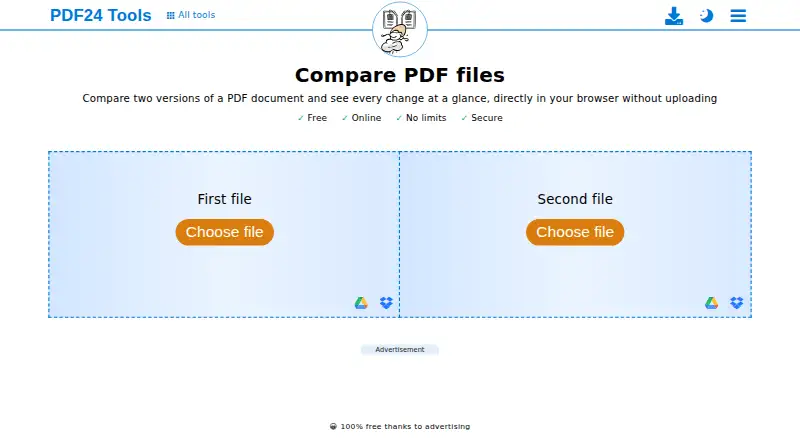
PDF24 Compare PDF compares two versions of a PDF and marks text that has changed, been added, or been removed. Readers can view the documents side by side, as an overlay, or with a slider. The comparison runs directly in a browser without installation, and PDF24 says the files are not uploaded to its servers. Google Drive is listed as a file-selection option. The tool is free, with no registration or time restrictions. PDF24 says transfers are SSL secured and server files are deleted automatically after one hour. For offline processing, PDF24 Creator keeps files on the local PC, but it can only be installed on Windows. PDF24 Tools can be installed from a browser on Android and iPhone or iPad, though it is not distributed through Google Play or the App Store. PDF24 says its online tools are available to companies free of charge and without restriction; a data-processing agreement can be requested.
Good
- Marks changed, added, and removed text.
- Offers side-by-side, overlay, and slider views.
- Runs in a browser without installation.
- Free use has no registration or time restrictions.
- PDF24 says comparison files stay in the browser.
Watch out
- Offline PDF24 Creator is Windows-only.
- The mobile app is not distributed through major app stores.
Who it suits
This tool suits people who need to inspect changes between PDF versions without installing software or registering. It may also suit organizations that need free online PDF comparison, while Windows users can use PDF24 Creator for offline processing.
Verdict
PDF24 Compare PDF offers several clear ways to review document changes at no cost. Its browser-based comparison avoids installation, while offline processing requires Windows.
Plans and prices
From PDF24 Compare PDF's own pricing page, checked 1 Oct 2026.
| Plan | Price | What it gives you |
|---|---|---|
| Free | Free | No limits · No registration · No time restrictions · 100% free thanks to advertising |
The facts
Each one read from PDF24 Compare PDF's own pages, with the date it was checked.
Where it runs
- Browser operation
- The comparison runs directly in the browser and requires no installation.checked 1 Oct 2026
- Mobile app
- PDF24 Tools can be installed from a browser on Android and iPhone/iPad, but it is not currently distributed through Google Play or the App Store.checked 1 Oct 2026
What it does
- Cloud integration
- The compare page displays Google Drive as a file-selection option.checked 1 Oct 2026
- Comparison modes
- Changed, added and removed text is marked, with side-by-side, overlay and slider views.checked 1 Oct 2026
- Data-processing agreement
- PDF24 says a data processing agreement for its online tools can be requested by email or contact form.checked 1 Oct 2026
- Desktop limitation
- PDF24 Creator can only be installed on Windows; Linux and Mac are not supported.checked 1 Oct 2026
- Enterprise deployment
- PDF24 Creator can be used with Citrix and is free for companies.checked 1 Oct 2026
- Local processing
- PDF24 states that files used by this comparison are compared directly in the browser and are not uploaded to its servers.checked 1 Oct 2026
- Offline alternative
- PDF24 Creator provides offline processing on Windows, with files remaining on the local PC.checked 1 Oct 2026
- Pricing model
- PDF24 says its tools are free of charge, with no hidden costs, funded by advertising.checked 1 Oct 2026
- Purpose
- Compares two versions of a PDF document and shows every change in the browser.checked 1 Oct 2026
- Security
- PDF24 states that file transfers are SSL secured, servers are located in Germany, and server files are automatically deleted after one hour.checked 1 Oct 2026
- Support
- PDF24 says its team responds to many user inquiries and provides a Help Center and contact channel.checked 1 Oct 2026
- Usage access
- The tools require no registration, have no subscription traps or forced premium versions, and have no time restrictions.checked 1 Oct 2026
The company
- Company use
- PDF24 says its online tools are available to companies free of charge and without restriction.checked 1 Oct 2026
- Founded
- 2006checked 28 Sep 2026
- Headquarters
- Berlin, Germanychecked 28 Sep 2026
The full review of PDF24 Compare PDF
Overview
PDF24 Compare PDF is a browser tool for finding differences between two versions of a PDF. It suits people who need a quick comparison without installing software, especially when they want to inspect text changes in more than one layout.
Its strongest case is straightforward: PDF comparison is free, requires no registration and has no time restrictions. The trade-off is that offline use is limited to Windows through PDF24 Creator.
Key features
PDF24 marks text that has changed, been added or removed, then lets you examine the versions side by side, as an overlay or with a slider. Those views make it easier to choose between reading the documents together and aligning them visually. The tool focuses on PDF comparison, so it is not the right choice if you need a broader document-review workflow beyond the PDF and Office comparison support.
The comparison runs directly in the browser, without an installation. PDF24 says files are compared there rather than uploaded to its servers, and the page offers Google Drive as a file-selection option. PDF24 also says transfers are SSL secured, its servers are in Germany and server files are automatically deleted after one hour. Those server protections matter for tools that use servers; they do not change the stated local processing of this comparison. Companies can use the online tools free of charge and without restriction, and can request a data processing agreement by email or contact form.
For broader document work, PDF24 Tools also supports importing existing PDFs, creating fillable forms and signature fields, and exporting to PDF. Inputs can include Word and Excel files, images, printable files, scanners and cameras.
Pricing
Free: free, billed 100% free thanks to advertising. The plan includes PDF and Office comparison, with no limits, registration or time restrictions. That makes it an unusually practical option for occasional personal checks as well as company use; there is no paid tier to unlock or subscription term to manage.
Platforms
The comparison is deployed on the web and runs in a browser. PDF24 Creator offers an offline alternative that keeps files on the local PC, but it can only be installed on Windows; Linux and Mac are not supported. Creator can be used with Citrix and is free for companies.
PDF24 Tools can be installed from a browser on Android and iPhone or iPad, but it is not distributed through Google Play or the App Store. That route may suit users comfortable installing from a browser, but it is less direct than a conventional store app.
Who it's for
Choose PDF24 Compare PDF for free, no-registration comparison when you want to spot text changes in two PDFs and prefer browser-based processing. It is also a sound fit for organizations seeking unrestricted company use. If policy requires offline processing, the choice narrows to Windows users of PDF24 Creator; Mac and Linux users do not have that desktop option.
Pros and cons
- Pros: No-cost access without caps or signup. The free plan has no limits or time restrictions, making it suitable beyond a short trial or occasional sample.
- Pros: Three comparison views. Side-by-side, overlay and slider layouts give users different ways to inspect marked changes.
- Pros: Browser-local comparison. PDF24 says comparison files are not uploaded to its servers, a useful distinction for privacy-conscious users.
- Cons: Offline desktop use is Windows-only. Mac and Linux users cannot use PDF24 Creator for local processing.
- Cons: Mobile installation is outside app stores. Android and iPhone/iPad users must install PDF24 Tools from a browser rather than a store listing.
Alternatives
For adjacent needs, browse Document Comparison Software, PDF Form Software, PDF Creation Software, PDF Compression Software or PDF Merger Software.
If the priority shifts from comparing PDFs to forms, FormForge is a free option across web and desktop and mobile platforms. Jotform is a web and mobile form alternative with a free Starter plan capped at five forms and 100 monthly submissions. Sejda PDF Forms offers a free desktop and web plan with page, hourly, upload and tool-specific limits.
Adobe Scan is a mobile option for Android and iOS. PDF Studio offers a free PDF viewer for Windows, Mac and Linux, plus a paid Pro edition. PDFgear is a free option on mobile, Mac, web and Windows; its online editor has a 100 MB per PDF limit.
UPDF has a free plan with daily conversion, batch, OCR, storage and file-size limits. DocHub is a web and mobile alternative whose free plan allows three uses per month shared across core features.
Verdict
PDF24 Compare PDF is an easy recommendation for anyone who needs to identify changes between PDF versions without paying, signing up or installing software. Its multiple views and browser-local comparison make the free offer useful rather than merely introductory. Look elsewhere if offline work is essential and you do not use Windows, or if you need a conventional app-store installation on mobile.
Getting started
- Open https://tools.pdf24.org/en/compare-pdf in a browser.
- Select the two PDF versions to compare; Google Drive is shown as a file source.
- Review marked changes using side-by-side, overlay, or slider view.
- For offline processing, install PDF24 Creator on Windows.
- On Android or iPhone/iPad, PDF24 Tools can be installed from a browser.
Questions
Does PDF24 Compare PDF cost anything?
The plan is listed as free, supported by advertising.
Do I need to register or install software?
No registration or installation is required for the browser comparison, and there are no time restrictions.
Which platforms are listed?
The listed platforms are Android, iOS, Linux, macOS, web, and Windows. PDF24 Creator, the offline desktop option, is available only for Windows.
Are comparison files uploaded to PDF24 servers?
PDF24 says comparison files are processed directly in the browser and are not uploaded to its servers.
Can companies use the online tools?
PDF24 says its online tools are available to companies free of charge and without restriction.
Is there an offline option?
PDF24 Creator processes files on the local PC and can be installed only on Windows.
Alternatives to PDF24 Compare PDF
- 1

Diffchecker
Free planiOSWebAPIExtension8.2From $15 a month - 2

DocFather Compare Documents
Free planiOSWeb7.6From $34.99 a year - 3
i-net PDFC
AndroidiOSWebAPI7.6From $199 a year - 4
Differino
Free planWebAPI7.3€1.99 one-time - 5
SmarterDiff
Free planAndroidiOSWebLinux7.3Free plan - 6
UltraCompare
LinuxmacOSWindows7.1From $99.95 a year