
PDF Studio
PDF Studio is a PDF editor for creating and modifying documents while maintaining compatibility with the PDF Standard.
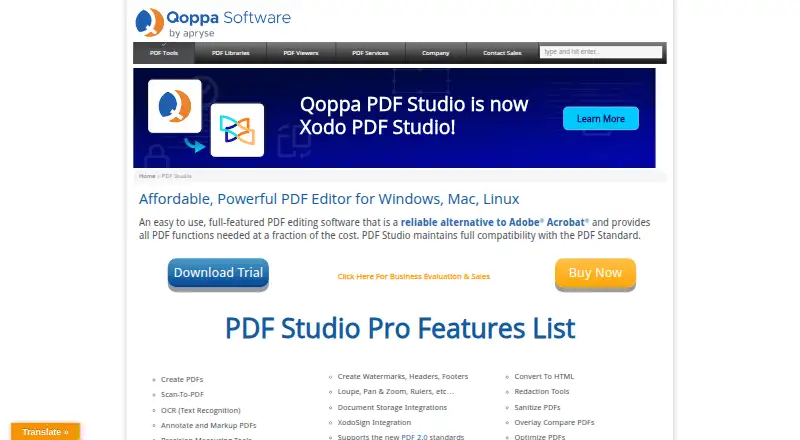
What PDF Studio is
PDF Studio is a PDF editor for creating and modifying documents while maintaining compatibility with the PDF Standard. It creates PDFs from scans, Microsoft Word, Excel, PowerPoint, text, and image files, and lets users edit PDF text, images, and shapes or redact content. OCR can recognize text and create searchable PDFs on Windows, Mac, and Linux. Pro adds batch processing for multiple PDFs and an Action Wizard for automating tasks. Integrations include DocuSign, Dropbox, Google Drive, and OneDrive; cloud files are edited as temporary local copies and returned to the service when saved. Security options include password protection, encryption, permissions, digital signatures, digital IDs, and trusted certificates. Pro supports PDF/A, PDF/X, and PDF/UA validation or conversion, as well as accessible tagged PDF creation. The free PDF Studio Viewer reads and annotates PDFs and fills interactive forms. PDF Studio Pro costs $149, paid once for one user on two computers, with a perpetual license. The Unix installer does not include native OCR or scanning features.
Good
- Edits text, images, and shapes directly in PDFs.
- Creates searchable PDFs with OCR on Windows, Mac, and Linux.
- Pro includes batch processing and task automation.
- Viewer can annotate PDFs and fill interactive forms.
Watch out
- Pro costs 149.00 USD as a one-time fee.
- Unix installer lacks native OCR and scanning.
- Cloud integrations use temporary local copies before saving back.
Who it suits
It suits people who need PDF creation, editing, OCR, or document security across Windows, Mac, or Linux. Pro is aimed at users who need batch tasks or PDF standards validation and conversion.
Verdict
PDF Studio covers document creation, editing, OCR, and security, with additional automation and standards tools in Pro. Unix users should note the installer’s OCR and scanning limitation.
Plans and prices
From PDF Studio's own pricing page, checked 1 Oct 2026.
| Plan | Price | What it gives you |
|---|---|---|
| PDF Studio Viewer | Free | free PDF reader · annotate PDFs · fill interactive forms · Windows, Mac, Linux |
| PDF Studio Pro | $149, paid once | 1 user on 2 computers · Windows, Mac, Linux · perpetual license · one-time fee |
The facts
Each one read from PDF Studio's own pages, with the date it was checked.
What it does
- Audience
- Qoppa says its PDF software serves small businesses, Fortune 500 companies and government agencies in more than a hundred countries.checked 1 Oct 2026
- Batch automation
- Pro includes batch processing of multiple PDFs and an Action Wizard for task automation.checked 1 Oct 2026
- Cloud file handling
- Cloud integrations edit a temporary local copy and send the file back to the service when saved.checked 1 Oct 2026
- Editing
- PDF Studio supports direct editing of PDF text, images and shapes, plus redaction.checked 1 Oct 2026
- Integrations
- PDF Studio integrates with DocuSign and document services including Dropbox, Google Drive and OneDrive.checked 1 Oct 2026
- OCR
- OCR adds text recognition to documents and creates searchable PDFs on Windows, Mac and Linux.checked 1 Oct 2026
- PDF creation
- It creates PDFs from scanned documents, Microsoft Word, Excel, PowerPoint, text and image files.checked 1 Oct 2026
- Product
- PDF Studio is an all-in-one PDF editor that maintains full compatibility with the PDF Standard.checked 1 Oct 2026
- Security
- Features include password protection, high-level encryption, PDF permissions, digital signatures, digital IDs and trusted certificates.checked 1 Oct 2026
- Standards
- Pro supports PDF/A, PDF/X and PDF/UA validation or conversion and creation of accessible tagged PDFs.checked 1 Oct 2026
- Support
- Purchased users receive free online and email-only technical support through the knowledge base and in-app email support.checked 1 Oct 2026
- Unix limitation
- The Unix installer does not provide native OCR and scanning features.checked 1 Oct 2026
The company
- Headquarters
- Atlanta, Georgia, United Stateschecked 28 Sep 2026
The full review of PDF Studio
PDF Studio is a cross-platform desktop PDF workspace for creating, editing, securing, and processing documents. It is best suited to businesses, administrators, and form-heavy workflows that need more than a reader, while the free Viewer serves basic reading and annotation. The paid Pro edition is a strong fit when a perpetual license and batch tools matter, but Unix users should account for missing native OCR and scanning.
Overview
PDF Studio maintains compatibility with the PDF Standard and handles the main document lifecycle in one application on Windows, macOS, and Linux. It can create PDFs from scanned pages, Microsoft Word, Excel, and PowerPoint files, as well as text and image files. Direct editing of PDF text, images, and shapes, plus redaction, means users can correct or sanitize a document without returning to its source application.
Its form capabilities set it apart from a basic editor. Existing PDFs can be imported, interactive forms filled, fields validated, conditional logic applied, and collected data exported as FDF, XFDF, XDP, PDF, or HTML. That makes it practical for operational paperwork and structured submissions, not merely reading.
Key features
OCR, forms, and workflow
OCR turns scanned pages into searchable PDFs on Windows, Mac, and Linux. The important qualification is platform-specific: the Unix installer does not provide native OCR or scanning, so Linux and other Unix users may need another capture or recognition route. Signature fields support form design, while digital signatures, digital IDs, and trusted certificates address signed-document workflows.
Pro adds bulk processing for multiple PDFs and an Action Wizard for repeatable task automation. Those tools can justify the upgrade for teams processing documents in volume; a person editing an occasional file is unlikely to benefit as much.
Cloud, security, and standards
Connections to DocuSign, Dropbox, Google Drive, and OneDrive keep PDF Studio relevant to existing document services. Cloud files are edited through a temporary local copy and sent back when saved, a workflow that is convenient but worth understanding for organizations with strict handling policies.
Password protection, high-level encryption, PDF permissions, and certificate-based trust provide layered control over sensitive files. Pro also validates or converts PDF/A, PDF/X, and PDF/UA documents and can create accessible tagged PDFs. These standards features are most valuable in archival, print-production, compliance, and accessibility-conscious work.
Pricing
PDF Studio Viewer — $0.00 USD, free. The Viewer is a free reader for Windows, Mac, and Linux with PDF annotation and interactive-form filling. It is the sensible choice for reading, marking up, and completing forms, but it does not replace a full editing and automation license.
PDF Studio Pro — $149.00 USD, one-time. The perpetual license covers one user on two computers across Windows, Mac, and Linux. It is the plan for direct editing, OCR, form construction and validation, signatures, bulk processing, Action Wizard automation, and Pro standards tools. The one-time fee avoids a recurring subscription, although the initial price is substantial for light users. Purchased users receive free online and email-only technical support through the knowledge base and in-app email support.
Platforms
PDF Studio runs on Windows, macOS, and Linux. OCR is supported on all three stated platforms, but the Unix installer lacks native OCR and scanning, making platform choice significant for Linux and other Unix deployments.
Who it's for
Choose PDF Studio when your work combines PDF editing with serious form handling, signatures, security, or repeatable processing. Small businesses, larger organizations, and public-sector teams can use the perpetual Pro license to standardize desktop work without per-month billing. The Viewer fits readers who only need annotation and form completion. Look elsewhere if you primarily need a free online tool, or if native Unix scanning and OCR are mandatory.
Pros and cons
- Pro: One application creates PDFs from common Office, scan, text, and image inputs and edits their contents directly.
- Pro: Form validation, conditional logic, signature fields, and five export formats support structured workflows.
- Pro: Batch processing, Action Wizard, standards conversion, and accessible tagged-PDF creation give the paid edition useful professional depth.
- Pro: The $149 perpetual license covers one user on two computers, with Windows, Mac, and Linux support.
- Con: Advanced editing, automation, and standards work require the paid edition; the free Viewer is intentionally limited.
- Con: Unix installations lack native OCR and scanning.
- Con: Cloud editing uses a temporary local copy before saving back to the service, which may not suit every security policy.
Alternatives
For a broad directory of form-focused tools, browse PDF Form Software.
PDF24 Compare PDF is the better pick when you want a completely free, no-registration tool with no stated limits or time restrictions across desktop, mobile, and web platforms.
Choose FormForge for a free cross-platform form option with no trial requirement and no account needed.
Jotform suits web-first form publishing, with a free Starter plan limited to five forms and 100 monthly submissions.
Pick Sejda PDF Forms if a browser-and-desktop combination works for you and its free tier's page, upload, and tool limits are acceptable.
PDFgear is a free alternative when online editing with a 100 MB per-PDF limit is sufficient.
Choose UPDF if a free tier covering two conversions per day, two-file batches, five OCR uses, 1 GB of cloud storage, and 10 MB maximum files matches your workload.
DocHub is aimed at web, iOS, and Android users who can work within three shared free uses per month.
FormRouter is an alternative paid option with a free trial and support for desktop, mobile, API, web, and self-hosted deployments.
Verdict
PDF Studio is a strong choice for users who need a serious PDF editor, capable forms, security controls, and batch automation without a recurring Pro subscription. Choose it especially for mixed Windows, macOS, and Linux environments and for workflows that benefit from standards validation or structured exports. Look elsewhere if you only need occasional free editing, or if native OCR and scanning on Unix are non-negotiable.
Alternatives to PDF Studio
- 1

Smallpdf
Free planAndroidiOSWebWindows8.1From $10 a month - 2
Xodo Sign
Free planAndroidiOSWebAPI8.1From $10 a month - 3

PDF Candy
Free planAndroidiOSWebLinux7.9From $4 a year - 4
PDF Agile
Free planWebmacOSWindows7.8$39 one-time - 5
Foxit PDF Editor
AndroidiOSWebmacOS7.7 - 6

PDFgear
Free planAndroidiOSWebExtension7.7Free plan