
FormForge
FormForge is a free browser-based PDF form builder for adding fillable fields to existing PDFs.
What FormForge is
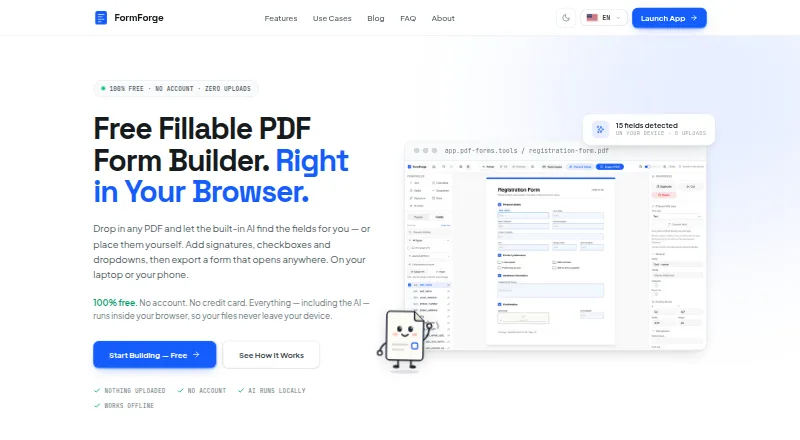
FormForge is a free browser-based PDF form builder for adding fillable fields to existing PDFs. Its AI detects fields in flat PDFs and scans, with detection running locally in the browser through WebAssembly. Users can add text, checkbox, radio button, dropdown, signature, date, and number fields. Form doctor performs 21 AcroForm checks and offers one-click fixes, while CSV input can be used to create batches of filled PDFs. Signatures can be drawn or typed in a handwritten style, and users can optionally add a cryptographic signature when exporting. PDF processing and drafts stay on the device in the browser. The installable PWA can work offline after resources are cached, but opening or reloading the page requires a connection. FormForge exports AcroForm PDFs and ZIPs of filled PDFs. It does not edit underlying page content or reorder, delete, rotate, or merge pages. There is no fixed page-count or file-size limit, though practical limits depend on available device memory. The free plan requires no account or credit card and has no page limit or watermark.
Good
- Detects fields in flat PDFs and scans
- Includes seven types of form fields
- Form doctor runs 21 checks with one-click fixes
- CSV batch processing creates filled PDFs
- Free plan needs no account or credit card
Watch out
- Opening or reloading the page requires a connection
- Cannot edit PDF page content or rearrange pages
- Text uses standard Helvetica only
- Practical file limits depend on device memory
Who it suits
FormForge suits HR and recruiting teams, government administrators, legal professionals, small businesses, freelancers, and developers who need fillable PDF forms. It may also fit users who want to process forms in a browser while keeping drafts on their device.
Verdict
FormForge focuses on adding and checking form fields rather than editing PDF pages. Its local browser processing and CSV batch generation may suit users with that narrower need.
Plans and prices
From FormForge's own pricing page, checked 29 Sep 2026.
| Plan | Price | What it gives you |
|---|---|---|
| Free | Free | No account or credit card · no paid tier, trial, feature gating, watermark, or page limit |
The facts
Each one read from FormForge's own pages, with the date it was checked.
What it does
- Compatibility
- It exports AcroForm PDFs that the site says open in Adobe Acrobat Reader, macOS Preview, Chrome, Firefox, and mobile PDF apps.checked 29 Sep 2026
- Field detection
- Its AI detects fields in flat PDFs and scans, and runs locally in the browser using WebAssembly.checked 29 Sep 2026
- Field types
- It supports text, checkbox, radio button, dropdown, signature, date, and number fields.checked 29 Sep 2026
- File limits
- The site says there is no fixed file-size or page-count limit; practical limits depend on available device memory.checked 29 Sep 2026
- Form tools
- Form doctor runs 21 AcroForm checks with one-click fixes, and the app can batch-generate filled PDFs from CSV data.checked 29 Sep 2026
- Integrations
- The privacy policy identifies self-hosted Rybbit for analytics and Netlify hosting; it names no form-submission or workflow integrations.checked 29 Sep 2026
- Notable limits
- It does not edit underlying PDF page content or reorder, delete, rotate, or merge pages, and embeds text using standard Helvetica only.checked 29 Sep 2026
- Offline use
- The site says the installable PWA works offline after its resources are cached, while its FAQ says opening or reloading the page requires a connection.checked 29 Sep 2026
- Privacy
- PDF processing and drafts stay on the device in the browser; the privacy policy says optional app analytics require consent and do not include PDF contents or form answers.checked 29 Sep 2026
- Signatures
- Users can draw or type a handwritten-style signature, or optionally add a cryptographic signature when exporting.checked 29 Sep 2026
- Support
- The maker invites bug reports and feature requests by email at [email protected].checked 29 Sep 2026
- What it does
- FormForge is a browser-based PDF form builder for turning PDFs into fillable forms.checked 29 Sep 2026
- Who it is for
- The site presents use cases for HR and recruiting, government administration, legal professionals, small businesses and freelancers, and developers.checked 29 Sep 2026
The company
- Headquarters
- Frechen, Germanychecked 23 Sep 2026
- Maker
- The About page identifies Aleksandar Jovanovic as the developer and says he is based in Germany.checked 29 Sep 2026
The full review of FormForge
Overview
FormForge is a browser-based tool for adding interactive fields to existing PDFs. It is best suited to people who need to build or check forms, rather than edit PDF pages. Its local processing and unrestricted free plan make that focused job appealing, with the trade-off that it is not a general-purpose PDF editor.
Key features
Build forms from PDFs
AI field detection works on flat PDFs and scans, and you can add text, checkbox, radio button, dropdown, signature, date, and number fields. Field validation helps catch entries that do not meet the rules set for a field. The breadth is useful for standard paperwork, though text is embedded in standard Helvetica only, which limits typographic control.
Check and complete forms
Form doctor runs 21 AcroForm checks and offers one-click fixes, a practical way to catch common form issues before sharing a document. For recurring paperwork, CSV batch generation creates filled PDFs in bulk, with results exportable as a ZIP. Signatures can be drawn or typed in a handwritten style; an optional cryptographic signature can be added when exporting.
Local processing and compatibility
PDF processing and drafts stay in the browser on the device. Optional app analytics require consent and exclude PDF contents and form answers. The installable PWA can work offline after its resources are cached, but opening or reloading the page requires a connection. Exported AcroForm PDFs are said to open in Adobe Acrobat Reader, macOS Preview, Chrome, Firefox, and mobile PDF apps.
There is no fixed file-size or page-count cap; practical limits depend on available device memory. FormForge does not edit underlying page content or reorder, delete, rotate, or merge pages. That makes it a poor fit for users who need to revise the document around the form.
Pricing
Free: free. There is no account or credit card requirement, paid tier, trial, feature gating, watermark, or page limit. This is unusually straightforward for individual form work and batch generation, but there is no paid option for broader editing capabilities. File handling remains bounded in practice by device memory.
Platforms
FormForge is available on Android, iOS, Linux, macOS, web, and Windows. The browser-based workflow is its core; offline use depends on caching the installable PWA first.
Who it's for
HR and recruiting teams, government administrators, legal professionals, small businesses, freelancers, and developers are among the use cases the maker presents. It is especially suitable when the work is to convert existing PDFs into fillable forms, validate them, or generate many completed copies from CSV. Teams needing submission or workflow integrations, or page-level PDF editing, should look elsewhere.
The developer, Aleksandar Jovanovic, is based in Germany; the listed headquarters are in Frechen, Germany. Bug reports and feature requests can be sent by email to [email protected].
Pros and cons
- Pros: AI detection supports both flat PDFs and scans, reducing manual field setup.
- Pros: The free plan has no account requirement, page limit, watermark, or feature gating.
- Pros: Local processing, field checks, and CSV batch generation cover a useful end-to-end form workflow.
- Cons: No page editing or organization tools means it cannot replace a general PDF editor.
- Cons: Offline use is conditional: cached PWA resources may work offline, but opening or reloading still needs a connection.
- Cons: Standard Helvetica is the only text font, limiting visual customization.
Alternatives
PDF Form Software is the broader category directory for comparing form tools.
- PDF24 Compare PDF suits readers who want a free PDF tool with no registration, time restrictions, or stated limits, rather than FormForge's narrow focus on form creation.
- Jotform is a web, iOS, and Android freemium option if online form workflows matter; its Starter plan allows 5 forms and 100 monthly submissions.
- Sejda PDF Forms is another form-focused freemium choice, with a Desktop+Web Free plan subject to page, hourly, upload, and tool-specific limits.
- PDF Studio is a better fit for Linux, macOS, or Windows users who want a broader paid PDF editor; it also offers a free viewer for reading, annotation, and filling interactive forms.
- PDFgear is a free option across desktop, mobile, and web if the online editor's 100 MB per-PDF limit is sufficient.
- UPDF is a cross-platform freemium alternative if its Free plan's daily conversion, batch, OCR, storage, and file-size caps meet your needs.
- DocHub may suit readers looking for a web-based document workflow; its Free plan allows 3 uses per month shared across core features.
- FormRouter is another paid option with a free trial.
Verdict
Choose FormForge if you need a free, locally processed way to turn existing PDFs into fillable forms, run checks, or generate completed copies in batches. Its focused toolkit is the reason to pick it; the lack of page editing and workflow integrations is the reason to look elsewhere when forms are only one part of a broader PDF or document process.
Getting started
- Open https://pdf-forms.tools/ in a browser.
- Import an existing PDF to create a fillable form.
- Add and validate the fields you need.
- Use Form doctor to check the AcroForm and apply fixes if needed.
- Optionally generate filled PDFs from CSV data or add a signature when exporting.
Questions
How much does FormForge cost?
The Free plan costs nothing. There is no paid tier, trial, feature gating, watermark, or page limit.
Do I need an account or credit card?
No. The Free plan requires neither an account nor a credit card.
Which platforms does FormForge support?
Its listed platforms are Android, iOS, Linux, macOS, web, and Windows.
Can I use it offline?
The installable PWA works offline after its resources are cached, but opening or reloading the page requires a connection.
Where does PDF processing happen?
PDF processing and drafts stay on the device in the browser. Optional app analytics require consent and exclude PDF contents and form answers.
Who makes FormForge?
The About page identifies Aleksandar Jovanovic, based in Germany, as the developer.
Alternatives to FormForge
- 1

Jotform
Free planAndroidiOSWeb8.2From $39 a month - 2
Foxit PDF Editor
AndroidiOSWebmacOS7.7 - 3

PDFgear
Free planAndroidiOSWebExtension7.7Free plan - 4

PlatoForms
Free planAndroidWebAPI7.7From $10 a month - 5

Nitro PDF Pro
iOSWebAPImacOS7.6From $15 a month - 6
Sejda PDF Forms
Free planWebLinuxmacOSWindows7.1From $63 a year